This repository was archived by the owner on Oct 15, 2026. It is now read-only.
Repository navigation
Deleting a Student From a Course
When a student drops a course, what is the best procedure for removing them from the CoCalc course? We would like them to be able to keep their project, but not appear in the instructor’s course.
Open the course file, select the Students tab, and clicks on the student's name. You should see a Delete button over on the right side.
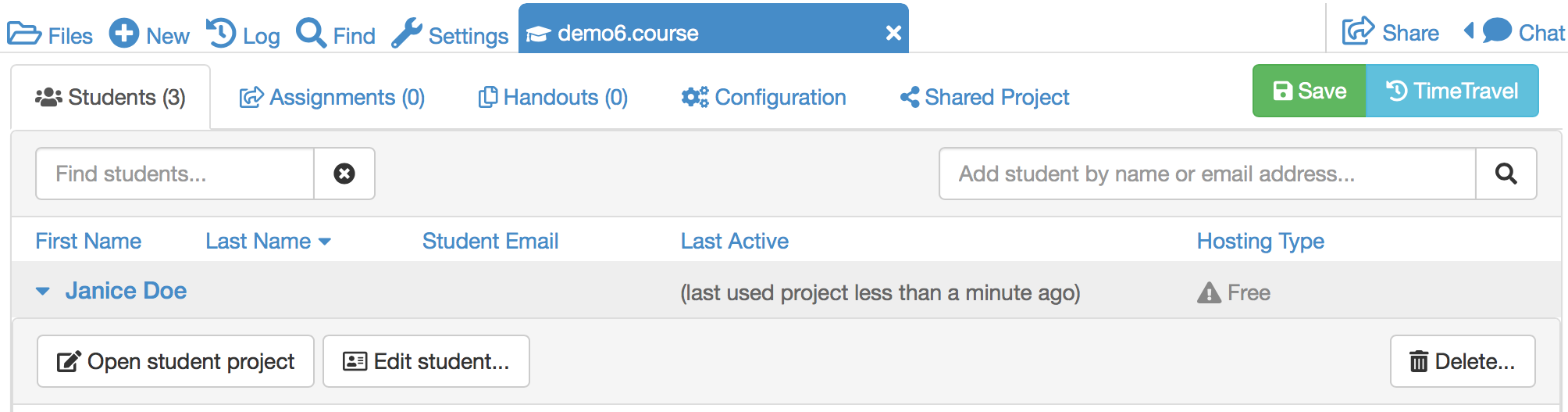
Clicking Delete will remove the student from the list. It's easy to undelete if you need to - the student's information is not actually deleted completely.
Upgrades applied by the instructor to the student project for the course are automatically removed when student is deleted. If student is added back (undeleted), upgrades to student project will have to be reapplied.
Thanks to Aaron Tresham for contributing this explanation in the CoCalc discussion group.