Calibration
This section contains the following subsections:
- Overall Process
- Calibration Setup
- Calibration of Coefficients
- Adjustment of Tour Rates
- Calibration Results
The model calibration is an iterative process, where the demand generated by DaySim is adjusted to match observed survey data. The below is the calibration process used, which is largely automated for efficiency purposes.

First DaySim is run with an initial set of inputs and estimated model coefficients. Then a set of R scripts automatically generates various summaries for the DaySim outputs. The summaries are in spreadsheet format and provide various comparisons of model outputs to the survey data. The comparisons are made for each DaySim model component such as auto ownership, work location choice model, school location choice model, daily activity pattern and so on. The spreadsheets automatically generate new coefficients for the next round of DaySim. The new coefficients are typically calculated using the ratio of the model to the survey shares. The new coefficients are then manually copied and pasted into DaySim coefficient files which are in text format (*.F12). Once coefficients are updated, a new iteration of DaySim run is started. Once again, updated summary spreadsheets are produced with updated coefficients for the next iteration of DaySim. This iterative process is continued until the model and the survey summaries match reasonably well.
After every few rounds of DaySim calibration, it is useful to do a full model run and validate highway and transit volumes to make sure that estimated volume look alright and are moving in the right direction during the calibration process.
The calibration setup used during this project is provided here - daysim_calibration.7z. Unzip the 7-zip file and update the project directory (project_directory) in every batch file. Also, copy the following inputs from the BKRCast model folder to the empty inputs folder in the setup:
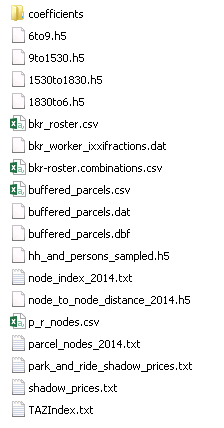
Here, the coefficients folder contains all DaySim coefficient files available here
NOTE: after downloading the setup, it is advisable to update the daysim_summaries folder with this folder.
The above setup uses the following files during calibration:
- Batch files
- Coefficients
- DaySim summaries
The setup uses several batch files to automate the calibration process (see above) for different DaySim model components , also available here. Begining of a batch file contains a description of the steps performed by the file.
DaySim coefficient files are updated at the beginning of a calibration round. The below is the format of a DaySim model coefficient file. The first column is coefficient index and the fourth column is coefficient value. During calibration, a new coefficient value is replaced in the fourth column corresponding to the coefficient index (row).

For example, in the above file, to adjust the coefficient value for coefficient index=105 (W-UNI), replace the corresponding coefficient value (3.09665812059) in the fourth column with a new coefficient value.
A list of coefficients in each coefficient file and corresponding descriptions are provided in a spreadsheet here.
A set of R scripts generates various summaries for the DaySim outputs. The summaries are in spreadsheet format and provide various comparisons of model outputs to the survey data. The comparisons are made for each DaySim model component such as auto ownership, work location choice model, school location choice model, daily activity pattern and so on. The spreadsheets automatically generate new coefficients for the next round of DaySim. The new coefficients are typically calculated using the ratio of the model to the survey shares.
The spreadsheets are here.
In the Daysim User Mannual, on the IndividiualPersonDayPattern model sheet, you see that each purpose X has variables X01 and X02 (X=1 for Work, 2 for School, etc.) for overall constants to increase tour rates and intermediate stop rates. You can also increase travel rates by person type, income group, household type, etc. using the additional variables for each purpose.
In each of the mode choice models (5 different ones at the tour level and one at the trip level), there is coefficient 2 that multiplies the generalized logsum from the various paths available (it’s just the path utility if there is only one path type available for the model). Increasing that will make mode choice more sensitive to travel time.
During the current project, following DaySim models are calibrated:
- Work Location Choice
- Individual Day Pattern
- Work-based Sub Tour Generation
- Tour Destination
- Tour Mode
- School Tour Time of Day
The work location model determines a usual work place location for a worker in the population. The model reads coefficients from the file WorkLocationModel.F12.

The individual day pattern model generates tours and stops for a person. The model reads coefficients from IndividualPersonDayPatternModel.F12. The spreadsheet "DayPattern.xlsm" contains various summaries with some high-level summaries of tours and trips by purpose and person type. These summaries, when compared with the survey data, are informative while deciding what coefficients to adjust for the next iteration of DaySim. Three types of coefficients are adjusted:
If number tours by purpose do not compare well then adjust the tour constants by purpose.

If tours by person type need to adjusted then coefficients by tour purpose and person type needs to be updated.

If trips by purpose are off then stop constants by purpose needs to be adjusted.

Adjust the following coefficients to increase/decrease total number work-based sub-tours. The coefficients for work-based sub tour generation are in WorkbasedSubtourGenerationModel.F12.

The tour destination model determines primary tour destination for tours in a person's day pattern. The model reads coefficients from the coefficient file OtherTourDestinationModel.F12. The file includes coefficients for distance from origin by purpose.
Social and Recreational Tour

Escort Tour

The tour mode model generates primary tour mode for tours in a person's day pattern. The model reads coefficients by purpose from the following coefficient files:
- Work (
WorkTourModeModel.F12) - School (
SchoolTourModeModel.F12) - Escort (
EscortTourModeModel.F12) - OtherHB (
OtherHomeBasedTourModeModel.F12) - WorkBased (
WorkBasedSubtourModeModel.F12)
The below is a list of coefficient index in the above files (here a column is a coefficient file as above):

The Work, school and other home-based purpose coefficient files also has transit tour mode coefficient constants for origin and destination district. The districts are specified in the field "External" in TAZIndex.txt file. The below are districts in the model region:

The origin and destination transit tour mode coefficients are:


The school tour time of day model determines departure and arrival times for tours in a person's day pattern. The model reads coefficients from the file SchoolTourTimeModel.F12. The file includes 10 coefficients for school tour departure times:
School Departure Time

The final calibration results are here.