Real-time flight map for Microsoft Flight Simulator 2020 — in your browser, in VR.



A Leaflet-powered moving map that displays your MSFS 2020 aircraft position in real time, with a glass-cockpit HUD, flight plan tracking, and waypoint navigation — all rendered in a browser window you can pin inside your VR headset.
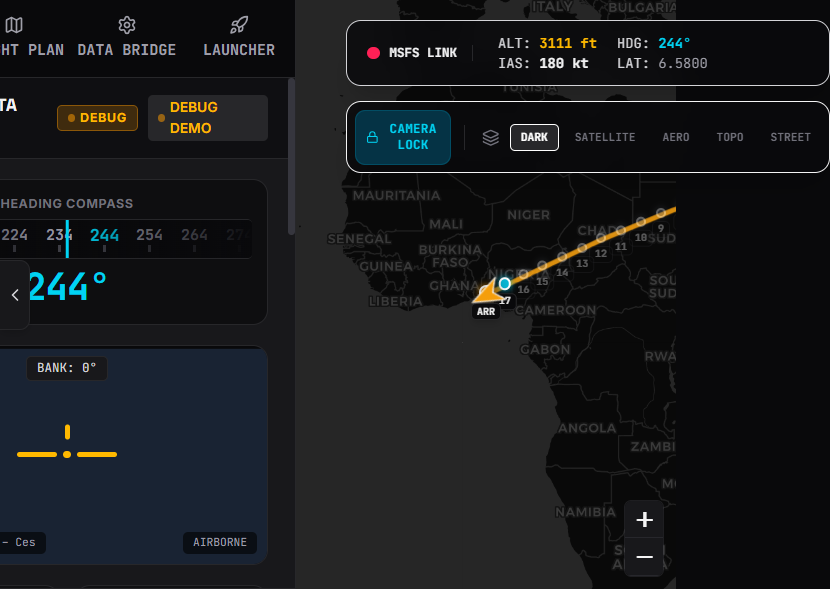
The main view: Leaflet moving map with the FlightDeckHUD overlay showing live telemetry — airspeed, altitude, heading, pitch/bank, fuel, gear/flaps, wind, and vertical speed.
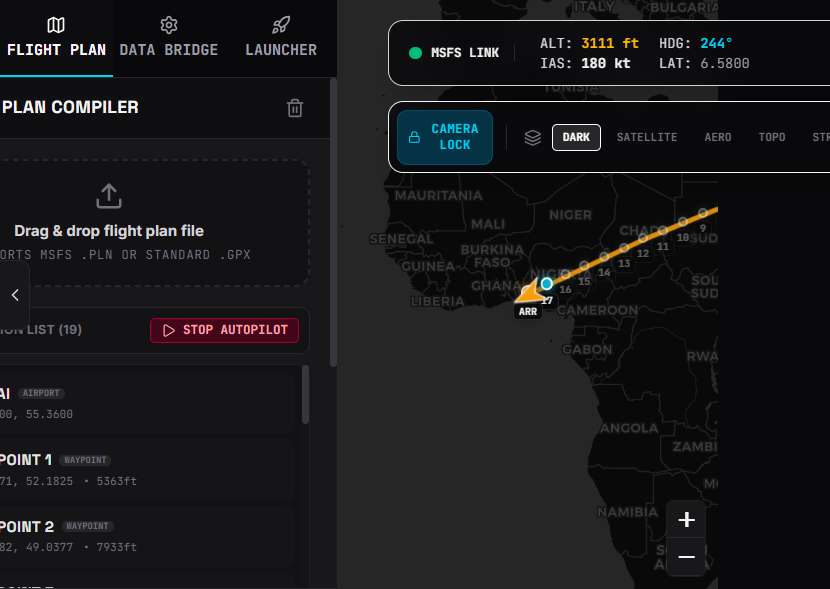
Flight Plan tab: waypoint list with active leg highlighting, distance, bearing, and ETA — displayed alongside the route polyline on the map.
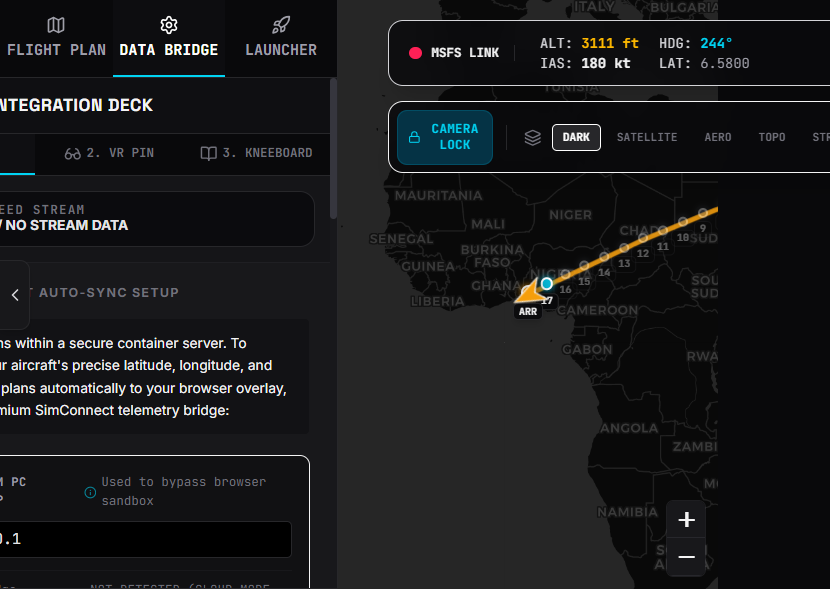
Step-by-step MSFS Bridge setup guide built right into the UI — no need to dig through documentation.
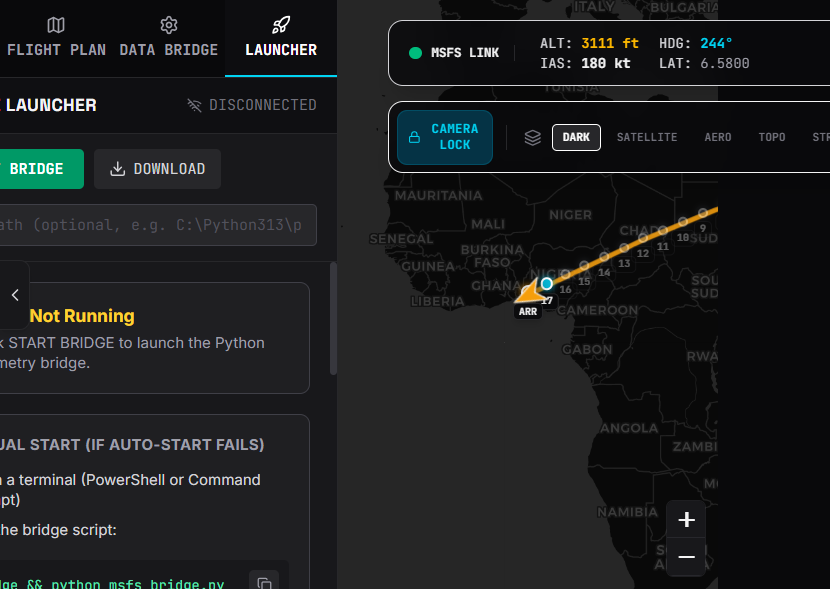
Start/stop the Python SimConnect bridge from the browser with a live log viewer and connection status indicator.
- Live Telemetry — Aircraft position, heading, speed, altitude, pitch/bank, fuel, gear/flaps, wind, and vertical speed streamed in real time via Server-Sent Events
- Moving Map — Leaflet map with multiple tile layers (CartoDB Dark/Light, OpenStreetMap, OpenAIP airspace overlay) and a rotated plane icon that follows your heading
- Flight Plan Panel — Waypoint list with active leg highlighting, distance, bearing, and ETA calculations
- Glass-Cockpit HUD — Real-time flight instruments displayed in a clean overlay
- Python SimConnect Bridge — Reads telemetry directly from MSFS 2020 via SimConnect SDK and serves it to the Node.js backend
- Bridge Control UI — Start/stop the Python bridge from the browser with live log output
- VR-Ready — Open in a browser overlay (e.g., OVR Toolkit, Desktop+) pinned in your VR cockpit
MSFS 2020 (SimConnect SDK)
        │
        ▼
Python Bridge (msfs_bridge.py)
  ├─ Polls telemetry every 1–2s
  └─ Serves JSON at http://localhost:5912
        │
        ▼
Node.js Server (server.ts)
  ├─ Express REST + SSE endpoints
  ├─ Spawns/monitors bridge subprocess
  └─ Vite dev server for React SPA
        │
        ▼
React Frontend (src/)
  ├─ Leaflet map with tile layers
  ├─ FlightDeckHUD — telemetry gauges
  ├─ FlightPlanPanel — waypoint tracking
  └─ BridgeLauncher — bridge control UI
See ARCHITECTURE.md for the full system diagram and data flow details.
npm installnpm run devThis starts the Node.js server with Vite. The app will be available at http://localhost:3000.
Make sure MSFS 2020 is running, then either:
- From the browser — Click the "Start Bridge" button in the Bridge Launcher panel
- From the terminal:
python bridge/msfs_bridge.py
The bridge connects to MSFS via SimConnect and begins streaming telemetry to the server.
Use your VR browser overlay tool (OVR Toolkit, Desktop+, etc.) to pin http://localhost:3000 inside your cockpit view.
msfs-vr-flight-map/
├── server.ts                  # Express + Vite server, SSE telemetry, bridge process manager
├── bridge/
│   └── msfs_bridge.py         # Python SimConnect bridge
├── src/
│   ├── App.tsx                # Root component with Leaflet map, sidebar, telemetry state
│   ├── main.tsx               # React entry point
│   ├── index.css              # Tailwind CSS
│   ├── types.ts               # TypeScript type definitions
│   ├── components/
│   │   ├── FlightDeckHUD.tsx       # Telemetry gauges overlay
│   │   ├── FlightPlanPanel.tsx     # Waypoint list & navigation info
│   │   ├── BridgeLauncher.tsx      # Bridge start/stop & log viewer
│   │   └── MSFSBridgeGuide.tsx     # Step-by-step setup instructions
│   └── utils/
│       ├── bearing.ts              # Bearing calculation utility
│       └── bearing.test.js         # Bearing unit tests
├── ARCHITECTURE.md            # Full architecture documentation
├── vite.config.ts             # Vite configuration
├── tsconfig.json              # TypeScript configuration
└── package.json
| Command | Description |
|---|---|
npm run dev |
Start the development server (Express + Vite) |
npm run build |
Build for production (Vite + esbuild) |
npm run start |
Run the production build |
npm run lint |
Type-check with TypeScript compiler |
npm run test |
Run bearing utility tests |
The Python bridge runs an HTTP server on http://localhost:5912 by default. The Node.js server expects to find it there. You can configure the bridge port and other settings in bridge/msfs_bridge.py.