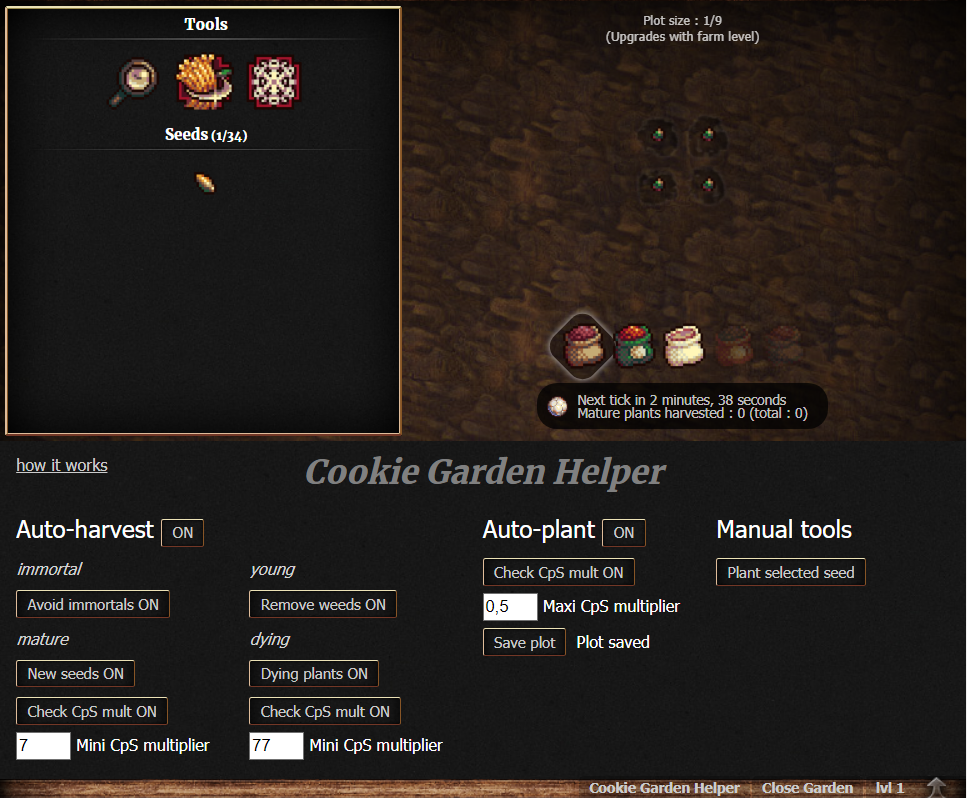
Automate your garden in Cookie Clicker.
There are a few ways to load this mod:
Courtesy of Z, it's a new centralized way of posting/installing Cookie Clicker mods.
- Install this extension if you're on Chrome or this one if you're on Firefox.
- Go to CCRepo.
- Click on Cookie Garden Helper and then "Subscribe".
- Copy this code and save it as a bookmark.
- Paste it in the URL section.
- To activate, click the bookmark when the game's open.
javascript: Game.LoadMod('https://cdn.jsdelivr.net/gh/yannprada/cookie-garden-helper@master/cookie-garden-helper.js');Want the mods to be loaded automatically everytime you open the game? Well for that we have this following script for stuff like Tampermonkey or Greasemonkey that you can use:
// ==UserScript==
// @name Cookie Garden Helper
// @namespace Garden
// @include http://orteil.dashnet.org/cookieclicker/
// @include https://orteil.dashnet.org/cookieclicker/
// @include http://orteil.dashnet.org/cookieclicker/beta/
// @include https://orteil.dashnet.org/cookieclicker/beta/
// @version 1
// @grant none
// ==/UserScript==

setInterval(() => {
  if (Game.ready) {
    Game.LoadMod('https://cdn.jsdelivr.net/gh/yannprada/cookie-garden-helper@master/cookie-garden-helper.js');
  }
}, 1000);To begin, click the button Cookie Garden Helper, at the bottom of your garden / farms. There, you can configure how you would like the mod to operate.
The mod loop through each unlocked tile, then tries to auto-harvest or auto-plant, depending on what is activated.
First, it will check if the tile is empty. If not, it will check if the plant is immortal. If it is, and the Avoid immortals option is ON, ignore this tile. If not, it will compute the plant stage. Below is a list of these stages, and the conditions when the plant will be harvested:
- young:
- if it is a weed, and the option Remove weeds is ON
- if the option Clean garden is ON, the corresponding saved slot is empty and the plant is already unlocked or new
- if the option Clean garden is ON, the corresponding saved slot is not empty but the young plant don't match
- mature:
- if it is a new seed, and the option New seeds is ON
- if the option All is ON
- if the option Check CpS Mult is ON, and the current CpS multiplier is above or equal to the one specified at Mini CpS multiplier
- dying:
- if the option Check CpS Mult is ON, and the current CpS multiplier is above or equal to the one specified at Mini CpS multiplier
- if the plant is dying, the last tick is 60 seconds from expiring, and the option Dying plants is ON
This one will work if:
- the tile is empty
- a plot has been previously saved with the button Save plot
- the option Check CpS Mult is:
- ON, and the current CpS multiplier is below or equal to the one specified at Maxi CpS multiplier
- OFF
Note: mouse over the message Plot saved, to see what was saved.
This section is pretty obvious. Only one tool is there for now:
- Plant selected seed:
- select a seed you have unlocked
- click this button to fill all the empty tiles of your plot
- (don't forget to deselect the seed)
When you sacrifice your garden, a few things will happen:
- your saved plot will be erased
- the auto-harvest will be toggled OFF
- the auto-plant will be toggled OFF
This is to prevent planting locked seeds, as well as allowing you to verify your configuration before restarting automation.
The rest of your configuration will remain.