



A microservices-based architecture for Project A, following Domain-Driven Design (DDD) principles, Hexagonal Architecture (Ports & Adapters), Separation of Concerns (SoC), SOLID principles, Choreography pattern for service coordination, and the Saga pattern for distributed transactions.
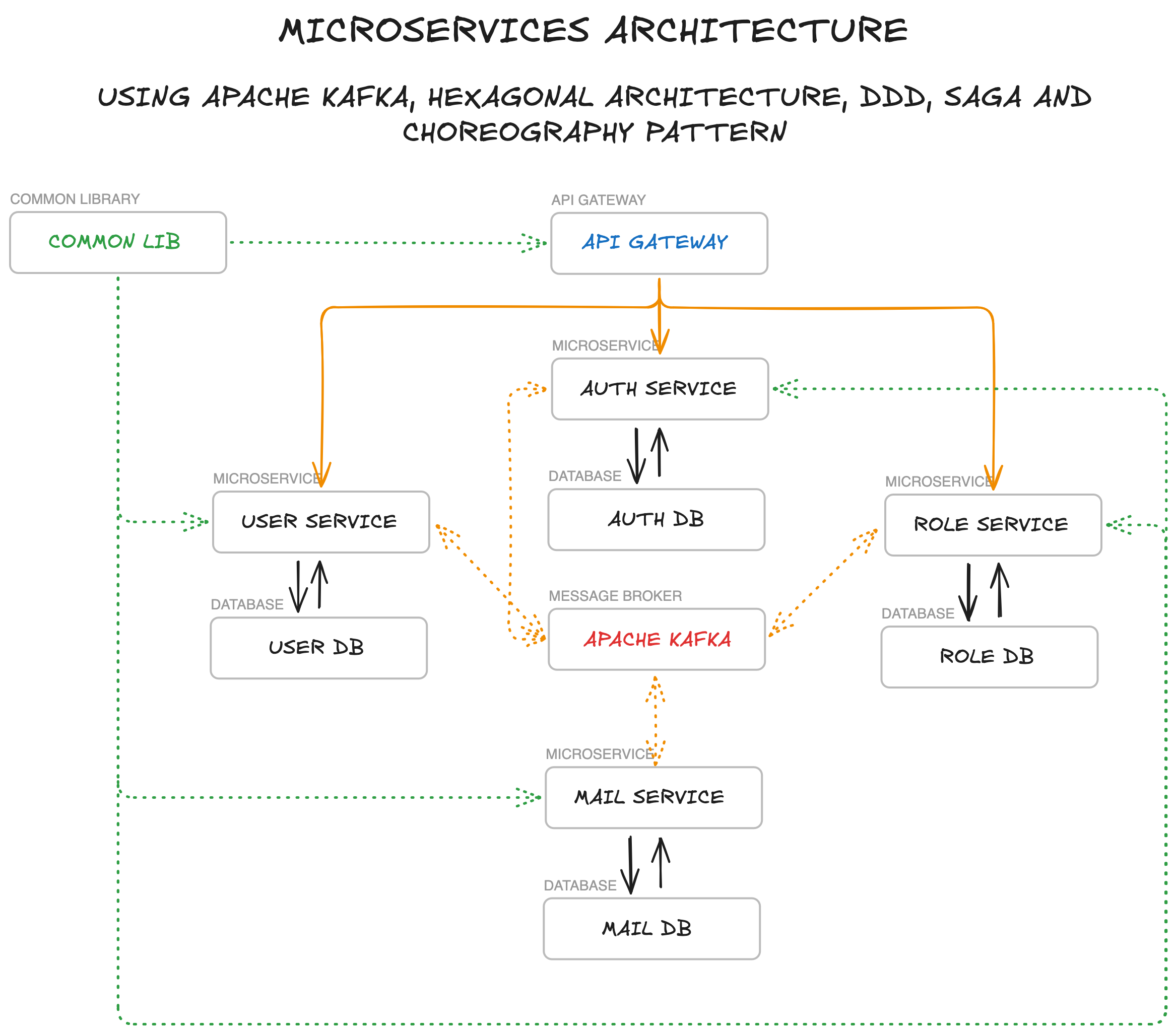
The project is split into the following components:
- API Gateway - Entry point for all client requests, handles routing to appropriate services and JWT token validation
- Auth Service - Manages authentication and authorization with JWT tokens and refresh tokens (http only secure cookie)
- User Service - Handles user profile management and user-related operations
- Role Service - Manages roles and permissions across the system
- Mail Service - Handles email sending operations and templates
- Shared Infrastructure - Shared infrastructure, contracts, and utilities used across all microservices
- Template Service - Baseline configuration for future microservices
Each microservice follows Hexagonal Architecture principles with a three-layer structure and has its own PostgreSQL database. Services communicate with each other via Apache Kafka for event-driven architecture, implementing the Choreography pattern.
- The system uses Kafka in KRaft mode (Kafka Raft), eliminating the need for Zookeeper.
- Configuration is handled via
KAFKA_PROCESS_ROLES(broker,controller) andKAFKA_CONTROLLER_QUORUM_VOTERS. - A static
CLUSTER_IDis provided indocker-compose.ymlfor simplified setup.
- Provides shared code, DTOs, event definitions, and utilities for all microservices
- Implements shared patterns like Outbox pattern
- Contains reusable components for Kafka integration, exception handling, and API responses
- Ensures consistency in how services communicate and process events
- Includes base classes for implementing event choreography
- Provides shared ports and adapters interfaces for consistent hexagonal architecture implementation
- Integration events definitions for inter-service communication
- Responsible for user authentication, authorization using JWT and refresh tokens (http only secure cookie)
- Manages the user credentials, account activation, and session management
- Database stores:
- User credentials (email, hashed passwords)
- Refresh tokens (http only secure cookie)
- Verification tokens (for account activation, password reset, etc.)
- User roles (mirrored from Role Service)
- Provides endpoints for registration, login, logout, account activation, password reset, and email change
- Publishes authentication events that trigger workflows in other services
- Implements hexagonal architecture with clear separation between business logic and external adapters
- Manages the roles and permissions throughout the system
- Database stores:
- Role definitions
- User-role assignments
- Provides APIs for creating, updating, and assigning roles
- Publishes role-related events to Kafka for other services to consume
- Reacts to user events to assign default roles automatically
- Follows hexagonal architecture with domain-driven role management at its core
- Manages user profiles and user-related information not needed for authentication
- Database stores:
- User personal information (first name, last name, etc.)
- User preferences
- Other user-specific data not required for authentication
- Consumes user-related events from other services
- Provides APIs for managing user profiles
- Publishes user profile events when changes occur
- Implements clean hexagonal architecture with isolated business logic
- Responsible for sending emails based on templates
- Database stores:
- Email logs
- Delivery status
- Consumes mail request events from other services
- Supports various email templates (welcome, password reset, account activation, etc.)
- Acts as a reactive service in the choreography flow
- Uses hexagonal architecture to decouple email sending logic from external mail providers
- A template for implementing hexagonal architecture
- Example domain models, repositories, and services
- Sample event definitions and Kafka integration
- Basic Saga pattern implementation
- Back-end: Spring Boot, Kotlin, Gradle Kotlin DSL
- Database: PostgreSQL (separate instance for each service)
- Message Broker: Apache Kafka KRaft (Zookeeper-less)
- API Documentation: OpenAPI (Swagger)
- Containerization: Docker/Podman, Docker Compose/Podman Compose
- Authentication: JWT and refresh tokens (http only secure cookie)
- Testing: JUnit, Testcontainers
- Docker and Docker Compose / Podman and Podman Compose
- JDK
- Gradle
- Clone the repository:
git clone https://github.com/yourusername/project-a-microservices.git
# and
cd project-a-microservices- Start the infrastructure:
docker-compose up -d- Build and run microservices: Each microservice is now an independent Gradle project. To build or run a specific service, navigate to its directory:
Building:
cd <service-name>
./gradlew build
Local Running:
cd <service-name>
./gradlew bootRun --args='--spring.profiles.active=dev'
Available Services:
api-gatewayauth-serviceuser-servicerole-servicemail-serviceshared-infrastructure(library)
- Access the services:
- API Gateway: http://localhost:8080
- Auth Service: http://localhost:8082
- User Service: http://localhost:8083
- Role Service: http://localhost:8084
- Mail Service: http://localhost:8085
- Kafka UI: http://localhost:8090
- MailDev: http://localhost:1080
For convenience, you can use the provided Makefile in the root directory:
- Build all services:
make build-all - Run tests in all services:
make test-all - Clean all services:
make clean-all
- Make changes to the relevant service code
- Build the service:
cd <service-name>
./gradlew build- Start the microservice:
./gradlew bootRun --args='--spring.profiles.active=dev'Each microservice implements Hexagonal Architecture to achieve clean separation of concerns.
Benefits:
- Testability: Core business logic can be tested independently
- Flexibility: Easy to swap external dependencies without affecting business logic
- Maintainability: Clear separation between business rules and technical details
- Technology Independence: Core domain is not coupled to specific frameworks or technologies
Each microservice is designed around a specific business domain with:
- A clear bounded context
- Domain models that represent business entities
- A layered architecture within the hexagonal structure
- Domain-specific language
- Encapsulated business logic
The project structure follows DDD principles within hexagonal architecture:
domain: Core business models, domain services, domain events, and business logicapplication: Controllers, DTOs, use cases, application services, and port definitions (Primary Adapters)infrastructure: Adapters for external systems like databases, Kafka, email providers, etc. (Secondary Adapters)
The codebase adheres to:
- Single Responsibility Principle: Each class has a single responsibility
- Open/Closed Principle: Classes are open for extension but closed for modification
- Liskov Substitution Principle: Subtypes are substitutable for their base types
- Interface Segregation Principle: Specific interfaces rather than general ones
- Dependency Inversion Principle: Depends on abstractions (ports), not concretions (adapters)
The hexagonal architecture naturally enforces these principles by:
- Isolating business logic from external concerns
- Using dependency inversion through ports and adapters
- Maintaining clear boundaries between layers
The system uses a choreography-based approach for service coordination:
- Services react to events published by other services without central coordination
- Each service knows which events to listen for and what actions to take
- No central orchestrator is needed, making the system more decentralized and resilient
- Services maintain autonomy and can evolve independently
Benefits of this approach:
- Reduced coupling between services
- More flexible and scalable architecture
- Easier to add new services or modify existing ones
- Better resilience as there's no single point of failure
- Aligns well with hexagonal architecture by treating event communication as external adapters
For distributed transactions that span multiple services, we use the Saga pattern:
- A service publishes a domain event to Kafka through its event publishing adapter
- Other services consume the event through their event consuming adapters
- Business logic in the domain core processes the event and may trigger compensating actions
- If an operation fails, compensating transactions are triggered to maintain consistency
Example: User Registration Saga
- Auth Service: Creates new user credentials and publishes UserRegisteredEvent
- User Service: Consumes event and creates user profile
- Role Service: Consumes event and assigns default roles
- Mail Service: Consumes event and sends welcome email
Each step is handled by the respective service's hexagonal architecture, ensuring clean separation between event handling (adapters) and business logic (domain core).
Services communicate asynchronously through Kafka events, implemented as external adapters in the hexagonal architecture:
- UserRegisteredEvent: Triggered when a new user registers
- UserActivatedEvent: Triggered when a user activates their account
- MailRequestedEvent: Triggered when an email needs to be sent
- RoleCreatedEvent: Triggered when a new role is created
- RoleAssignedEvent: Triggered when a role is assigned to a user
- UserProfileUpdatedEvent: Triggered when a user profile is updated
Event publishing and consuming are handled by dedicated adapters, keeping the domain core focused on business logic.
This project uses a combination of HTTP ETags (at API boundaries) and JPA Optimistic Locking (within services) to prevent lost updates and to ensure safe concurrency across microservices and asynchronous processing.
- API layer: ETag/If-Match for conditional updates from clients (front-end, API consumers).
- Persistence layer: JPA
@Versionon entities + the load → mutate → save pattern inside a single transaction. - Sagas and Outbox: Internal consistency ensured by JPA Optimistic Locking and idempotency safeguards — no HTTP ETags here.
- Role Service
PUT /roles/{id}requiresIf-Matchheader with the ETag received from a prior GET.- Missing
If-Match→428 Precondition Required. - Version mismatch (precondition failed) →
412 Precondition Failed.
- Missing
GET /roles/{id},GET /roles/name/{name}returnETag: W/"<version>".- Collections (e.g.,
GET /roles,GET /roles/user/{userId}) return a collection ETag derived from item versions (hash-based weak ETag) for efficient caching.
- User Service
GET /users/{id},GET /users/email/{email}returnETag: W/"<version>"for clients that want to track staleness. (Updates to user profile are event-driven and do not use If-Match directly.)
Example client flow (Role update):
- Read current state
curl -i http://localhost:8084/roles/1
# Response contains: ETag: W/"<version>"
- Update with precondition
curl -i -X PUT http://localhost:8084/roles/1 \
  -H 'Content-Type: application/json' \
  -H 'If-Match: W/"<version>"' \
  -d '{"name": "MANAGER", "description": "Updated"}'
- If the resource changed meanwhile, the server returns
412. If the header is missing, it returns428.
Error semantics at the API layer:
428 Precondition Required— missingIf-Matchon required endpoints.412 Precondition Failed— ETag/If-Match does not match current version.409 Conflict— last-resort handler for JPAObjectOptimisticLockingFailureException(race detected at commit time).
- Entities use
@Versionto enable Optimistic Locking (e.g.,AuthUser,User,Role,KafkaOutbox, and Saga/SagaStep entities where applicable). - Services follow the pattern: load the entity → apply changes →
save(...)inside@Transactional. Hibernate includesWHERE version = ?and raises a conflict if data changed concurrently.
- Sagas are backend-internal processes (event-driven), not HTTP resources — therefore ETag/If-Match is not used in Sagas.
- Concurrency control:
@Versionon Saga and/or SagaStep where applicable, persisted via load → mutate → save.- Idempotency for steps:
- Database-level unique constraint on
(sagaId, stepName)prevents duplicate step insertion. - Service-level soft check in
recordSagaStepreturns the existing step if already present (safe retries/duplicates).
- Database-level unique constraint on
- Compensation steps are recorded and published through Outbox when needed.
KafkaOutboxhas@Version.- The
KafkaOutboxProcessorupdates message status by mutating the loaded entity and callingsave(...)(no bulk JPQL updates). This leverages Optimistic Locking to avoid races between processor instances. - On failure, the processor increments
retryCount, stores the error, and persists viasave(...)again.
Each service provides its own Swagger UI for API documentation:
- Auth Service: http://localhost:8082/swagger-ui.html
- User Service: http://localhost:8083/swagger-ui.html
- Role Service: http://localhost:8084/swagger-ui.html
- Mail Service: http://localhost:8085/swagger-ui.html
- Each service exposes health and metrics endpoints through Spring Boot Actuator
- Health checks can be accessed at
/actuator/healthon each service - Metrics can be collected for observability and monitoring service health
The project uses ktlint for code formatting and style checks. Go to the service directory and run:
./gradlew ktlintFormatTo check the code style, run:
./gradlew ktlintCheckYou can also use make format-all and make check-style-all from the root directory.