YouTube Demo:
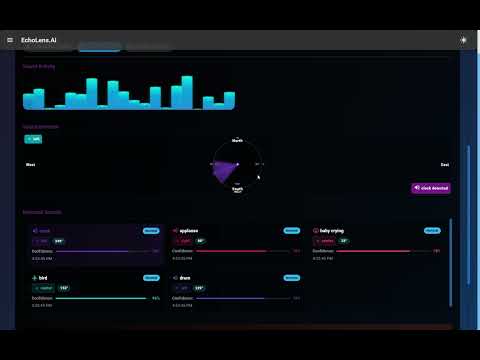
EchoLens.AI is an innovative application designed to assist deaf and hard-of-hearing individuals by translating audio environments into accessible information. The system combines audio processing, emotion detection, and spatial awareness to provide a comprehensive understanding of the user's surroundings.
- Speech Transcription: Real-time speech-to-text conversion with contextual understanding
- Sound Detection: Identifies and classifies environmental sounds (doorbell, alarms, etc.)
- Emotion Recognition: Analyzes speech for emotional content and context
- Spatial Audio Mapping: Determines the direction and distance of sound sources
- Interactive Sound Map: Visualizes sound sources in a spatial representation showing direction, distance, and type
- Directional Indicators: Shows where sounds are coming from (North, South, East, West)
- Visual Feedback: Intuitive interface displaying audio information with customizable themes
- AI-Powered Chat: Contextual conversation with an AI assistant
- Multimodal Analysis: Combined audio/text and visual processing for enhanced understanding
- Real-time Visualization: Dynamic audio waveforms and particle effects
- Spatial Environment Modeling: 3D representation of sound locations
- Python 3.8+ for backend
- Node.js 14+ for frontend
- Google Gemini API key for AI features
- MongoDB (optional for persistent storage)
- Clone the repository
git clone https://github.com/yourusername/echolens-ai.git
cd echolens-ai- Set up the backend
cd backend
pip install -r requirements.txt
cp .env.example .env
# Edit .env file to add your GOOGLE_API_KEY- Frontend Launch
cd ../frontend
npm install
npm start- Backend Launch
cd ..
python echolens_api.py- Flask: Web server framework with REST API endpoints
- Flask-CORS: Cross-origin resource sharing middleware
- Python-dotenv: Environment variable management
- TensorFlow & TensorFlow Hub: ML frameworks for audio processing
- Google Generative AI (Gemini): Multimodal AI for analysis
- SpeechRecognition: Audio transcription engine
- NumPy & SciPy: Scientific computing and signal processing
- Sounddevice: Audio capture and playback
- PyRoomAcoustics: Spatial audio analysis
- OpenCV & Pillow: Image and video processing
- PyMongo: MongoDB database connectivity
- Deepface: Face and emotion detection (optional)
- YAMNet: Pretrained audio event classification model
- Pytest: Testing framework
- React.js: UI component library and framework
- Material-UI (MUI): Design system and component library
- Emotion: CSS-in-JS styling
- Framer Motion: Animation and motion effects library
- React Router: Client-side routing
- React Scripts: Development toolchain
- Custom Animation: Pulse and ripple effects for audio visualization
- Canvas API: For drawing audio waveforms and particle effects
- CSS Keyframes: For custom animations and transitions
EchoLens.AI consists of three main components:
-
Audio Processing Engine: Captures and analyzes audio input using microphone arrays and signal processing
- Sound classification with YAMNet
- Speech recognition with advanced audio processing
- Directional audio analysis with spatial algorithms
-
AI Analysis System: Processes audio for context, emotion, and meaning
- Google Gemini AI for multimodal analysis
- Emotional context detection
- Background noise filtering
- Sound event classification
-
Visual Interface: Presents processed information in an accessible format
- Interactive sound map showing sound sources
- Directional indicators for spatial awareness
- Emotion visualization with color coding
- Real-time transcription with speaker identification
- Custom animations for different sound types
python app.py --debug --open-browser- Start the application
- Grant microphone and camera permissions when prompted
- Use the main dashboard to view real-time audio transcription and sound detection
- Navigate to the Sound Map to visualize spatial audio information
- Check the Spatial Audio Visualizer for directional sound representation
- Switch to Chat mode to have contextual conversations about the audio environment
- Adjust visualization settings for optimal experience on your device
This project is licensed under the MIT License - see the LICENSE file for details.
Contributions are welcome! Please feel free to submit a Pull Request.
- Google Gemini AI for multimodal analysis
- TensorFlow for machine learning capabilities
- YAMNet for audio classification
- Material-UI for UI components
- Framer Motion for animations
- PyRoomAcoustics for spatial audio modeling