*** Consult the original author's repository at https://github.com/amir1376/ab-download-manager






Just install it with curl, and find the app in the panel menu > Internet > AB Download Manager
curl -fsSL https://tinyurl.com/3m9pmdew | bashor with wget
wget -q -O - https://tinyurl.com/3m9pmdew | bashbash <(curl -fsSL https://tinyurl.com/4tbh3hj4)Please sponsor me in Github, or donate to me via paypal , or donate to me via buymeacoffee. Thanks!
Also donate crytocurrency to the original author @amir1376 at this link https://github.com/amir1376/ab-download-manager/blob/master/DONATE.md
Report problems with Linux arm64 or just chat about whatever in the "Discussions" page.

AB Download Manager is a desktop app that helps you manage and organize your downloads more efficiently than ever before. This edition of the app shall install and work on up-to-date modern Linux arm64 distributions Ubuntu, Debian, Fedora, Raspberry Pi OS (Raspbian), Manjaro, Asahi, et cetera on armv8 aarch64 devices such as a Raspberry Pi, Orange Pi, Banana Pi, Pine64, Odroid, Khadas, NanoPi, Radxa Rock Pi, Snapdragon, Apple Silicon and others.
- ⚡️ Faster Download Speed
- 🧵 Mult-threaded download tasks
- ⏰ Queues and Schedulers
- 🌐 Browser Extensions
- 💻 Multiplatform (Android / Windows / Linux / Mac)
- 🌙 Multiple Themes (Dark/Light/Black and more) with modern UI
- ❤️ Free and Open Source
Please visit the Project Website for more info.


A list of available files on github is in the releases page HERE
After you download a tar.gz file, then extract the contents and navigate into the folder ABDownloaderManager and bin. Execute the file ABDownloaderManager
Copy the text below, then paste and run the command in a Terminal.
bash <(curl -fsSL https://raw.githubusercontent.com/petesimon/abdm-linux-arm64/master/scripts/install.sh)
⚠️ Warning: This software is NOT on Google Play or other app stores unless listed here. Any version claiming to be or related to this project should be considered SCAM and UNSAFE.
For alternative installation methods, uninstallation instructions, and more details, please refer to the wiki page.
You can download the browser extension to integrate the app with your browser.


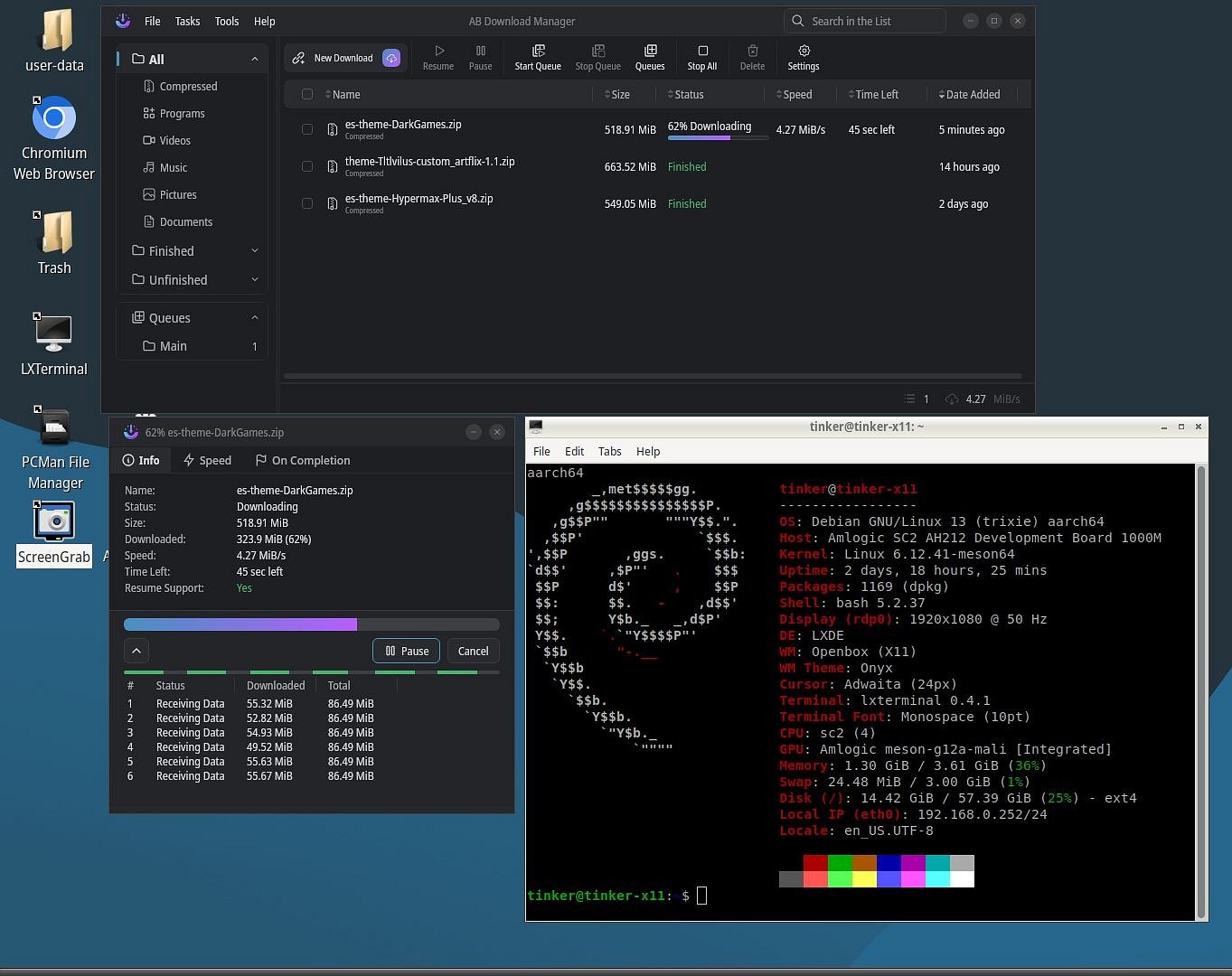


Please keep in mind that this project is in the beginning of its journey. Lots of features are on the way!
But, in the meantime you may face Bugs or Problems. If you do, please report them to me via the Community chat or through GitHub Issues, and I'll do my best to fix them ASAP.
You can join our Telegram Group to:
- Report problems
- Suggest features
- Get help with the app
There are multiple repositories related to the AB Download Manager project:
| Repository | Description |
|---|---|
| Main Application (You are here) | Contains the Application that runs on your device |
| Browser Integration | Contains the Browser Extension to be installed on your browser |
| Website | Contains the AB Download Manager website |
I've spent a lot of time to create this project.
If you like my work, please consider giving it a ⭐ — thanks! ❤️
If you notice any bugs in the source code, please report them via the GitHub Issues section in the original repository which belongs to @amir1376.
To compile and test the desktop app on your local machine, follow these steps:
-
Clone the project.
-
Download and extract the JBR, and make it available by either:
- Adding it to your
PATH, or - Setting the
JAVA_HOMEenvironment variable to its installation path.
- Adding it to your
-
Navigate to the project directory, open your terminal and execute the following command:
./gradlew createReleaseFolderForCi
-
The output will be available at:
<project_dir>/build/ci-release
Note. This project is compiled and published by GitHub actions here, so if you faced any problem you can check that too.
If you’d like to help translate AB Download Manager into another language, or improve existing translations, you can do so on Crowdin. Here’s how:
- Visit the project in Crowdin
- Please DO NOT submit translations via pull requests.
- If you want to add a new language, please see this.
If you want to contribute to this project, please read Contributing Guide first.
If you'd like to support the project, you can find details on how to donate in the DONATE.md file.