
The missing link between your GPU and Python AI libraries


"Why does my PyTorch crash with CUDA errors when I just installed it?"
Because your driver supports CUDA 11.8, but
pip install torchgave you CUDA 12.4 wheels.
Env-Doctor diagnoses and fixes the #1 frustration in GPU computing: mismatched CUDA versions between your NVIDIA driver, system toolkit, cuDNN, and Python libraries.
It takes 5 seconds to find out if your environment is broken - and exactly how to fix it.
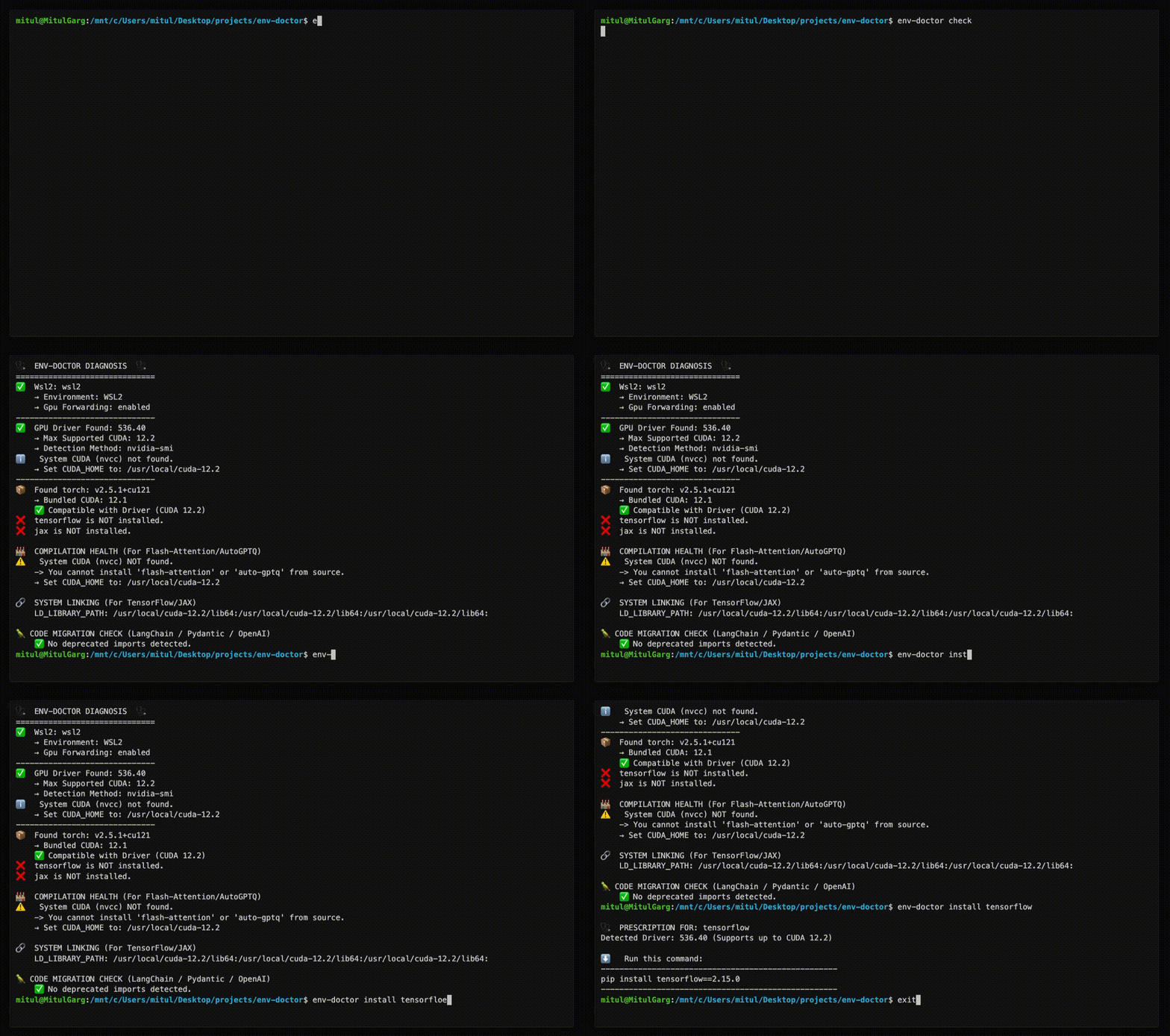
| Feature | What It Does |
|---|---|
| One-Command Diagnosis | Check compatibility: GPU Driver → CUDA Toolkit → cuDNN → PyTorch/TensorFlow/JAX |
| Compute Capability Check | Detect GPU architecture mismatches — catches why torch.cuda.is_available() returns False on new GPUs (e.g. Blackwell) even when driver and CUDA are healthy |
| Python Version Compatibility | Detect Python version conflicts with AI libraries and dependency cascade impacts |
| CUDA Installation Guide | Get platform-specific, copy-paste CUDA installation commands for your system |
| Safe Install Commands | Get the exact pip install command that works with YOUR driver |
| Extension Library Support | Install compilation packages (flash-attn, SageAttention, auto-gptq, apex, xformers) with CUDA version matching |
| AI Model Compatibility | Check if LLMs, Diffusion, or Audio models fit on your GPU before downloading |
| WSL2 GPU Support | Validate GPU forwarding, detect driver conflicts within WSL2 env for Windows users |
| Deep CUDA Analysis | Find multiple installations, PATH issues, environment misconfigurations |
| Container Validation | Catch GPU config errors in Dockerfiles before you build |
| MCP Server | Expose diagnostics to AI assistants (Claude Desktop, Zed) via Model Context Protocol |
| CI/CD Ready | JSON output and proper exit codes for automation |
pip install env-doctorEnv-Doctor includes a built-in Model Context Protocol (MCP) server that exposes diagnostic tools to AI assistants like Claude Code and Claude Desktop.
-
Install env-doctor:
pip install env-doctor
-
Add to Claude Desktop config (
~/Library/Application Support/Claude/claude_desktop_config.json):{ "mcpServers": { "env-doctor": { "command": "env-doctor-mcp" } } } -
Restart Claude Desktop - the tools will be available automatically.
env_check- Full GPU/CUDA environment diagnosticsenv_check_component- Check specific component (driver, CUDA, cuDNN, etc.)python_compat_check- Check Python version compatibility with installed AI librariescuda_info- Detailed CUDA toolkit informationcudnn_info- Detailed cuDNN library informationcuda_install- Step-by-step CUDA installation instructionsinstall_command- Get safe pip install commands for AI librariesmodel_check- Analyze if AI models fit on your GPUmodel_list- List all available models in databasedockerfile_validate- Validate Dockerfiles for GPU issuesdocker_compose_validate- Validate docker-compose.yml for GPU configuration
env-doctor-mcp-demo.mp4
Ask your AI assistant:
- "Check my GPU environment"
- "Is my Python version compatible with my installed AI libraries?"
- "How do I install CUDA Toolkit on Ubuntu?"
- "Get me the pip install command for PyTorch"
- "Can I run Llama 3 70B on my GPU?"
- "Validate this Dockerfile for GPU issues"
- "What CUDA version does my PyTorch require?"
- "Show me detailed CUDA toolkit information"
Learn more: MCP Integration Guide
env-doctor checkExample output:
🩺 ENV-DOCTOR DIAGNOSIS
============================================================

🖥️  Environment: Native Linux

🎮 GPU Driver
   ✅ NVIDIA Driver: 535.146.02
   └─ Max CUDA: 12.2

🔧 CUDA Toolkit
   ✅ System CUDA: 12.1.1

📦 Python Libraries
   ✅ torch 2.1.0+cu121

✅ All checks passed!
On new-generation GPUs (e.g. RTX 5070 / Blackwell), env-doctor catches architecture mismatches and distinguishes between two failure modes:
Hard failure — torch.cuda.is_available() returns False:
🎯  COMPUTE CAPABILITY CHECK
    GPU: NVIDIA GeForce RTX 5070 (Compute 12.0, Blackwell, sm_120)
    PyTorch compiled for: sm_50, sm_60, sm_70, sm_80, sm_90, compute_90
    ❌ ARCHITECTURE MISMATCH: Your GPU needs sm_120 but PyTorch 2.5.1 doesn't include it.

    This is likely why torch.cuda.is_available() returns False even though
    your driver and CUDA toolkit are working correctly.

    FIX: Install PyTorch nightly with sm_120 support:
       pip install --pre torch torchvision torchaudio --index-url https://download.pytorch.org/whl/nightly/cu126
Soft failure — torch.cuda.is_available() returns True via NVIDIA's PTX JIT, but complex ops may silently degrade:
🎯  COMPUTE CAPABILITY CHECK
    GPU: NVIDIA GeForce RTX 5070 (Compute 12.0, Blackwell, sm_120)
    PyTorch compiled for: sm_50, sm_60, sm_70, sm_80, sm_90, compute_90
    ⚠️  ARCHITECTURE MISMATCH (Soft): Your GPU needs sm_120 but PyTorch 2.5.1 doesn't include it.

    torch.cuda.is_available() returned True via NVIDIA's driver-level PTX JIT,
    but you may experience degraded performance or failures with complex CUDA ops.

    FIX: Install a newer PyTorch with native sm_120 support for full compatibility:
       pip install --pre torch torchvision torchaudio --index-url https://download.pytorch.org/whl/nightly/cu126
env-doctor python-compat🐍 PYTHON VERSION COMPATIBILITY CHECK
============================================================
Python Version: 3.13 (3.13.0)
Libraries Checked: 2
❌ 2 compatibility issue(s) found:
tensorflow:
tensorflow supports Python <=3.12, but you have Python 3.13
Note: TensorFlow 2.15+ requires Python 3.9-3.12. Python 3.13 not yet supported.
torch:
torch supports Python <=3.12, but you have Python 3.13
Note: PyTorch 2.x supports Python 3.9-3.12. Python 3.13 support experimental.
⚠️ Dependency Cascades:
tensorflow [high]: TensorFlow's Python ceiling propagates to keras and tensorboard
Affected: keras, tensorboard, tensorflow-estimator
torch [high]: PyTorch's Python version constraint affects all torch ecosystem packages
Affected: torchvision, torchaudio, triton
💡 Consider using Python 3.12 or lower for full compatibility
💡 Cascade: tensorflow constraint also affects: keras, tensorboard, tensorflow-estimator
💡 Cascade: torch constraint also affects: torchvision, torchaudio, triton
============================================================
env-doctor install torch⬇️ Run this command to install the SAFE version:
---------------------------------------------------
pip install torch torchvision --index-url https://download.pytorch.org/whl/cu118
---------------------------------------------------
env-doctor cuda-install============================================================
CUDA TOOLKIT INSTALLATION GUIDE
============================================================
Detected Platform:
Linux (ubuntu 22.04, x86_64)
Driver: 535.146.02 (supports up to CUDA 12.2)
Recommended CUDA Toolkit: 12.1
============================================================
Ubuntu 22.04 (x86_64) - Network Install
============================================================
Installation Steps:
------------------------------------------------------------
1. wget https://developer.download.nvidia.com/compute/cuda/repos/ubuntu2204/x86_64/cuda-keyring_1.1-1_all.deb
2. sudo dpkg -i cuda-keyring_1.1-1_all.deb
3. sudo apt-get update
4. sudo apt-get -y install cuda-toolkit-12-1
Post-Installation Setup:
------------------------------------------------------------
export PATH=/usr/local/cuda-12.1/bin${PATH:+:${PATH}}
export LD_LIBRARY_PATH=/usr/local/cuda-12.1/lib64${LD_LIBRARY_PATH:+:${LD_LIBRARY_PATH}}
TIP: Add the above exports to ~/.bashrc or ~/.zshrc
Verify Installation:
------------------------------------------------------------
nvcc --version
Official Download Page:
https://developer.nvidia.com/cuda-12-1-0-download-archive
Supported Platforms:
- Ubuntu 20.04, 22.04, 24.04
- Debian 11, 12
- RHEL 8, 9 / Rocky Linux / AlmaLinux
- Fedora 39+
- WSL2 (Ubuntu)
- Windows 10/11
- Conda (all platforms)
For extension libraries like flash-attn, SageAttention, auto-gptq, apex, and xformers that require compilation from source, env-doctor provides special guidance to handle CUDA version mismatches:
env-doctor install flash-attnExample output (with CUDA mismatch):
🩺  PRESCRIPTION FOR: flash-attn

⚠️   CUDA VERSION MISMATCH DETECTED
     System nvcc: 12.1.1
     PyTorch CUDA: 12.4.1

🔧  flash-attn requires EXACT CUDA version match for compilation.
    You have TWO options to fix this:

============================================================
📦  OPTION 1: Install PyTorch matching your nvcc (12.1)
============================================================

Trade-offs:
  ✅ No system changes needed
  ✅ Faster to implement
  ❌ Older PyTorch version (may lack new features)

Commands:
  # Uninstall current PyTorch
  pip uninstall torch torchvision torchaudio -y

  # Install PyTorch for CUDA 12.1
  pip install torch --index-url https://download.pytorch.org/whl/cu121

  # Install flash-attn
  pip install flash-attn --no-build-isolation

============================================================
⚙️   OPTION 2: Upgrade nvcc to match PyTorch (12.4)
============================================================

Trade-offs:
  ✅ Keep latest PyTorch
  ✅ Better long-term solution
  ❌ Requires system-level changes
  ❌ Verify driver supports CUDA 12.4

Steps:
  1. Check driver compatibility:
     env-doctor check

  2. Download CUDA Toolkit 12.4:
     https://developer.nvidia.com/cuda-12-4-0-download-archive

  3. Install CUDA Toolkit (follow NVIDIA's platform-specific guide)

  4. Verify installation:
     nvcc --version

  5. Install flash-attn:
     pip install flash-attn --no-build-isolation

============================================================
env-doctor model llama-3-8b🤖 Checking: LLAMA-3-8B (8.0B params)
🖥️ Your Hardware: RTX 3090 (24GB)
💾 VRAM Requirements:
✅ FP16: 19.2GB - fits with 4.8GB free
✅ INT4: 4.8GB - fits with 19.2GB free
✅ This model WILL FIT on your GPU!
List all models: env-doctor model --list
Automatic HuggingFace Support (New ✨) If a model isn't found locally, env-doctor automatically checks the HuggingFace Hub, fetches its parameter metadata, and caches it locally for future runs — no manual setup required.
# Fetches from HuggingFace on first run, cached afterward
env-doctor model bert-base-uncased
env-doctor model sentence-transformers/all-MiniLM-L6-v2
Output:
🤖  Checking: BERT-BASE-UNCASED
    (Fetched from HuggingFace API - cached for future use)
    Parameters: 0.11B
    HuggingFace: bert-base-uncased

🖥️   Your Hardware:
    RTX 3090 (24GB VRAM)

💾  VRAM Requirements & Compatibility
  ✅  FP16:  264 MB - Fits easily!

💡  Recommendations:
1. Use fp16 for best quality on your GPU
env-doctor dockerfile🐳 DOCKERFILE VALIDATION
❌ Line 1: CPU-only base image: python:3.10
Fix: FROM nvidia/cuda:12.1.0-runtime-ubuntu22.04
❌ Line 8: PyTorch missing --index-url
Fix: pip install torch --index-url https://download.pytorch.org/whl/cu121
| Command | Purpose |
|---|---|
env-doctor check |
Full environment diagnosis |
env-doctor python-compat |
Check Python version compatibility with AI libraries |
env-doctor cuda-install |
Step-by-step CUDA Toolkit installation guide |
env-doctor install <lib> |
Safe install command for PyTorch/TensorFlow/JAX, extension libraries (flash-attn, auto-gptq, apex, xformers, SageAttention, etc.) |
env-doctor model <name> |
Check model VRAM requirements |
env-doctor cuda-info |
Detailed CUDA toolkit analysis |
env-doctor cudnn-info |
cuDNN library analysis |
env-doctor dockerfile |
Validate Dockerfile |
env-doctor docker-compose |
Validate docker-compose.yml |
env-doctor scan |
Scan for deprecated imports |
env-doctor debug |
Verbose detector output |
# JSON output for scripting
env-doctor check --json

# CI mode with exit codes (0=pass, 1=warn, 2=error)
env-doctor check --ci
GitHub Actions example:
- run: pip install env-doctor
- run: env-doctor check --ciFull documentation: https://mitulgarg.github.io/env-doctor/
- Getting Started
- Command Reference
- MCP Integration Guide
- WSL2 GPU Guide
- CI/CD Integration
- Architecture
Video Tutorial: Watch Demo on YouTube
Contributions welcome! See CONTRIBUTING.md for details.
MIT License - see LICENSE