



Live demo (code) Some examples using a small DSL of its own.
Railroad diagrams represent grammar rules as paths from a start point to an end point. Each path describes a sequence accepted by the rule.
Build diagrams by combining nodes such as Terminal, Sequence, and Choice. All built-in nodes are available at the crate root.
use railroad::*;

let mut seq: Sequence<Box<dyn Node>> = Sequence::default();
seq.push(Box::new(Start))
   .push(Box::new(Terminal::new("BEGIN".to_owned())))
   .push(Box::new(NonTerminal::new("syntax".to_owned())))
   .push(Box::new(End));

let dia = Diagram::new_with_stylesheet(seq, &Stylesheet::Light);
println!("{}", dia);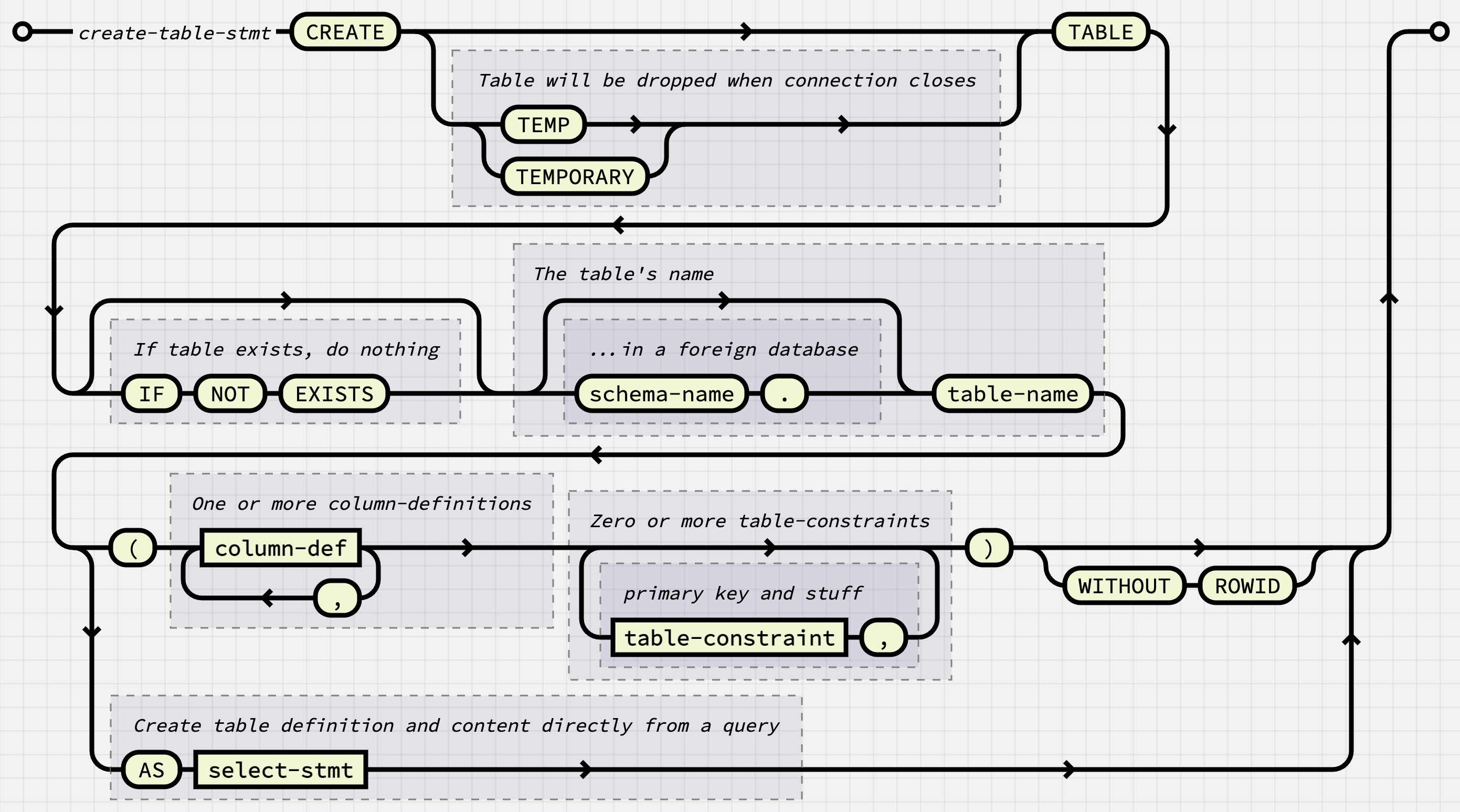
Follow a path from start to end. Read literal tokens along the path, expand named rules, and follow the arrows around branches and loops.
Tokens and control flow
Tokens, sequences, alternatives, and repetitions.
Consume exactly the token if.

Rust
use railroad::*;

let node = Terminal::new("if".to_owned());Expand the named rule expr.

Rust
use railroad::*;

let node = NonTerminal::new("expr".to_owned());Consume (, an expression, and ) in order.

Rust
use railroad::*;

let node = Sequence::<Box<dyn Node>>::new(vec![
    Box::new(Terminal::new("(".to_owned())),
    Box::new(NonTerminal::new("expr".to_owned())),
    Box::new(Terminal::new(")".to_owned())),
]);A simplified XML Schema-style duration: PT followed by one or more hours (H), minutes (M), and seconds (S), in order. Here, digits means one or more decimal digits. Accepts PT1H, PT1H3S, and PT1H2M3S; rejects PT and PT3S1H.

Rust
use railroad::*;

let node = Sequence::<Box<dyn Node>>::new(vec![
    Box::new(Terminal::new("PT".to_owned())),
    Box::new(Subsequence::new(vec![
        Sequence::<Box<dyn Node>>::new(vec![
            Box::new(NonTerminal::new("digits".to_owned())),
            Box::new(Terminal::new("H".to_owned())),
        ]),
        Sequence::<Box<dyn Node>>::new(vec![
            Box::new(NonTerminal::new("digits".to_owned())),
            Box::new(Terminal::new("M".to_owned())),
        ]),
        Sequence::<Box<dyn Node>>::new(vec![
            Box::new(NonTerminal::new("digits".to_owned())),
            Box::new(Terminal::new("S".to_owned())),
        ]),
    ])),
]);Choose exactly one alternative: true or false.

Rust
use railroad::*;

let node = Choice::new(vec![
    Terminal::new("true".to_owned()),
    Terminal::new("false".to_owned()),
]);Consume else, or take the upper bypass and consume nothing.

Rust
use railroad::*;

let node = Optional::new(Terminal::new("else".to_owned()));Consume one or more items using the lower return path.

Rust
use railroad::*;

let node = Repeat::new(NonTerminal::new("item".to_owned()), Empty);Skip all items via the upper bypass, or consume one or more via the lower loop.

Rust
use railroad::*;

let node = Optional::new(Repeat::new(NonTerminal::new("item".to_owned()), Empty));Consume one or more comma-separated items, without a leading or trailing comma.

Rust
use railroad::*;

let node = Repeat::new(
    NonTerminal::new("item".to_owned()),
    Terminal::new(",".to_owned()),
);
Annotations and assertions
Annotation connects a checkpoint to any node below the path. Use LabeledBox to add a border and label. Its marker can point ahead or behind in the reading direction. The examples below use these markers to illustrate lookahead and lookbehind assertions.
Connect a checkpoint to a labeled box below the path.

Rust
use railroad::*;

let node = Annotation::new(LabeledBox::new(
    NonTerminal::new("statement".to_owned()),
    Comment::new("Only at top level".to_owned()),
));Consume one ASCII character if the upcoming input does not start with a quote, backslash, or CR. The assertion itself consumes no input.

Rust
use railroad::*;

let node = Sequence::<Box<dyn Node>>::new(vec![
    Box::new(Annotation::new_ahead(LabeledBox::new(
        Sequence::<Box<dyn Node>>::new(vec![
            Box::new(Choice::<Box<dyn Node>>::new(vec![
                Box::new(Terminal::new("\"".to_owned())),
                Box::new(Terminal::new("\\".to_owned())),
                Box::new(NonTerminal::new("CR".to_owned())),
            ])),
            Box::new(Continuation)]),
        Comment::new("Must not match ahead".to_owned()),
    ))),
    Box::new(NonTerminal::new("ASCII".to_owned())),
]);Match a decimal integer, then reject exactly 0.

Rust
use railroad::*;

let node = Sequence::<Box<dyn Node>>::new(vec![
    Box::new(NonTerminal::new("DECIMAL".to_owned())),
    Box::new(Annotation::new_behind(LabeledBox::new(
        Sequence::<Box<dyn Node>>::new(vec![
            Box::new(Continuation),
            Box::new(Terminal::new("0".to_owned())),
        ]),
        Comment::new("Must not match behind".to_owned()),
    ))),
]);
Layout
Stacks and choices connect their children; grids arrange independent diagrams.
Read the same (, expression, ) sequence across connected rows.

Rust
use railroad::*;

let node = Stack::<Box<dyn Node>>::new(vec![
    Box::new(Terminal::new("(".to_owned())),
    Box::new(NonTerminal::new("expr".to_owned())),
    Box::new(Terminal::new(")".to_owned())),
]);Choose one of four alternatives spread across two columns: true, false, null, or undefined.

Rust
use railroad::*;

let node = MultiChoice::new(vec![
    vec![
        Terminal::new("true".to_owned()),
        Terminal::new("false".to_owned()),
    ],
    vec![
        Terminal::new("null".to_owned()),
        Terminal::new("undefined".to_owned()),
    ],
]);Place independent diagrams above one another, with no connecting path.

Rust
use railroad::*;

let node = VerticalGrid::new(vec![
    Sequence::<Box<dyn Node>>::new(vec![
        Box::new(SimpleStart),
        Box::new(Terminal::new("yes".to_owned())),
        Box::new(SimpleEnd),
    ]),
    Sequence::<Box<dyn Node>>::new(vec![
        Box::new(SimpleStart),
        Box::new(Terminal::new("no".to_owned())),
        Box::new(SimpleEnd),
    ]),
]);Place the same independent diagrams beside one another.

Rust
use railroad::*;

let node = HorizontalGrid::new(vec![
    Sequence::<Box<dyn Node>>::new(vec![
        Box::new(SimpleStart),
        Box::new(Terminal::new("yes".to_owned())),
        Box::new(SimpleEnd),
    ]),
    Sequence::<Box<dyn Node>>::new(vec![
        Box::new(SimpleStart),
        Box::new(Terminal::new("no".to_owned())),
        Box::new(SimpleEnd),
    ]),
]);Reserve equal widths for rule labels so each diagram body begins at the same horizontal position.

Rust
use railroad::*;

let node = {
    let labels = ["expr", "statement", "item"].map(|text| Comment::new(text.to_owned()));
    let column_width = labels.iter().map(Node::width).max().unwrap_or(0);
    let rows = labels.into_iter().map(|label| {
        HorizontalGrid::<Box<dyn Node>>::new(vec![
            Box::new(Alignment::new(
                label,
                column_width,
                0,
                HorizontalAlignment::Start,
                VerticalAlignment::Top,
                false,
            )),
            Box::new(Sequence::<Box<dyn Node>>::new(vec![
                Box::new(SimpleStart),
                Box::new(NonTerminal::new("body".to_owned())),
                Box::new(SimpleEnd),
            ])),
        ])
    });
    rows.collect::<VerticalGrid<_>>()
};Place a choice at the top, center, or bottom of equal-height boxes. The choice keeps its natural size, and its connecting rail moves with it.

Rust
use railroad::*;

let node = {
    let placements = [
        (VerticalAlignment::Top, "Top"),
        (VerticalAlignment::Centered, "Centered"),
        (VerticalAlignment::Bottom, "Bottom"),
    ];
    placements.into_iter().map(|(vertical, label)| {
        Sequence::<Box<dyn Node>>::new(vec![
            Box::new(SimpleStart),
            Box::new(LabeledBox::new(
                Alignment::new(
                    Choice::new(vec![
                        Terminal::new("yes".to_owned()),
                        Terminal::new("no".to_owned()),
                    ]),
                    120,
                    110,
                    HorizontalAlignment::Centered,
                    vertical,
                    true,
                ),
                Comment::new(label.to_owned()),
            )),
            Box::new(SimpleEnd),
        ])
    }).collect::<HorizontalGrid<_>>()
};Enlarge the inline comment and shrink the return-path comment, keeping their connecting rails aligned.

Rust
use railroad::*;

let node = Repeat::new(
    Scale::new(Comment::new("Scaled up".to_owned()), 1.5),
    Scale::new(Comment::new("Scaled down".to_owned()), 0.75),
);
Labels, links, and markers
Add explanatory text, hyperlinks, and start, end, or omission markers.
Show explanatory text along the path, without consuming a token.

Rust
use railroad::*;

let node = Comment::new("an expression follows".to_owned());Draw a box around a node, with a label above it.

Rust
use railroad::*;

let node = LabeledBox::new(
    NonTerminal::new("expr".to_owned()),
    Comment::new("expression".to_owned()),
);Link a node to documentation. Open the SVG directly or embed it inline to use the link.

Rust
use railroad::*;

let node = Link::new(
    NonTerminal::new("expr".to_owned()),
    "https://docs.rs/railroad/latest/railroad/struct.NonTerminal.html".to_owned(),
);Vertical bars mark the beginning and end of a complete diagram.

Rust
use railroad::*;

let node = Sequence::<Box<dyn Node>>::new(vec![
    Box::new(Start),
    Box::new(NonTerminal::new("expr".to_owned())),
    Box::new(End),
]);Circles provide compact start and end markers.

Rust
use railroad::*;

let node = Sequence::<Box<dyn Node>>::new(vec![
    Box::new(SimpleStart),
    Box::new(NonTerminal::new("expr".to_owned())),
    Box::new(SimpleEnd),
]);Three dots mark omitted portions before and after the fragment.

Rust
use railroad::*;

let node = Sequence::<Box<dyn Node>>::new(vec![
    Box::new(ContinuationStart),
    Box::new(NonTerminal::new("expr".to_owned())),
    Box::new(ContinuationEnd),
]);An ellipsis marks an omitted section.

Rust
use railroad::*;

let node = Sequence::<Box<dyn Node>>::new(vec![
    Box::new(Terminal::new("BEGIN".to_owned())),
    Box::new(Continuation),
    Box::new(Terminal::new("END".to_owned())),
]);Use Empty where a node is required but no input is consumed. The first alternative contains a label but no token.

Rust
use railroad::*;

let node = Choice::<Box<dyn Node>>::new(vec![
    Box::new(LabeledBox::new(
        Empty,
        Comment::new("Default".to_owned()),
    )),
    Box::new(Terminal::new("ASC".to_owned())),
    Box::new(Terminal::new("DESC".to_owned())),
]);
Implementing Node
Custom nodes must draw within their reported bounds, with the connecting path at y + entry_height(). Leaf nodes need to implement entry_height(), height(), width(), and draw(). Composite nodes can override compute_geometry(), draw_with_geometry(), and render_with_geometry() to compute child geometry once and reuse it during rendering.
Use railroad::svg to construct SVG elements and paths. See the crate documentation for the full API.
Run cargo run --example visuals to generate examples/visuals.html for manual layout checks. Add cases to examples/visuals.rs when developing a node. Enable the visual-debug feature to show guide lines and include geometry metadata in the SVG.
The test suite validates SVG test cases against the W3C SVG 1.1 DTD and all bundled CSS stylesheets with the Nu Html Checker. A validation failure caused by the library's provided nodes, rendering methods, or bundled stylesheets is considered a bug and should be reported as such.
Choose a built-in theme or add custom CSS with Diagram::add_css.


This library took strong inspiration from Tab Atkins-Bittner's railroad-diagrams.