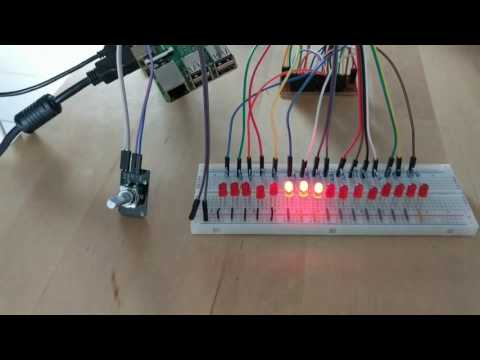
Very basic Umbrella Project with Nerves controlling a number of LEDs with a turning dial.
The LEDs are controlled by two daisy-chained 74HC595 shift registers. The turning dial is a KY040 rotary encoder.
-
Clone the repo
-
Create a
apps/slider/config/secrets.exsfile and edit it -
Get and solder and wire the hardware correctly
-
cd app/slider
-
export MIX_TARGET=rpi3
-
mix deps.get
-
mix firmware
-
mix firmware.burn
-
put sd into rasp
-
enjoy
-
change code
-
mix firmware
-
mix firmware.push
ip of your rasp3--target rpi3 -
updated over the air!
Nerves applications produce images for hardware targets based on the
MIX_TARGET environment variable. If MIX_TARGET is unset, mix builds an
image that runs on the host (e.g., your laptop). This is useful for executing
logic tests, running utilities, and debugging. Other targets are represented by
a short name like rpi3 that maps to a Nerves system image for that platform.
All of this logic is in the generated mix.exs and may be customized. For more
information about targets see:
https://hexdocs.pm/nerves/targets.html#content
To start your Nerves app:
export MIX_TARGET=my_targetor prefix every command withMIX_TARGET=my_target. For example,MIX_TARGET=rpi3- Install dependencies with
mix deps.get - Create firmware with
mix firmware - Burn to an SD card with
mix firmware.burn
- Official docs: https://hexdocs.pm/nerves/getting-started.html
- Official website: http://www.nerves-project.org/
- Discussion Slack elixir-lang #nerves (Invite)
- Source: https://github.com/nerves-project/nerves