
This assignment splits up a monolith project into several parts, to demonstrate microservices and REST APIs in action. The section I am working on is 3.9. Rating and Comments Dashboard for Students. For this project, my technology stack includes using NodeJS and Express for my API server, SQLite for the database (specifically the npm implementation of it), and the React framework with the chakra-ui component library for frontend.
API Server Docker Hub Link Frontend Server Docker Hub Link
For an in-depth documentation of the API, please refer to the API Reference.
The task breakdown for this assignment is as follows:
-
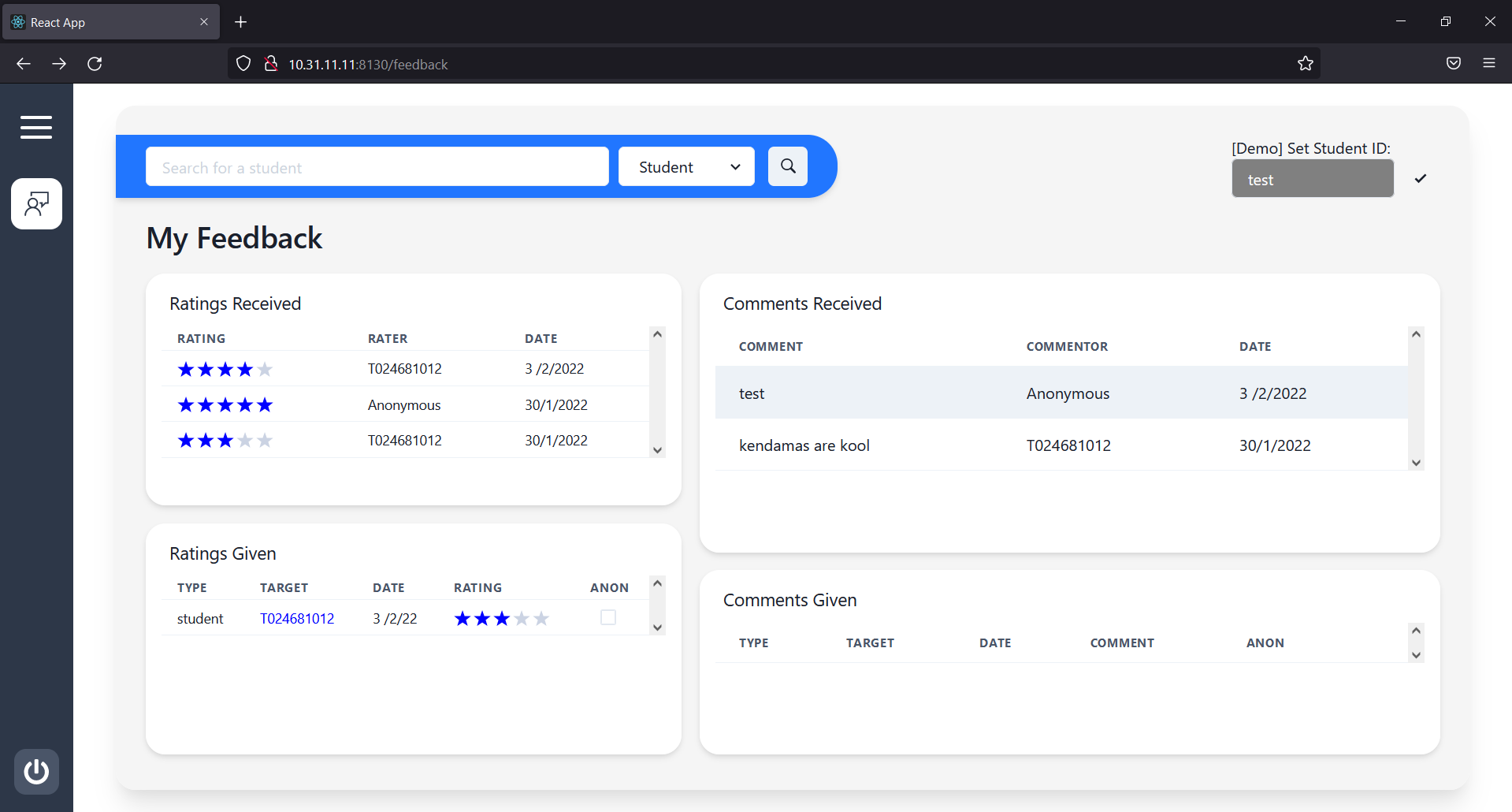
3.9.1. Create, view, update ratings and comments to students, tutors, modules, classes
-
3.9.2. View ratings and comments received
-
3.9.3. List ratings and comments received (anonymized)
-
3.9.4. List ratings and comments given
# 1. Personal Feedback
http://10.31.11.11:8130/feedback

# 2. Other Student's Feedback
http://10.31.11.11:8130/feedback/:studentId

# 3. Module Feedback
http://10.31.11.11:8130/feedback/module/:moduleId

# 4. Class Feedback
http://10.31.11.11:8130/feedback/class/:classId
Any non-matching routes will be brought to the Missing Page, where users will be prompted to either go back to the previous page, go to the login page, or go to the personal feedback page.
To deploy, scripts have been prepared for Windows and Linux-based systems to automatically setup the containers or stop them. These scripts can be found in the ./deploy_scripts, and they take 1 argument to run, either up or down. The up command pulls the latest versions of the images (links available above) from Docker Hub, and serves the API Server and Frontend Server on the default bridge network, with container names 13_api-server and 13_frontend-server, and ports 8131 and 8130 respectively. Additionally, a volume of name sqlite-db is created for the purpose of a persistant database.
Download and Run Containers
.\deploy_scripts\windows.bat upStop Containers
.\deploy_scripts\windows.bat down# Download and Run Containers
./deploy_scripts/linux.sh up
# Stop Containers
./deploy_scripts/linux.sh downInstallation Requirements:
- NodeJS Version 17.3.1
- Yarn Package Manager
In the root directory (where app.js is), run yarn install to download the relevant dependencies. Then, run yarn start or yarn nodemon to start running the server. On successful setup, the server will be available on port 8131.
For this project, setup of the database is done automatically from the setup of the NodeJS API Server, and there is no need to install SQLite. Only the npm sqlite3 package is required, and that is also automatically installed. On setup, the database will be a file named student.db, located in the db directory. In that same directory, a setupdb.js file contains the database logic used by the API Server, including the SQL setup commands. As such, there is no SQL file for setup.
In the frontend directory, run yarn install to download the relevant dependencies. Then, run yarn start to serve the React application on port 8130. Note that the dependencies for the React Frontend and NodeJS API Server are different, so yarn install has to be run a total of 2 times, once in each directory, for both to be setup properly.
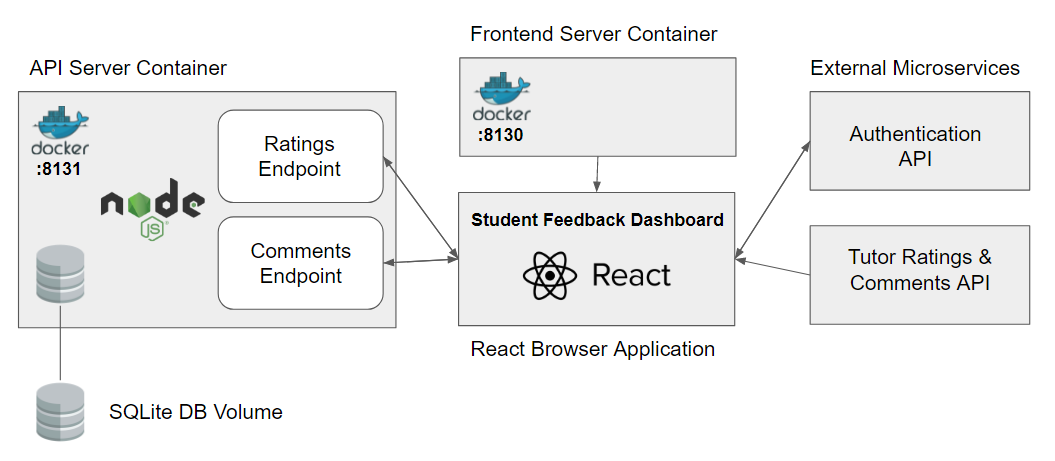
For this overall assignment, a total of 2 microservices were created, 1 for the API Server which serves API requests for both ratings and comments, and the other for the frontend server, which serves the React webapp. The reason why student comment and rating-related requests are served from 1 microservice instead of 2 separate ones is because the processing of all requests for comments and ratings, be it GET, POST or PUT, are very similar. Because of this, the comment and rating endpoints share various functions that help in the validation of requests, such as checking for query strings or whether certain JSON fields are undefined, and as such, it would be more practical to group them into the same microservice, so future changes to any validation functions be more consistent across endpoints. For the case of my API Server, since all requests are not process-intensive and the server is also 'stateless' (explained in the next section), containers will be scaled the same regardless of traffic for either comments or ratings, so there is no reason to separate comments and ratings into 2 separate microservices.
For the API Server Microservice, it was built using NodeJS with the Express library, and the application was built with scalability as the main priority. The server was built to be a 'stateless' application, having no data or variables that are stored on the server at any time. This means that if several containers are serving the API server, all requests would be handled exactly the same way, so scaling out would be easy to implement, as long as the respective load balancers and routers are properly set up.
Within the API Server microservice also lies a SQLite database. The database is just a singular file with a .db extension that is mounted as a volume, and any application with access to a sqlite interface would be able to read and write to the database with the right permissions. If several API Server containers were to up at any time, they would be able to read and write to the volume database in parallel, further contributing to the goal of scalability.
The reason SQLite was chosen as the database engine for this microservice was because it is a lightweight, full-featured, SQL database engine, which means that it could perform the functions of a typical relational database, yet take up a relatively smaller amount of storage and system resources. Given that my microservice to handle student ratings and comments is a relatively small microservice in terms of storage and functionality, SQLite is the most suitable database engine, since it takes up less space, and also removes the complexities that full-fledged heavyweight databases bring.
For the frontend, I decided to use React because it is a component-based frontend framework that serves a single-page application. The benefit of a component-based rendering system is that different sections of the website can make their own requests to various API endpoints and display the data accordingly, which allows for other components still being able to perform their functions if any one component fails, allowing the application to still run even with multiple points of failure. This is especially crucial for this assignment, since the frontend also fetches from the external API endpoints, such as login authentication and the comments and ratings given by tutors, so even if the fetch requests fail, the rest of the application can still function and display only student comments and ratings. The benefit of a single-page application is that any routing within the same domain and port can be handled by the webapp itself without making additional calls to the frontend server, reducing the overall number of requests that are made.
On push to the main branch, code will be tested to ensure that it passes the ESLint linting standards.
On push to the main branch, the main API server code will be tested using the test scripts in the test directory. These tests cover all the endpoints of the API, and the workflow only passes if all these tests pass. On the top of the README, a live tracker of the CI pass status is displayed for quick monitoring.
Whenever a tag with a 'v' in front is pushed to origin, the code for the frontend server and API server will be built using the various Dockerfiles specified, and the latest version of the image will be uploaded to Docker Hub, making the process of deployment easier.