

MintCam is a lightweight, feature-rich webcam application for Linux Mint. It provides a clean, dark-themed interface with live preview, photo capture, video recording, and advanced features like QR scanning, focus assist, face auto-framing, and time-lapse support.
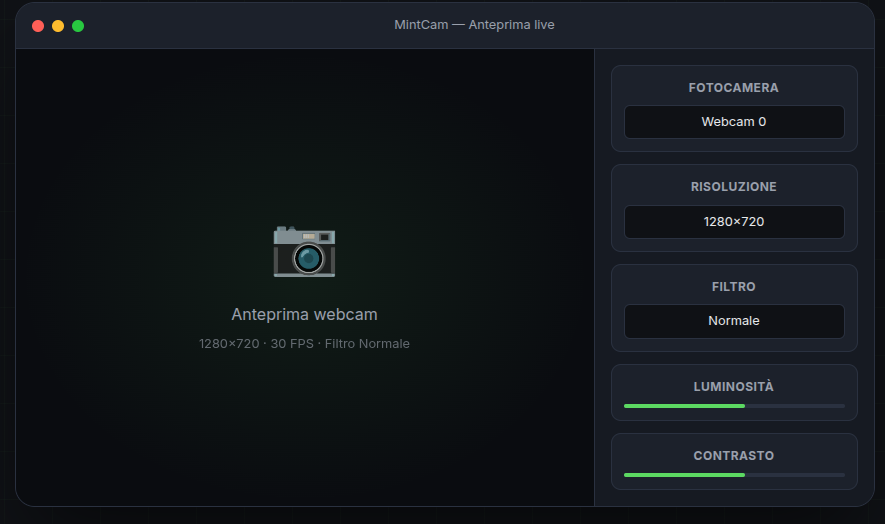
- Live webcam preview with real-time FPS counter
- Photo capture (single and burst modes)
- Video recording with automatic codec detection (mp4v, XVID, MJPG fallback)
- QR/Barcode scanner integration
- Focus assist with visual indicator (Laplacian variance scoring)
- Face auto-framing using OpenCV face detection
- Time-lapse recording with automatic MP4 assembly
- Filters: Normal, Grayscale, Sepia, Negative, High Contrast
- Adjustments: brightness, contrast, saturation
- Composition grid overlay
- Live mirror toggle
- Multiple aspect formats: 16:9, 4:3, 9:16
- Photo timer: 3, 5, 10 seconds
- Photo burst: 3, 5, 10, 15 shots
- Preview pause
- Recording duration limit (auto-stop clips)
- Adjustable photo quality
- Autostart with system
- Dark theme UI
- Custom icon
- OS: Linux Mint 21+ (Ubuntu 22.04+)
- Python: 3.10 or newer
- System packages:
v4l-utils,ffmpeg,libxcb-cursor0 - Python packages:
opencv-python,pyzbar,Pillow
One command; adds the repository, imports the signing key and installs the app:
curl -fsSL https://jeaders.github.io/MintCam/apt/install.sh | sudo bashOr manually:
sudo install -d -m 0755 /etc/apt/keyrings
curl -fsSL https://jeaders.github.io/MintCam/apt/mintcam-archive-key.asc \
  | sudo gpg --dearmor --yes -o /etc/apt/keyrings/mintcam.gpg
echo "deb [signed-by=/etc/apt/keyrings/mintcam.gpg] https://jeaders.github.io/MintCam/apt stable main" \
  | sudo tee /etc/apt/sources.list.d/mintcam.list
sudo apt update
sudo apt install mintcam
Adding a repository in Software Sources (or with the snippet above) makes MintCam appear in the Software Manager search, and updates arrive through Update Manager like any other package.
Download the latest .deb from Releases
and install:
# Direct download of the current release
wget https://github.com/jeaders/MintCam/releases/latest/download/mintcam_0.8.1_all.deb
sudo apt install ./mintcam_0.8.1_all.deb
apt install ./... resolves the dependencies (v4l-utils, ffmpeg,
libxcb-cursor0, python3-venv) automatically; dpkg -i alone does not.
git clone https://github.com/jeaders/MintCam.git
cd MintCam
python3 -m venv .venv
source .venv/bin/activate
pip install -r requirements.txt
./run.shAfter installation, you can:
- Search for MintCam in the Linux Mint menu
- Or run from terminal:
mintcam
- Or from the source directory:
./run.sh
| Shortcut | Action |
|---|---|
| Space | Capture photo |
| R | Start/stop recording |
| F | Toggle focus assist |
| G | Toggle grid |
| M | Toggle mirror |
| Q | Toggle QR scanner |
Photos and videos are saved to:
~/MintCam/photos/     - Captured images
~/MintCam/recordings/  - Recorded videos
~/MintCam/logs/        - Application logs
To verify your webcam is detected:
v4l2-ctl --list-devices
v4l2-ctl --list-formats-ext -d /dev/video0- Open Menu → Preferences → Startup Applications
- Click "Add"
- Name:
MintCam - Command:
mintcam - Save
After installing via .deb, run once from terminal to initialize the user virtual environment:
/usr/bin/mintcamMake sure you're not setting a clip duration limit. Disable "Limit duration" in settings if recording cuts off.
Verify your camera works with v4l2-ctl (see above). Ensure no other application is using the camera.
Install dependencies:
pip install pyzbar Pillow
sudo apt install libzbar0sudo dpkg --purge mintcam || true
rm -rf ~/.local/share/mintcam
rm -f ~/.local/share/applications/mintcam.desktopMintCam/
├── app/
│ ├── main.py # Application entry point
│ ├── camera.py # Webcam capture thread
│ ├── recorder.py # Video recording with codec fallback
│ ├── settings.py # Settings persistence
│ ├── storage.py # File management
│ └── ui/
│ ├── main_window.py # Main UI window
│ └── styles.py # Dark theme stylesheet
├── assets/ # Logo and banner images
├── tests/ # Unit tests
├── requirements.txt # Python dependencies
├── packaging/ # .deb packaging files
├── build-deb.sh # Build .deb package script
└── run.sh # Run from source script
./build-deb.shThe package will be created in dist/.
- Critical fix: ffmpeg command indices were wrong in audio recording, causing silent audio in all recordings on PulseAudio systems
- Fixed motion detection auto-stop when recording starts manually
- Fixed audio level meter overlapping with REC indicator
- Fixed audio device enumeration
- Audio recording fix for Linux Mint XFCE (PulseAudio detection)
- Audio device selection (choose specific microphone)
- Check for updates button (GitHub releases API)
- Fixed stale maintainer email in packaging metadata
- Renamed the desktop and appdata ids to
mintcamto match the.desktopfile - Added the LICENSE file
- Updated icon assets for all sizes
- Fixed recording module (writer release sync in stop/__del)
- Added PPA for Ubuntu Noble
- Initial public release
- Live webcam preview with FPS counter
- Photo capture (single, burst, timer)
- Video recording with codec auto-detection
- QR/Barcode scanner
- Focus assist with visual indicator
- Face auto-framing
- Time-lapse recording
- Filters and adjustments (brightness/contrast/saturation)
- Dark theme UI
- .deb package for Linux Mint
- AppStream metadata for Software Manager
Distributed under the MIT License. See LICENSE for details.
© 2026 Alex Mirici — Web Developer https://alexmirici.netlify.app
Report issues at https://github.com/jeaders/MintCam/issues