
Chat Line is a modern responsive AI chatbot landing page built with HTML, CSS, and JavaScript. It includes a polished hero section, animated chatbot interface, light and dark mode, smooth transitions, responsive layouts, and a clear place to connect your chatbot API such as Gemini.
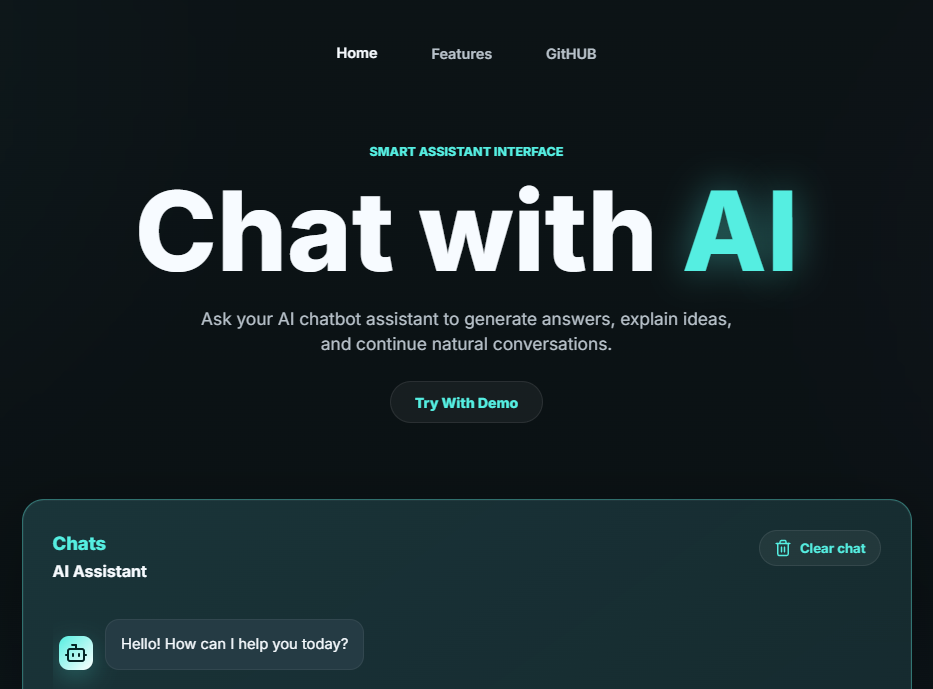
- Fully responsive layout for desktop, tablet, and mobile devices
- Modern AI chatbot UI inspired by dark glass-style interfaces
- Light mode and dark mode with saved user preference
- Animated background effects
- Smooth button, link, and message transitions
- Bot typing indicator
- Animated bot reply text
- Automatic chat scrolling for long conversations
- Clear chat button
- Separated HTML, CSS, and JavaScript files
- Bootstrap included for responsive utilities
- Lucide icons included for modern UI icons
- Ready chatbot API integration function in JavaScript
chat-ai-website/
├── index.html
├── style.css
├── script.js
└── README.md
Contains the website layout:
- Navigation bar
- Hero section
- Chatbot interface
- Feature cards
- External library links
- CSS and JavaScript file links
Contains all styling:
- Responsive layout
- Dark and light theme variables
- Chat UI styling
- Background animation
- Button transitions
- Mobile breakpoints
Contains all functionality:
- Theme toggle
- Chat message rendering
- Typing animation
- Bot response animation
- Auto-scroll behavior
- Clear chat feature
- Chatbot API placeholder
The chatbot API code should be added inside the getBotReply() function in script.js.
Current placeholder:
async function getBotReply(userMessage) {
  await new Promise((resolve) => window.setTimeout(resolve, 900));
  return `I received: "${userMessage}". Connect your bot API inside getBotReply() and this area will show the live assistant response with the same animation.`;
}
Example Gemini setup:
const GEMINI_API_KEY = "PASTE_YOUR_GEMINI_API_KEY_HERE";
const GEMINI_MODEL = "gemini-2.5-flash";

async function getBotReply(userMessage) {
  const response = await fetch(
    `https://generativelanguage.googleapis.com/v1beta/models/${GEMINI_MODEL}:generateContent`,
    {
      method: "POST",
      headers: {
        "Content-Type": "application/json",
        "x-goog-api-key": GEMINI_API_KEY
      },
      body: JSON.stringify({
        contents: [
          {
            role: "user",
            parts: [{ text: userMessage }]
          }
        ]
      })
    }
  );

  const data = await response.json();

  if (!response.ok) {
    console.error(data);
    return "Gemini API error. Please check your API key, model name, or billing/settings.";
  }

  return (
    data?.candidates?.[0]?.content?.parts?.[0]?.text ||
    "Gemini did not return a text reply."
  );
}Do not expose private API keys in frontend JavaScript for a production website. Browser JavaScript can be inspected by users, so your API key can be copied.
For production, create a backend API endpoint and keep the Gemini API key on the server. The frontend should call your backend, and your backend should call Gemini.
- Bootstrap 5.3.3
- Lucide Icons
- Google Fonts - Inter
You can change the color theme in style.css by editing the CSS variables:
:root {
  --bg: #071114;
  --brand: #55eee1;
  --brand-2: #68a5ff;
  --text: #f7fbff;
}
You can update the default demo messages in script.js:
const starterMessages = [
  {
    role: "bot",
    text: "Hello! How can I help you today?"
  }
];This project works in modern browsers such as:
- Chrome
- Edge
- Firefox
- Safari
This project is free to use and customize for personal or learning projects.