Automated configuration of API rates and limits (specified in OpenAPI and SLA4OAI) for Envoy, HAProxy, NGinx and Traefik.
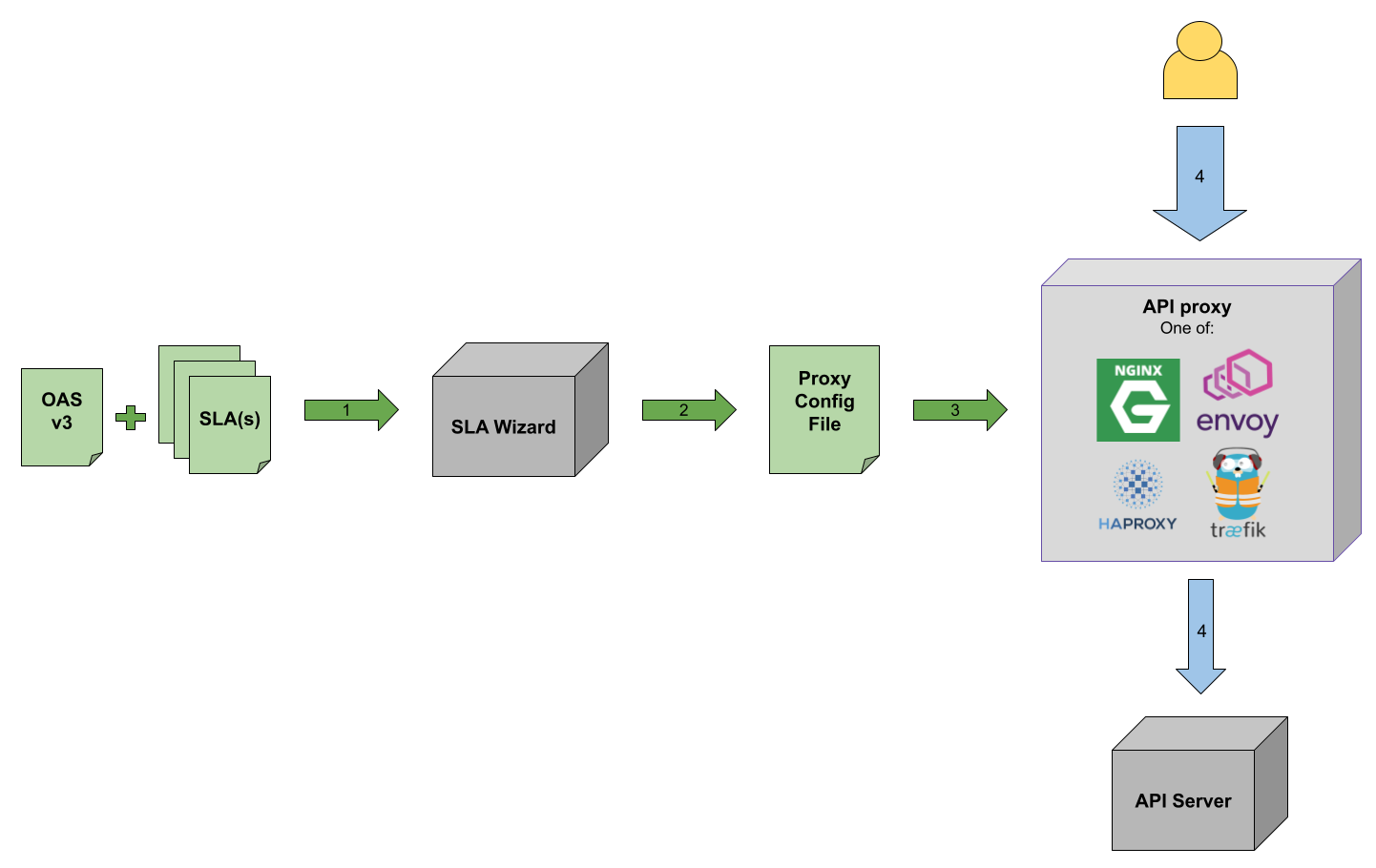
- The user provides to SLA Wizard an OpenAPI Specification v3 and one or more SLAs agreement.
- SLA Wizard generates a proxy configuration file which includes the rate limiting indicated in the SLA(s). Refer to section Creating proxy configurations for details on this.
- The obtained configuration is provided to the proxy server when launching it. The proxy can be one of: Envoy, HAProxy, Nginx or Traefik.
- The API requests will be rate-limited according to the proxy configuratin file, which matches what the API SLA(s) indicate.
Once the tool is published in npm, it will be possible to install it using npm install sla-wizard but until then, to get the tool clone the repository and install dependencies:
git clone https://github.com/isa-group/sla-wizard
cd sla-wizard
npm install
Displayed below is the output of the -h option of SLA Wizard CLI:
$ node src/index.js -h
Usage: sla-wizard <arguments> <options>

Options:
  -h, --help                display help for command

Commands:
  config [options] <proxy>
  runTest [options]         Run test with APIPecker.
help [command] display help for commandSLA Wizard includes currently two commands:
| Command | Explanation |
|---|---|
config |
Takes an SLA document and generates a proxy configuration file which includes rate limiting as specified on the provided SLA. |
runTest |
Performs validation testing of the rate limiting defined on a proxy by an SLA Wizard-generated configuration file. |
To control log levels define the environment variable LOGGER_LEVEL prior to the run. The possible values are error, warn, custom, info and debug.
The following table describes all the options that SLA Wizard includes for its commands:
| Option/Argument | Command | Required | Explanation | Default Value |
|---|---|---|---|---|
proxy |
config |
Yes | Proxy for which the configuration should be generated. (choices: "nginx", "haproxy", "traefik", "envoy") | - |
-o, --outFile <configFile> |
config |
Yes | Config output file. | - |
--sla <slaPath> |
config & runTest |
No | One of: 1) single SLA, 2) folder containing SLAs, 3) URL returning an array of SLA objects. Note in the case of runTest the URL option is not supported. |
./specs/sla.yaml |
--oas <pathToOAS> |
config & runTest |
No | Path to an OAS v3 file. | ./specs/oas.yaml |
--customTemplate <customTemplate> |
config |
No | Custom proxy configuration template. | - |
--authLocation <authLocation> |
config |
No | Where to look for the authentication parameter. | header |
--authName <authName> |
config |
No | Name of the authentication parameter, for example "token" or "apikey". | apikey |
--specs <testSpecs> |
runTest |
No | Path to a test config file. | ./specs/testSpecs.yaml |
sla-wizard can also be used as a Node.js module.
const slaWizard = require("sla-wizard");

// 1. Using the default function (config)
slaWizard("nginx", {
  outFile: "nginx.conf",
  sla: "./specs/sla.yaml",
  oas: "./specs/oas.yaml",
});

// 2. Using specific command methods
slaWizard.runTest({
  specs: "./specs/testSpecs.yaml",
});

// 3. Using plugin-specific methods
slaWizard.configNginxConfd({
  outDir: "./nginx-config",
  sla: "./specs/sla.yaml",
});

slaWizard.addToConfd({
  outDir: "./nginx-config",
  sla: "./new-sla.yaml",
});SLA Wizard only works with SLAs of type agreement. It validates the provided SLAs with the SLA4OAI-Specification JSON schema.
If any of the provided SLAs is not valid (does not conform to schema or is not of type agreement), the execution will stop. Additionally, duplicated SLAs will be ignored.
The API server must be indicated on the OAS document. While it is possible to specify multiple servers in the OAS' servers section, SLA Wizard will consider only the first one.
For instance, in the following example only http://server1:8080 is considered:
openapi: 3.0.0
servers:
  - url: 'http://server1:8080'
  - url: 'http://server2:8080'
  - url: 'http://server3:8080'
...Both SLA Wizard functionalities provided by the commands config and runTest require an SLA document. While it is possible to reference the SLA directly in the OAS document (info.x-sla.$ref), the tool will not consider it. Instead, please use the commands' --sla option to indicate where the SLA document(s) can be found. This option can take a path to a single file, a folder containing multiple files or even a URL (note GET to the URL must receive an array, even if there's only one SLA).
APIs support different authentication methods. When authenticating with an API key, generally, it is possible to provide it in different places of the request:
- As a header
- As a query parameter
- As part of the URL
All the proxies supported by SLA Wizard allow using API keys on these three locations. When creating a proxy configuration file, the option --authLocation of SLA Wizard's config command should be used to set this, it can take the values header, query and url. In any case, the usage of the option is not compulsory, its default value is header.
SLA Wizard will need to know the set of possible API keys to be used on the API, the SLA must then include the property context.apikeys, containing a list of API keys valid for authentication of API calls.
SLA Wizard can create configuration files from scratch for four different proxy technologies: Envoy, HAProxy, Nginx and Traefik. Also, it can modify an already existing configuration file, to add the SLA logic.
For more information on how to use the tool for each of the four proxies, refer to their specific docs:
Perform the following steps to test SLA Wizard. For further testing we recommend making use of sla-gateway-benchmark.
git clone https://github.com/isa-group/sla-wizard
cd sla-wizard
npm installThe following command creates 4 SLAs, each with 2 apikeys and then creates a config file for Nginx, with rate limiting based on those 4 SLAs:
npm run prepare_test nginx 4 2See the config file created by the previous command:
less /tmp/proxy-configuration-fileIt must be a YAML file with the following variables:
authLocation: Indicates how the apikeys should be sent to the proxy during the testing: as a header, as a query parameter or as part of the url. Possible values areheader,queryandurl, respectively.extraRequests: An integer that will multiply the number of expected 200 HTTP responses for a given endpoint and will send that amount of requests. For example, if an SLA allows a user to make 10 requests per second, if this variable is set to 3,npm testwill send 30 requests per second for a single user.minutesToRun: Minutes to run (this applies to endpoints that have "per minute" rate limiting).secondsToRun: Seconds to run (this applies to endpoints that have "per second" rate limiting).
cat > /tmp/sla-wizard-test-config.yaml <<EOL
authLocation: header
extraRequests: 3
minutesToRun: 3
secondsToRun: 30
EOLTEST_CONFIG=/tmp/sla-wizard-test-config.yaml \
OAS4TEST=/tmp/sla-gateway-benchmark/specs/simple_api_oas.yaml \
SLAS_PATH=/tmp/generatedSLAs/ \
npm testThe variables for configuring npm run are:
TEST_CONFIG: Path to the test run configuration file.OAS4TEST: Path to the API's OAS document.SLAS_PATH: Path to the API's SLAs.
While the test is running you can check the containers are up and the proxy's logs:
docker ps

docker logs -f nginx_proxy_1Make use of the following command once testing completes to remove containers and generated files:
npm run test_cleanupSLA Wizard features a powerful plugin system that allows extending both the CLI with new commands and the programmatic API with new methods.
-
Local Plugins:
- Stored in the
plugins/directory of your project. - Can be a single
.jsfile (e.g.,plugins/myCommand.js) or a directory containing an index file (e.g.,plugins/my-complex-plugin/index.js). - Discovered automatically by SLA Wizard.
- Stored in the
-
External (NPM) Plugins:
- Installed via
npm install <plugin-name>. - Must be explicitly enabled in
sla-wizard.config.json.
- Installed via
Create a sla-wizard.config.json file in your project root to register and configure plugins:
{
  "plugins": [
    {
      "name": "sla-wizard-plugin-hello",
      "config": {
        "greeting": "Welcome"
      }
    }
  ]
}npm install sla-wizard-plugin-helloPlugins can register new commands that appear in the help menu:
node index.js hello --name Developer
# Output: Welcome, Developer! 👋When sla-wizard loads a plugin, it automatically attaches its exported functions (excluding apply) as methods to the main sla-wizard module.
const slaWizard = require('sla-wizard');

// 1. If configured in sla-wizard.config.json, it's ready to use:
slaWizard.hello({ name: 'User' });

// 2. Register plugins dynamically at runtime:
const myLocalPlugin = require('./my-local-plugin');
slaWizard.use(myLocalPlugin, { customSetting: 'active' });

slaWizard.myPluginMethod();A plugin is a Node.js module that can export an apply function and/or other utility methods.
/**
 * the 'apply' function is called during initialization.
 * It receives the 'program' (Commander instance), 'ctx' (Core utilities), and 'config'.
 */
module.exports.apply = (program, ctx, config) => {
  program
    .command("my-command")
    .description("Description for CLI help")
    .action((options) => {
      // CLI logic here
    });
};

/**
 * Any other exported function is automatically attached to the sla-wizard module.
 */
module.exports.myUtility = (options, ctx) => {
  return "Result from plugin";
};Copyright 2023, ISA Group, University of Sevilla

Licensed under the Apache License, Version 2.0 (the "License"); you may not use this file except in compliance with the License. You may obtain a copy of the License at apache.org/licenses/LICENSE-2.0
Unless required by applicable law or agreed to in writing, software distributed under the License is distributed on an "AS IS" BASIS, WITHOUT WARRANTIES OR CONDITIONS OF ANY KIND, either express or implied. See the License for the specific language governing permissions and limitations under the License.