

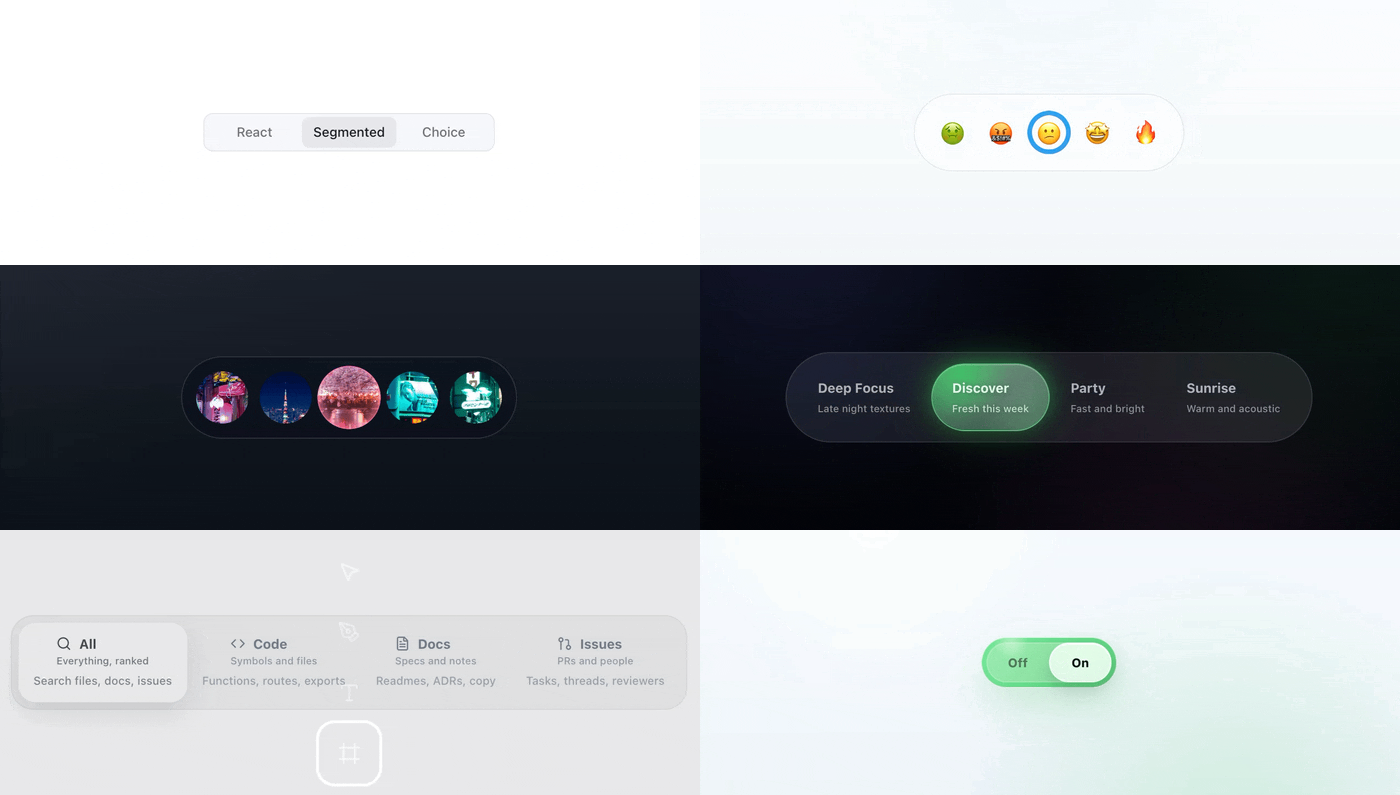
react-segmented-choice is a React segmented control for choices that should feel like real UI, not styled tabs.
It keeps the boring parts in place: native radio semantics, keyboard behavior, form-friendly state and drag-to-select. From there, you can shape the same component into a switch, toolbar, option picker, rail or compact mode control with CSS and measured geometry.
Typical use cases:
- report ranges, billing periods, density switches and mode pickers
- icon rails and compact toolbars where every option needs a stable target
- custom switches or tabs alternatives that should still behave like form controls
The hosted Storybook shows the range: plain controls, rails, thumbnails, filters, toggles and the geometry stories behind them.
pnpm add react-segmented-choice
# or
npm install react-segmented-choice
# or
yarn add react-segmented-choice
Import bundled styles once:
import 'react-segmented-choice/styles.css';Import the bundled stylesheet before your app or component CSS. That keeps the default skin available while letting your own classes override public --rsc-* variables and stable .rsc-* hooks in normal CSS order.
import { SegmentedChoice } from 'react-segmented-choice';
import 'react-segmented-choice/styles.css';

export function ReportRange() {
  return (
    <SegmentedChoice
      ariaLabel="Report range"
      defaultValue="week"
      options={[
        { value: 'day', label: 'Day' },
        { value: 'week', label: 'Week' },
        { value: 'month', label: 'Month' },
      ]}
    />
  );
}SegmentedChoiceValue is string. Treat option values as stable public IDs. If the selected thing is a richer object, keep that object in your app state and pass the ID to the control.
For complex domain values, keep external mapping by ID:
const items = [
  { id: 'plan-free', plan: { seats: 1, tier: 'free' } },
  { id: 'plan-pro', plan: { seats: 10, tier: 'pro' } },
] as const;

const byId = Object.fromEntries(items.map(x => [x.id, x.plan]));

<SegmentedChoice
  ariaLabel="Plan"
  value={selectedId}
  onValueChange={id => {
    setSelectedId(id);
    setSelectedPlan(byId[id]);
  }}
  options={items.map(x => ({ value: x.id, label: x.plan.tier }))}
/>;The package has one component entry point and a small type surface. This README keeps the map short; API.md is where the prop-by-prop reference and longer examples live.
Exports:
SegmentedChoice- types:
SegmentedChoiceProps,SegmentedChoiceOption,SegmentedChoiceValue,SegmentedChoiceGeometry,SegmentedChoiceSlotProps - geometry/types:
SegmentedChoiceTrackLayout,SegmentedChoiceTrackStyle,SegmentedChoiceIndicatorStyle,SegmentedChoiceIndicatorContentMode,SegmentedChoiceIndicatorTransition - typography helpers:
SEGMENTED_CHOICE_FONT_FAMILY,SEGMENTED_CHOICE_TYPOGRAPHY_TOKENS,getSegmentedChoiceTypographyTokens,SegmentedChoiceTypographyTokens
Top-level props:
options,value,defaultValue,onValueChange,namedisabled,required,orientation,optionSizing,optionDistribution,sizedraggable,loopariaLabel,ariaLabelledby,ariaDescribedbyclassName,styleNonce,unstyled,slotProps,geometry
Layout props worth knowing early:
optionSizingcontrols option box dimensions:equaluses the widest measured option content for every option,contentlets each option follow its own content width andgeometry.optionSizeswitches to fixed square option boxes.optionDistributioncontrols option placement when the surface has extra space. The default isspace-between;space-aroundadds outer breathing room too. Surface width itself still comes from normal CSS layout.
Structural runtime guarantees:
optionsmust contain at least 2 entries- every
options[i].valuemust be a unique string - invalid option structures render nothing and warn in development
- the radiogroup must be labelled with
ariaLabelorariaLabelledby
For complete prop-by-prop reference with examples, see API.md.
Option fields:
value: unique string selection valuelabel: rendered option contentariaLabel: accessible label for icon-only or non-text labelsdescription: optional secondary contentdisabled: disables one optionaccentColor: optional per-option indicator color, sanitized before runtime CSS injection
Use geometry when the layout mechanics need to change, not just the colors. It controls things like underlay vs overlay behavior, track span, fixed option or indicator sizes, drag scale, cloned indicator content and indicator motion.
geometry?: {
  mode?: "underlay" | "overlay";
  dragScale?: boolean | number;
  optionSize?: number;
  anchor?: {
    size?: number;
    width?: number;
    height?: number;
  };
  track?: {
    layout?: "container" | "center-span";
    style?: "surface" | "none";
  };
  indicator?: {
    size?: number;
    width?: number;
    height?: number;
    style?: "fill" | "ring" | "none";
    content?: "none" | "clone-active";
    transition?: "smooth" | "instant";
    inset?: number;
    borderWidth?: number;
  };
}
Defaults:
geometry.mode = "underlay"geometry.track.layout = "container"geometry.track.style = "surface"geometry.indicator.style = "fill"geometry.indicator.content = "none"geometry.indicator.transition = "smooth"
geometry.indicator.transition is only about the moving selection indicator:
"smooth"animates selection indicator position and size changes."instant"updates indicator position and size without movement or resize animation.
It does not delay value changes or change drag preview behavior.
slotProps is for integration hooks, not visual styling:
- allowed:
className,data-*, non-conflictingaria-*, handlers (onPointerEnter, etc.) - not supported:
style
style is intentionally ignored at runtime even if forced through a cast.
For slotProps.list, internal pointer/focus handlers run before user-provided handlers.
Use list-level handlers to observe or add to interactions. Do not rely on them to override the built-in drag and commit flow.
Root radiogroup semantics stay controlled by top-level props such as ariaLabel, ariaLabelledby and ariaDescribedby.
Example:
<SegmentedChoice
  ariaLabel="Density"
  defaultValue="comfortable"
  options={[
    { value: 'comfortable', label: 'Comfortable' },
    { value: 'compact', label: 'Compact' },
  ]}
  slotProps={{
    root: { 'data-qa': 'density-choice' },
    option: { 'data-track': 'density-option' },
  }}
/>SegmentedChoice does not put style={...} on its rendered slots.
The styling contract is intentionally CSS-first:
- stable
.rsc-*classes for slot targeting - core state
data-*attrs for state-specific styling - public
--rsc-*variables for theme tokens - no rendered slot inline styles, so your CSS can still override variables such as
--rsc-surface
Runtime geometry is separate from theme styling. Measured positions and sizes are written through an internal scoped stylesheet, not through slot inline styles.
Dynamic layout values are injected into a shared document stylesheet.
- pass
styleNoncewhen your app uses strict CSP withoutunsafe-inline - instances in the same document share one runtime style host per nonce value
- controls with different
styleNoncevalues create separate runtime style hosts
.rsc-root,.rsc-list,.rsc-track,.rsc-indicator,.rsc-indicator-content.rsc-option,.rsc-option-input,.rsc-option-anchor,.rsc-option-content.rsc-option-label,.rsc-option-description
Use class hooks for stable slot targeting. Use data attrs for semantic state and interaction state.
data-orientation,data-sizedata-disabled,data-unstyled,data-dragging,data-drag-released
data-dragging marks an active pointer drag. data-drag-released is briefly true after a pointer drag ends so CSS can add optional release feedback such as a bounce or glow. The default stylesheet does not animate release.
data-selected,data-disabled,data-focus-visibledata-has-description,data-previewed
data-previewed marks the option currently targeted during an active drag. It can differ from data-selected until the drag commits.
Always active:
--rsc-bg,--rsc-surface,--rsc-border-color,--rsc-border-radius--rsc-font-family,--rsc-font-weight,--rsc-line-height,--rsc-letter-spacing--rsc-font-size,--rsc-description-font-size--rsc-container-offset,--rsc-padding,--rsc-gap,--rsc-label-gap--rsc-disabled-opacity--rsc-option-min-size,--rsc-option-padding-block,--rsc-option-padding-inline,--rsc-option-radius--rsc-track-size--rsc-text-color,--rsc-active-text-color--rsc-indicator-bg,--rsc-indicator-color--rsc-indicator-border-width,--rsc-indicator-shadow,--rsc-focus-ring-color
Optional public override:
--rsc-indicator-hover-bgoverrides the overlay fill hover color. Without it, overlay fill hover preserves activeaccentColor; controls without an active accent use the default gray hover fill.
Public variables are the documented --rsc-* tokens above. They are safe to theme from external CSS.
Internal runtime selectors and variables use data-rsc-* and --_rsc-*. They belong to the bundled stylesheet and scoped runtime layout rules. Do not build app-level styling contracts on them.
Server rendering does not emit the internal runtime stylesheet.
- SSR markup is safe to render without touching
window,documentornavigator - the scoped runtime CSS is installed on the client after hydration during the first layout effect
- expect indicator geometry to settle on the client after hydration
- Component state and
geometrydefine mechanics/layout. - Internal runtime stylesheet applies instance-scoped layout values.
- Public CSS variables define theme and visual output.
- Class/data selectors define contextual styling.
slotPropsadds attrs/events/class names to slots.
Use geometry when the component should measure or move differently. Use CSS when the same mechanics should look different.
unstyled means "remove the default visual skin". It is not a headless primitive. Structure, semantics, slots and layout logic still come from the component.
For deeper guidance, examples and sentence-level descriptions of each stable class/data hook, read API.md.
Storybook is the easiest place to see the component pushed past the default pill control.
It covers:
- baseline variants and state examples
- geometry and indicator architecture
- CSS-first customization patterns
- rails, thumbnails, filters, custom switches and toggle-like controls
- keyboard, pointer, drag and accessibility interaction behavior
- styling examples built only on the documented public API
Run it locally with pnpm storybook, or browse the hosted examples at sb.segmentedchoice.visiofutura.com.
For quick forks, the main examples are also available on CodeSandbox.
Open CodeSandbox examples
The supported baseline is current and previous major releases of:
- Chrome / Edge
- Safari
The library is tested with Chromium and WebKit in CI.
pnpm test:visual
pnpm test:visual:update
test:visual builds Storybook and compares screenshots for the curated tags: ["visual"] stories.
- Native radio inputs and radiogroup semantics
- Arrow/Home/End keyboard support
- Disabled options skipped in keyboard navigation
- Immediate form compatibility via shared
name - For non-text labels, pass
ariaLabelper option
Tagged releases publish a CycloneDX SBOM generated from the pnpm lockfile.
Security and compliance tooling can use the SBOM to inspect dependency metadata.
- Format:
pnpm format:check - Lint:
pnpm lint - Typecheck:
pnpm typecheck - Build/declaration output:
pnpm build - Unit:
pnpm test:unit - Storybook interactions:
pnpm test:storybook - Source/build contract:
pnpm test:contract - Package sanity:
pnpm pack:check - Visual regression:
pnpm test:visual - Coverage:
pnpm test:coverage
CI runs format checks, lint, unit coverage, package build, public contract checks, package-content checks, Storybook browser tests and Chromium/WebKit visual regression.
prepack runs: build -> contract check -> pack check.
- React:
^18.2.0 || ^19.0.0 - Node:
>=22.13.0