Design: OAuth
Here's a hopefully up-to-date overview of how OAuth works in SmashBits.
We won't do a detailed explanation of the general OAuth flow here, as that's been covered by many tutorials. But as a starting point, here's a diagram summarizing that flow for Twitter, which is currently our only OAuth provider:
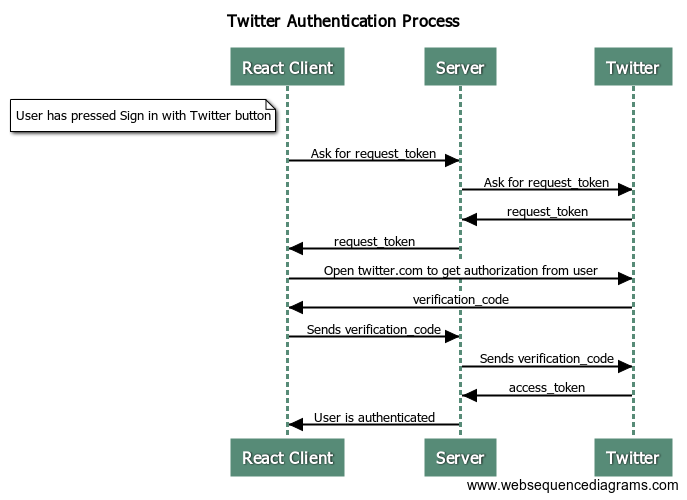
(Taken from https://www.npmjs.com/package/react-twitter-auth#workflow, though I've seen it elsewhere.)
We use two relevant pieces of middleware at the express-js level: passport-js and express-session.
- passport-js interfaces with Twitter's OAuth API via a built-in
TwitterStrategyplugin, and provides hooks to store/retrieve users from the DB (more on this below). - express-session manages the user's session and helps with persistent sign-in. It sets the
sid(session ID) cookie on the response, and automatically stores known sessions in a Mongo collection.
In addition, we store known users in a users collection in Mongo. When a user authenticates with Twitter, we associate their profile with a SmashBits user; in the future, this will allow us to associate multiple profiles from different OAuth providers with a single user if we wish.
So putting it all together, a typical OAuth Twitter flow goes like this:
- On first load of the app, express-session sets a session ID as a cookie, which is echoed back on subsequent requests (this behavior is controlled by the
credentials: 'include'option onfetch()), and is used to associate the different requests in the OAuth flow. - The user clicks a button to initiate a request to sign in with Twitter.
- The React client calls the
/login/twitterendpoint. - passport-js uses its predefined TwitterStrategy to call the Twitter OAuth API and redirect the client to a Twitter auth page. (Note that having the proper CORS setup is important here, as Twitter's domain is different than SmashBits.)
- The user (hopefully) authorizes SmashBits to read their Twitter profile info.
- The passport-js callback for a successful auth is called, and we retrieve the corresponding SmashBits user from the DB (or store a new one if it doesn't exist).
- Our OAuth callback endpoint at
/oauth/twitter/callbackis invoked, which does the final verification step and redirects the client to/login?success=true. - The React client loads a quick, blank
LoginTransitionPage, whose job is to actually retrieve the profile info from the server. It does this by calling the/profileendpoint. - Because the session ID on the cookie matches an authenticated user, the
/profileendpoint sends back the profile data, which is used by the client for display purposes. - For all subsequent requests until the cookie expires, the
passport.(de)serializeUser()middleware callbacks associate a session ID from a request with a user in the DB, ensuring that all eligible request are treated as authenticated. (This is also how the previous step works.)