Video metadata for Expo apps, powered by Mediabunny on iOS, Android, and web.
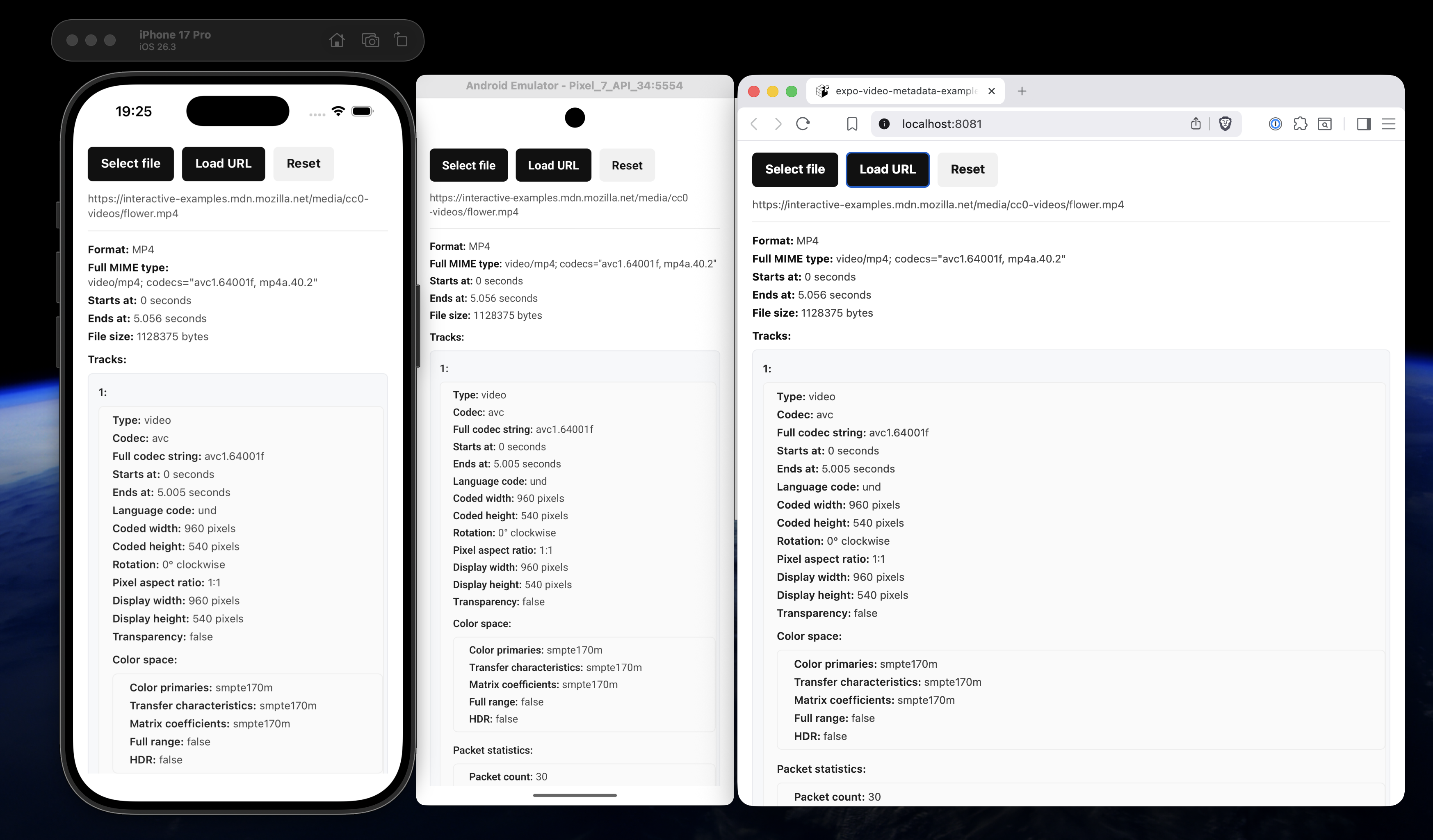
This package exposes Mediabunny-style metadata for Expo and React Native: format, MIME type, start/end timestamps, per-track codecs, dimensions, rotation, pixel aspect ratio, display dimensions, color space, packet statistics, audio properties, metadata tags, embedded images, file size, and GPS location when the file contains it.
It is currently maintained against Expo SDK 56.
npx expo install expo-video-metadataThis package does not ship custom native code. It uses Mediabunny for parsing and expo-file-system for efficient local file reads on iOS and Android.
For bare React Native apps, install and configure Expo modules first:
https://docs.expo.dev/bare/installing-expo-modules/
iOS and Android use Mediabunny through a small expo-file-system source adapter. Local file:// and content:// videos are read with byte-range file handle reads, so large videos do not need to be loaded fully into memory.
Remote URLs are read through Mediabunny's URL source. Request headers can be passed through the headers option.
On iOS, picking videos with expo-image-picker is fastest when you keep the original asset representation:
preferredAssetRepresentationMode: ImagePicker.UIImagePickerPreferredAssetRepresentationMode.Current;That avoids unnecessary copying or transcoding before metadata is read.
Web uses the same Mediabunny parser. It parses the media file in the browser instead of relying on <video> metadata events, which keeps the result shape aligned with iOS and Android.
Local web sources can be passed as File, Blob, blob: URLs, or data: URLs.
Remote web sources are read with fetch, so browser rules apply:
- The server must allow CORS, for example with
Access-Control-Allow-Origin. - The server should support byte-range requests with
Accept-Ranges: bytes. - If the video needs auth, pass headers through
VideoInfoOptions.
If a remote URL works on iOS or Android but fails on web, it is usually a CORS issue. Native networking is not subject to browser CORS.
import { getVideoInfoAsync } from "expo-video-metadata";

const info = await getVideoInfoAsync(videoUri);
With headers for a remote file:
const info = await getVideoInfoAsync("https://example.com/video.mp4", {
  headers: {
    Authorization: "Bearer token",
  },
});
On web, you can also pass a File or Blob:
const info = await getVideoInfoAsync(file);When using expo-image-picker on web, prefer the returned asset.file over
asset.uri:
const asset = result.assets[0];
const info = await getVideoInfoAsync(asset.file ?? asset.uri);
Passing the File lets Mediabunny read only the byte ranges it needs. Passing a
blob: URL requires loading that URL back into a Blob first, which can be much
slower for large videos.
getVideoInfoAsync(
  source: string | File | Blob,
  options?: {
    headers?: Record<string, string>;
    exactDuration?: boolean;
    packetStatsSampleCount?: number | null;
    includeMetadataTags?: boolean;
    includeVideoTracks?: boolean;
    includeAudioTracks?: boolean;
  }
): Promise<VideoInfoResult>
source can be:
- a local
file://orcontent://URI on iOS and Android - a remote URL
- a
FileorBlobon web - a
blob:ordata:URL on web
Base64/data URLs work on web, but they are not ideal for large videos.
By default, durations are read from metadata when possible, video and audio tracks are included, packet statistics inspect the first 30 packets of each track, and metadata tags are skipped. Skipping tags avoids extra reads for title, artist, comments, embedded images, raw tags, and GPS location when you only need technical media metadata.
Use includeMetadataTags: true when you need container tags or location data:
const info = await getVideoInfoAsync(source, {
  includeMetadataTags: true,
});
If you only need one media kind, disable the other one:
const info = await getVideoInfoAsync(source, {
  includeAudioTracks: false,
});
To match Mediabunny's metadata extraction demo more closely, use:
const info = await getVideoInfoAsync(source, {
  exactDuration: true,
  includeMetadataTags: true,
  packetStatsSampleCount: null,
});
Those settings can scan much more of the file.
type VideoInfoResult = {
  format: string;
  mimeType: string | null;
  start: number;
  end: number;
  tracks: MediaTrackInfo[];
  metadataTags?: MetadataTagsInfo | null;
  fileSize: number;

  // Convenience fields derived from the primary video/audio tracks:
  duration: number;
  hasAudio: boolean;
  isHDR: boolean | null;
  width: number;
  height: number;
  fps: number;
  bitRate: number;
  codec: string;
  orientation: "Portrait" | "PortraitUpsideDown" | "Landscape" | "LandscapeRight" | "LandscapeLeft";
  naturalOrientation: "Portrait" | "Landscape";
  aspectRatio: number;
  is16_9: boolean;
  audioSampleRate: number;
  audioChannels: number;
  audioCodec: string;
  location: {
    latitude: number;
    longitude: number;
    altitude?: number;
  } | null;
};

type MediaTrackInfo = {
  type: string;
  codec: string | null;
  codecParameterString: string | null;
  start: number;
  end: number;
  languageCode: string;
  packetStats: {
    packetCount: number;
    averagePacketRate: number;
    averageBitrate: number;
  } | null;
} & (
  | {
      type: "video";
      codedWidth: number;
      codedHeight: number;
      rotation: number;
      pixelAspectRatio: { num: number; den: number };
      displayWidth: number;
      displayHeight: number;
      transparency: boolean;
      colorSpace: {
        primaries: string | null;
        transfer: string | null;
        matrix: string | null;
        fullRange: boolean | null;
        hdr: boolean | null;
      };
    }
  | {
      type: "audio";
      numberOfChannels: number;
      sampleRate: number;
    }
  | {}
);

type MetadataTagsInfo = {
  title?: string;
  description?: string;
  artist?: string;
  album?: string;
  albumArtist?: string;
  trackNumber?: number;
  tracksTotal?: number;
  discNumber?: number;
  discsTotal?: number;
  genre?: string;
  date?: string;
  lyrics?: string;
  comment?: string;
  images?: {
    mimeType: string;
    data: Uint8Array;
    size: number;
  }[];
  rawTagCount?: number;
  raw?: Record<string, unknown>;
};
Some fields depend on what the file actually exposes and what options you pass.
For example, metadataTags and location are only read when
includeMetadataTags is true, and location is only returned when the video
contains a readable GPS tag.
Codec values come directly from Mediabunny. Use track.codec for the short
codec identifier, such as avc or aac, and track.codecParameterString for
the full codec string, such as avc1.640034 or mp4a.40.2. The legacy
convenience fields codec and audioCodec mirror the primary video and audio
track codec values.
import * as ImagePicker from "expo-image-picker";
import { getVideoInfoAsync } from "expo-video-metadata";

const result = await ImagePicker.launchImageLibraryAsync({
  mediaTypes: "videos",
  base64: false,
  exif: true,
  legacy: false,
  videoQuality: ImagePicker.UIImagePickerControllerQualityType.High,
  preferredAssetRepresentationMode:
    ImagePicker.UIImagePickerPreferredAssetRepresentationMode.Current,
});

if (!result.canceled) {
  const asset = result.assets[0];
  const info = await getVideoInfoAsync(asset.file ?? asset.uri, {
    includeMetadataTags: true,
  });
  console.log(info);
}
expo-image-picker may not expose location data unless legacy is enabled, even when the original video contains it.