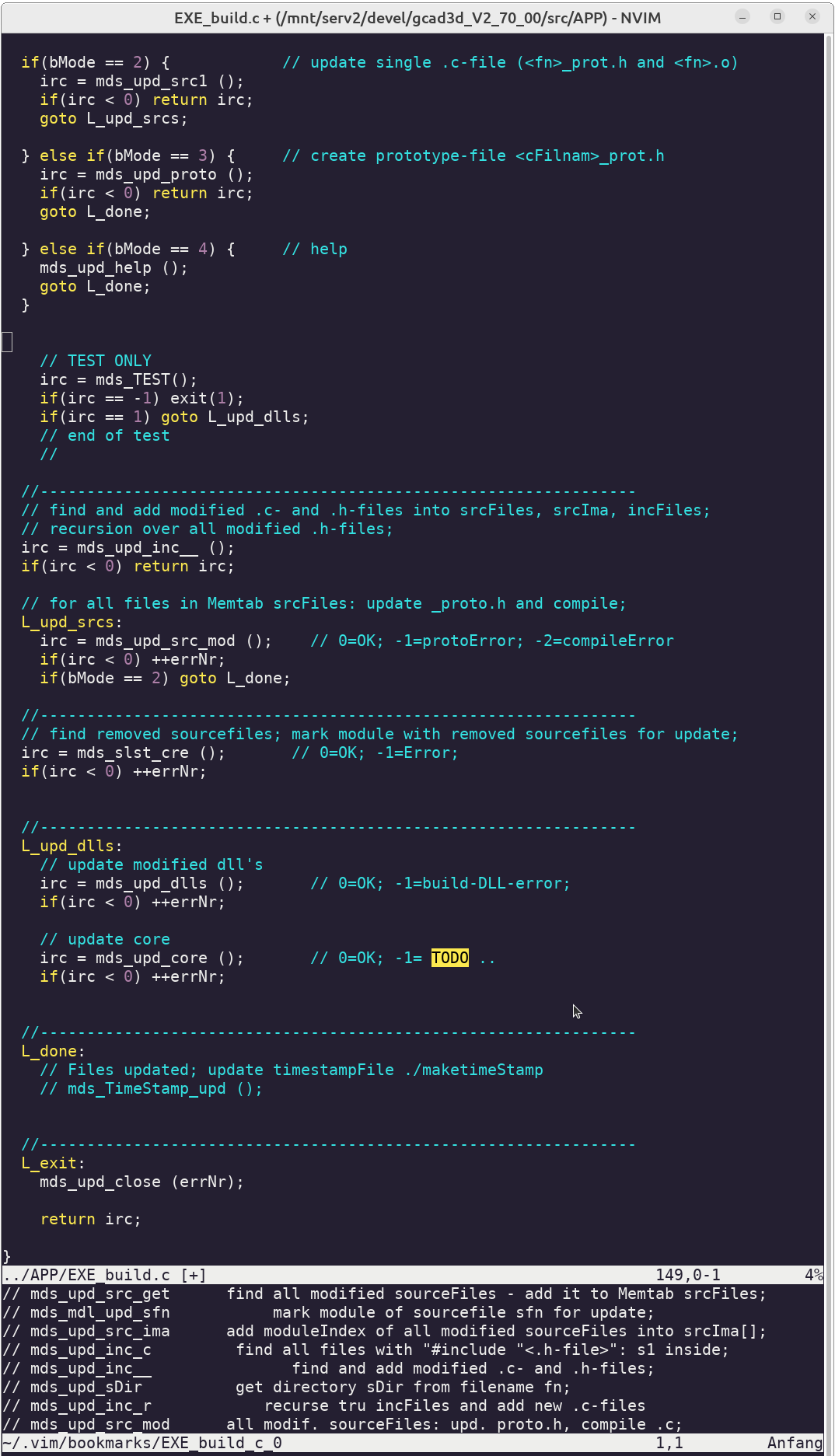
- provides a window with bookmarks for console-editor nvi (vi, vim)
- bookmarks have a smaller window under then main-window;
- can add, jump-to, remove bookmarks for the active sourcefiles
- bookmarks are a copy of the first 80 chars of the active line in vi;
- bookmarks are displayed using a split-buffer on bottom of window
- bookmarks are stored in files in directory ~/.vim/bookmarks/
- can display / hide bookmarks (display / remove bookmark-window)
- each sourcefile has its own bookmarkfile (in ~/.vim/bookmarks)
- can open same file many times
The 'jump-to-bookmark' is done by a 'find bookmark-text' (does not jump to a stored line-number). Advantage: finds bookmark also if line-number has changed (if lines have been inserted or deleted) Disadvantage: the bookmark-text must be long enough to be uniq.
Cursor is in source-buffer:
  add bookmark for active sourceline in source-buffer:
    key 'bb'    (2 times key 'b')

  remove bookmark for active sourceline in source-buffer:
    key 'bb'    (2 times key 'b')

  remove bookmark in bookmark-buffer :
    key 'bb'    (2 times key 'b')

  goto line of stored bookmark:
    select line in bookmark-buffer (below), key enter
    or double-click line in bookmark-buffer

  show or hide the bookmarks-section:
   key 'bv'   (key b then key v) in source-buffer or key q in bookmark-buffer

  set cursor into bookmark-section or back into source-buffer:
    key  Tab

  jump into line of bookmark-buffer:
    double-click onto line in bookmark-buffer
    - or goto bookmark-buffer and click line

  goto bookmark-buffer:
    click into bookmark-buffer or key Tab;

  edit bookmark-file:
    key 'be'   (keys b and e); edit, then save with ":w" and return with Ctrl-O


Cursor is in bookmark-buffer:
  jump to this line in source-buffer:
    press key Enter (CR) or double-click line;q

  delete line in bookmark-buffer:
    press Del-key;

  Problem: if characters in bookmark-buffer are selected:
    unselect with Esc Esc
# prepare the vim-directory (if not yet exists)
mkdir ~/.vim

# clone bookmarkVim into new directory ~/bookmarkVim/
cd
git clone https://github.com/gcad3d/bookmarkVim

# copy these files from ~/bookmarkVim into directory ~/.vim -
cd ~/bookmarkVim/
cp vi-bookmarks.vim vi-bookmarks.c README.md ~/.vim/.
# vi-bookmarks.vim ist the vi-scriptFile;

# vi-bookmarks.vim needs executable vi-bookmarks.c to add/delete in the bookmark-files
# compile the executable (creates file vi-marks64 or vi-marks32)
cd ~/.vim
cc -o vi-bookmarks`getconf LONG_BIT` vi-bookmarks.c

# now find the active vimrc - for nvi now ~/.config/nvim/init.vim
# - in vi do :scriptnames to find the vimrc
# if no local ~/.config/nvim/init.vim exists it will be created -
mkdir ~/.config/nvim/
# add the following line to init.vim (or add to your rc-file) -
# - to activate the bookmarks-buffer:
echo ":source ~/.vim/vi-bookmarks.vim" >> ~/.config/nvim/init.vim

# test it: (use vi (vi = neovim))
vi ~/.vim/*.c
# key b and then b - bookmark-buffer comes up and active line is displayed
# go down some lines, key again bb - this line is also displayed below
# double-click line in the bookmark-buffer to jump to bookmark
# select line 1 in bookmark-buffer below; key enter; first sourcelines comes up.
# or key tab = enter bookmarks, go down, jump with enter-key
# key b and v - bookmark-buffer is hidden.
# key bv - bookmark-buffer comes up.
# (keys bv or bb must be clicked quick)
# See Bookmark-files:
ls -l $HOME/.vim/bookmarks/

# to view this file correct use a markdown viewer.
not yet done ..
vi-bookmarks.vim              vim-script
vi-bookmarks.c                executable-source
README.md                     this file
Send bug-reports, suggestions for improvement to franz.reiter@gcad3d.org.
EOF