Folders and files
| Name | Name | Last commit date | ||
|---|---|---|---|---|
Repository files navigation
#+TITLE: anubad
#+DATE: Tuesday, Oct 27, 2017
#+OPTIONS: num:t
#+STARTUP: overview

Translation Glossary and More

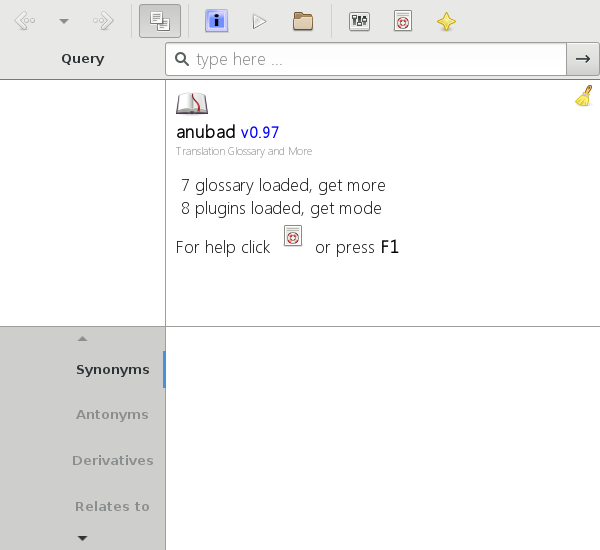
[[https://raw.githubusercontent.com/foss-np/anubad/dump/screenshots/00.png]]

The *anubad* is the /open sourced/ glossary browsing framework build
and designed not only for /translators/ and /localizers/ but also for
the common users.

Don't want to install? we have the [[https://github.com/foss-np/anubad-web][web-port]].

* Getting it
** Manual

   Make sure these requirements are fullfilled.

   | requirements          | linux          | ms-windows  |
   |-----------------------+----------------+-------------|
   | python                | python >= 3.00 | [[https://www.python.org/downloads/][python 3.xx]] |
   | gobject-introspection | python-gobject | pygi/base   |
   | GTK                   | Gtk+ >= 3      | pygi/       |

   Latest version can be downloaded as [[https://github.com/foss-np/anubad/archive/master.zip][zip]]
   or [[https://github.com/foss-np/anubad/archive/master.tar.gz][tar]] or cloned.

   *TL;DR* requirements check the =./demo.pyw=, only requires
   _python_.


** Symbolic Link

   Application can still be executable from anywhere. Add symbolic
   link to *executable-path* i.e. paths defined under shell
   variable =$PATH=.

   This can be helpful while running *bleeding edge* version directly from
   git repository or in development to avoid frequent installation.

*** To link
   #+begin_src bash
     $ cd anubad/src/
     $ sudo make link
   #+end_src

*** To unlink
   #+begin_src bash
     $ sudo make unlink
   #+end_src

* Glossaries

  *anubad* uses [[https://github.com/foss-np/np-l10n-glossary/][foss-np/np-l10n-glossary]] as the /default glossary/,
  which can be *downloaded* via application.

  Run below command to download it.

  #+begin_example
    $ cd anubad/src/
    $ ./utils.py
  #+end_example


* Usage
** Search Modes

   Search query beginning with '\\' will be unprocessed search

** Command-line

   #+begin_example
     anubad [OPTIONS] [COMMANDS]
   #+end_example

*** OPTIONS
    #+begin_example
      optional arguments:
        -h, --help    show this help message and exit
        --noplugins   Disable plugins loading
        --hide        Hide on startup
        --notray      Hide from notification tray
        --nohistfile  Disable history file
        --notaskbar   Hide from taskbar
        --nothread    Don't thread application
    #+end_example


*** EXAMPLES

    #+begin_example
      $ anubad search hello
    #+end_example

* Known Issues

  Sometime application tend to crash unexpectedly.

** Solution:
  Turn off the threading if it happens often (default: turned off).

  use =--nothread= argument to start `anubad` without threading

  Make changes in config file (=~/.config/anubad.ini=) to persist the
  change by adding =no-thread = True= in =[core]= section.

  #+begin_example
    [core]
    no-thread = True
  #+end_example

* Configuration

  Default Application configuration is stored in =default.ini=. To add
  you own configuration edit =~/.config/anubad.ini=.

* History

  *anubad* started as the graphical interface for browsing translation
  glossary.

** Similar Projects

   | Name             | Description                                      |
   |------------------+---------------------------------------------|
   | Artha            | A cross-platform thesaurus based on WordNet |
   | Stardict         | An International dictionary software        |
   | Gnome Dictionary | A default gnome application                 |

* Development & Contribution

  If you wish to contribute to this project, there are many things you can
  do beyond programming, to get started please read [[https://github.com/foss-np/anubad/wiki/CONTRIBUTING][this]]

  Any code Contributions to *anubad* should be made via /GitHub/ =pull
  request=.

-----

[[http://i.creativecommons.org/l/by/3.0/88x31.png]]

Copyright © 2013 - 2017 to the *anubad* Authors.