
Comment on your running app in the browser, and the coding agent in your terminal changes the code.
Click an element, say what should change, and send. The agent goes straight to the file and line that rendered it, edits the source, your dev server reloads, and the agent's reply appears next to your comment. Ask for alternatives and you can flip between them on the real page, tweak them, and pick one.
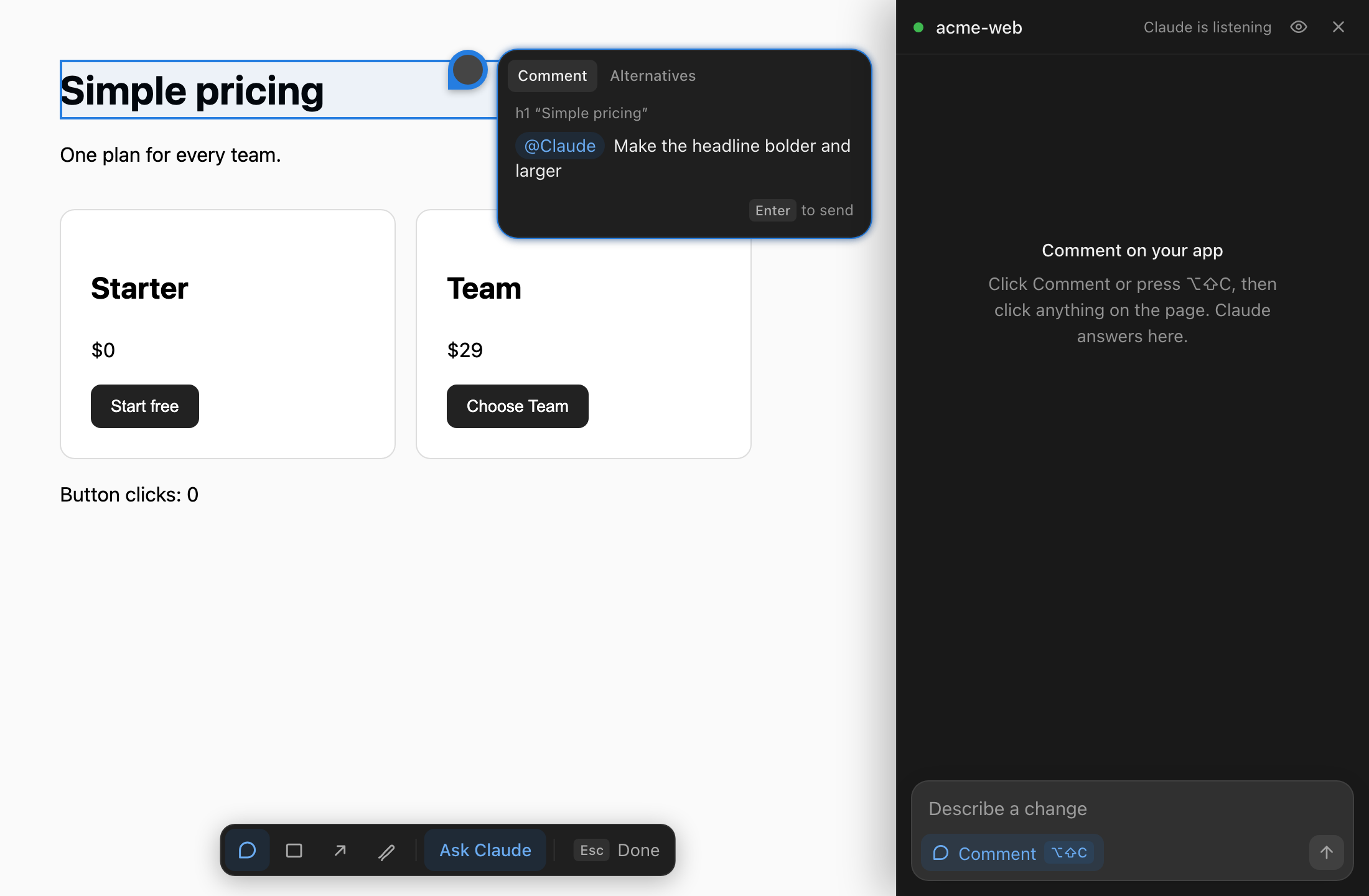
It works with React apps on a Vite dev server and with Astro sites, and with Claude Code or OpenCode as the agent (setup for the others).
-
Add the package to your app:
npm install --save-dev design-in-browser
-
Add the plugin to
vite.config.ts, first in the list:import designInBrowser from 'design-in-browser/vite' export default defineConfig({ plugins: [designInBrowser(), react()], })
It runs only in the dev server and adds nothing to your build.
On an Astro site, add the integration to
astro.config.mjsinstead:import designInBrowser from 'design-in-browser/astro' export default defineConfig({ integrations: [designInBrowser(), react()], })
-
Add the Claude Code plugin, once per machine:
claude plugin marketplace add formstep/design-in-browser
claude plugin install design-in-browser@design-in-browser
-
In a Claude Code session in your project, run:
/design-in-browser:liveClaude connects and says it is listening.
With OpenCode instead, run
opencode plugin add design-in-browser, then/design-in-browserin OpenCode. -
Start your dev server, open the app, and click the round button in the bottom-right corner (or press Alt+Shift+D) to open the dock. Drag the button elsewhere if it covers something; it keeps that spot. The dock opens beside your app and moves the page aside, so all of it stays in reach.
Click Comment in the dock (or press Alt+Shift+C), click anything on the page, type what should change, and press Enter. It goes to the agent right away, and a pin stays where you clicked.
The agent replies to each comment: done, a question, or skipped with a reason. Answer a question right under it, in the dock or in the pin, or dismiss it. Pins go away once a comment is done; the eye button in the dock's header (or Alt+Shift+H) hides the rest, and the switchers, while you look at the page. A card in the way can be dragged aside: the comment card by its surface, a pin's thread by its top edge or a name line. Double-click there to put a thread back.
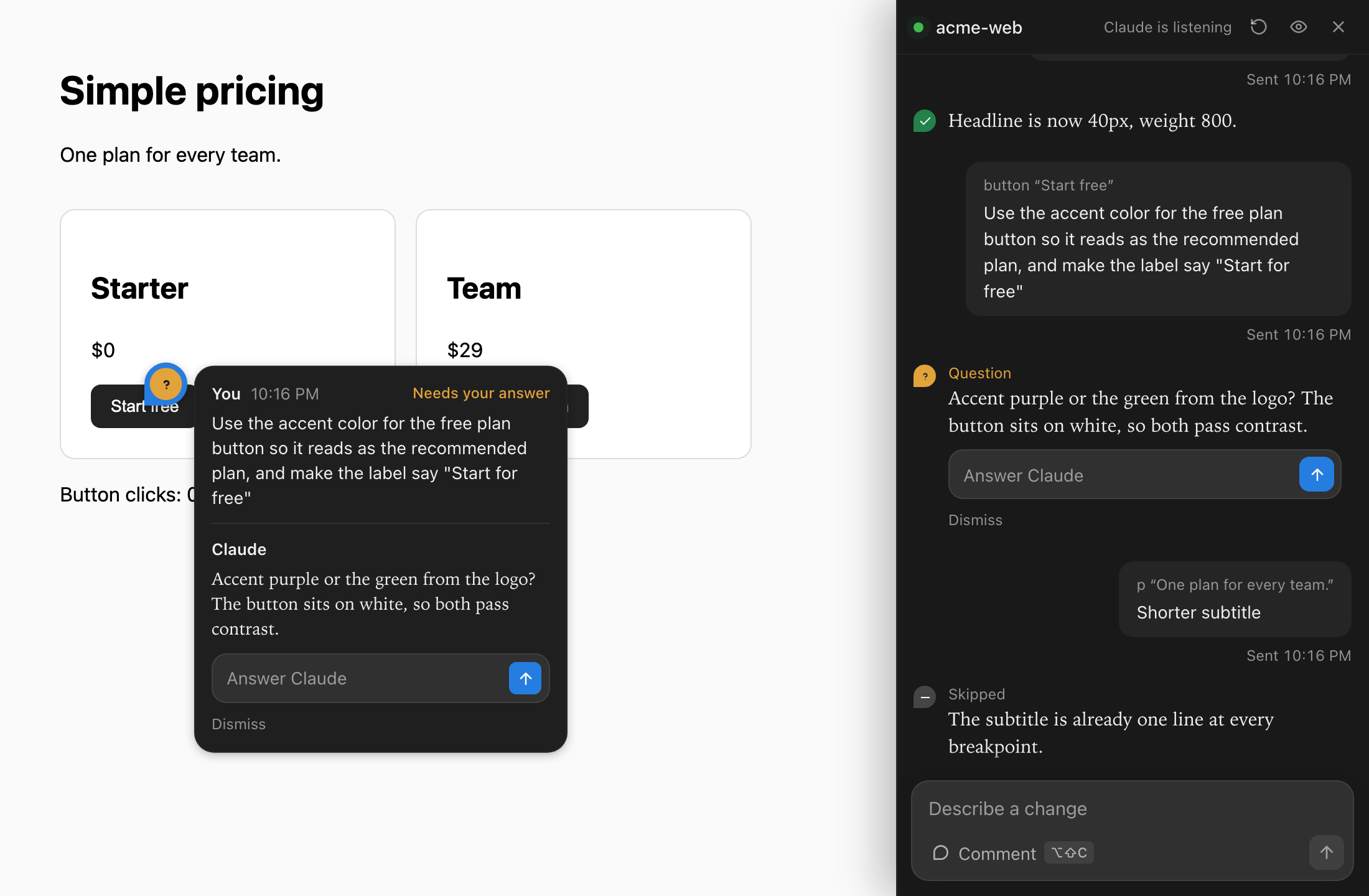
To send a note about the whole page, use Ask Claude in the toolbar or the dock's message field.
The agent can leave notes on the page too, such as where a change landed or a question about one element. They show as pins, and you answer a question right in its pin.
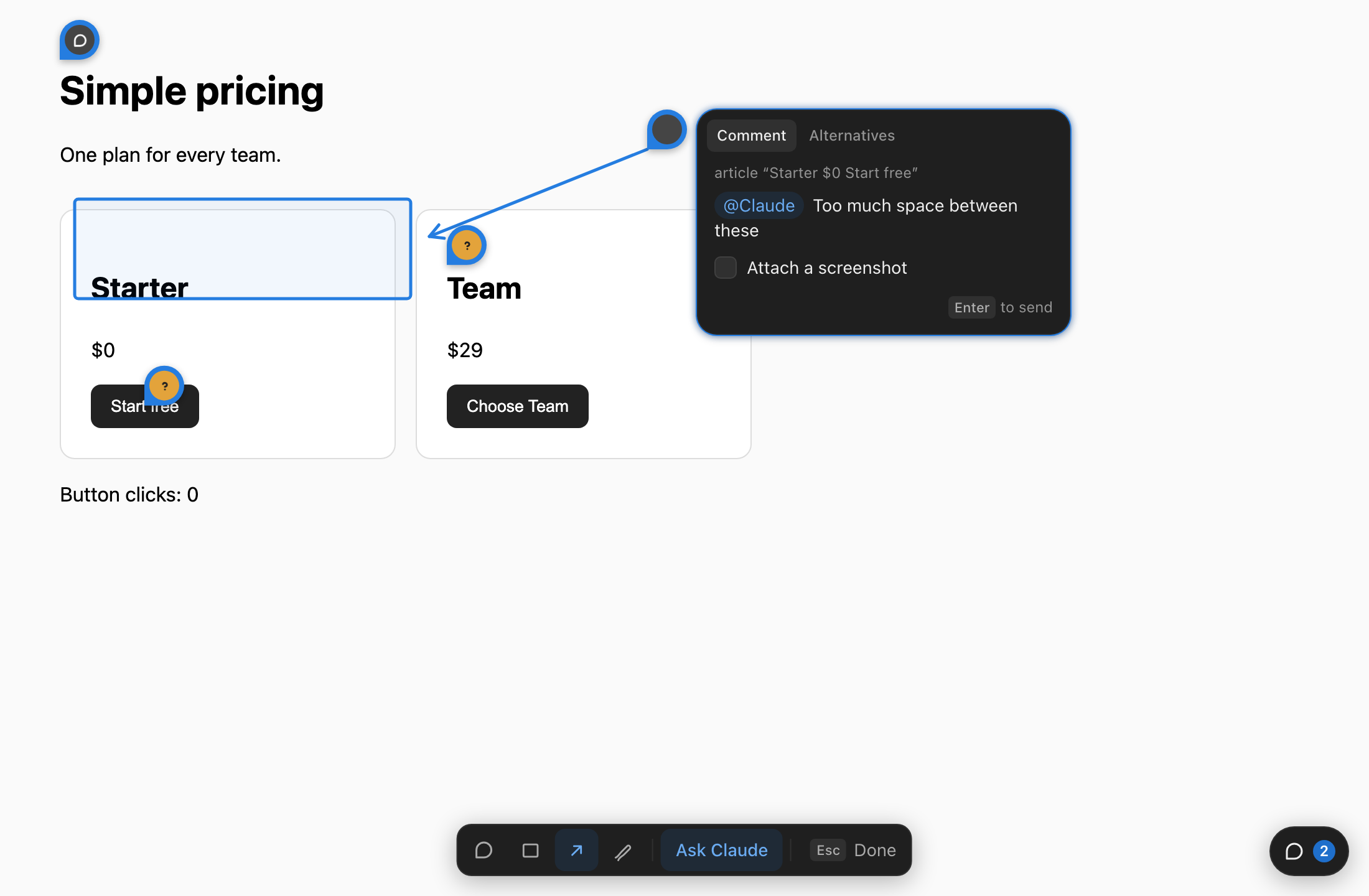
When words aren't enough, pick the box, arrow or pen in the toolbar and draw. The first mark opens a comment card beside it, and further marks join the same comment until you add it. Tick Attach a screenshot to send a picture of the marked area too, with your marks on it. The page draws it itself, so nothing asks for permission; if a page can't be drawn that way, the browser asks to share the tab instead.
Switch the comment card to Alternatives, choose how many (1 to 4), and send. The agent builds them in your code, and a switcher appears on that part of the page:
- With one alternative, it's a Before / After toggle.
- With more, you get Before plus arrows through the alternatives.
If the switcher covers something you want to see, drag it by its bar (outside the buttons) and it stays there, following that part of the page as you scroll; its tweaks card comes along. Double-click the bar to put it back.
Tweaks shows the knobs the agent added to an alternative, such as an optional badge, a padding slider or a choice of alignment. Changes show on the page as you make them.
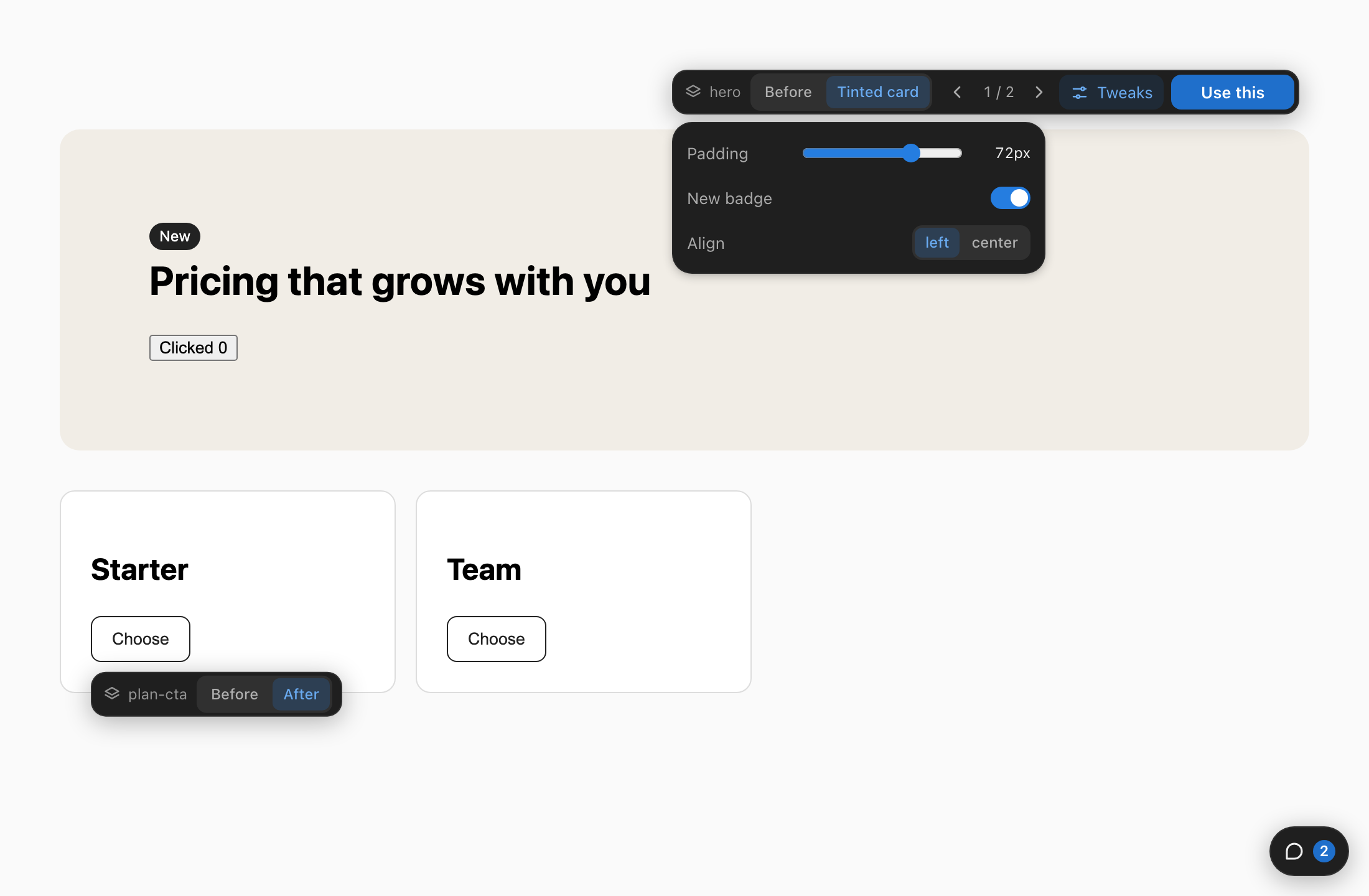
Use this sends your pick, with the tweak values, to the agent. It writes that version into the code and removes the others. Keep before keeps the original.
Alternatives use a <Variants> wrapper from design-in-browser/react while you decide. A production build fails if one is still in the code, so none ships by accident.
| Keys | Does |
|---|---|
| Alt+Shift+D | Open or close the dock |
| Alt+Shift+C | Start or stop picking elements |
| Alt+Shift+H | Hide or show everything on the page (pins, drawings, switchers), to see the page as it is |
| Enter | Add the comment (Shift+Enter for a new line) |
| Esc | Close the card, then stop picking |
The Vite plugin adds the overlay and the dock to your pages and keeps your choices. A small daemon on 127.0.0.1 passes sent comments to the agent session working on the same project, and wakes it. The agent reads them through an MCP server and replies the same way. Every batch is also saved in .design-in-browser/ in your project, which git ignores.
Your comments only travel on your machine. The plugin turns itself off when the dev server is reachable from the network (vite --host). docs/architecture.md has the details, including the security model and settings.
- React with Vite, and Astro. On an Astro site, only React islands carry their source location; for markup written in
.astrofiles, the agent finds the file by its text. Other frameworks aren't supported yet. - Claude Code and OpenCode get plugins; other agents need their MCP settings edited by hand (docs/agents.md).
- The dev server must run on localhost with hot reload on.
- The open dock moves the page aside, but the page's media queries still see the whole window, so it keeps its wide layout in the narrower space. Elements fixed to the window, such as dialogs and toasts, stay under the dock.
Everything on the first roadmap has shipped: source locations, drawing with screenshots, notes from the agent, and OpenCode. Ideas and requests are welcome as issues.
Issues and pull requests are welcome. CONTRIBUTING.md explains how to build, test and find your way around the code.