Google Photos and iOS are really good at looking at all your photos and highlighting the best ones. But there are lots of limitations, especially around how far back you can go. Nostalgix looks at all your photos and highlights the best ones based on technical, content, and emotional analysis. It screens out poor quality images, screenshots, slides etc.
I've written about the where/why of this system in more detail here: https://medium.com/@faizan_ali/replicating-google-photos-highlights-and-tv-ambient-mode-6eda5a8c2811
Building an LLM-powered system to curate photos and display them on my TV
Remember the days of analog cameras? The moment had to be pretty special to use up 1 of 30 pictures before you had to swap out the film. Pictures were curated by default! You'd have them processed and keep a stack of physical albums at home.
Just wanna see the implementation? Scroll to the "The Plan" section below!

Today, we can snap hundreds a day with our smartphones at a quality that would blow those old analogs outta the water. We can capture every moment, meaning camera rolls of thousands of pictures. The default state became uncurated.
Android was first to accept the challenge, with a combination of weekly/monthly/yearly photo highlights ("memories") that likely used internal machine learning models to grade images based on landmarks, relevance, and other technical factors. iOS followed a couple of years later. Curation! Even Microsoft's OneDrive is on the train now.
I particularly love that I can display photo highlights as a slideshow on my Chromecast (Android TV) when not in use. This is called Ambient mode. It's a merry time to walk past the TV, see an old memory pop up, pause, reminisce, and smile.
Ambient mode is incredible. It is very good at finding the best picture within a burst of pictures, screening bad/fuzzy/indecent photos, de-duplicating, and overall deciding that a photo is "good". But it has one big flaw: it only looks at photos over the past year.
That was painful. This meant that I would lose curation over any photos older than 365 days. Something had to be done. I decided to build a system to do this over my photos.
Can't have a plan without a goal. The goal? From thousands of photos, each highlight on the TV should make me stop and/or smile and/or reminisce. After some research, I settled on a system that would (this is roughly the actual flow):
-
Use a photo's EXIF metadata to:
a) Create a small overlay on the bottom showing location & month/year (to help trigger memories)
b) Further filter out images taken in bursts -
Use fun resolution heuristics to filter out screenshots (Screener Jr)
-
Use Vision LLM models to screen images (Screener)
This removes blurred images, blanks (pocket pictures?), indecent, receipts, presentation slides, screenshots, QR codes, etc. (See prompt below.) -
Leverage LLMs to score images on technical characteristics, actual content of the photo, and the emotional value of the moment (Grader)
Really powerful prompts that I sum up for a final score. This also lets me give group shots and selfies with friends higher scores. -
Leverage cosine similarity in image embeddings and location data with scores to de-duplicate (Deduper)
Helps pick the best images from a burst of images—as we all do. -
Use time + location data to detect "events" and select the best ones based on scores (Representor)
Helps pick the best representatives of an event to really showcase 1–3 highlights of each event (there are hundreds of "events" a year).
The system would run for all the images per day going back 7 years and for all future days. For every 100 images, it picks ~12–14 memorable ones.
This is all open-source! The repo is currently built as a script for my personal use but if you open a GitHub issue with a request, I will abstract it into a more usable system 🙂
GitHub Repo
Tech stack:
- Node.js & TypeScript (with help from Claude, Cursor, GPT o1)
- Dropbox SDK (to fetch and store images)
My phone uploads all photos to Dropbox which is API-accessible and gives me EXIF data (Google Photos does not give EXIF over API). - sharp to create date/location overlay
- p-queue to handle the various rate limits across downstream services
- Google's Geocode service to convert lat/long coordinates into addresses
- AWS S3 to store downloaded images (used only for debugging)
- GPT-4 for image analysis (mini might've been enough)
- JINA to create image embeddings using clip-v2
- biome for linting
- drizzle as the ORM
- Postgres on Neon Serverless (with pgvector)
Three main prompts here for technical, content, and emotional analysis. They work really well. I take the resulting scores and come up with a total using different weights.
First, assess the technical quality of the image:
Is the image unintentionally blurry, poorly exposed, or technically flawed?
If YES, no category can score above 6.5.

Then analyze the content and provide scores (0-10) for:
    1. Subject Clarity
        For photos with people:
            - Give 9-10: Perfect in every way - focus, lighting, faces crystal clear, it could be framed
            - Give 7-8: Sharp, well-executed shot with clear faces
            - Give 4-6: Main subjects visible but some clarity issues
            - Give 0-3: Major clarity issues or subjects hard to distinguish
            Note: Penalize zoomed-in portraits that lack detail
            Note: Do not penalize intentional background blur (bokeh) that draws attention to subject

        For landscapes, objects, or other subjects:
            - Give 9-10: Perfect technical execution AND compelling subject
            - Give 7-8: Good execution with clear, interesting subject
            - Give 4-6: Subject visible but technical or interest issues
            - Give 0-3: Poor execution or unclear subject
            Note: Technical problems MUST lower the score even if subject is interesting but intentional blur should not

    2. Composition
        For selfies with more than one person/group photos:
            - Give 9-10: Perfect framing, everyone clearly visible, more than one person
            - Give 7-8: Good framing, most faces clearly visible
            - Give 4-6: Some framing issues or obscured faces
            - Give 0-3: Poor framing, many obscured faces
            Note: Add +1.5 points for a selfie with two people
            Note: Penalize selfies with just one person

        For other people photos:
            - Give 9-10: Perfect framing, excellent subject placement
            - Give 7-8: Good framing, subjects well-placed
            - Give 4-6: Basic composition, some framing issues
            - Give 0-3: Poor framing or subject placement

        For landscapes/objects:
            - Give 9-10: Perfect composition AND technical execution
            - Give 7-8: Good composition, effective use of focus/blur if present
            - Give 4-6: Basic/flawed composition OR technical issues
            - Give 0-3: Poor composition AND technical issues
            Note: Score must reflect BOTH artistic merit AND technical quality

    3. Moment/Subject Interest
        For people photos:
            - Give 9-10: Significant moments (celebrations, interactions)
            - Give 7-8: Engaging expressions or interactions
            - Give 5-6: Standard poses or casual moments
            - Give 0-4: Random public band performances, casual/unremarkable moments
            Note: Generic performances or public entertainment should score low unless capturing something uniquely special

        For other subjects:
            - Give 9-10: Exceptional subject AND perfectly captured
            - Give 7-8: Interesting subject, well captured
            - Give 4-6: Either standard subject OR poorly captured
            - Give 0-4: Standard subject AND poorly captured
            Note: Even special moments (weddings, etc) must be well-captured to score high

    4. Scene Quality
        - Give 9-10: Perfect lighting AND excellent environment/background
        - Give 7-8: Good lighting AND good environment
        - Give 5-6: Issues with either lighting OR environment
        - Give 0-4: Issues with both lighting AND environment

IMPORTANT: Technical quality MUST be considered in ALL scores.
A technically poor photo of an interesting subject should NOT receive high scores.
Dark, blurry, or poorly exposed images should be scored low regardless of content.
Be more forgiving of images capturing a special moment, like blowing out birthday candles.
Analyze this image's technical qualities and score (0-10) each:

1. Image Clarity
    - Give 9-10: Main subject is tack sharp, intentional blur (if any) enhances composition
    - Give 7-8: Main subject nearly perfect focus with minimal softness
    - Give 4-6: Noticeable unintentional softness/blur on main subject
    - Give 0-3: Significant unintended blur, camera shake, or noise
    Note: Be very strict with clarity scores. Any unintentional blur should score 6 or below. Artistic background blur (bokeh) should not reduce score if subject is sharp

2. Exposure & Lighting
    - Give 9-10: Perfect exposure, full detail in shadows and highlights
    - Give 7-8: Good exposure with minor issues
    - Give 4-6: Under/overexposed but subject visible
    - Give 0-3: Severe exposure problems
    Consider: Dynamic range, highlight clipping, shadow detail

3. Technical Composition
    - Give 9-10: Perfect use of compositional techniques:
        * Rule of thirds
        * Leading lines
        * Balance/symmetry
        * Proper headroom/lookroom
        * Clean edges/corners
        * Bokeh used effectively
    - Give 7-8: Good composition with minor issues
    - Give 4-6: Basic composition, missing key elements
    - Give 0-3: Poor composition, multiple issues

4. Color Quality
    - Give 9-10: Excellent color accuracy, balance, and harmony
    - Give 7-8: Good color with minor issues
    - Give 4-6: Noticeable color issues but acceptable
    - Give 0-3: Major color problems
    Consider: White balance, saturation, color cast

IMPORTANT: Any unintended blur, even if slight, must score 6 or lower in clarity. This does not apply to artistic blur (bokeh).
A score of 7 or above in clarity means the image must be perfectly sharp or have intended bokeh.
Analyze this image's emotional impact and provide scores (0-10) for:

1. Emotional Atmosphere
    For people photos:
        - Give 9-10: Powerful emotions, expressions, or interactions
        - Give 7-8: Clear positive/engaging emotions
        - Give 5-6: Basic emotional content
        - Give 0-4: Limited emotional impact
        Note: Add +1 point if capturing genuinely funny/humorous moments while maintaining visual clarity

    For landscapes/objects:
        - Give 9-10: Powerful mood or atmosphere AND clear visual focus
        - Give 7-8: Clear emotional atmosphere with strong subject presence
        - Give 5-6: Pleasant but standard atmosphere
        - Give 0-4: Limited atmospheric impact or unclear subject focus

2. Connection/Resonance
    For people photos:
        - Give 9-10: Deep human connection or interaction AND technical excellence
        - Give 7-8: Clear engagement between subjects with good clarity
        - Give 5-6: Basic interaction or poses
        - Give 0-4: Limited connection or poor visual quality

    For landscapes/objects:
        - Give 9-10: Strong viewer connection AND clear subject focus
        - Give 7-8: Clear appeal with good technical execution
        - Give 5-6: Standard viewer engagement
        - Give 0-4: Limited engagement or poor clarity

3. Impact & Memorability
    - Give 9-10: Exceptional moments WITH technical excellence
    - Give 7-8: Strong emotional connection and good clarity
    - Give 5-6: Pleasant but ordinary moments
    - Give 0-4: Generic scenes or poor technical quality
    Note: Even humorous moments must maintain visual clarity to score high

4. Visual Poetry
    - Give 9-10: Perfect capture of a mood AND technical excellence
    - Give 7-8: Strong artistic elements with good clarity
    - Give 5-6: Basic aesthetic appeal
    - Give 0-4: Limited artistic impact or poor technical quality
Analyze this image for both content and quality.

Check for:
1. Indecency (reject if present)
2. Focus/blur issues
3. Blank or near-blank images
4. Darkness/exposure problems
5. Resolution (reject if low)
6. Orientation problems
7. Receipts
8. Presentation slides
9. Screenshot (including Instagram screenshots)
10. QR Code

Only reject for:
- Clear technical problems (not artistic choices)
You can figure out whether a picture is a screenshot to 60–70% certainty deterministically (no ML) with zero false positives.
// Tags is a key value object of EXIF tags to values
const isLikelyScreenshot = (tags: Tags): boolean => {
  let isMissingCamera = false
  let isScreenshotColorType = false
  let isUnusualResolution = false

  // Check for missing camera-specific metadata
  const cameraMetadata = ['Make', 'Model', 'ExposureTime', 'ISOSpeedRatings', 'GPSLatitude', 'GPSLongitude']
  const missingMetadata = cameraMetadata.filter(key => !tags[key])

  if (missingMetadata.length === cameraMetadata.length) {
    isMissingCamera = true
    console.log('Exif likely screenshot: Missing camera-specific metadata (make, model, exposure settings, GPS)')
  }

  // Check for standard screenshot color characteristics
  if (tags['Color Type']?.description?.includes('RGB with Alpha')) {
    isScreenshotColorType = true
    console.log('Exif likely screenshot: Uses RGB with Alpha color space, typical for screenshots')
  }

  // Check for standard photo resolutions
  // Common photo resolutions often come in standard sizes or ratios
  const width = Number(tags['Image Width']?.value || 0)
  const height = Number(tags['Image Height']?.value || 0)

  if (!width || !height) isUnusualResolution = true
  else {
    // Common aspect ratios for smartphone cameras (with some tolerance)
    const aspectRatio = width / height
    const commonAspectRatios = [
      4 / 3, // Standard camera aspect
      16 / 9, // Widescreen
      3 / 2, // Classic DSLR
      1      // Square
    ]

    // Common megapixel ranges for modern smartphone cameras
    const megapixels = (width * height) / 1000000
    const isCommonMegapixels = megapixels >= 8 && megapixels <= 108 // Range from basic smartphones to high-end

    // Check if the aspect ratio matches common photo ratios (with 5% tolerance)
    const hasStandardAspectRatio = commonAspectRatios.some(ratio => {
      const tolerance = 0.05
      return Math.abs(aspectRatio - ratio) <= tolerance
    })

    // Resolution patterns that suggest screenshots
    isUnusualResolution =
      // Odd specific numbers (like 639x495) often indicate screenshots
      (width % 100 !== 0 && height % 100 !== 0) ||
      // Very low resolution for modern devices
      megapixels < 2 ||
      // Uncommon aspect ratio and non-standard megapixels
      (!hasStandardAspectRatio && !isCommonMegapixels)
  }

  if (isUnusualResolution) {
    console.log(`Exif likely screenshot: Non-standard photo resolution: ${width}x${height}`)
  }

  return isMissingCamera && isScreenshotColorType && isUnusualResolution
}It's working pretty well, and now my TV has memories from many years!
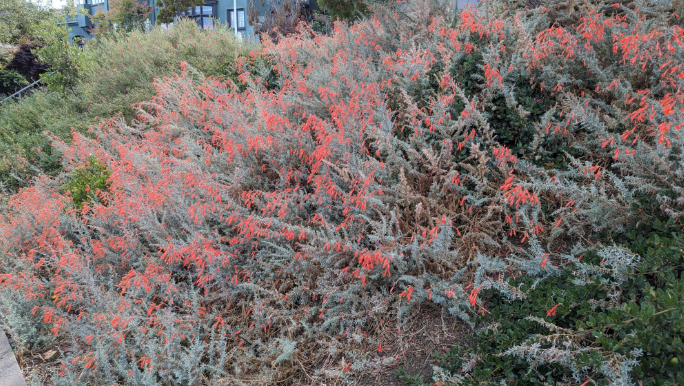
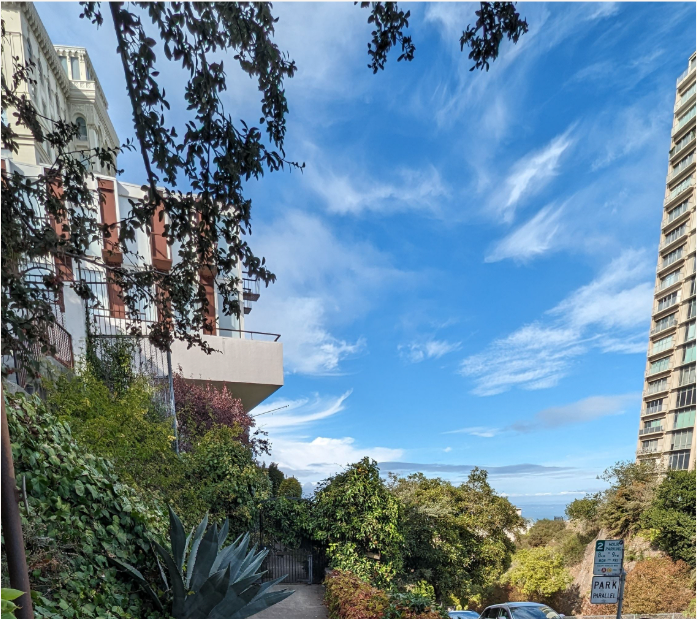
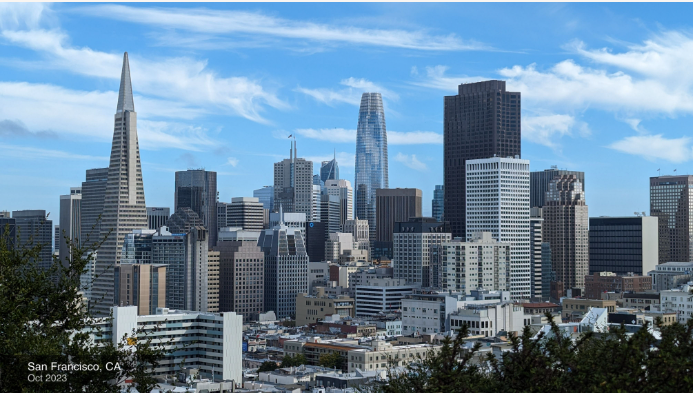
Here's an example: I took some pictures on a walk and it picked what it decided was the best one—I picked landscapes because it's probably not a good idea to put my friends up here without them knowing 🙂
The Candidates
Notice these last two are slightly different—one has better framing.




The Winner (with overlay):
The Pick
- Automated Photo Processing
- Processes photos from Dropbox Camera Uploads folder
- Extracts EXIF metadata (location, device info, timestamps)
- Screens out screenshots and low-quality images
- Handles batch processing with configurable concurrency
- Automatic screenshot detection using EXIF analysis
- Quality Assessment
- Technical quality scoring
- Content analysis
- Emotional impact evaluation
- Custom scoring weights for selfies vs. regular photos
- Vision AI-powered image understanding
-
Duplicate Detection
- Cosine similarity comparison of image embeddings
- Time-based grouping (10-minute windows)
- Adjustable similarity thresholds (0.885 default)
- Special handling for near-simultaneous photos (12-second window)
-
Event Grouping
- Time-based event detection (30-minute windows)
- Location-based grouping using neighborhood data
- Automatic representative photo selection
- Smart event photo reduction (keeps top 50% of photos)
-
Location Services
- Reverse geocoding with rich location data
- Neighborhood, city, state detection
- Rate-limited API handling
- Coordinate validation and error handling
-
Multi-Cloud Integration
- Dropbox for source photos and highlights
- AWS S3 for processed image storage
- Jina AI for image embeddings (1024-dimensional vectors)
- PostgreSQL with pgvector for similarity search
-
Image Processing
- Location and date overlay generation
- EXIF data preservation
- Smart orientation handling
- Custom font rendering with drop shadows
- Node.js 16+
- PostgreSQL with pgvector extension
- API Keys for:
- Dropbox
- Google Maps (for geocoding)
- OpenAI (GPT-4 Vision)
- AWS S3
- Jina AI (for embeddings)
The system uses PostgreSQL
Images are scored based on three main criteria:
- Technical Quality (35% weight, 15% for selfies)
- Content Interest (30% weight)
- Emotional Impact (35% weight, 55% for selfies)
Minimum highlight score: 6.91
typescript // Process a date range await main('2024-01-01', '2024-01-31')
-
Image Discovery & Download
- Scans Dropbox Camera Uploads folder
- Downloads in batches with rate limiting
- Extracts EXIF metadata
-
Initial Screening
- Screenshot detection
- Technical quality assessment
- Content appropriateness check
-
Deep Analysis
- Technical quality scoring
- Content interest evaluation
- Emotional impact assessment
- Embedding generation
-
Organization
- Duplicate detection using embeddings
- Event grouping by time and location
- Representative photo selection
-
Export
- High-quality photo selection (score >= 6.91)
- Location/date overlay generation
- Upload to Dropbox Highlights folder
SIMILARITY_THRESHOLD: 0.885CLOSE_TIME_THRESHOLD: 0.85TIME_WINDOW_MS: 10 minutesCLOSE_TIME_WINDOW_MS: 12 seconds
MAX_EVENT_INTERVAL_MS: 30 minutes- Event size reduction: 50% of photos kept
- Google Geocoding: 50 queries per second
- Dropbox API: Automatic retry with exponential backoff
- Image Processing: Configurable batch sizes and delays
Contributions are welcome! Please feel free to submit a Pull Request.
This project is licensed under the MIT License - see the LICENSE file for details.