Repository navigation
Home
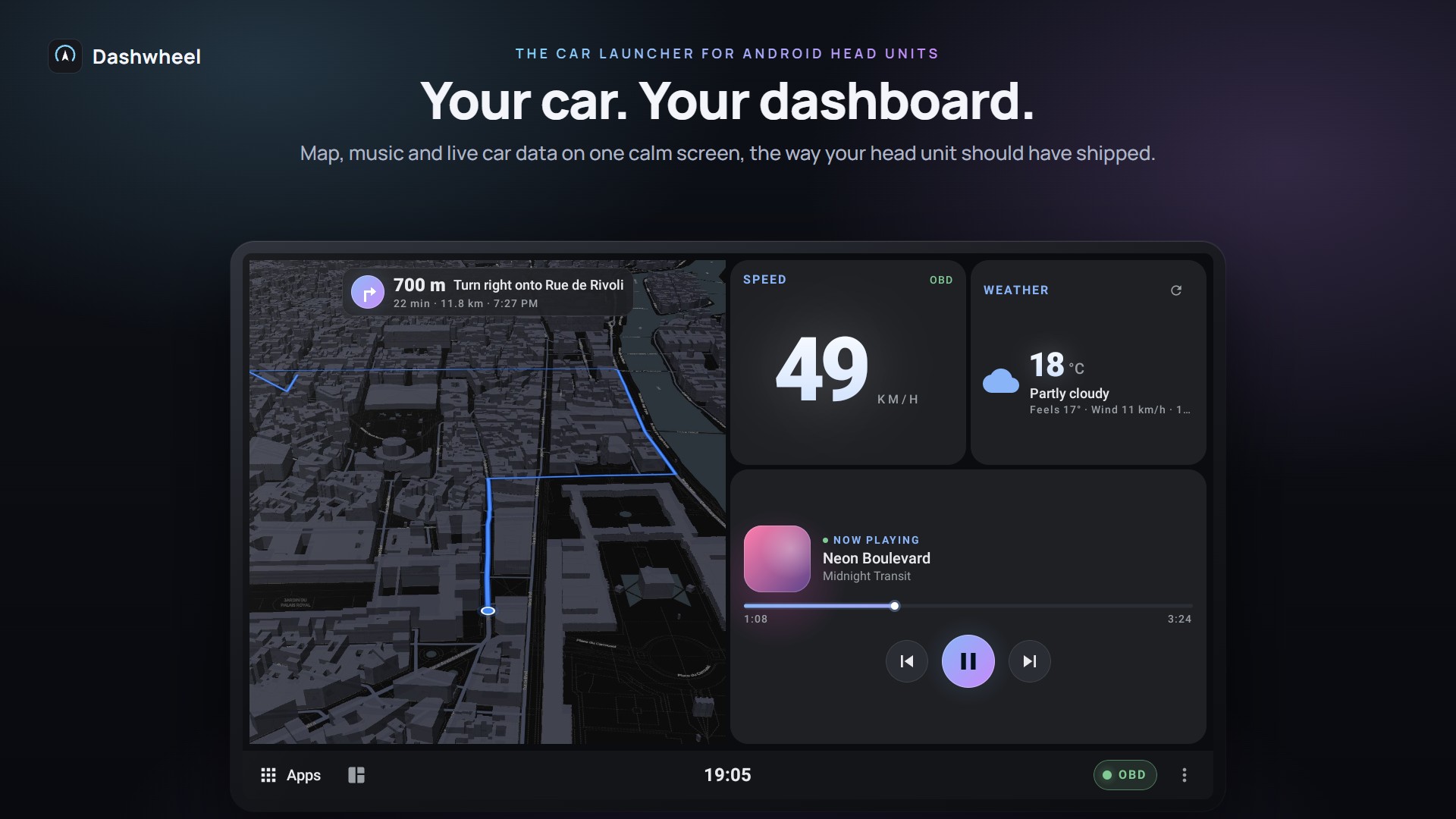
Dashwheel is a car launcher for Android head units: map, music and live car data on one calm screen. It is free to use, with no ads and no account, built with Jetpack Compose, and made first for 1280×720 head units (ROCO K706 / QF / FYT units, Android 9+). It also runs on upright screens and phones.
Download the latest release: Dashwheel-<version>.apk for the head unit, dashwheel-companion.apk for the phone. A Google Play edition without the root features is on its way: see Installation and Updates.
| Installation and Updates | Installing the APKs, first-run setup, the tour of the basics, beta and stable updates, crash and compatibility reports |
| Second Screen (Raspberry Pi) ‐ experimental | A Raspberry Pi drives a second monitor in the car: a cluster or an app streamed from the head unit |
| Root and PMPatch3 | What works with and without root, with or without PMPatch3 |
| How to Root Your Head Unit | Simple steps to put Magisk on a head unit |
| Supported Head Units | Will it work on my unit? QF, FYT, Microntek, HCN (Junsun), Topway, Reglink, Allwinner, Nowadays: what Dashwheel uses on each |
| Tested Hardware | Head units, car, adapters, phones and Pi parts actually tried |
| Troubleshooting | When something doesn't show up |
The dashboard
- Dashboards and Tiles: three dashboards to start, up to seven, all at once in the overview, free 36×21 grid, tiles over the map or other tiles, tile panel, templates you try on your own screen, a dashboard the AI lays out from your words, Moments (Home follows the drive), side rail and tabs, upright screens
- Widgets and Designs: 55+ widgets (the Now tile, quick switches you pick, Car problems on your car's picture, drive history...), 60+ designs
- Themes and Skins: 14+ themes, whole-design skins (Panorama, after the C4 Picasso's cabin) plus twelve new looks from Liquid to Paper, each arranging Home its own way, one font for the whole launcher, day and night by the car, the sun or set times
- Apps on the Dashboard: apps in a window, inside a tile, or side by side; root and PMPatch3
The car
- Car Data (OBD and CANbox): ELM327 OBD over Bluetooth, a USB cable or the phone, Deep OBD, your own readings, tyres from a USB TPMS receiver, the head unit's own car data, the trip computer and every warning of a Peugeot, Citroën or DS
- AI Mechanic and Gemini: fault codes explained, sensor watch (a word before a fault code shows up), start-up briefing, Gemini Live, the assistant that knows the car
- Car Care and Servicing: car profile, registration scan, particle filter, warm-up, battery, servicing planner, LPG tank, fuel prices
- Reverse View: Dashwheel's own reversing screen with steering lines and parking radar
- My Car Picture: your own car (photo or 3D) in the tiles and alerts, live in 3D on the Car problems card
On the road
- Navigation and Directions: the built-in map, Google Maps / Waze next turn, Maps inside a tile
- Hands-Free and Steering Wheel: spoken alerts with one switch each, steering-wheel button map with a second mode and a screen focus, volume that follows speed, Dashwheel's own volume bar, Tasker and other automation apps
- Alerts and ROM Pop-ups: your own call, door, radar, tyre and climate alerts instead of the unit's pop-ups
Phone and screens
- Phone Link and Companion: notifications, messages, calls, the phone's GPS for the car, where's my car, drive log, typing from the phone, shared dashboards, a Rescue card, a touchpad (the phone moves a pointer on the car screen), Road watch (the phone's camera watches the road and reads speed-limit signs, experimental)
- Second Screen (Raspberry Pi) ‐ experimental: a second, non-touch monitor driven by a Raspberry Pi
More
- Boot Logo (K706 only), Demo Mode, Languages and Units (twelve languages, Russian, Hungarian, Lithuanian and Turkish included)
- Building from Source: toolchain, CI, release signing
Dashwheel moves fast and is tested on one real car (a 2011 Citroën C4 Picasso with a ROCO K706 unit). Pages use these labels:
- Stable: in daily use on the car.
- Car-tested: tried in the car, may still have rough edges.
- Emulator only: works on the emulator, not yet confirmed in a car.
- Experimental: off by default or clearly marked in the app; expect changes.
Dashwheel is free, has no ads and collects no data, and it always will. It's made by one person in their spare time, tested on a real car, with every new feature checked from the driver's seat.
If it makes your drives nicer, a coffee on Ko-fi keeps it going: it pays for test hardware (like the Raspberry Pi and screen behind the second screen) and the hours spent on new features and fixes.

Questions, news and other drivers: the Dashwheel Telegram group.
Can't donate? A ⭐ on the repository, a bug report or a photo of Dashwheel in your car helps just as much.
Getting started
- Installation and Updates
- Root and PMPatch3
- How to Root Your Head Unit
- Supported Head Units
- Tested Hardware
- Troubleshooting
Dashboard
Car
Road
Phone and screens
More