

Live Application: https://story-timeline-builder-237864658489.herokuapp.com/
Repository: https://github.com/denmurray10/Story-timeline-builder
Story Timeline Builder is a comprehensive, AI-augmented full-stack Django application engineered specifically for fiction authors. Designed to eliminate the cognitive overload of managing complex multi-book series, it serves as a dynamic digital story bible—tracking timelines, character psychology, world-building, and continuity across thousands of pages.
- The Vision & Problem Statement
- Core Features & Capabilities
- User Experience (UX) Design
- Technical Architecture & Data Model
- AI Integration & Engineering
- Security & Authentication
- Agile Development & Project Management
- Testing & Deployment
- Local Installation
- Developer Reflection
- Future Roadmap
- Credits
Authors writing long-running series face a monumental challenge in maintaining narrative momentum. Managing complex character arcs, evolving relationships, and chronological events across multiple volumes frequently results in:
- Continuity Errors: Losing track of overlapping timelines or accidentally breaking established world-building rules.
- Cognitive Overload: Spending more energy managing scattered physical notes, spreadsheets, and disconnected documents than actually drafting the manuscript.
- Lost Nuance: Forgetting the subtle psychological shifts, friendships, and judgments a character has made three books prior.
Built from my own experience managing a 5-book crime thriller series, Story Timeline Builder replaces static spreadsheets with a relational, visually intuitive database. It allows writers to map chronological events against narrative sequence, dynamically track character bonds, and leverage a custom-trained AI continuity editor (Penn) that knows your universe as intimately as you do.
Unlike generic chatbots, the built-in Penn AI is strictly prompt-engineered to serve as your dedicated editorial assistant:
- Deep Manuscript Analysis: Upload your manuscript and Penn will analyze it for continuity errors across multiple books, ensuring your timeline remains flawless.
- Psychological Tracking: Penn tracks your characters' emotions, friendships, underlying judgments, and past actions, building a complete psychological profile over time.
- Style-Matched Drafting: Hitting writer's block? Penn can brainstorm plot progressions or even finish a chapter by mimicking your exact authorial voice, drawing on the deep history of your series.
A standout feature built to solve a personal pain point. As casts grow, tracking who knows whom becomes chaotic.
- Visual Nodes: Physically see connection lines and relationship types (e.g., rival, ally, sibling) between your characters.
- Focus Filtering: Massive relationship webs can cause visual clutter. Users can dynamically filter connections down to just one or two specific bonds, allowing for hyper-focused character development.
- The Dashboard: A widget-based central hub featuring "Today's Focus" tasks, series stats, and character spotlights.
- Architect View: Toggle between high-level series planning and hyper-focused scene drafting.
- Interactive Timeline: A horizontally scrolling timeline to plot chronological events, featuring robust filtering by character, location, or custom tags.
- Rich Character Profiles: Track a character's role, arc status, core personality, and deep backstory.
- Codex: A dedicated, searchable repository for locations, lore, organisations, and history.
To ensure the application remains lightning-fast—even as authors upload hundreds of high-resolution book covers and character portraits—a custom Django image compressor intercepts all media uploads. Images are automatically compressed and optimized on the fly before being routed to Cloudinary for cloud storage.
- Light-Mode First: The UI utilizes warm parchment tones (
#f4f1ee) and soft pastels to mimic a physical notebook, drastically reducing eye strain during long writing sessions. - Progressive Disclosure: Complex tools are hidden until needed, preventing interface bloat.
- Consistent Action Patterns: Indigo (
#6366f1) is strictly reserved for primary interactive elements to create an intuitive, predictable navigation experience.
Wireframes were developed to map layout hierarchy and test user flow before implementation. (Note: Replace with actual URLs to your images)


Tech Stack: Django 4.2, Python 3.12, Neon PostgreSQL, Tailwind CSS, Vanilla JS.
The database utilizes a robust relational schema designed to handle the complex, overlapping data structures inherent to book series. Every piece of story data is strictly tethered to the User model, ensuring absolute privacy of an author's intellectual property.
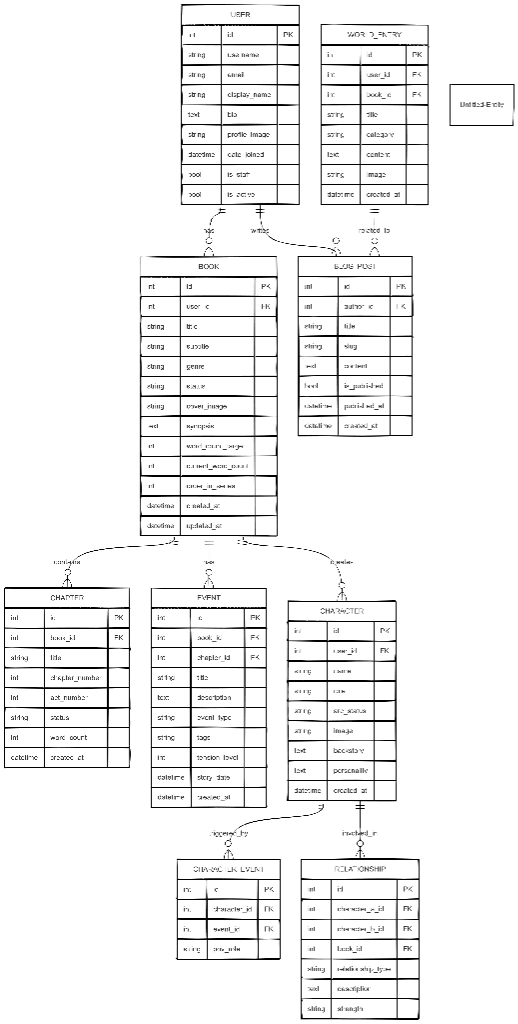
erDiagram USER ||--o{ BOOK : "owns" BOOK ||--o{ CHAPTER : "contains" BOOK ||--o{ EVENT : "has" CHAPTER ||--o{ EVENT : "contains" USER ||--o{ CHARACTER : "creates" CHARACTER ||--o{ CHARACTER_EVENT : "appears in" EVENT ||--o{ CHARACTER_EVENT : "features" CHARACTER ||--o{ RELATIONSHIP : "character_a" CHARACTER ||--o{ RELATIONSHIP : "character_b" BOOK ||--o{ RELATIONSHIP : "scoped to" USER ||--o{ WORLD_ENTRY : "creates"
- AI Integration & Engineering AI was leveraged not just as an app feature, but as a core component of the development lifecycle:
As Development Assistants: Google Gemini: Acted as a senior coding assistant. I used Gemini to architect complex solutions, plan feature logic before writing code, and carefully engineer the system prompts for the app's internal AI.
GitHub Copilot: Utilized extensively for inline code suggestions, syntax auto-completion, and rapid bug debugging during active development.
Perplexity AI: Served as a research tool for optimizing complex Django ORM queries.
In-App Engineering (Penn AI): Bounded Context: I integrated the DeepSeek API to power the Penn assistant. Using Gemini to help write the system instructions, I engineered DeepSeek to operate within strict boundaries: it is instructed to respond solely to questions relating to the application's features and the specific manuscripts/books the user has uploaded. It will not act as a general chatbot, ensuring it remains a highly specialized writing tool.
- Security & Authentication Data Isolation: @login_required decorators and rigorous backend ownership checks ensure users can only ever access or mutate their own relational story data.
Staff Access: Superusers have access to a custom-built Staff Dashboard featuring live analytics, AI usage metrics, and a support ticket resolution system.
Authentication Pivot: Standard email/password authentication is fully secured via django-allauth. I initially attempted to configure Google OAuth for social logins; however, due to complexities with the external API configuration, I made the executive decision to table the feature. This allowed me to protect the project timeline and prioritize the core MVP features that authors actually need.
- Agile Development & Project Management This project was executed using an Agile methodology, tracking Epics and Sprints via a Kanban board.
Kanban board link: GitHub Projects Board
- Testing & Deployment Deployment Architecture The application is deployed to Heroku, utilizing Neon for managed PostgreSQL hosting, Cloudinary for scalable media storage, and WhiteNoise for highly efficient static file serving.
Deployment Architecture CSS Pass Validation HTML Pass Validation Lighthouse Pass Validation
Manual Testing Rigorous manual testing was conducted across all core user journeys.
Feature Action / Test Expected Result Result Authentication Register new account / Login Account created; redirected to Dashboard. (Pass) Data Privacy Force URL of another user's book Server rejects request (403/404). (Pass) Relationship Map Add connection and test filters Map renders correctly; filters isolate nodes. (Pass) AI Boundary Ask AI an off-topic question AI politely refuses, redirecting to story data. (Pass) Image Upload Upload large 5MB book cover Image is compressed automatically on save. (Pass) 9. Local Installation To run this project locally:
Clone the repository: git clone https://github.com/denmurray10/Story-timeline-builder.git
Create and activate a virtual environment: python -m venv venv and source venv/bin/activate
Install dependencies: pip install -r requirements.txt
Create a .env file with SECRET_KEY, DATABASE_URL, CLOUDINARY_URL, and AI API keys.
Run migrations: python manage.py migrate
Start the server: python manage.py runserver
- Developer Reflection Building Story Timeline Builder was an incredible crucible for my skills in full-stack architecture. The technical highlight was undoubtedly engineering the Penn AI assistant—successfully passing an author's complex, relational story data to an LLM as context, and getting actionable, style-matched writing advice back, was a major milestone.
I am particularly proud of the Relationship Map. Tracking character connections has always been a personal struggle in my own writing. Building a feature that visually maps these bonds, complete with filtering to reduce visual clutter, solved a genuine pain point for me.
Lessons Learned: The Reality of Scope Creep Perhaps the most profound takeaway from this project was a hard lesson in project scoping and time management. Initially, I took a "quantity over quality" approach. I attempted to add as many exciting features as possible right out of the gate without a clear architectural path for how they would integrate in tandem. Because the initial scope was far too massive for the project's short timeframe, some parts of the application ended up feeling half-completed.
Moving forward, I will adopt a strictly iterative, MVP-first approach. I will thoroughly map out feature priority, building and testing one feature at a time, and only moving on to the next once the previous is fully operational. Tabling Google OAuth to focus on the core writing tools was my first step in this direction. This project has fundamentally improved my ability to manage scope, protect project timelines, and understand the value of gradual, polished development.
- Future Roadmap Iterative Refinement: Complete and polish the secondary features that were affected by the initial scope creep.
Google OAuth: Finalize and deploy social login via django-allauth for frictionless user onboarding.
AI Plot Hole Detection Workers: Utilize background AI tasks to automatically scan across books and flag timeline inconsistencies without user prompting.
External Syncing: API integrations with tools like Scrivener or Google Docs to update dashboard word counts automatically.
- Credits Designed, engineered, and developed by Den Murray.
Built as a Capstone Project for the AI Augmented Full Stack Bootcamp.
AI Assistant powered by DeepSeek API.
UI styling powered by Tailwind CSS.
Database hosting managed by Neon.
Cloud deployment architecture by Heroku.