
Never stop coding. Save 20-40% tokens with RTK + auto-fallback to FREE & cheap AI models.
Connect All AI Code Tools (Claude Code, Cursor, Antigravity, Copilot, Codex, Gemini, OpenCode, Cline, OpenClaw...) to 40+ AI Providers & 100+ Models.





🚀 Quick Start • 💡 Features • 📖 Setup • 🌐 Website
🇻🇳 Tiếng Việt • 🇨🇳 中文 • 🇯🇵 日本語 • 🇷🇺 Русский • 🇹🇭 ไทย • 🇮🇷 فارسی • 🇮🇩 Indonesia
Stop wasting money, tokens and hitting limits:
- ❌ Subscription quota expires unused every month
- ❌ Rate limits stop you mid-coding
- ❌ Tool outputs (git diff, grep, ls...) burn tokens fast
- ❌ Expensive APIs ($20-50/month per provider)
- ❌ Manual switching between providers
9Router solves this:
- ✅ RTK Token Saver - Auto-compress tool_result content, save 20-40% tokens per request
- ✅ Maximize subscriptions - Track quota, use every bit before reset
- ✅ Auto fallback - Subscription → Cheap → Free, zero downtime
- ✅ Multi-account - Round-robin between accounts per provider
- ✅ Universal - Works with Claude Code, Codex, Cursor, Cline, any CLI tool
┌─────────────┐
│  Your CLI   │  (Claude Code, Codex, OpenClaw, Cursor, Cline...)
│   Tool      │
└──────┬──────┘
       │ http://localhost:20128/v1
       ↓
┌─────────────────────────────────────────────┐
│           9Router (Smart Router)            │
│  • RTK Token Saver (cut tool_result tokens) │
│  • Format translation (OpenAI ↔ Claude)     │
│  • Quota tracking                           │
│  • Auto token refresh                       │
└──────┬──────────────────────────────────────┘
       │
       ├─→ [Tier 1: SUBSCRIPTION] Claude Code, Codex, GitHub Copilot
       │   ↓ quota exhausted
       ├─→ [Tier 2: CHEAP] GLM ($0.6/1M), MiniMax ($0.2/1M)
       │   ↓ budget limit
       └─→ [Tier 3: FREE] Kiro, OpenCode Free, Vertex ($300 credits)

Result: Never stop coding, minimal cost + 20-40% token savings via RTK
1. Install globally:
npm install -g 9router
9router
🎉 Dashboard opens at http://localhost:20128
2. Connect a FREE provider (no signup needed):
Dashboard → Providers → Connect Kiro AI (~50 credits/month free: Claude 4.5 + GLM-5 + MiniMax) or OpenCode Free (no auth) → Done!
3. Use in your CLI tool:
Claude Code/Codex/OpenClaw/Cursor/Cline Settings:
  Endpoint: http://localhost:20128/v1
  API Key: [copy from dashboard]
  Model: kr/claude-sonnet-4.5
That's it! Start coding with FREE AI models.
Alternative: run from source (this repository):
This repository package is private (9router-app), so source/Docker execution is the expected local development path.
cp .env.example .env
npm install
PORT=20128 NEXT_PUBLIC_BASE_URL=http://localhost:20128 npm run dev
Production mode:
npm run build
PORT=20128 HOSTNAME=0.0.0.0 NEXT_PUBLIC_BASE_URL=http://localhost:20128 npm run start
Default URLs:
- Dashboard:
http://localhost:20128/dashboard - OpenAI-compatible API:
http://localhost:20128/v1

🇻🇳 Tiếng Việt Tiết kiệm chi phí LLM cho OpenClaw với 9Router by Mì AI |

🇵🇰 اردو / हिन्दी 9Router + Claude Code FREE Unlimited Setup by Build AI With Hamid |

🇺🇸 English 9Router + Claude Code FREE Setup by Build AI With Hamid |

🇺🇸 English 9Router + Claude Code FREE Setup by Build AI With Hamid |

🇺🇸 English Claude Code FREE Forever — Unlimited Models by Build AI With Hamid |
🇺🇸 English Claude CLI Free Setup with 9Router 🚀 by CodeVerse Soban |

🇻🇳 Tiếng Việt Cài Đặt OpenClaw Free Từ A-Z + 9Router by Mai Gia |
🇺🇸 English FREE OpenClaw + Claude Opus 4.6 by Build AI With Hamid |

🇮🇩 Indonesia Koding 24 Jam Anti Rate Limit! Hemat Token AI 65% | Tutorial Quick Setup 9Router 🚀 by Krisswuh |

🇮🇩 Indonesia Cara Deploy 9Router di Hugging Face GRATIS Non-Stop! | Alternatif VPS RAM 16GB by Krisswuh |

🇮🇷 Persian-فارسی این شکلی از هر API ای استفاده کن برای هوش مصنوعی by Matin SenPai |

🇻🇳 Tiếng Việt Hướng Dẫn Setup OpenClaw + 9Router: Tạo Bot Zalo AI Tự Động Từ A-Z by tuanminhhole |
🎬 Made a video about 9Router? Submit a Pull Request adding your video to this section — we'll merge it!
9Router works seamlessly with all major AI coding tools:
 Claude-Code |
 OpenClaw |
 Codex |
 OpenCode |
 Cursor |
 Antigravity |
 Cline |
 Continue |
 Droid |
 Roo |
 Copilot |
 Kilo Code |
 OpenDesign |
 jcode |
 Grok Build |
 Devin CLI |
 DeepSeek TUI |
 Qwen Code |
|
Claude-Code |
Antigravity |
Codex |
 GitHub |
Cursor |
 Kimchi |
 Kiro AI Claude 4.5 + GLM-5 + MiniMax 50 credits/month free |
OpenCode Free No auth • Auto-fetch models Free (model list varies) |
 Vertex AI Gemini 3 Pro + GLM-5 + DeepSeek $300 credits free |
Note: iFlow, Qwen Code and Gemini CLI free tiers were discontinued in 2026. Use Kiro / OpenCode Free / Vertex instead.
Kiro AI moved to a paid model in Sep 2025 — the free tier is now capped at 50 credits/month (plus 500 trial credits for new accounts in the first 30 days). Paid tiers: Pro $20/mo (1,000 credits), Pro+ $40/mo (2,000), Pro Max $100/mo (5,000), Power $200/mo (10,000). OpenCode Free model list fluctuates over time (some models free only for limited promos) — subject to change without notice. Vertex AI: the $300 free credit for new GCP accounts is still valid, but since Mar 2026 the Gemini API endpoint no longer consumes these credits — call the Vertex AI Studio endpoint instead.
 OpenRouter |
 GLM |
 Kimi |
 MiniMax |
 OpenAI |
 Anthropic |
|
Gemini |
 DeepSeek |
 Groq |
 xAI |
 Mistral |
 Perplexity |
 Together AI |
 Fireworks |
 Cerebras |
 Cohere |
 NVIDIA |
 SiliconFlow |
...and 20+ more providers including Nebius, Chutes, Hyperbolic, and custom OpenAI/Anthropic compatible endpoints
For speech and embeddings served from your own machine — whisper.cpp, faster-whisper, Speaches, Kokoro-FastAPI, openedai-speech, llama.cpp/llama-server, vLLM, Infinity, text-embeddings-inference, or anything else that speaks the OpenAI shape.
| Provider | Endpoint used | Typical server |
|---|---|---|
| Self-hosted STT | /v1/audio/transcriptions |
whisper.cpp, faster-whisper |
| Self-hosted TTS | /v1/audio/speech |
Kokoro-FastAPI, openedai-speech |
| Self-hosted Embedding | /v1/embeddings |
llama-server, vLLM, Infinity |
Every other speech provider is a named cloud service with a fixed endpoint. These three read their address from each connection, so one provider can front several machines and load-balance across them like any other.
Set it on the connection as providerSpecificData.baseUrl:
| Provider | Give it | Result |
|---|---|---|
| Self-hosted STT | the full URL — http://host:8080/v1/audio/transcriptions |
used as-is |
| Self-hosted TTS | the server root — http://host:8880 |
+ /v1/audio/speech |
| Self-hosted Embedding | the OpenAI base, /v1 included — http://host:8080/v1 |
+ /embeddings |
Mind the
/v1on embeddings. The adapter appends/embeddings, sohttp://host:8080resolves tohttp://host:8080/embeddingsand misses the OpenAI route — llama-server answers 501. Give it the same base URL an OpenAI client would use. A full.../v1/embeddingsis also accepted, so a value pasted from acurlexample works too.
The API key is not checked by most local servers, but the field must be non-empty:
it is what gives the connection a credentials record, and baseUrl lives there.
Any placeholder works.
Self-hosted Embedding has no cloud fallback by design — a connection saved
without a baseUrl is reported as a configuration error rather than quietly
falling back to api.openai.com, which would send your input text and API key to
a third party under a provider named "Self-hosted".
| Feature | What It Does | Why It Matters |
|---|---|---|
| 🚀 RTK Token Saver (RTK ⭐40K) | Compress tool outputs (git diff, grep, ls, tree...) before sending to LLM |
Save 20-40% input tokens per request |
| 🧠 Headroom Token Saver (Headroom) | Optional external /v1/compress proxy before provider routing |
Save more context tokens without changing clients |
| 🪨 Caveman Mode (Caveman ⭐52K) | Inject caveman-speak prompt → LLM replies terse, technical substance preserved | Save up to 65% output tokens |
| 🐴 Ponytail (Ponytail) | Inject "lazy senior dev" prompt → LLM writes minimal, YAGNI-first code (Lite/Full/Ultra) | Fewer output tokens, less refactoring |
| 🎯 Smart 3-Tier Fallback | Auto-route: Subscription → Cheap → Free | Never stop coding, zero downtime |
| 📊 Real-Time Quota Tracking | Live token count + reset countdown | Maximize subscription value |
| 🔄 Format Translation | OpenAI ↔ Claude ↔ Gemini ↔ Cursor ↔ Kiro ↔ Vertex | Works with any CLI tool |
| 👥 Multi-Account Support | Multiple accounts per provider | Load balancing + redundancy |
| 🔄 Auto Token Refresh | OAuth tokens refresh automatically | No manual re-login needed |
| 🎨 Custom Combos | Create unlimited model combinations | Tailor fallback to your needs |
| 📝 Request Logging | Debug mode with full request/response logs | Troubleshoot issues easily |
| 💾 Cloud Sync | Sync config across devices | Same setup everywhere |
| 📊 Usage Analytics | Track tokens, cost, trends over time | Optimize spending |
| 🌐 Deploy Anywhere | Localhost, VPS, Docker, Cloudflare Workers | Flexible deployment options |
Set X-9Router-Token-Saver: off to bypass all token savers for one chat request.
📖 Feature Details
Tool outputs (git diff, grep, find, ls, tree, log dumps...) often eat 30-50% of your prompt budget. RTK detects them and applies smart, lossless compression before the request hits the LLM:
- Filters:
git-diff,git-status,grep,find,ls,tree,dedup-log,smart-truncate,read-numbered,search-list - Auto-detect: No config needed — RTK peeks the first 1KB of each
tool_resultand picks the right filter. - Safe by design: If a filter fails, throws, or makes output bigger, RTK silently keeps the original text. Errors never break your request.
- Universal: Works across all formats (OpenAI, Claude, Gemini, Cursor, Kiro, OpenAI Responses) because it runs before any format translation.
- Default ON: Toggle anytime in Dashboard → Endpoint settings.
Without RTK: 47K tokens sent to LLM
With RTK:    28K tokens sent to LLM   (40% saved · same context · same answer)
Headroom is optional and runs separately. 9Router calls Headroom's local /v1/compress endpoint, then keeps normal routing, fallback, auth, and usage tracking:
Client → 9Router → Headroom /v1/compress → 9Router → provider
Local setup:
pip install "headroom-ai[proxy]"
headroom proxy --port 8787
Enable in Dashboard → Endpoint → Token Saver → Headroom. Default URL: http://localhost:8787.
Docker examples:
# Headroom service in same Docker network
http://headroom:8787

# Headroom running on host machine
http://host.docker.internal:8787
If Headroom is down or returns an error, 9Router fails open and sends the original request.
Ponytail injects a "lazy senior dev" system prompt into every request, biasing the LLM toward minimal, YAGNI-first code — deletion over addition, stdlib over new deps, one-liners over abstractions. Adapted from DietrichGebert/ponytail.
- Lite — Build what's asked, name the lazier alternative.
- Full — YAGNI ladder enforced: stdlib → native → existing deps → one-liner → minimal code.
- Ultra — YAGNI extremist: deletion first, ship the one-liner, challenge the rest of the requirement in the same response.
Without Ponytail: verbose code, extra abstractions, "just in case" scaffolding
With Ponytail:    shortest working diff, no unrequested abstractions, fewer tokens
Never trades away: input validation, error handling that prevents data loss, security, accessibility, or anything explicitly requested. Enable in Dashboard → Endpoint → Ponytail. Stacks with Caveman (output terseness) and RTK (input compression).
Create combos with automatic fallback:
Combo: "my-coding-stack"
  1. cc/claude-opus-4-6        (your subscription)
  2. glm/glm-4.7               (cheap backup, $0.6/1M)
  3. if/kimi-k2-thinking       (free fallback)

→ Auto switches when quota runs out or errors occur
- Token consumption per provider
- Reset countdown (5-hour, daily, weekly)
- Cost estimation for paid tiers
- Monthly spending reports
Seamless translation between formats:
- OpenAI ↔ Claude ↔ Gemini ↔ Cursor ↔ Kiro ↔ Vertex ↔ Antigravity ↔ Ollama ↔ OpenAI Responses
- Your CLI tool sends OpenAI format → 9Router translates → Provider receives native format
- Works with any tool that supports custom OpenAI endpoints
- Add multiple accounts per provider
- Auto round-robin or priority-based routing
- Fallback to next account when one hits quota
- OAuth tokens automatically refresh before expiration
- No manual re-authentication needed
- Seamless experience across all providers
- Create unlimited model combinations
- Mix subscription, cheap, and free tiers
- Name your combos for easy access
- Share combos across devices with Cloud Sync
- Enable debug mode for full request/response logs
- Track API calls, headers, and payloads
- Troubleshoot integration issues
- Export logs for analysis
- Sync providers, combos, and settings across devices
- Automatic background sync
- Secure encrypted storage
- Access your setup from anywhere
- Prefer server-side cloud variables in production:
BASE_URL(internal callback URL used by sync scheduler)CLOUD_URL(cloud sync endpoint base)
NEXT_PUBLIC_BASE_URLandNEXT_PUBLIC_CLOUD_URLare still supported for compatibility/UI, but server runtime now prioritizesBASE_URL/CLOUD_URL.- Cloud sync requests now use timeout + fail-fast behavior to avoid UI hanging when cloud DNS/network is unavailable.
- Track token usage per provider and model
- Cost estimation and spending trends
- Monthly reports and insights
- Optimize your AI spending
💡 IMPORTANT - Understanding Dashboard Costs:
The "cost" displayed in Usage Analytics is for tracking and comparison purposes only. 9Router itself never charges you anything. You only pay providers directly (if using paid services).
Example: If your dashboard shows "$290 total cost" while using Kiro free models, this represents what you would have paid using paid APIs directly. Your actual cost = $0 (Kiro free tier: ~50 credits/mo).
Think of it as a "savings tracker" showing how much you're saving by using free models or routing through 9Router!
- 💻 Localhost - Default, works offline
- ☁️ VPS/Cloud - Share across devices
- 🐳 Docker - One-command deployment
- 🚀 Cloudflare Workers - Global edge network
| Tier | Provider | Cost | Quota Reset | Best For |
|---|---|---|---|---|
| 🚀 TOKEN SAVER | RTK (built-in) | FREE | Always on | Save 20-40% tokens on EVERY request |
| 💳 SUBSCRIPTION | Claude Code (Pro/Max) | $20-200/mo | 5h + weekly | Already subscribed |
| Codex (Plus/Pro) | $20-200/mo | 5h + weekly | OpenAI users | |
| GitHub Copilot | $10-19/mo | Monthly | GitHub users | |
| Cursor IDE | $20/mo | Monthly | Cursor users | |
| 💰 CHEAP | GLM-5.1 / GLM-4.7 | $0.6/1M | Daily 10AM | Budget backup |
| MiniMax M2.7 | $0.2/1M | 5-hour rolling | Cheapest option | |
| Kimi K2.5 | $9/mo flat | 10M tokens/mo | Predictable cost | |
| 🆓 FREE | Kiro AI | $0 | 50 credits/mo | Claude 4.5 + GLM-5 + MiniMax free (paid tiers above) |
| OpenCode Free | $0 | Varies* | No auth, auto-fetch models (list changes over time) | |
| Vertex AI | $300 credits | New GCP accounts | Gemini 3 Pro + DeepSeek + GLM-5 (use Vertex AI Studio endpoint for free credits) |
💡 Pro Tip: RTK + Kiro AI + OpenCode Free combo = $0 cost + 20-40% token savings!
9Router Billing Reality:
✅ 9Router software = FREE forever (open source, never charges)
✅ Dashboard "costs" = Display/tracking only (not actual bills)
✅ You pay providers directly (subscriptions or API fees)
✅ FREE providers stay FREE (Kiro ~50 credits/mo, OpenCode Free, Vertex $300 credits = $0 within free-tier limits) — note iFlow/Qwen/Gemini CLI free tiers were discontinued in 2026
❌ 9Router never sends invoices or charges your card
How Cost Display Works:
The dashboard shows estimated costs as if you were using paid APIs directly. This is not billing - it's a comparison tool to show your savings.
Example Scenario:
Dashboard Display:
• Total Requests: 1,662
• Total Tokens: 47M
• Display Cost: $290

Reality Check:
• Provider: Kiro (free tier: ~50 credits/mo)
• Actual Payment: $0.00
• What $290 Means: Amount you SAVED by using free models!
Payment Rules:
- Subscription providers (Claude Code, Codex): Pay them directly via their websites
- Cheap providers (GLM, MiniMax): Pay them directly, 9Router just routes
- FREE providers (iFlow, Kiro, Qwen): Genuinely free forever, no hidden charges
- 9Router: Never charges anything, ever
Problem: Quota expires unused, rate limits during heavy coding
Solution:
Combo: "maximize-claude"
  1. cc/claude-opus-4-7        (use subscription fully)
  2. glm/glm-5.1               (cheap backup when quota out)
  3. kr/claude-sonnet-4.5      (free emergency fallback)

Monthly cost: $20 (subscription) + ~$5 (backup) = $25 total
vs. $20 + hitting limits = frustration
Problem: Can't afford subscriptions, need reliable AI coding
Solution:
Combo: "free-forever"
  1. kr/claude-sonnet-4.5      (Claude 4.5 free via Kiro, ~50 credits/mo)
  2. kr/glm-5                  (GLM-5 free via Kiro)
  3. oc/<auto>                 (OpenCode Free, no auth)

Monthly cost: $0
Quality: Production-ready models + RTK saves 20-40% tokens
Problem: Deadlines, can't afford downtime
Solution:
Combo: "always-on"
  1. cc/claude-opus-4-7        (best quality)
  2. cx/gpt-5.5                (second subscription)
  3. glm/glm-5.1               (cheap, resets daily)
  4. minimax/MiniMax-M2.7      (cheapest, 5h reset)
  5. kr/claude-sonnet-4.5      (free via Kiro, ~50 credits/mo)

Result: 5 layers of fallback = zero downtime
Monthly cost: $20-200 (subscriptions) + $10-20 (backup)
Problem: Need AI assistant in messaging apps (WhatsApp, Telegram, Slack...), completely free
Solution:
Combo: "openclaw-free"
  1. kr/claude-sonnet-4.5      (Claude 4.5 free)
  2. kr/glm-5                  (GLM-5 free)
  3. kr/MiniMax-M2.5           (MiniMax free)

Monthly cost: $0
Access via: WhatsApp, Telegram, Slack, Discord, iMessage, Signal...
📊 Why does my dashboard show high costs?
The dashboard tracks your token usage and displays estimated costs as if you were using paid APIs directly. This is not actual billing - it's a reference to show how much you're saving by using free models or existing subscriptions through 9Router.
Example:
- Dashboard shows: "$290 total cost"
- Reality: You're using Kiro free models (~50 credits/mo)
- Your actual cost: $0.00
- What $290 means: Amount you saved by using free models instead of paid APIs!
The cost display is a "savings tracker" to help you understand your usage patterns and optimization opportunities.
💳 Will I be charged by 9Router?
No. 9Router is free, open-source software that runs on your own computer. It never charges you anything.
You only pay:
- ✅ Subscription providers (Claude Code $20/mo, Codex $20-200/mo) → Pay them directly on their websites
- ✅ Cheap providers (GLM, MiniMax) → Pay them directly, 9Router just routes your requests
- ❌ 9Router itself → Never charges anything, ever
9Router is a local proxy/router. It doesn't have your credit card, can't send invoices, and has no billing system. It's completely free software.
🆓 Are FREE providers really unlimited?
Mostly! The current FREE providers (Kiro, OpenCode Free, Vertex) are genuinely free, but free tiers have limits:
These are free services offered by those respective companies:
- Kiro AI: ~50 credits/month free (plus 500 trial credits for new accounts in the first 30 days) via AWS Builder ID / Google / GitHub OAuth. Paid tiers available above that.
- OpenCode Free: No-auth passthrough proxy, models auto-fetched from
opencode.ai/zen/v1/models. The free model list fluctuates over time (some models free only for limited promos) — subject to change without notice. - Vertex AI: $300 free credits for new Google Cloud accounts (90 days). Since Mar 2026 the Gemini API endpoint no longer consumes these credits — use the Vertex AI Studio endpoint instead.
9Router just routes your requests to them - there's no "catch" or future billing from 9Router itself. They're truly free services, and 9Router makes them easy to use with fallback support.
Discontinued free tiers (no longer recommended):
- ❌ iFlow: Was free unlimited, now changed to paid (2026)
- ❌ Qwen Code: Free OAuth tier fully discontinued by Alibaba on 2026-04-15
- ❌ Gemini CLI: Service fully shut down by Google on 2026-06-18 (replaced by the closed-source Antigravity CLI). Discontinued — do not use.
💰 How do I minimize my actual AI costs?
Free-First Strategy:
-
Start with 100% free combo:
1. kr/glm-5 (GLM-5 free via Kiro, ~50 credits/mo)
2. OpenCode Free models (no auth, auto-fetched)
3. Vertex AI Gemini 3 Pro (using the Vertex AI Studio endpoint with $300 credits)
Cost: $0/month (within Kiro's free credit cap; OpenCode/Vertex subject to their free-tier limits)
-
Add cheap backup only if you need it:
4. glm/glm-4.7 ($0.6/1M tokens)Additional cost: Only pay for what you actually use
-
Use subscription providers last:
- Only if you already have them
- 9Router helps maximize their value through quota tracking
Result: Most users can operate at $0/month using only free tiers!
📈 What if my usage suddenly spikes?
9Router's smart fallback prevents surprise charges:
Scenario: You're on a coding sprint and blow through your quotas
Without 9Router:
- ❌ Hit rate limit → Work stops → Frustration
- ❌ Or: Accidentally rack up huge API bills
With 9Router:
- ✅ Subscription hits limit → Auto-fallback to cheap tier
- ✅ Cheap tier gets expensive → Auto-fallback to free tier
- ✅ Never stop coding → Predictable costs
You're in control: Set spending limits per provider in dashboard, and 9Router respects them.
🔐 Subscription Providers (Maximize Value)
Dashboard → Providers → Connect Claude Code
→ OAuth login → Auto token refresh
→ 5-hour + weekly quota tracking

Models:
  cc/claude-opus-4-7
  cc/claude-opus-4-6
  cc/claude-sonnet-4-6
  cc/claude-haiku-4-5-20251001
Pro Tip: Use Opus for complex tasks, Sonnet for speed. 9Router tracks quota per model!
Dashboard → Providers → Connect Codex
→ OAuth login (port 1455)
→ 5-hour + weekly reset

Models:
  cx/gpt-5.5
  cx/gpt-5.4
  cx/gpt-5.3-codex
cx/gpt-5.2-codexDashboard → Providers → Connect GitHub
→ OAuth via GitHub
→ Monthly reset (1st of month)
Models:
gh/gpt-5.4
gh/claude-opus-4.7
gh/claude-sonnet-4.6
gh/gemini-3.1-pro-preview
gh/grok-code-fast-1Dashboard → Providers → Connect Cursor
→ OAuth login
→ Monthly subscription
Models:
cu/claude-4.6-opus-max
cu/claude-4.5-sonnet-thinking
cu/gpt-5.3-codex💰 Cheap Providers (Backup)
- Sign up: Zhipu AI
- Get API key from Coding Plan
- Dashboard → Add API Key:
- Provider:
glm - API Key:
your-key
- Provider:
Use: glm/glm-5.1, glm/glm-5, glm/glm-4.7
Pro Tip: Coding Plan offers 3× quota at 1/7 cost! Reset daily 10:00 AM.
- Sign up: MiniMax
- Get API key
- Dashboard → Add API Key
Use: minimax/MiniMax-M2.7, minimax/MiniMax-M2.5
Pro Tip: Cheapest option for long context (1M tokens)!
- Subscribe: Moonshot AI
- Get API key
- Dashboard → Add API Key
Use: kimi/kimi-k2.5, kimi/kimi-k2.5-thinking
Pro Tip: Fixed $9/month for 10M tokens = $0.90/1M effective cost!
🆓 FREE Providers (Recommended)
Dashboard → Connect Kiro
→ AWS Builder ID, AWS IAM Identity Center, Google, or GitHub
→ Unlimited usage

Models:
  kr/claude-sonnet-4.5
  kr/claude-haiku-4.5
  kr/glm-5
  kr/MiniMax-M2.5
  kr/qwen3-coder-next
  kr/deepseek-3.2
Pro Tip: Best free option for Claude. No API key, no payment, fully unlimited.
Dashboard → Connect OpenCode Free
→ No login required (passthrough proxy)
→ Models auto-fetched from opencode.ai/zen/v1/models
Pro Tip: Fastest setup. Just connect and start coding.
Dashboard → Connect Vertex AI
→ Upload Google Cloud Service Account JSON
→ Enable Vertex AI API in your GCP project

Models:
  vertex/gemini-3.1-pro-preview
  vertex/gemini-3-flash-preview
  vertex/gemini-2.5-flash

Vertex Partner (Anthropic / DeepSeek / GLM / Qwen via Vertex):
  vertex-partner/glm-5-maas
  vertex-partner/deepseek-v3.2-maas
  vertex-partner/qwen3-next-80b-a3b-thinking-maas
Pro Tip: New Google Cloud accounts get $300 credits free for 90 days. Plenty for daily coding.
🎨 Create Combos
Dashboard → Combos → Create New

Name: premium-coding
Models:
  1. cc/claude-opus-4-7 (Subscription primary)
  2. glm/glm-5.1 (Cheap backup, $0.6/1M)
  3. minimax/MiniMax-M2.7 (Cheapest fallback, $0.20/1M)

Use in CLI: premium-coding

Monthly cost example (100M tokens):
  80M via Claude (subscription): $0 extra
  15M via GLM: $9
  5M via MiniMax: $1
  Total: $10 + your subscription
Name: free-combo
Models:
  1. kr/claude-sonnet-4.5 (Claude 4.5 free via Kiro, ~50 credits/mo)
  2. kr/glm-5 (GLM-5 free via Kiro)
  3. vertex/gemini-3.1-pro-preview ($300 free credits)

Cost: $0 forever (+ 20-40% token savings via RTK)!
🔧 CLI Integration
Settings → Models → Advanced:
  OpenAI API Base URL: http://localhost:20128/v1
  OpenAI API Key: [from 9router dashboard]
  Model: cc/claude-opus-4-7
Or use combo: premium-coding
Edit ~/.claude/config.json:
{
  "anthropic_api_base": "http://localhost:20128/v1",
  "anthropic_api_key": "your-9router-api-key"
}export OPENAI_BASE_URL="http://localhost:20128"
export OPENAI_API_KEY="your-9router-api-key"
codex "your prompt"Option 1 — Dashboard (recommended):
Dashboard → CLI Tools → OpenClaw → Select Model → Apply
Option 2 — Manual: Edit ~/.openclaw/openclaw.json:
{
  "agents": {
    "defaults": {
      "model": {
        "primary": "9router/kr/claude-sonnet-4.5"
      }
    }
  },
  "models": {
    "providers": {
      "9router": {
        "baseUrl": "http://127.0.0.1:20128/v1",
        "apiKey": "sk_9router",
        "api": "openai-completions",
        "models": [
          {
            "id": "kr/claude-sonnet-4.5",
            "name": "Claude Sonnet 4.5 (Kiro Free)"
          }
        ]
      }
    }
  }
}
Note: OpenClaw only works with local 9Router. Use
127.0.0.1instead oflocalhostto avoid IPv6 resolution issues.
Provider: OpenAI Compatible
Base URL: http://localhost:20128/v1
API Key: [from dashboard]
Model: cc/claude-opus-4-7
🚀 Deployment
# Clone and install
git clone https://github.com/decolua/9router.git
cd 9router
npm install
npm run build

# Configure
export JWT_SECRET="your-secure-secret-change-this"
export INITIAL_PASSWORD="your-password"
export DATA_DIR="/var/lib/9router"
export PORT="20128"
export HOSTNAME="0.0.0.0"
export NODE_ENV="production"
export NEXT_PUBLIC_BASE_URL="http://localhost:20128"
export NEXT_PUBLIC_CLOUD_URL="https://9router.com"
export API_KEY_SECRET="endpoint-proxy-api-key-secret"
export MACHINE_ID_SALT="endpoint-proxy-salt"

# Start
npm run start

# Or use PM2
npm install -g pm2
pm2 start npm --name 9router -- start
pm2 save
pm2 startupPublished images (multi-platform linux/amd64 + linux/arm64):
- Docker Hub:
decolua/9router - GHCR:
ghcr.io/decolua/9router
Quick start (use published image):
docker run -d \
  --name 9router \
  -p 20128:20128 \
  -v "$HOME/.9router:/app/data" \
  -e DATA_DIR=/app/data \
  decolua/9router:latest
→ Open http://localhost:20128
Build from source (dev):
git clone https://github.com/decolua/9router.git
cd 9router/app
docker build -t 9router .
docker run -d --name 9router -p 20128:20128 \
  -v "$HOME/.9router:/app/data" -e DATA_DIR=/app/data 9router
Container defaults:
PORT=20128HOSTNAME=0.0.0.0
Useful commands:
docker logs -f 9router
docker restart 9router
docker stop 9router && docker rm 9router
docker pull decolua/9router:latest   # update to latest
Data persistence: $HOME/.9router/db/data.sqlite on host ↔ /app/data/db/data.sqlite in container.
| Variable | Default | Description |
|---|---|---|
JWT_SECRET |
Auto-generated (~/.9router/jwt-secret) |
JWT signing secret for dashboard auth cookie (override to share across instances) |
INITIAL_PASSWORD |
123456 |
First login password when no saved hash exists |
DATA_DIR |
~/.9router |
Main app data location (SQLite at $DATA_DIR/db/data.sqlite) |
PORT |
framework default | Service port (20128 in examples) |
HOSTNAME |
framework default | Bind host (Docker defaults to 0.0.0.0) |
NODE_ENV |
runtime default | Set production for deploy |
BASE_URL |
http://localhost:20128 |
Server-side internal base URL used by cloud sync jobs |
CLOUD_URL |
https://9router.com |
Server-side cloud sync endpoint base URL |
NEXT_PUBLIC_BASE_URL |
http://localhost:3000 |
Backward-compatible/public base URL (prefer BASE_URL for server runtime) |
NEXT_PUBLIC_CLOUD_URL |
https://9router.com |
Backward-compatible/public cloud URL (prefer CLOUD_URL for server runtime) |
API_KEY_SECRET |
endpoint-proxy-api-key-secret |
HMAC secret for generated API keys |
MACHINE_ID_SALT |
endpoint-proxy-salt |
Salt for stable machine ID hashing |
ENABLE_REQUEST_LOGS |
false |
Enables request/response logs under logs/ |
AUTH_COOKIE_SECURE |
false |
Force Secure auth cookie (set true behind HTTPS reverse proxy) |
REQUIRE_API_KEY |
false |
Enforce Bearer API key on /v1/* routes (recommended for internet-exposed deploys) |
HTTP_PROXY, HTTPS_PROXY, ALL_PROXY, NO_PROXY |
empty | Optional outbound proxy for upstream provider calls |
SEARXNG_URL |
http://localhost:8888/search |
Endpoint for the built-in unauthenticated SearXNG web-search provider |
Notes:
- Lowercase proxy variables are also supported:
http_proxy,https_proxy,all_proxy,no_proxy. .envis not baked into Docker image (.dockerignore); inject runtime config with--env-fileor-e.- On Windows,
APPDATAcan be used for local storage path resolution. INSTANCE_NAMEappears in older docs/env templates, but is currently not used at runtime.
- Main app state:
${DATA_DIR}/db/data.sqlite(SQLite — providers, combos, aliases, keys, settings, usage history) - Auto backups:
${DATA_DIR}/db/backups/ - Optional request/translator logs:
<repo>/logs/...whenENABLE_REQUEST_LOGS=true - Both
${DATA_DIR}and~/.9routerresolve to the same location in a Docker container — the symlink/root/.9router -> /app/datais created at build time.
View all available models
Claude Code (cc/) - Pro/Max:
cc/claude-opus-4-7cc/claude-opus-4-6cc/claude-sonnet-4-6cc/claude-sonnet-4-5-20250929cc/claude-haiku-4-5-20251001
Codex (cx/) - Plus/Pro:
cx/gpt-5.5cx/gpt-5.4cx/gpt-5.3-codexcx/gpt-5.2-codexcx/gpt-5.1-codex-max
GitHub Copilot (gh/):
gh/gpt-5.4gh/claude-opus-4.7gh/claude-sonnet-4.6gh/gemini-3.1-pro-previewgh/grok-code-fast-1
Cursor (cu/) - Subscription:
cu/claude-4.6-opus-maxcu/claude-4.5-sonnet-thinkingcu/gpt-5.3-codexcu/kimi-k2.5
GLM (glm/) - $0.6/1M:
glm/glm-5.1glm/glm-5glm/glm-4.7
MiniMax (minimax/) - $0.2/1M:
minimax/MiniMax-M2.7minimax/MiniMax-M2.5
Kimi (kimi/) - $9/mo flat:
kimi/kimi-k2.5kimi/kimi-k2.5-thinking
Kiro (kr/) - Free (~50 credits/month, paid tiers above):
kr/claude-sonnet-4.5kr/claude-haiku-4.5kr/glm-5kr/MiniMax-M2.5kr/qwen3-coder-nextkr/deepseek-3.2
OpenCode Free (oc/) - FREE no-auth:
- Auto-fetched from
opencode.ai/zen/v1/models
Vertex AI (vertex/) - $300 free credits:
vertex/gemini-3.1-pro-previewvertex/gemini-3-flash-previewvertex/gemini-2.5-flashvertex-partner/glm-5-maasvertex-partner/deepseek-v3.2-maas
"Language model did not provide messages"
- Provider quota exhausted → Check dashboard quota tracker
- Solution: Use combo fallback or switch to cheaper tier
Rate limiting
- Subscription quota out → Fallback to GLM/MiniMax
- Add combo:
cc/claude-opus-4-7 → glm/glm-5.1 → kr/claude-sonnet-4.5
OAuth token expired
- Auto-refreshed by 9Router
- If issues persist: Dashboard → Provider → Reconnect
High costs
- Enable RTK in Dashboard → Endpoint settings (default ON, saves 20-40% tokens)
- Check usage stats in Dashboard
- Switch primary model to GLM/MiniMax
- Use free tier (Kiro, OpenCode Free, Vertex) for non-critical tasks
Dashboard opens on wrong port
- Set
PORT=20128andNEXT_PUBLIC_BASE_URL=http://localhost:20128
First login not working
- Check
INITIAL_PASSWORDin.env - If unset, fallback password is
123456
No request logs under logs/
- Set
ENABLE_REQUEST_LOGS=true
- Runtime: Node.js 20+
- Framework: Next.js 16
- UI: React 19 + Tailwind CSS 4
- Database: SQLite (better-sqlite3 / node:sqlite / sql.js fallback)
- Streaming: Server-Sent Events (SSE)
- Auth: OAuth 2.0 (PKCE) + JWT + API Keys
POST http://localhost:20128/v1/chat/completions
Authorization: Bearer your-api-key
Content-Type: application/json

{
  "model": "cc/claude-opus-4-6",
  "messages": [
    {"role": "user", "content": "Write a function to..."}
  ],
  "stream": true
}GET http://localhost:20128/v1/models
Authorization: Bearer your-api-key
→ Returns all models + combos in OpenAI format- Website: 9router.com
- GitHub: github.com/decolua/9router
- Issues: github.com/decolua/9router/issues
Thanks to all contributors who helped make 9Router better!
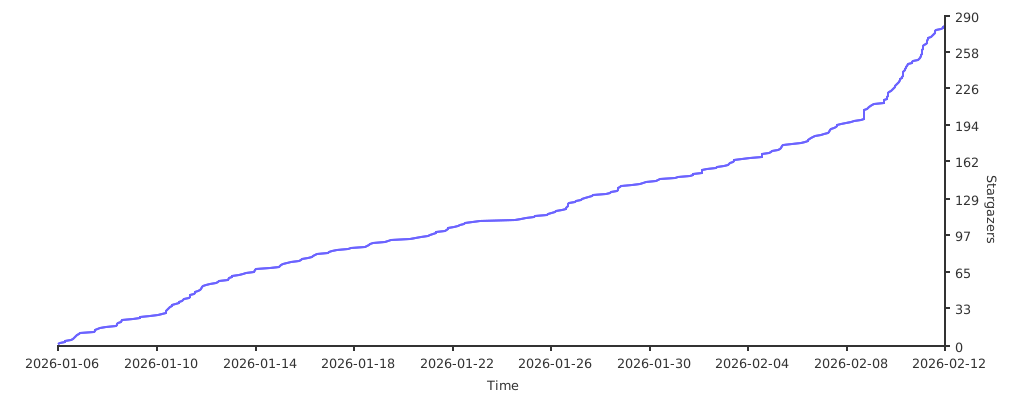
OmniRoute — A full-featured TypeScript fork of 9Router. Adds 36+ providers, 4-tier auto-fallback, multi-modal APIs (images, embeddings, audio, TTS), circuit breaker, semantic cache, LLM evaluations, and a polished dashboard. 368+ unit tests. Available via npm and Docker.
Built on the shoulders of giants:
- CLIProxyAPI — original Go implementation that inspired this JavaScript port.
- RTK
— Rust token-saver. 9Router ports its compression pipeline to JS → −20-40% input tokens on every request.
- Caveman
by @JuliusBrussee — viral "why use many token when few token do trick". 9Router adapts its prompt → −65% output tokens.
- Ponytail
by @DietrichGebert — "lazy senior dev" skill. 9Router injects its YAGNI-first ladder → fewer tokens, less code, shorter diffs.


Huge thanks to these authors — without their work, 9Router's token-saving features wouldn't exist. ⭐ them on GitHub!
MIT License - see LICENSE for details.