This project enables the use of an ESP32-P4 display into an all-sky camera viewer. It features multi-image cycling, hardware acceleration, and seamless integration with Home Assistant.
3.6" Screen

4" Screen

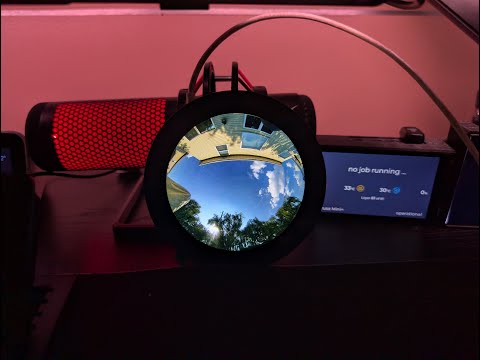
Click here to watch on YouTube



Comprehensive documentation for both users and developers is organized as follows:
- Hardware Requirements - Details on supported displays, ESP32-P4 specifications, and required libraries.
- Installation Guide - Instructions for flashing firmware, compiling from source, and initial WiFi setup.
- Configuration Guide - Guide for Web UI, MQTT, multi-image setup, and serial commands.
- Features and Usage - Information on multi-image cycling, touch controls, health monitoring, and Home Assistant integration.
- OTA Updates - Procedures for wireless firmware updates with automatic rollback.
- Troubleshooting - Solutions for common issues, crash diagnosis, and support channels.
- System Architecture - Overview of system design, memory layout, and control flow.
- API Reference - Documentation for classes and REST API endpoints.
- Multi-Image Display: Automatically cycle through up to 10 image sources or control via API.
- Flexible Update Modes: Choose between automatic cycling or API-triggered refresh for external control (v-snd-0.62+).
- Runtime Display Selection: Switch between 3.4" and 4.0" displays via the Web UI without recompilation (v-snd-0.61+).
- Enhanced Brightness Control: Three modes available: Manual, MQTT Auto, or Home Assistant with clear UI indication (v-snd-0.61+).
- AllSky Module: Dedicated allsky_esp32round module by Alex for automatic image resizing for both display sizes.
- Hardware Accelerated: Utilizes ESP32-P4 PPA for fast scaling and rotation (385-507ms render time).
- High Resolution: Supports images up to 1448×1448 pixels with 2× scaling capability.
- Per-Image Transforms: Individual scale, offset, and rotation settings for each image.
- Touch Controls: Tap to navigate; double-tap to toggle modes.
- Home Assistant Ready: Features auto-discovery via MQTT with full control capabilities.
- Web Configuration: Modern, responsive UI for managing all settings.
- OTA Updates: Wireless firmware updates with automatic rollback functionality.
- Easy Setup: Captive portal for WiFi configuration featuring a QR code.
- Waveshare 3.4" ESP32-P4 Touch LCD (800×800) - Tested and Working
- Waveshare 4.0" ESP32-P4 Touch LCD (720×720) - Tested and Working
Requirements: ESP32-P4 with WiFi 6, DSI display, GT911 touch, and PSRAM.
Note: Both displays are supported. Select the appropriate display type in the Web UI System settings after flashing (v-snd-0.61+).
Full Details: Hardware Requirements Guide
Download Latest Release:
- Navigate to Releases.
- Download
ESP32-P4-Allsky-Display-Factory.bin(for initial USB installation).
Important: Use the -Factory.bin file for USB flashing. The -OTA.bin file is intended for wireless updates only.
Flash using esptool:
esptool.py --chip esp32p4 --port COM3 --baud 921600 write_flash 0x0 ESP32-P4-Allsky-Display-Factory.binUniversal Display Support: Pre-compiled firmware is compatible with both 3.4" (800×800) and 4.0" (720×720) displays. Select the display type in the Web UI System settings after flashing.
Full Instructions: Installation Guide
On first boot, the device establishes a WiFi network:
- Connect to:
AllSky-Display-Setup(no password). - Scan QR Code on the display or navigate to
http://192.168.4.1. - Select network, enter password, and click Connect.
- Device reboots and displays the IP address.

Full Details: Installation Guide - First Boot
Access http://[device-ip]:8080/ to configure:
- Image sources (up to 10 URLs).
- MQTT and Home Assistant settings.
- Display transforms and brightness.
- Cycle intervals.

Full Guide: Configuration Guide

Auto-Discovery: Enable MQTT in the web interface; the device will appear automatically.
Control: Manage brightness, cycling, image selection, transforms, and system actions.
Full Integration Guide: Features - Home Assistant

Download:
- Hardware Requirements - Displays, ESP32-P4, libraries, wiring.
- Installation Guide - Flash firmware, compile from source, WiFi setup.
- Configuration Guide - Web UI, MQTT, images, serial commands.
- Features and Usage - Controls, health monitoring, Home Assistant.
- OTA Updates - Wireless updates, A/B partitions, safety.
- Troubleshooting - Common issues, crash diagnosis, diagnostics.
- System Architecture - Design, memory layout, data flow.
- API Reference - Classes, REST endpoints, MQTT topics.