
Download Link: https://cenullum.itch.io/godot-engine-voxelizer
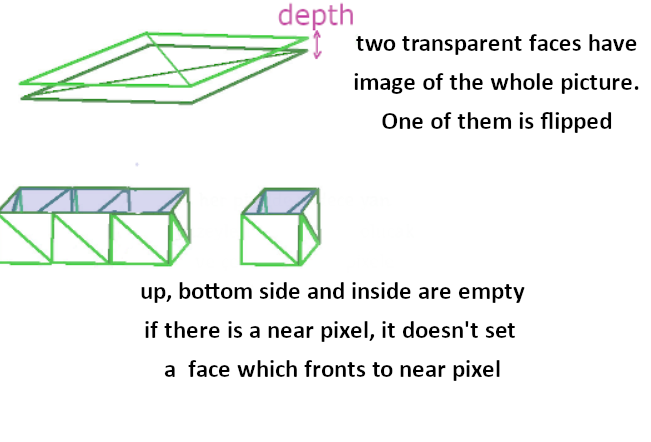
You can drag and drop your image to be voxelated then rotate this voxelated mesh by using A W S D keys and Y and H keys to move. Also you can give depth value and alpha cut value (alpha_offset) which is for considering a pixel as opaque instead of transparent.
- Add voxelizer.gd to a MeshInstance node
- Set image to "Voxel Me" on inspector (image shouldn't have filter)
- Set TransparentMaterial.tres to "Material" on inspector as script parametre, NOT DIRECTLY
- You can change alpha offset and depth if you want
- If you want to change sprite via code you can use func voxelization() and send sprite as parametre in it
This code build a wall which is 2 triangles. It does this if there are no pixels nearby by looking at the forward, backward, left and right of each pixel of the image then creates transparent up and down faces. These faces have the image of the whole picture.
License On The Project: MIT License
Information About The License: https://opensource.org/licenses/MIT
It would be appreciated if you mention me in your project