

A lightweight, native open-source bridge linking your Android phone and your Mac over your local Wi-Fi network—with zero cloud accounts, zero telemetry, and zero latency.


What's New in v1.3.1 • Key Features • Getting Started • Pairing & Multi-Device • Security & Privacy
| macOS Menu Bar App (Local File Sharing & Transfer) | Android App (3-Tab Floating Pill Navigation) |
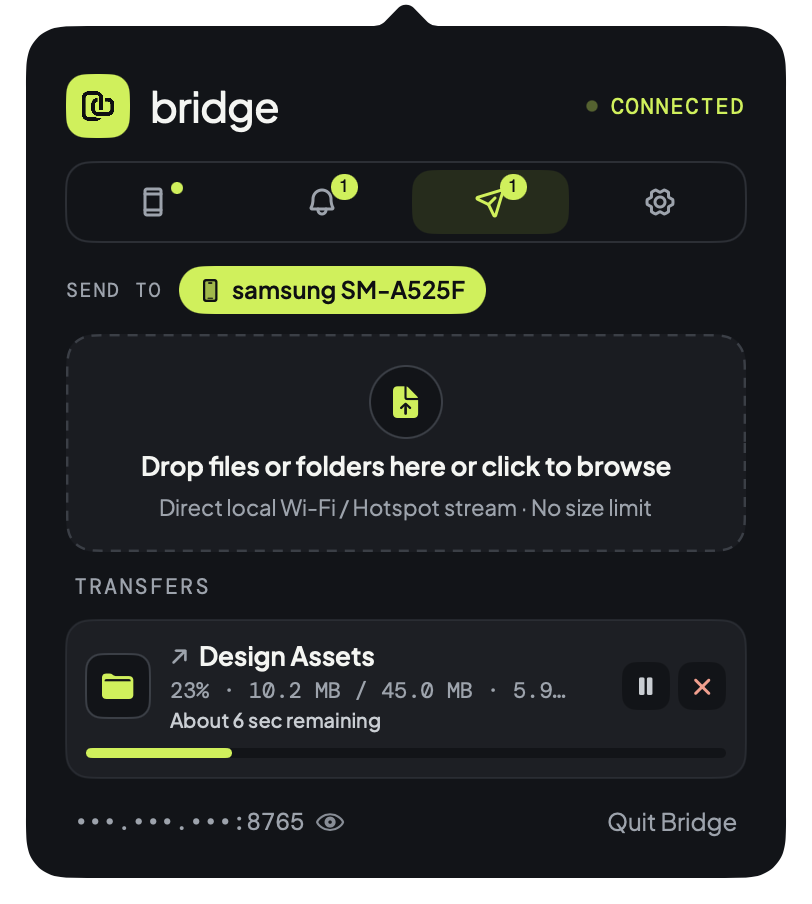 |
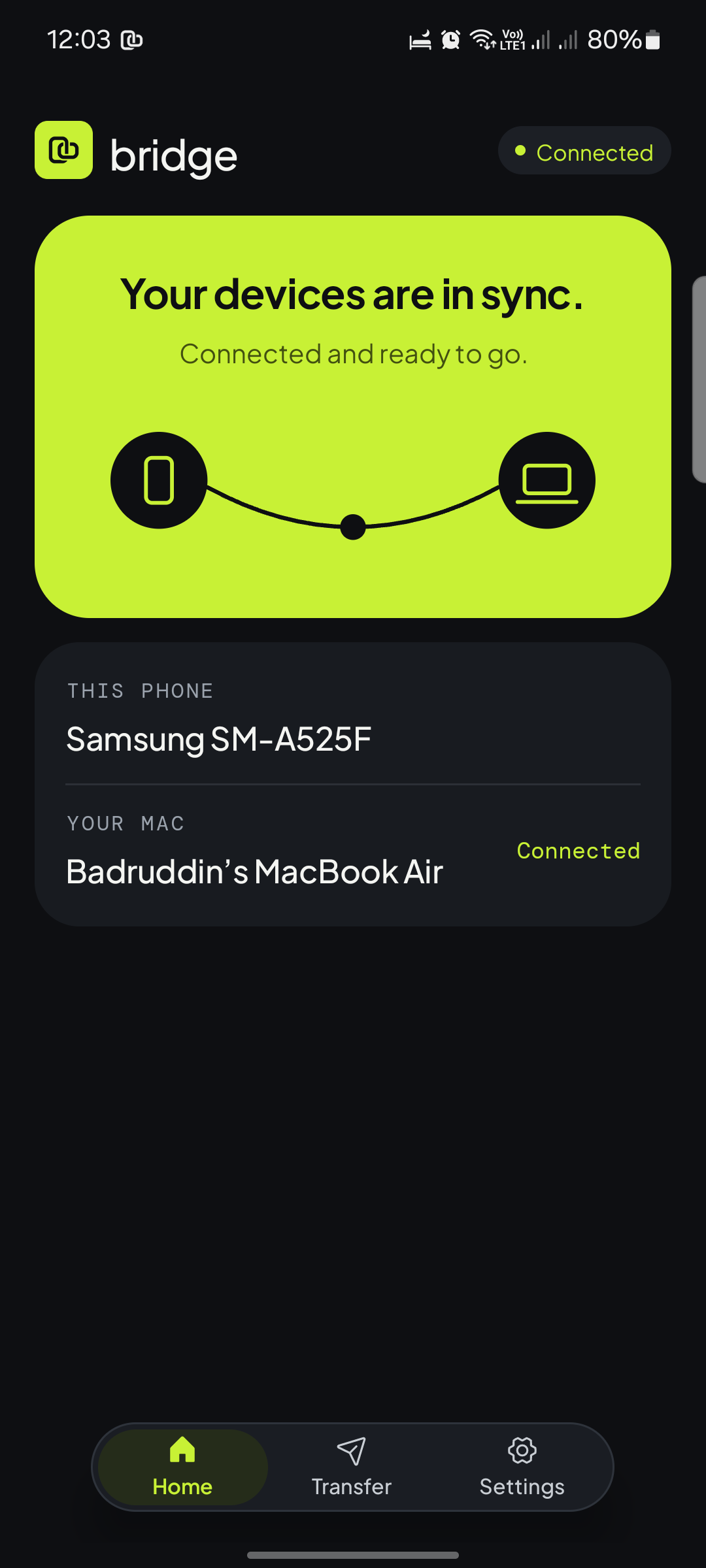 |
Note
Active Open-Source Project
Bridge is an actively maintained open-source project updated on a regular basis with continuous stability enhancements, new features, and design improvements. Star the repository to follow releases and upcoming roadmap milestones.
Bridge v1.3.1 focuses on bug fixes and privacy polish:
- Latest Message First in macOS Notifications — Stacked chat banners on macOS now preview the newest incoming message when collapsed while keeping older messages visible when expanded.
- Clean Disconnect & Unpair Sync — Added a dedicated Disconnect / Connect button on Android, fixed the unpaired state (
No device paired), and synchronized remote unpairing so macOS resets directly to the pairing screen. - Hidden IP Addresses by Default — Masked IP addresses in the macOS menu bar with dots (
•••.•••.•••) and added a small eye icon toggle to reveal or hide them on click.
- Unlimited Transfers: Transfer single files, batches, or full directory structures directly between Mac and Android with zero file size limits.
- Direct LAN Stream: Transfers stream straight across your local network or hotspot with hardware-accelerated AES-GCM encryption and post-transfer SHA-256 verification.
- Folder Structure Integrity: Directories are packaged cleanly without OS metadata (
.DS_Store,__MACOSX,Thumbs.db) using fast deflate compression. - Native OS Shortcuts: Drag and drop onto the macOS menu bar icon, right-click in Finder to "Share with Bridge", or share from Android's system share sheet (
ACTION_SEND). - Custom Save Locations: Choose your custom downloads folder on both Mac (via persistent Security-Scoped Bookmarks) and Android (via Storage Access Framework).
- Instant Text Copy: Copy any text, code snippet, or link on your phone or Mac; immediately paste it on the other device with zero extra taps.
- Screenshot & Image Sync: Copy an image in Preview, capture a macOS screenshot (
Cmd+Shift+4), or copy a photo on Android—it syncs directly into the other device's pasteboard. - Echo Suppression: Robust SHA-256 digest hashing prevents infinite clipboard feedback loops.
- Instant Forwarding: Phone notifications appear instantly in the macOS menu bar popover and as native macOS notification banners with app icons.
- Inline Quick Reply: Type and send replies directly to messages without touching your phone.
- Smart Filtering: Persistent background services and duplicate group summaries are automatically filtered out to keep your Mac feed clean.
- Bidirectional Settings Sync: Toggle notification sync on either phone or Mac with changes synchronized across both devices in real time.
- Mac Alert Mirroring: Optionally forward Mac system notifications to your Android device with smart duplicate detection (drops alerts for apps already installed on your phone).
- Zero-Config Bonjour Discovery: Discovers your Mac automatically on Wi-Fi via mDNS (
_clipboardsync._tcp), adapting seamlessly to DHCP router changes. - Sleep & Wake Resilience: Automatically pauses when your MacBook lid closes and re-establishes the connection within 1.5 seconds upon waking.
- 100% Local Wi-Fi: All communication travels strictly over your local router on
TCP :8765. Zero cloud servers, zero third-party accounts, zero tracking.
- One Mac, Multiple Phones: Keep your personal and work phones linked to your MacBook at the same time.
- Unified Feed: Notifications from both devices are displayed with individual device tags.
- Selective Unpairing: Unpair or disconnect one phone without affecting other active devices.
You can install Bridge by downloading the pre-built binaries from GitHub Releases, using terminal commands, or building from source.
- Download the latest
v1.3.1release assets from Releases:- 💻
Bridge-v1.3.1-macOS.zip— Native macOS Menu Bar App (macOS 11.0+) - 📱
Bridge-v1.3.1-Android.apk— Native Android App (Android 8.0+)
- 💻
- Install on macOS:
- Unzip
Bridge-v1.3.1-macOS.zipand moveBridge.appinto/Applications. - Launch
Bridge.app. (If macOS Gatekeeper prompts on first launch, right-clickBridge.app→ Open, or runxattr -cr /Applications/Bridge.app && open /Applications/Bridge.appin Terminal). - The Bridge icon will appear in your top menu bar.
- Unzip
- Install on Android:
- Open
Bridge-v1.3.1-Android.apkon your Android phone to install the app. - Android 14–16 Google Play Protect Notice: Because Bridge uses
BIND_NOTIFICATION_LISTENER_SERVICEandBIND_ACCESSIBILITY_SERVICE, Play Protect's sideload fraud protection on newer Android devices may block opening the APK from a browser or file manager ("App blocked to protect your device"). If that happens, install from your Mac using ADB instead (Option 2 below):adb install -r /tmp/Bridge-Android.apk
- Android 13+ Restricted Settings: If Accessibility or Notification Access appears grayed out after sideloading, open Settings → Apps → Bridge → ⋮ (top right) → Allow restricted settings, then enable the permissions.
- Open
# 1. Download & launch the macOS Menu Bar app
curl -L -o /tmp/Bridge-macOS.zip "https://github.com/badruddin-tasnim/bridge/releases/download/v1.3.1/Bridge-v1.3.1-macOS.zip"
unzip -q -o /tmp/Bridge-macOS.zip -d /Applications
xattr -cr /Applications/Bridge.app
open /Applications/Bridge.app

# 2. Download & install the Android APK over ADB
curl -L -o /tmp/Bridge-Android.apk "https://github.com/badruddin-tasnim/bridge/releases/download/v1.3.1/Bridge-v1.3.1-Android.apk"
adb install -r /tmp/Bridge-Android.apkClick to expand build instructions (Swift & Gradle)
- macOS: macOS 11.0+ with Xcode Command Line Tools (
xcode-select --install) - Android: JDK 17+ and Android SDK (
compileSdk 34)
cd mac-app
make clean && make
make install   # Installs Bridge.app to /Applications/Bridge.app
make run # Launches Bridge in your menu barcd android-app
./gradlew assembleDebug
adb install -r app/build/outputs/apk/debug/app-debug.apkAll official release assets include SHA256SUMS.txt on the GitHub Release page. Starting after v1.3.1, release APKs are also signed with Bridge's dedicated Android release certificate:
# 1. Verify archive & APK checksums against SHA256SUMS.txt
shasum -a 256 -c SHA256SUMS.txt

# 2. Verify the Android APK signing certificate SHA-256 fingerprint
apksigner verify --print-certs Bridge-*-Android.apk
Expected Android signing certificate SHA-256 digest:
AC:40:63:01:B9:1F:9D:49:65:8D:37:12:3D:4C:D6:A7:F7:91:13:2C:D7:BB:3A:3F:51:F5:60:BD:60:B9:77:DC
Pairing your devices is fast, private, and requires zero account creation:
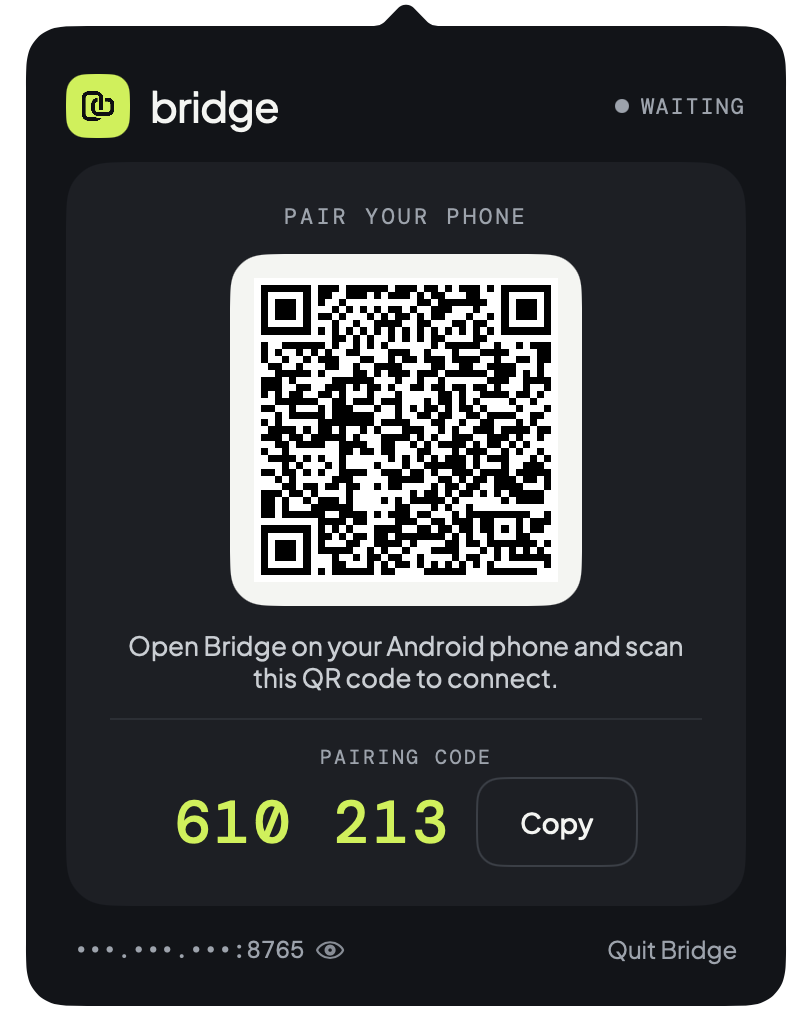
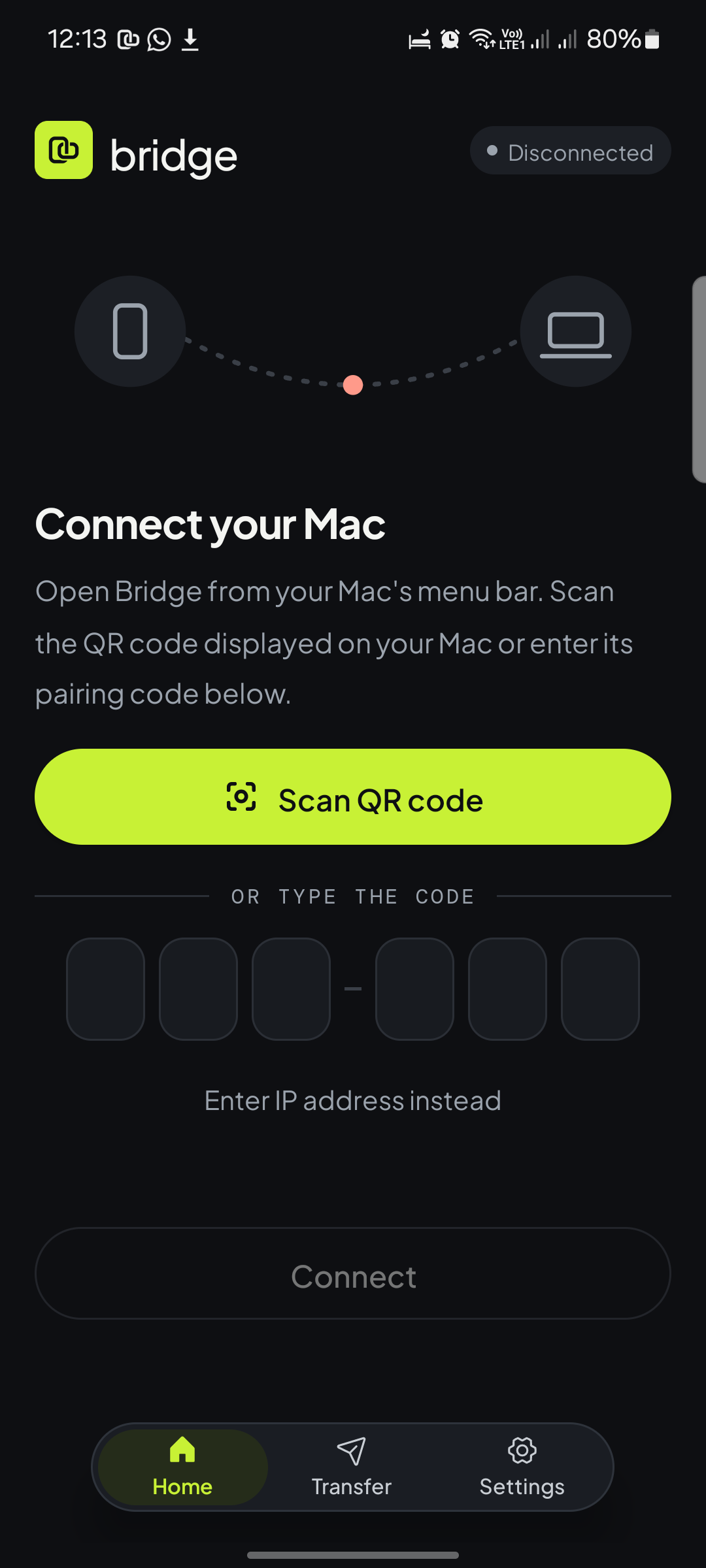
| Step 1: Open Mac Menu Bar | Step 2: Scan QR or Enter Code on Phone |
 |
 |
| Step 3: Permissions & Device Controls | Step 4: Connected & Ready |
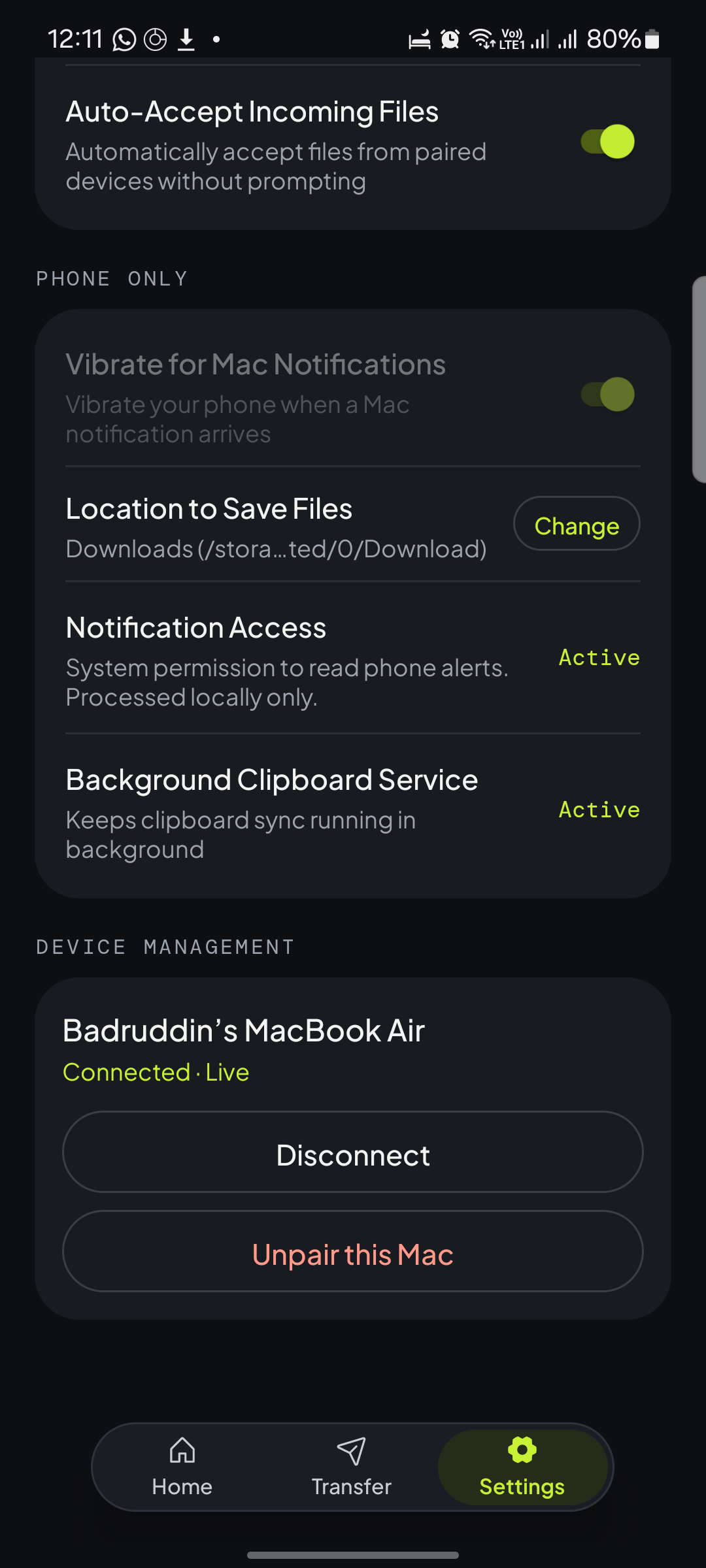 |
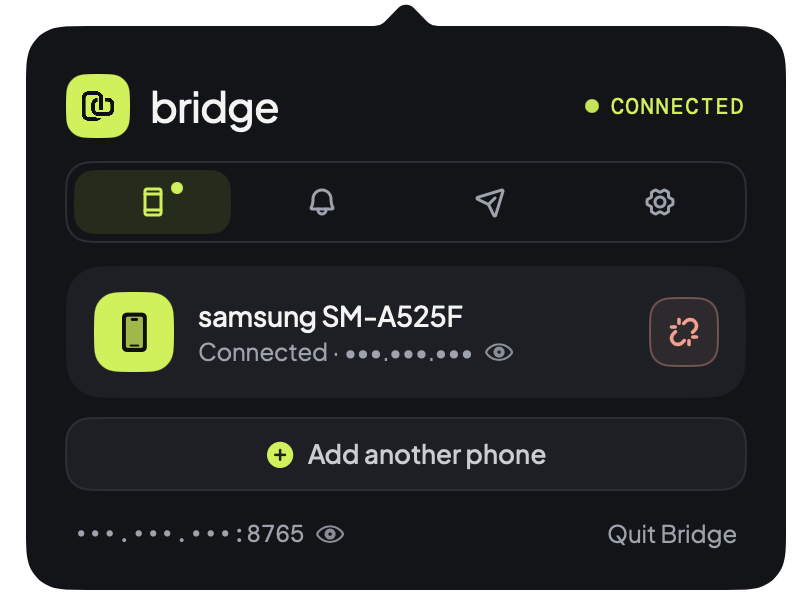 |
- Connect to Same Wi-Fi: Ensure your Android phone and Mac are connected to the same local Wi-Fi network. (Tip: When traveling or away from home, you can also connect your Mac directly to your phone's Personal Hotspot).
- Open Bridge on Mac: Click the Bridge icon in your Mac menu bar. It displays your instant QR code and 6-digit code.
- Scan or Type Code on Android:
- Tap Scan QR code in the Android app and point your camera at the Mac menu bar popover.
- Alternatively: Enter the 6-digit pairing code shown on your Mac.
- Manual IP: If on an enterprise network blocking multicast (mDNS), tap Enter IP address instead and click the eye icon in the bottom bar of the Mac popover to view your
IP:port.
- Grant Permissions on Android:
- Notification Access: Allows Bridge to mirror your incoming notifications and route quick replies.
- Accessibility Service: Android 10+ restricts background apps from reading the clipboard. Bridge uses an accessibility event listener to capture copy actions without screen reading or keylogging.
- Battery Optimization Exemption: Prevents OEM task killers from freezing background sync when your phone is locked.
- Adding Another Phone:
- Click Add another phone in the Mac popover anytime.
- The QR drawer expands smoothly without disconnecting your existing device.
- Scan with your second device to link both phones simultaneously!
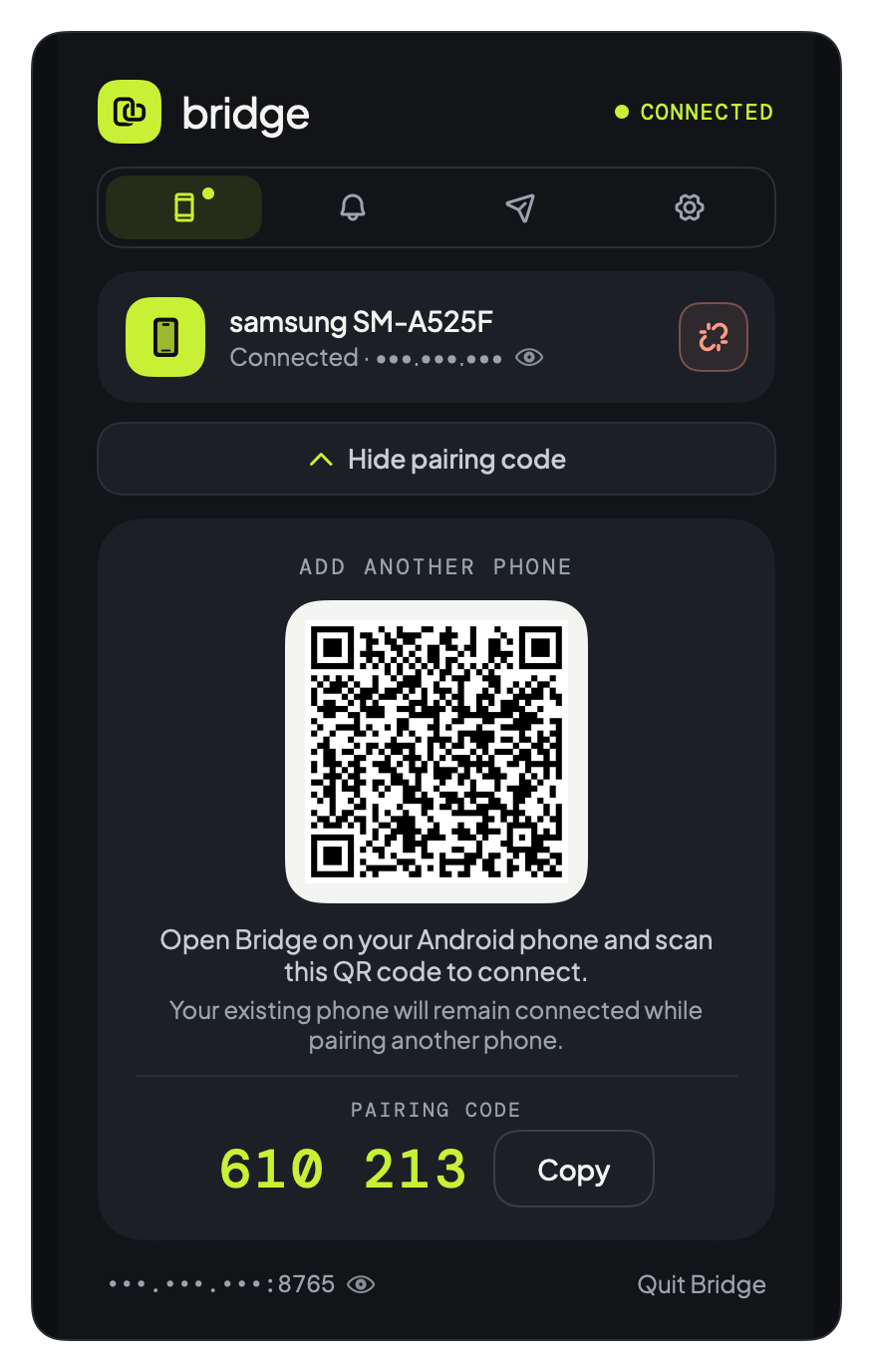
Expand "Add another phone" anytime to connect an additional device.
Bridge is built to be 100% local, zero-cloud, and auditable (see SECURITY.md for current details and planned protocol hardening).
-
Android pairing handshake: The Android client authenticates using a salted SHA-256 challenge-response instead of sending the 6-digit pairing code directly:
$$\text{Proof} = \text{SHA-256}(\text{"bridge-hello:"} + \text{PairingCode} + \text{":"} + \text{ClientNonce})$$ The Mac verifies the proof and replies with a matchingwelcomeproof before authorizing the session. -
Current threat model (Trusted Local Wi-Fi): Control messages on
TCP :8765(clipboard text/images, notifications, and file-transfer control tokens) currently run over an unencrypted local TCP socket, while file-transfer data streams are encrypted withAES-256-GCMusing aSHA-256-derived session token. TLS transport encryption and PAKE / high-entropy pairing authentication are planned forv1.4.0(so until then, only use Bridge on trusted private networks/hotspots).
- Per-IP Exponential Lockout: 5 failed handshake attempts from an IP within 60 seconds trigger an immediate 60-second lockout, doubling exponentially on consecutive violations up to 960 seconds.
- Global Rate-Limiting: 10 failed handshake attempts across all IPs within 60 seconds trigger a 30-second global handshake lockout.
- Anti-Replay Nonce Caching: Caches the most recent 256 handshake nonces to reject replayed
hellopackets. - Unauthenticated Handshake Timeout: Connections that do not authenticate within 8 seconds are automatically dropped.
- Bounded Buffers: Unauthenticated connections are restricted to 8 KB max payload size (and max 4 concurrent unauthenticated sockets) to mitigate memory exhaustion and socket DoS.
- Bridge rejects connections originating from public or non-private IP addresses.
- Only local LAN addresses (RFC 1918:
10.0.0.0/8,172.16.0.0/12,192.168.0.0/16, link-local169.254.0.0/16, CGNAT100.64.0.0/10, and loopback/link-local IPv6) are accepted. - Pairing codes on macOS are stored with strict POSIX
0600permissions (~/.bridge_pairing_code).
| Permission | Exact Purpose in Bridge | Source Reference |
|---|---|---|
BIND_NOTIFICATION_LISTENER_SERVICE |
Reads incoming Android status bar notifications to mirror them to your Mac and delivers replies/dismissals back to apps. | BridgeNotificationListenerService.kt |
BIND_ACCESSIBILITY_SERVICE |
Detects copy events on Android 10+ so clipboard text can be synced without background polling. Does not read screen text or log keystrokes. | ClipboardSyncAccessibilityService.kt |
INTERNET |
Establishes the local LAN TCP socket (:8765) between phone and Mac. Checks GitHub API for new releases. |
NetworkSyncClient.kt |
CAMERA |
Active only when scanning the pairing QR code. Video frames are decoded in memory and discarded immediately. | MainActivity.kt |
POST_NOTIFICATIONS |
Displays the persistent foreground notification required by Android to keep the background sync engine alive. | ClipboardSyncForegroundService.kt |
REQUEST_IGNORE_BATTERY_OPTIMIZATIONS |
Prevents Android Doze mode from killing the socket connection when the device is locked. | MainActivity.kt |
Contributions, bug reports, and suggestions are welcome! Feel free to open an issue or submit a pull request.
Released under the MIT License.