
Embeds Spotify for Developers, you can create a simple Embed by copying a few lines of HTML and dropping it into a web page that you control.
<!DOCTYPE html>
<html>

<head>
    <title>Spotify widget</title>
    <link rel="preconnect" href="https://fonts.googleapis.com">
    <link rel="preconnect" href="https://fonts.gstatic.com" crossorigin>
    <link href="https://fonts.googleapis.com/css2?family=Audiowide&family=Bitcount+Grid+Single:[email protected]&display=swap" rel="stylesheet">

    <script src="https://open.spotify.com/embed/iframe-api/v1" async></script>

    <script>
        let player = null

        let spotify = [
            // Playlist
            'spotify:playlist:37i9dQZEVXbMZ5PAcNTDXd',
            // Episode
            'spotify:episode:7makk4oTQel546B0PZlDM5',
            'spotify:episode:43cbJh4ccRD7lzM2730YK3',
            'spotify:episode:6I3ZzCxRhRkNqnQNo8AZPV',
            // Playlist
            'spotify:playlist:37i9dQZEVXbNG2KDcFcKOF',
        ]


        window.onSpotifyIframeApiReady = (IFrameAPI) => {
            const element = document.getElementById('spotify-iframe')

            const options = {
                uri: spotify[0],
                // Podcast or playlist uri
                // uri: 'spotify:playlist:37i9dQZEVXbMZ5PAcNTDXd',
            }

            // EmbedController
            const callback = (EmbedController) => {
                player = EmbedController
                player.addListener("playback_started", handlePlaybackStart)
                player.addListener('playback_update', handlePlaybackUpdate)
                // player.loadUri(spotify[0])
                // player.play()
                // player.stop()
            }

            IFrameAPI.createController(element, options, callback)
        }

        function play() {
            player.play()
        }

        function pause() {
            player.pause()
        }

        // Change uri
        function change(id) {
            player.loadUri(spotify[id])
        }

        const handlePlaybackStart = (e) => {
            const { playingURI } = e.data
            console.log(`The playback has started for: ${playingURI}`)
        }

        const handlePlaybackUpdate = (e) => {
            const { position, duration, isBuffering, isPaused, playingURI } = e.data
            console.log(`Playback State updates:
              position - ${position},
              duration - ${duration},
              isBuffering - ${isBuffering},
              isPaused - ${isPaused},
              playingURI - ${playingURI},
              duration - ${duration}`
            )
        };
    </script>

    <style>
        .iframe-script iframe {
            min-height: 500px !important;
        }

        .iframe-embed iframe {
            min-height: 700px !important;
        }

        body {
            font-family: Audiowide;
        }

        button {
            font-family: Audiowide;
            float: left;
            padding: 10px 20px;
            border: none;
            color: #fff;
            background: #333;
            margin: 15px;
            margin-left: 0px;
            cursor: pointer;
            font-size: 18px;
            border-radius: 10px;
        }
    </style>
</head>

<body>
    <h2>Script</h2>

    <button onclick="play()">Play</button>
    <button onclick="pause()">Pause</button>
    <button onclick="change(1)">Podcast 1</button>
    <button onclick="change(2)">Podcast 2</button>
    <button onclick="change(3)">Podcast 3</button>
    <button onclick="change(4)">Playlist</button>

    <div class="iframe-script">
        <div id="spotify-iframe"></div>
    </div>

    <h2>Embed</h2>

    <div class="iframe-embed">
        <iframe data-testid="embed-iframe" src="https://open.spotify.com/embed/playlist/37i9dQZF1DX7zqr9q1MPG7?utm_source=generator&theme=0" width="100%" height="500" frameBorder="0" allowfullscreen="" allow="autoplay; clipboard-write; encrypted-media; fullscreen; picture-in-picture" loading="lazy"></iframe>
    </div>

</body>

</html>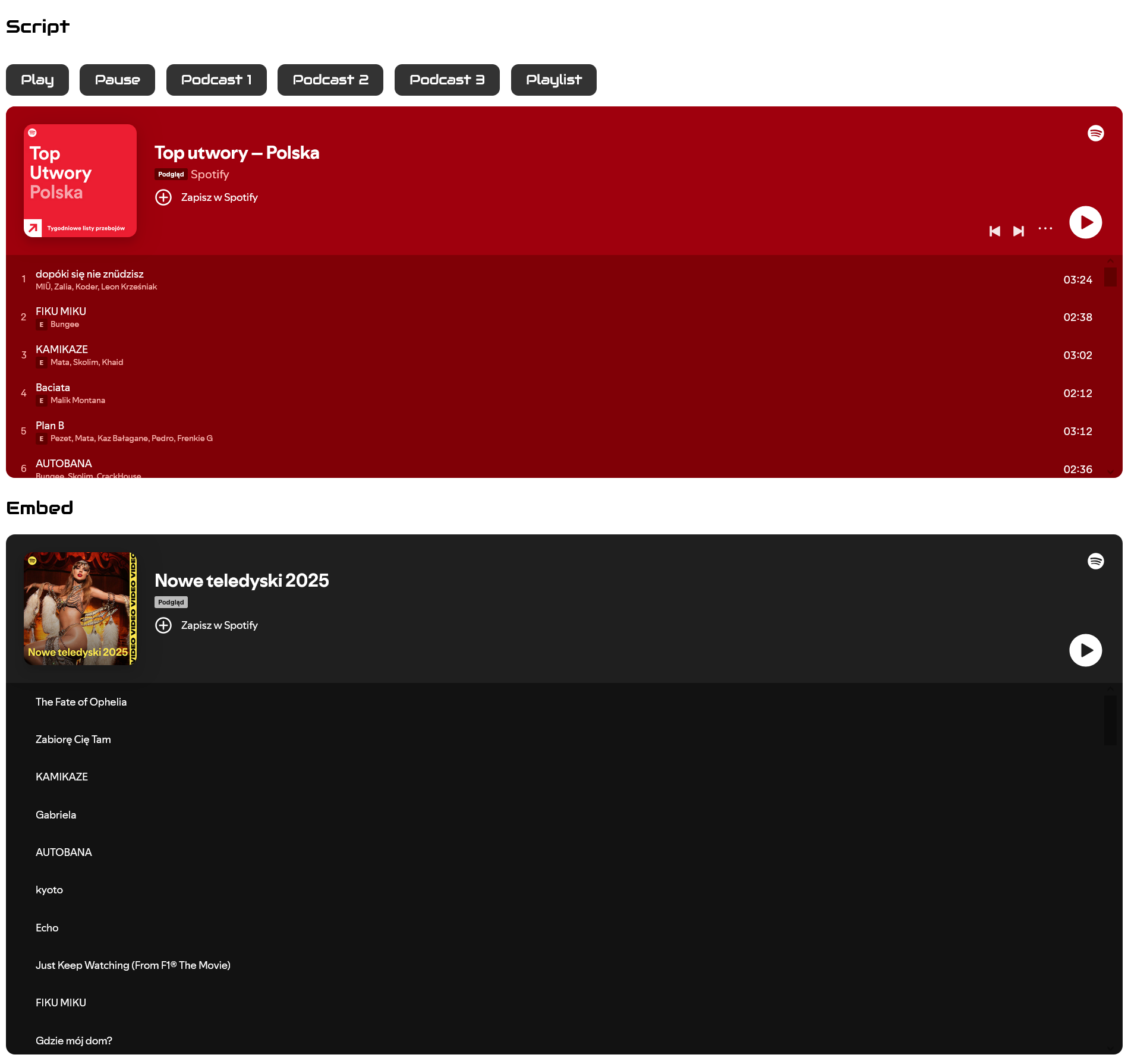
<iframe width="100%" height="500" src="https://open.spotify.com/embed/artist/76QERaQEFTh2VKRUL7wz7m" title="Spotify player" frameborder="0" allowfullscreen="" allow="autoplay; clipboard-write; encrypted-media; fullscreen; picture-in-picture" loading="lazy"></iframe>
<iframe width="100%" height="500" src="https://open.spotify.com/embed/playlist/37i9dQZF1DX7zqr9q1MPG7" title="Spotify player" frameborder="0" allowfullscreen="" allow="autoplay; clipboard-write; encrypted-media; fullscreen; picture-in-picture" loading="lazy"></iframe>

<iframe width="100%" height="315" src="https://www.youtube.com/embed/ifVVc8xTas0?si=miy0-cSU6GTZB3ta" title="YouTube video player" frameborder="0" allow="accelerometer; autoplay; clipboard-write; encrypted-media; gyroscope; picture-in-picture; web-share" referrerpolicy="strict-origin-when-cross-origin" allowfullscreen></iframe>
<iframe width="100%" height="315" src="https://www.youtube.com/embed/aK2pS-Chr-k?si=S3xnxel24wULlkwE" title="YouTube video player" frameborder="0" allow="accelerometer; autoplay; clipboard-write; encrypted-media; gyroscope; picture-in-picture; web-share" referrerpolicy="strict-origin-when-cross-origin" allowfullscreen></iframe>
<iframe width="100%" height="315" src="https://www.youtube.com/embed/IQmLO9ryEIU?si=TlKOjbEyTglFu2Cd" title="YouTube video player" frameborder="0" allow="accelerometer; autoplay; clipboard-write; encrypted-media; gyroscope; picture-in-picture; web-share" referrerpolicy="strict-origin-when-cross-origin" allowfullscreen></iframe>
<iframe width="100%" height="315" src="https://www.youtube.com/embed/VRyTWvv2SgA?si=IcmN5RNmx86yYw_E" title="YouTube video player" frameborder="0" allow="accelerometer; autoplay; clipboard-write; encrypted-media; gyroscope; picture-in-picture; web-share" referrerpolicy="strict-origin-when-cross-origin" allowfullscreen></iframe>

<video autoplay="" loop="" muted="" playsinline="" poster="data:image/gif;base64,R0lGODlhAQABAIAAAAAAAP///yH5BAEAAAAALAAAAAABAAEAAAIBRAA7" style="background-image: url('https://mayday.pl/wp-content/uploads/2024/09/time-table-bg.jpg'); background-color: transparent; background-repeat: no-repeat; background-size: cover; background-position: center center; left: 0px; top: 0px; height: 897.833px; width: 1596px"><source src="https://mayday.pl/wp-content/uploads/2024/09/2023-Mayday-Teaser-19.mp4" type="video/mp4" /></video>