🌐 Languages: English | Русский | ไทย | 中文 | Español | العربية




AI Illustrator is a powerful tool designed to automatically generate consistent, high-quality illustrations for stories using Google's Gemini models for both text analysis and image generation. It processes a story text file, analyzes it to understand the visual style, characters, and locations, and then generates a sequence of cinematic illustrations.
The Tale of Kolobok: For this demonstration, we processed the classic fairy tale "Kolobok" (The Little Round Bun). The story follows a freshly baked bun that comes to life, escapes from an old man and woman, and rolls away into the forest. Along its journey, it sings a song and outsmarts a hare, a wolf, and a bear, before finally being outwitted by a cunning fox.
Generation Parameters:
- Story Input: The Kolobok text
- Style Prompt: "cute and whimsical children's book illustration for toddlers"
- Models: Text / Validator (
gemini-3.1-pro-preview), Image (gemini-3.1-flash-image-preview)- Resolution Context: 512px,
1:1Aspect Ratio


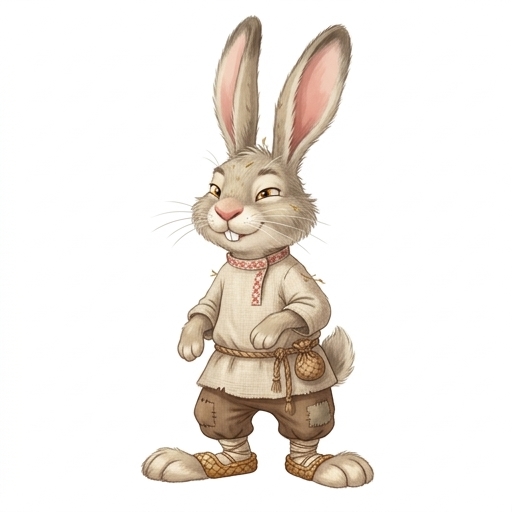
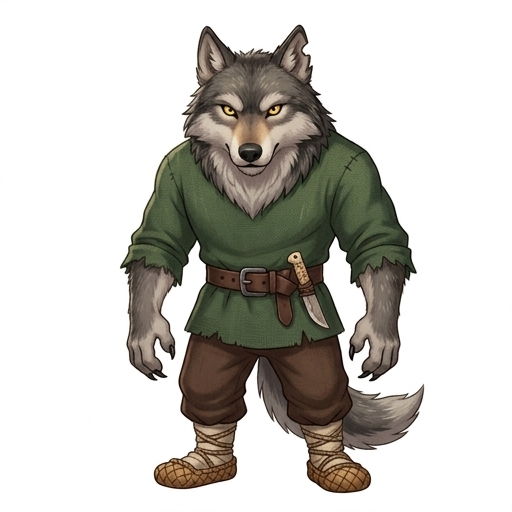








- Automatic Style Detection: Analyzes the story text to determine the most appropriate art style and generates consistent illustrations based on that style.
- Character Consistency:
- Extracts character descriptions and generates reference character images (Full Body).
- Maintains a persistent catalog of characters in
output/data.jsonto ensure the same character looks consistent throughout the story. - Uses Clean References pattern: Character reference cards are generated strictly on isolated PURE WHITE backgrounds to prevent environmental bleeding during scene integration.
- Uses reference images (multimodal generation) to keep character appearance stable across different scenes.
- Location Consistency:
- Generates and caches location reference images (Cinematic style shots).
- Maintains a location catalog in
output/data.jsonto reuse settings. - Quota Optimization: Smart location matching ensures the API only generates environment assets for locations strictly active in the story's scenes, skipping unused background descriptions.
- Cinematic Scene Generation:
- Splits the story into logical scenes securely using Semantic Chunking (preserving context across chunks).
- Parallelizes scene rendering via ThreadPool for faster generation.
- Generates a single, cohesive cinematic frame for each scene (Configurable aspect ratio).
- Utilizes Textual Anchoring by explicitly mapping multi-character references via strictly structured
MANDATORY VISUAL DETAILSblocks to prevent the model from confusing outfits or features between characters.
- LLM-as-a-Judge QA Loop & Self-Correction:
- Natively validates generated images against strict structural rulesets (e.g., Single Frame, Anatomy constraints, No Text, No Borders).
- If an image fails (e.g., multiple angles, extra limbs, or framing borders), a strict validation prompt instantly triggers a constrained re-generation block.
- Intelligent Style Editor: Implements programmatic AI QA to validate text style descriptions, preventing false-positive flaggings (like confusing the banned word "text" inside the allowed word "texture").
- Context Preservation: Injected feedback heavily anchors the model to retain the original character identity and art style while exclusively fixing the noted structural error.
- Safety Filter Bypass: Automatically sanitizes raw QA failures through an intermediate "Prompt Engineer" LLM pass. This translates negative feedback (like "remove watermark/signature") into positive, visually clear prompts that safely bypass image generator block-filters.
- Applies QA validation uniformly across Style Templates, Characters, Locations, and Scenes to maintain a cohesive, artifact-free narrative.
- Native Structured Outputs:
- Replaces brittle markdown-JSON parsing with 100% reliable Google GenAI
response_schemasupport mapped directly to Pydantic models.
- Replaces brittle markdown-JSON parsing with 100% reliable Google GenAI
- API Resilience:
- Fully handles API rate limits, timeouts, and payload failures using exponential backoff retry mechanisms (
tenacity).
- Fully handles API rate limits, timeouts, and payload failures using exponential backoff retry mechanisms (
- Docker Support: Fully containerized for easy deployment and execution.
- Comprehensive Testing: High test coverage under continuous integration with Github Actions & Codecov.
- Python 3.12+ (if running locally)
- Docker & Docker Compose (recommended for isolation)
- Google Cloud API Key with access to Gemini models (including image generation capabilities).
git clone git@github.com:artryazanov/ai-illustrator.git
cd ai-illustratorCopy the example environment file and add your API key.
cp .env.example .envOpen .env and set your variables:
GEMINI_API_KEY=your_api_key_here
TEXT_MODEL_NAME=gemini-3.1-pro-preview # or compatible
VALIDATOR_MODEL_NAME=gemini-3.1-pro-preview # or compatible
IMAGE_MODEL_NAME=gemini-3.1-flash-image-preview # or specific imagen model
IMAGE_RESOLUTION=1K # Options: 512, 1K, 2K, 4K
IMAGE_ASPECT_RATIO=1:1 # Options: 1:1, 1:4, 1:8, 2:3, 3:2, 3:4, 4:1, 4:3, 4:5, 5:4, 8:1, 9:16, 16:9, 21:9
MAX_RETRIES=4 # Maximum generation attempts during QA loopsBuild the Docker image:
docker-compose buildRun the generator:
- Place your story text file in the
data/directory (e.g.,data/my_story.txt). - Execute the container:
Note: The
docker-compose run app --text-file data/my_story.txt --output-dir output/my_project_name
outputdirectory will be populated with the results on your host machine.
Create a virtual environment:
python3 -m venv venv
source venv/bin/activate
Install dependencies:
pip install -r requirements.txtRun the application:
python main.py --text-file data/my_story.txt --output-dir output/my_project_name--text-file: (Required) Path to the input text file containing the story.--output-dir: Directory to save generated assets and illustrations (default:output).--style-prompt: Optional prompt to guide the initial style detection (e.g., "Cyberpunk anime", "Oil painting").
The tool creates an organized, flat output directory:
output/
├── characters/             # Character assets
│   └── 1_character_name.jpeg
├── locations/              # Location assets
│   └── 1_location_name.jpeg
├── illustrations/          # Final Scene Illustrations
│   └── 1_sunny_park_scene.jpeg
├── data.json               # Unified manifest (Style, Characters, Locations, Illustrations)
└── style_templates/        # Generated style base images
    ├── style_reference_fullbody.jpg   # Dynamic character style reference
    └── bg_location.jpg                # Dynamic neutral background for locations
The data.json file serves as the central manifest for the project.
{
  "style_prompt": "Description of the visual style...",
  "characters": [
    {
      "id": 1,
      "name": "Character Name",
      "original_name": "Original Name from Text",
      "description": "Visual description...",
      "full_body_path": "output/characters/1_character_name.jpeg",
      "generation_prompt": "Full generation prompt used..."
    }
  ],
  "locations": [
    {
      "id": 1,
      "name": "Location Name",
      "original_name": "Original Name from Text",
      "description": "Visual description...",
      "reference_image_path": "output/locations/1_location_name.jpeg",
      "generation_prompt": "Full generation prompt used..."
    }
  ],
  "illustrations": [
    {
      "scene_id": 1,
      "story_segment": "Original text of the scene...",
      "name": "sunny_park_scene",
      "location": {
        "id": 1,
        "name": "Location Name"
      },
      "characters": [
        {
          "id": 1,
          "name": "Character Name",
          "full_body_path": "output/characters/1_character_name.jpeg"
        }
      ],
      "illustration_path": "output/illustrations/1_sunny_park_scene.jpeg",
      "generation_prompt": "Full generation prompt used..."
    }
  ]
}This project uses pytest for testing. The test suite covers models, configuration, asset management, analyzer text splitting semantics, and the AI client wrapper. It rigorously tests fallback strategies, mocked PIL IO handlers, ThreadPool concurrency limits, dynamic schema mappings, and exponential backoff retry mechanics.
To run tests:
# Activate your virtual environment first
source venv/bin/activate

# Run all tests with coverage reporting
pytest --cov=app --cov-report=term-missing tests/The tests use unittest.mock and pytest-mock to simulate Google GenAI API responses and filesystem operations, ensuring that tests are fast and do not consume API quota.
main.py: Entry point and orchestration logic.app/: Core package.config.py: Configuration and environment management.core/: Key logic modules.ai_client.py: Wrapper for Google GenAI SDK.analyzer.py: Story analysis (Scene/Character/Location extraction).asset_manager.py: Manages creation and cataloging of reference assets.illustrator.py: Generates the final scene illustrations.models.py: Pydantic data models.
tests/: Test suite.
This project is licensed under the MIT License - see the LICENSE file for details.