A full-stack web application for managing charitable organizations — events, volunteers, members, news, and communications — built with Node.js, React 19, and MongoDB.
Live demo: https://charity-portal.onrender.com
- Overview
- Screenshots
- Tech Stack
- Architecture
- Key Features
- API Reference
- Database Schema
- Application Map
- Project Structure
- Getting Started
- Security Highlights
- Credits
The Charity Portal is a role-aware web application that centralizes the day-to-day operations of a charitable organization. It supports five user roles — Member, Administrator, Organizer, Volunteer, and Performer — each with tailored access to events, news, volunteer coordination, and administrative tools.
The project began as a Create React App (CRA) monolith and has since been modernized: frontend-v2/ replaces the legacy frontend/ with Vite + React 19 + MUI v7, resolving all previously reported audit vulnerabilities and cutting cold-start build times significantly.
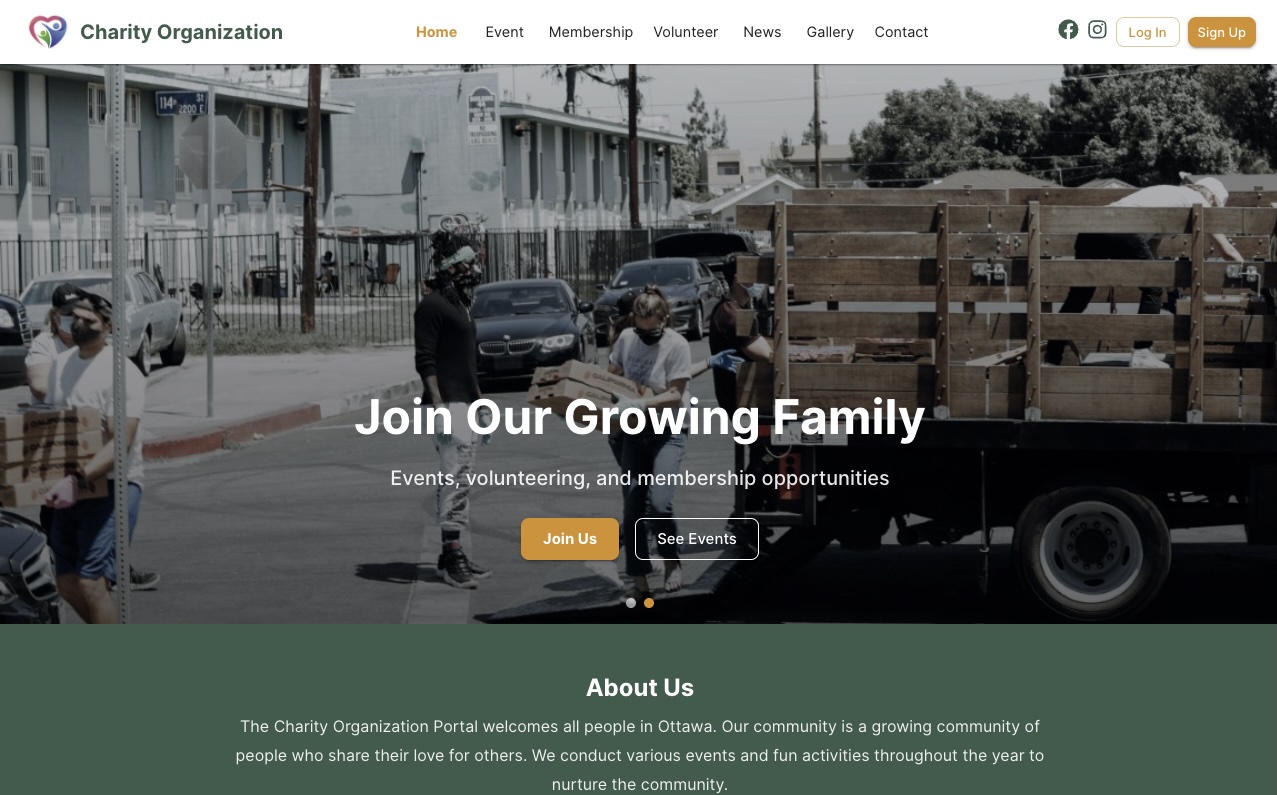
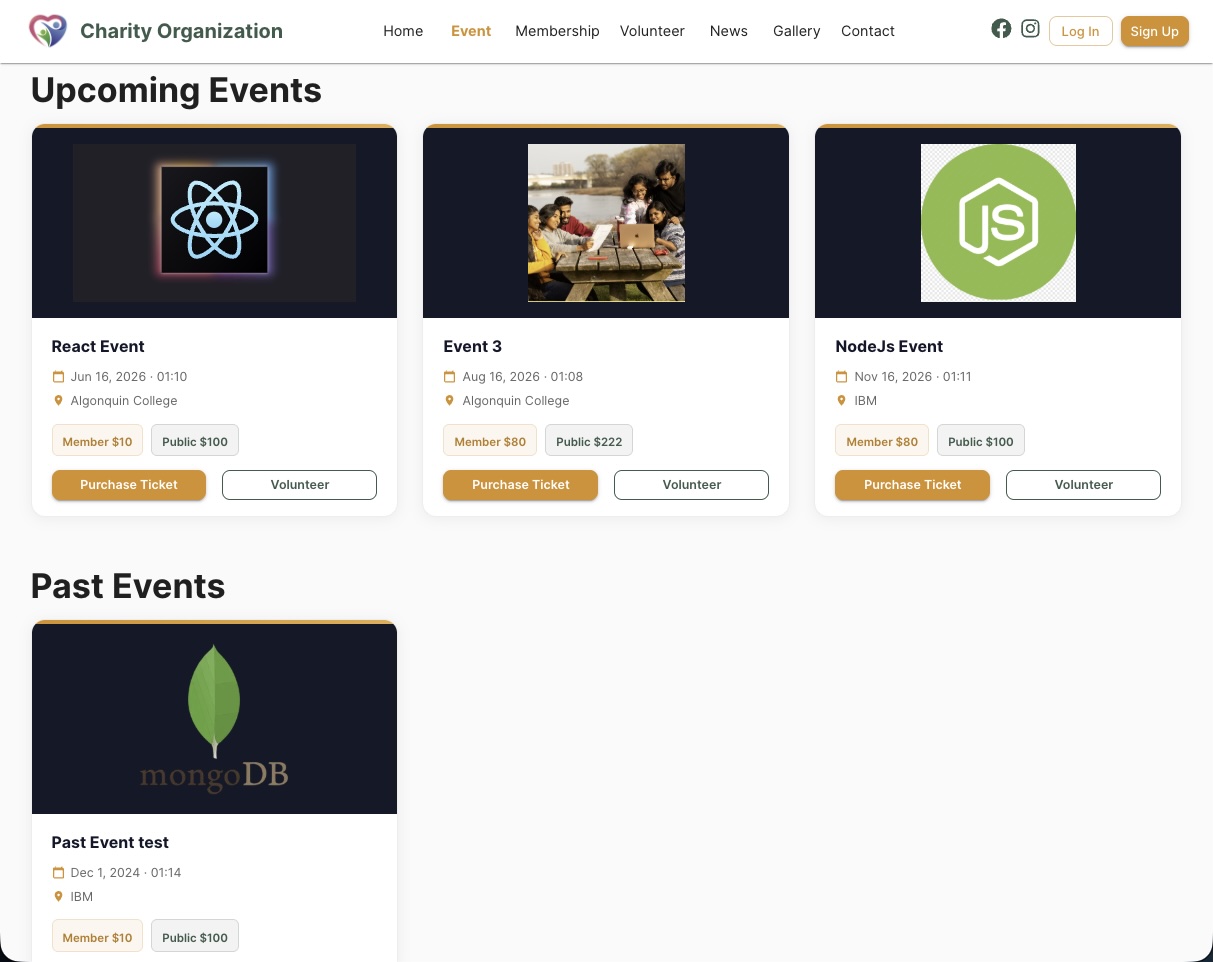
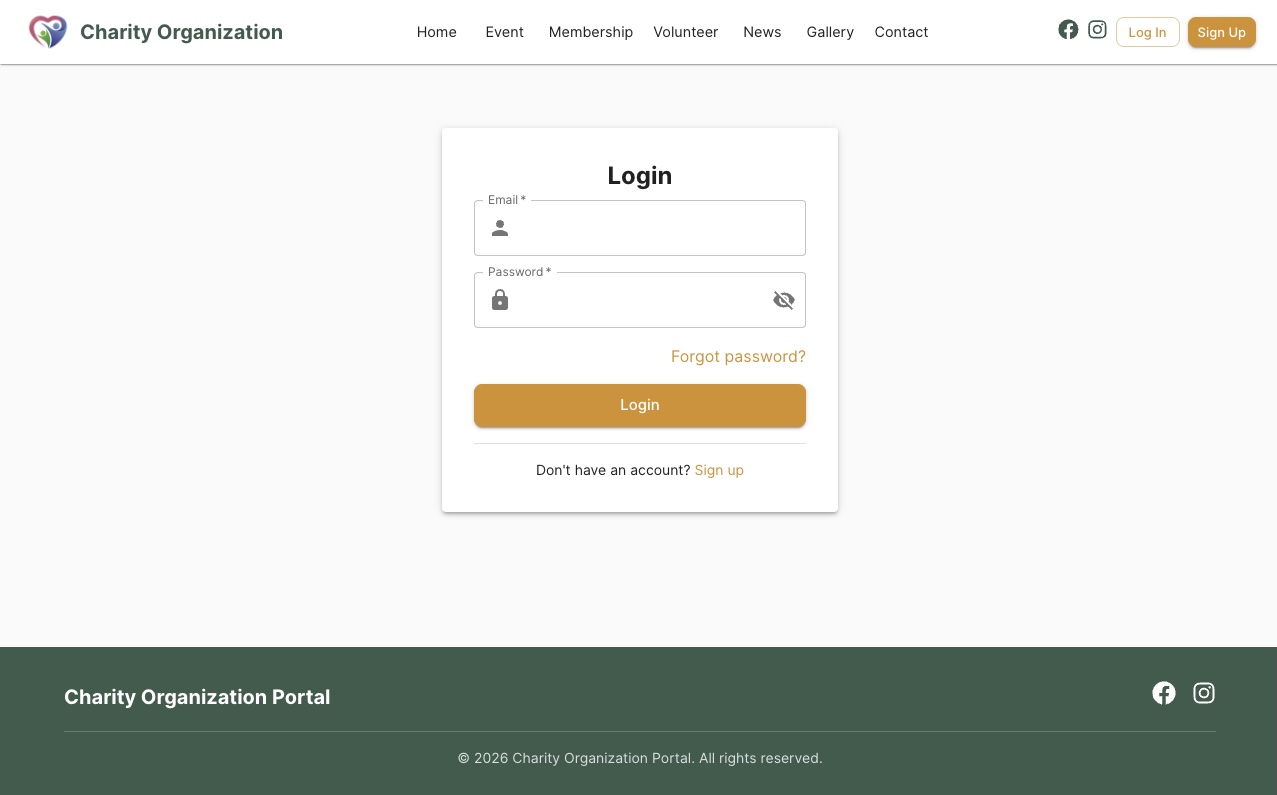
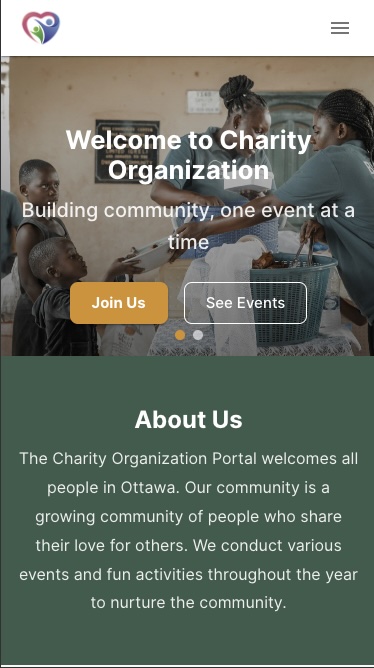






| Layer | Technology |
|---|---|
| Runtime | Node.js 18+ |
| Framework | Express.js 4.21 |
| Database | MongoDB 8.x + Mongoose ODM |
| Auth | JWT (jsonwebtoken 9) + bcryptjs |
| File Storage | Multer + Cloudinary |
Nodemailer + Gmail API (googleapis) |
|
| OTP | Custom OTP model + email delivery |
| Dev | Nodemon |
| Layer | Technology |
|---|---|
| Bundler | Vite 7 |
| Framework | React 19 |
| UI Library | MUI v7 (Material-UI) |
| Routing | react-router-dom 7 |
| HTTP | Axios |
| Rich Text | React-Quill 2 |
| Data Tables | Material-React-Table 3 |
| Toasts | react-toastify |
frontend/(CRA) is archived in-place. All active development targetsfrontend-v2/.
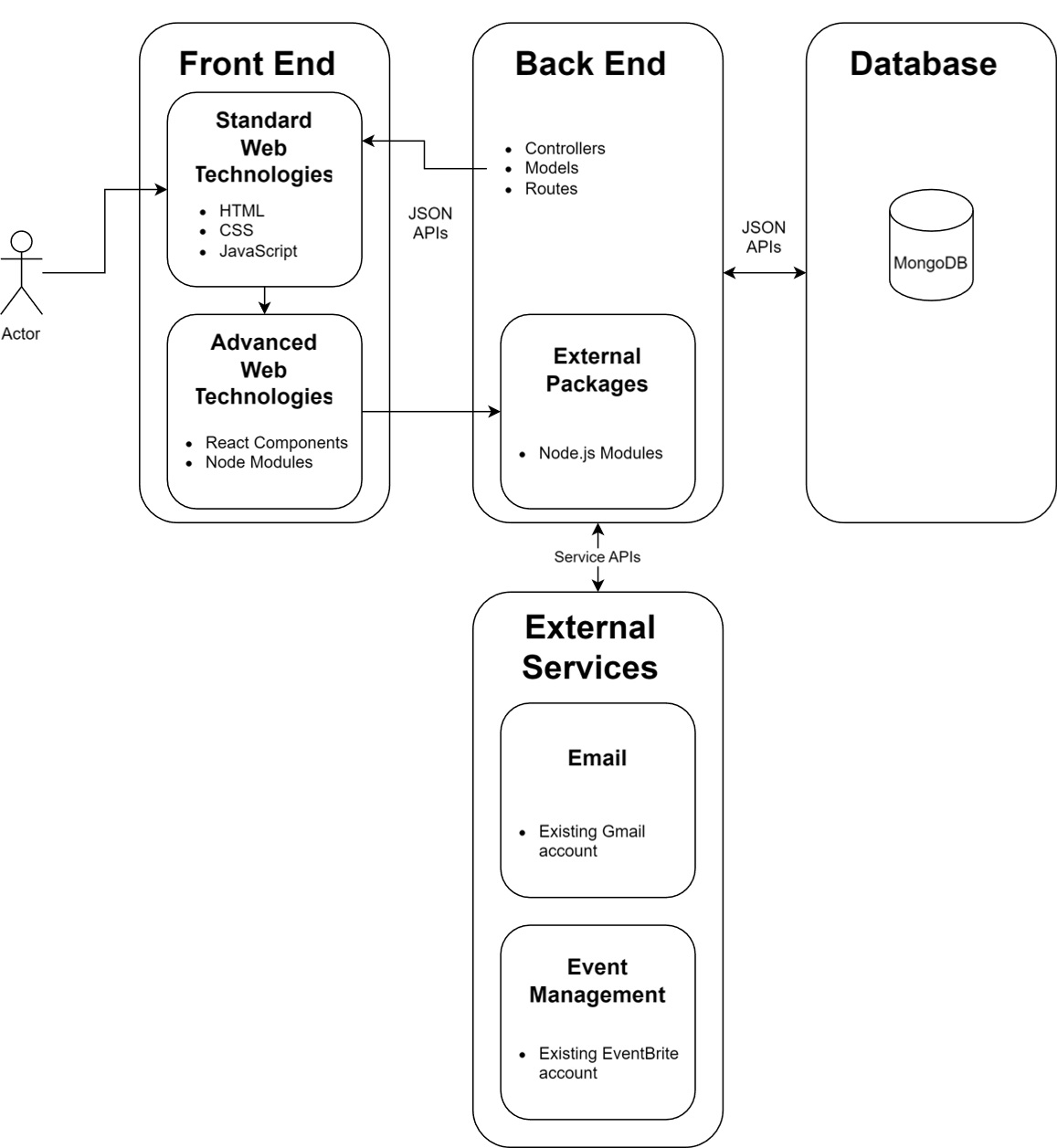
The application follows a classic three-tier architecture:
- Presentation layer — React 19 SPA served via Vite dev server or static hosting. MUI v7 components provide a consistent Material Design UI with a custom amber/green theme.
- Application layer — Express.js REST API handles business logic, RBAC enforcement via JWT middleware, file uploads via Multer/Cloudinary, and email dispatch via Gmail API.
- Data layer — MongoDB Atlas stores all application data. Mongoose schemas enforce structure and relationships across 7 collections.
- Roles: Member, Administrator, Organizer, Volunteer, Performer
- JWT-based session with role ID stored in token payload
ProtectedRoutecomponent in React guards client-side navigation- Middleware on every sensitive API endpoint verifies token and role before processing
- Full CRUD for events (create, read, update, delete)
- Image uploads via Multer (multipart) → Cloudinary CDN
- Events displayed as responsive MUI cards with images, dates, and descriptions
- Past-events view separates upcoming from historical events
- Public volunteer sign-up form with OTP verification before submission
- Admin table (Material-React-Table) for viewing and managing all volunteers
- Bulk email notifications to volunteers via Gmail API
- Role-filtered content: non-members see public posts; logged-in users see role-specific posts
- Rich text authoring via React-Quill 2 (WYSIWYG with image resize support)
- Post notification emails sent to relevant users on publish
- Admin-only table (Material-React-Table) listing all registered users
- Inline edit and delete with confirmation
- Filter and sort by role, name, or email
- Public contact form delivers submissions to the admin inbox via Gmail API
- Sender receives a confirmation copy of their submitted message
- "Forgot password" initiates a secure time-limited token sent by email
- Token-based reset route (
/reset-password/:token) validates and updates the hashed password
- MUI
Gridcontainer withxs=12 sm=6 md=4breakpoints throughout - Mobile-first layout tested at 375px, 768px, and 1280px viewports
- Consistent
<Container maxWidth="lg">wrapper on all pages
| Resource | Method | Endpoint | Auth |
|---|---|---|---|
| Auth | POST | /api/auth/login |
Public |
| Auth | POST | /api/auth/signup |
Public |
| Auth | POST | /api/auth/forgetPassword |
Public |
| Auth | PATCH | /api/auth/resetPassword/:token |
Public |
| Users | GET | /api/user/getAllUsers |
Admin |
| Users | PATCH | /api/user/updateUser/:id |
Admin |
| Users | DELETE | /api/user/deleteUser/:id |
Admin |
| Events | GET | /api/event/readEvent |
Public |
| Events | POST | /api/event/addEvent |
Auth |
| Events | PATCH | /api/event/updateEvent/:id |
Auth |
| Events | DELETE | /api/event/deleteEvent/:id |
Auth |
| Events | POST | /api/event/upload |
Auth |
| Volunteers | POST | /api/volunteer/volunteerSignUp |
Auth |
| Volunteers | GET | /api/volunteer/getAllVolunteers |
Admin |
| Volunteers | POST | /api/volunteer/notify-volunteers |
Admin / Organizer |
| Posts | GET | /api/post/getPostsForNonMember |
Public |
| Posts | POST | /api/post/getPostByRole |
Auth |
| Posts | POST | /api/post/addPost |
Auth |
| Posts | POST | /api/post/notify-users |
Auth |
| OTP | POST | /api/otp/send-otp |
Public |
| OTP | POST | /api/otp/verify-otp |
Public |
| Contact | POST | /api/contact/send-contact-email |
Public |
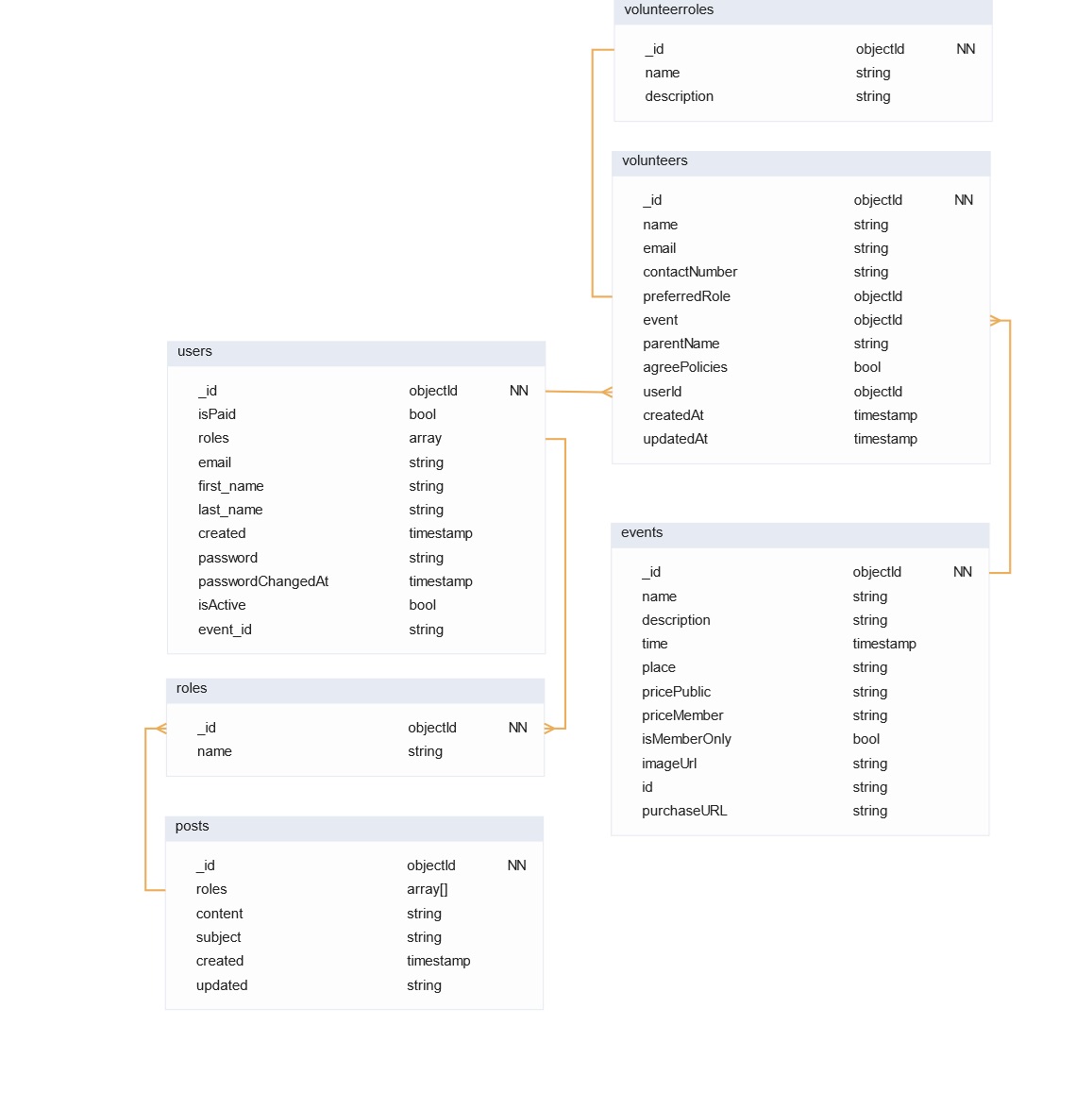
The application uses 7 MongoDB collections:
| Collection | Purpose |
|---|---|
User |
Registered accounts; stores hashed password, role reference, profile data |
Event |
Event records with title, description, date, image URL |
Post |
News/blog posts with rich-text body, target role, author |
Volunteer |
Volunteer sign-up records linked to events and users |
Role |
Role definitions (Member, Admin, Organizer, Volunteer, Performer) |
VolunteerRole |
Junction collection mapping volunteers to specific roles per event |
OTP |
Time-limited one-time passwords for volunteer sign-up verification |
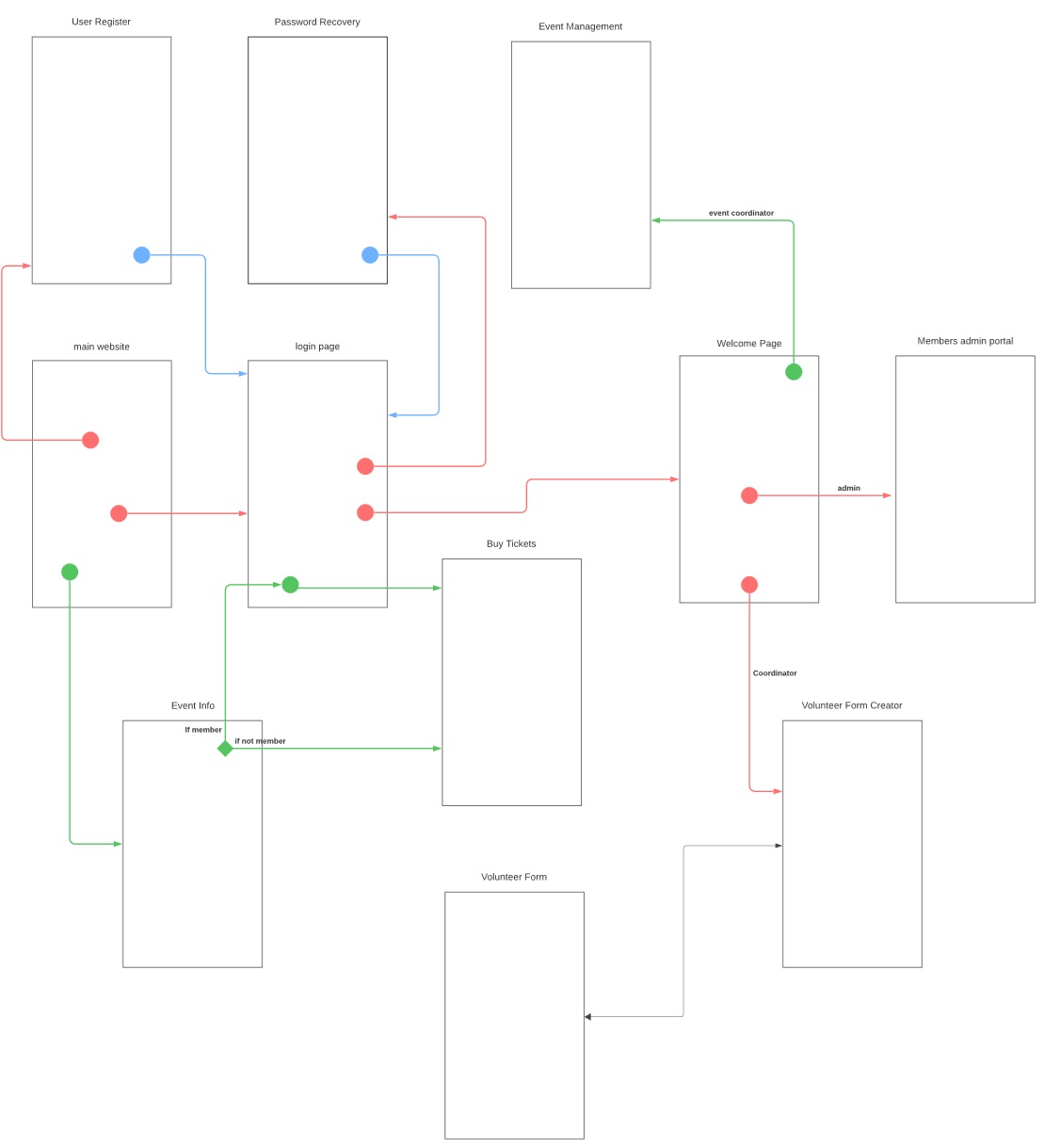
| Public Routes | Protected Routes (Admin) |
|---|---|
/ — Home |
/member-manage — User management table |
/event — Upcoming events |
/volunteer-manage — Volunteer management table |
/past-events — Past events |
/add-news — Create/publish posts |
/membership — Membership info |
|
/volunteer — Volunteer sign-up |
|
/news — News portal |
|
/gallery — Photo gallery |
|
/contact-us — Contact form |
|
/login — Login |
|
/register — Sign up |
|
/reset-password/:token — Password reset |
|
/policy — Privacy policy |
Charity-Portal/
├── backend/
│   ├── controllers/         # Business logic per entity
│   ├── models/              # Mongoose schemas (User, Event, Post, …)
│   ├── routes/              # Express route definitions
│   └── utils/               # JWT helpers, email dispatch, OTP utilities
├── frontend/                # Legacy CRA app (archived, not actively maintained)
├── frontend-v2/             # Active: Vite + React 19 + MUI v7
│   └── src/
│       ├── components/      # Navbar, Footer, EventCard, PostCard, Auth forms…
│       ├── pages/           # Route-level page components (Home, Events, News…)
│       ├── router/          # ProtectedRoute RBAC guard
│       ├── utils/           # URL validation helpers
│       ├── UserContext.jsx  # Auth context (user, login, logout)
│       └── theme.js         # MUI createTheme — amber (#e88a1d) + green (#2e5d4b)
└── ReadmeFiles/             # Documentation assets (screenshots, diagrams)
- Node.js ≥ 18, npm ≥ 9
- MongoDB Atlas account (free tier is sufficient)
- Cloudinary account (free tier)
- Gmail account with App Password enabled
cd backend
npm install
cp .env.example .env   # fill in the values below
node server.js # http://localhost:<SERVER_PORT>cd frontend-v2
npm install
cp .env.example .env # fill in VITE_* values below
npm run dev # http://localhost:5173backend/.env
| Variable | Description |
|---|---|
MONGODB_URI |
MongoDB Atlas connection string |
JWT_SECRET |
Secret key used for JWT signing |
SERVER_PORT |
Express server port (e.g. 5000) |
EMAIL_USER |
Gmail address used for notifications |
EMAIL_PASSWORD |
Gmail App Password |
CLOUDINARY_CLOUD_NAME |
Cloudinary cloud name |
CLOUDINARY_API_KEY |
Cloudinary API key |
CLOUDINARY_API_SECRET |
Cloudinary API secret |
frontend-v2/.env
| Variable | Description |
|---|---|
VITE_BASE_URL |
Backend API base URL (e.g. http://localhost:5000) |
VITE_ROLE_ADMIN |
MongoDB ObjectId of the Admin role |
VITE_ROLE_MEMBER |
MongoDB ObjectId of the Member role |
VITE_ROLE_ORGANIZER |
MongoDB ObjectId of the Organizer role |
VITE_ROLE_VOLUNTEER |
MongoDB ObjectId of the Volunteer role |
VITE_ROLE_PERFORMER |
MongoDB ObjectId of the Performer role |
Role ObjectIds are generated by MongoDB on first server start. Check the
rolescollection in Atlas and copy the_idvalues into your.env.
- Password hashing —
bcryptjswith salted rounds; plaintext passwords are never stored - JWT sessions — Signed tokens with role payload; verified by Express middleware on every protected route
- Role-Based Access Control — Five distinct roles enforced at both the API and client-router level
- OTP verification — Time-limited one-time passwords guard volunteer sign-up submissions
- Secure password reset — Token-based email flow with expiry; token invalidated after use
- CORS policy — Restricted to known frontend origins in production
- Timothy Norman
- Iseul Park
- Parth Patel
- Andres Camilo Porras Becerra
- Binbin Yang
- Dunxing Yu