Supports private deployment, scalable, enterprise-grade video conferencing solution.
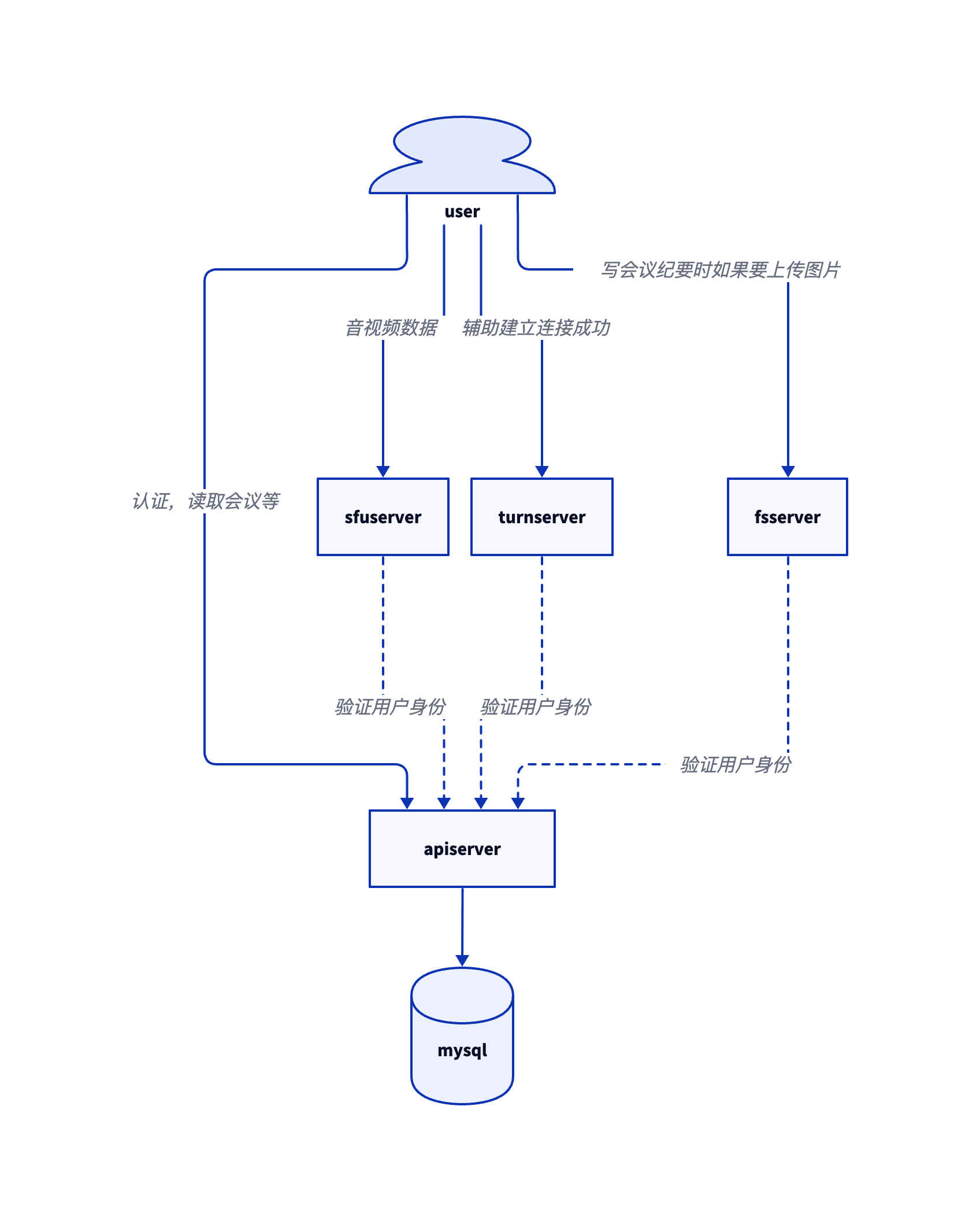
The entire system is divided into five components: apiserver, sfuserver, fsserver, turnserver, and allocateserver.
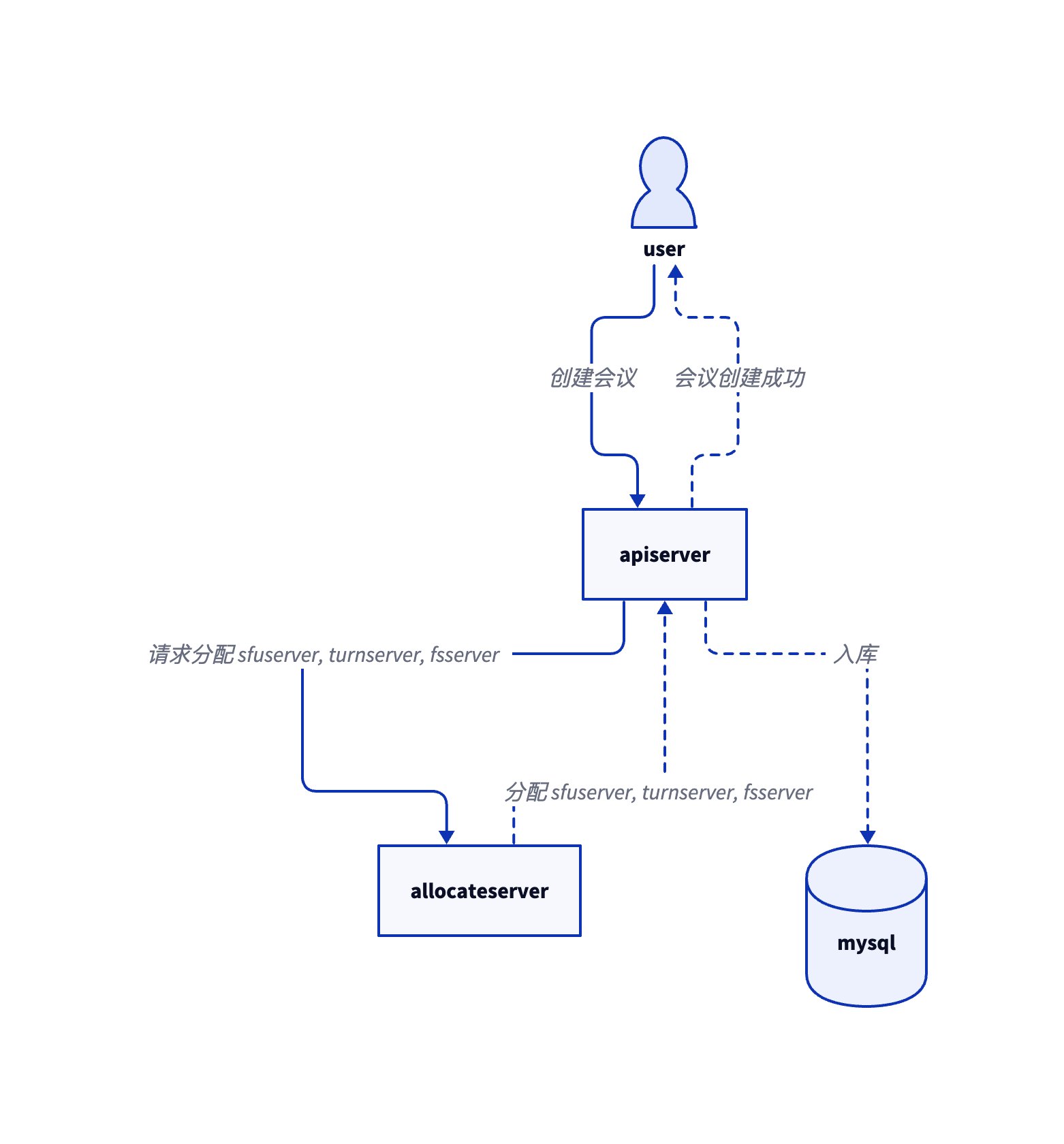
apiserver: Acts as the hub of the entire Meeting. It needs to connect to a mysql database and has low server requirements. The static binary has no dependencies and can be deployed with a single line of command.sfuserver: Acts as a relay for audio and video. It needs to connect toapiserverand has high server requirements. The static binary has no dependencies and can be deployed with a single line of command.turnserver: Acts as a role to ensure successful user connection to the meeting. It needs to connect toapiserverand theoretically has low server requirements. The static binary has no dependencies and can be deployed with a single line of command.fsserver: Acts as a storage role for writing meeting minutes images or files. It needs to connect toapiserverand has low server requirements. The static binary has no dependencies and can be deployed with a single line of command.allocateserver: When a user connects toapiserverto create a meeting,apiserverwill requestallocateserverto allocate for the meeting:sfuserver,turnserver,fsserver. Requires simple development by the enterprise to implement its own allocation strategy.
bash <(curl https://bash.ooo/nami.sh)
nami install meeting
meeting is a standalone binary file, you can also download without nami.
Usually, Meeting is used by enterprise employees and some external people, rather than a profit-making internet system pursuing user volume, so apiserver generally does not have high server requirements, so choose server configuration as appropriate. apiserver is a subcommand of the meeting dependency-free static binary, which can be deployed with a single line of command.
meeting apiserver
    --secret xxx
    --mysqlAddress 127.0.0.1:3306
    --mysqlUser root
    --mysqlPassword 111111
    --mysqlDatabase Meeting
    --domainaddress apiserver.com:443
    --cert /path/to/cert.pem
    --certkey /path/to/certkey.pem
    --mailServer smtp.hello.com
    --mailPort 587
    --mailUsername hello
    --mailFrom hi@hello.com
    --allocateserver http://192.168.1.2:80/path
--secret: Please contact BD to obtain--certand--certkey: Optional. If not specified, it will listen on port80to self-sign certificates.--mailServer,--mailPort,--mailUsernameand--mailFrom: Multiple can be specified, for example, specifying both internal and external mail, example:--mailServer smtp1.hello.com --mailServer smtp2.hello.com--allocateserver: Althoughallocateserversupports any URL, generallyapiserverandallocateservercan be connected via intranet. Ifapiserveraccessesallocateservervia the external network, it is recommended thatallocateserveruse https and an unpredictable, irregular path.- Firewall needs to open
443/TCP,80/TCP(as needed)
sfuserver acts as an audio and video relay server and has high server requirements. For inbound and outbound bandwidth estimation, please check FAQ. Taking Google Cloud as an example, it is recommended that a single meeting use at least a dedicated n2-standard-16, 16 vCPU, 64 GB memory server. sfuserver is a subcommand of the meeting dependency-free static binary, which can be deployed with a single line of command.
meeting sfuserver
    --secret xxx
    --domainaddress 1.sfuserver.com:443
    --cert /path/to/cert.pem
    --certkey /path/to/certkey.pem
    --apiserver apiserver.com:443
--secret: Please contact BD to obtain--certand--certkey: Optional. If not specified, it will listen on port80to self-sign certificates. The frequency of self-signed certificates is a maximum of 50 per week. If estimated to exceed this limit, please specify your own certificate.- Firewall needs to open
ALL/TCP,ALL/UDP
turnserver is used to assist users in successfully establishing connections. It will relay audio and video data when necessary, but generally, connections are successful and do not relay audio and video data, so theoretically, it does not require high server requirements. So choose server configuration as appropriate. turnserver is a subcommand of the meeting dependency-free static binary, which can be deployed with a single line of command.
meeting turnserver
    --secret xxx
    --port 3478
    --ip 1.2.3.4
    --apiserver apiserver.com:443
--secret: Please contact BD to obtain--ip: If serving users outside the enterprise, please specify the public IP of the current server, otherwise intranet IP is also acceptable depending on the actual situation.- Firewall needs to open
ALL/TCP,ALL/UDP
fsserver acts as a storage role for writing meeting minutes images or files. Generally, it does not require high server requirements. So choose server configuration as appropriate. fsserver is a subcommand of the meeting dependency-free static binary, which can be deployed with a single line of command.
meeting fsserver
    --secret xxx
    --domainaddress fsserver.com:443
    --cert /path/to/cert.pem
    --certkey /path/to/certkey.pem
    --directory /path/storage
    --apiserver apiserver.com:443
--secret: Please contact BD to obtain--certand--certkey: Optional. If not specified, it will listen on port80to self-sign certificates.--directory: Specify the directory used to store files.- Firewall needs to open
443/TCP,80/TCP(as needed)
When a user connects to apiserver to create a meeting, apiserver will request allocateserver to allocate for the meeting: sfuserver, turnserver, fsserver. Requires simple development by the enterprise to implement its own allocation strategy. allocateserver only needs to provide one interface, such as /path/a_unpredictable_path. apiserver will have three types of requests, determined by the different parameters carried by the request:
-
Request to allocate
sfuserver,turnserverforScheduled MeetingGET /path/a_unpredictable_path?Kind=SFUTURN&Email=xxx&BeginAt=xxx&EndAt=xxx HTTP/1.1 200 OK Content-Type: application/json {"sfu": "1.sfuserver.com:443", "turn": "1.2.3.4:3478"}Request
- Kind:
SFUTURN - Email: Email of the user creating the meeting
- BeginAt: Scheduled meeting start timestamp
- EndAt: Scheduled meeting end timestamp
Response
- sfu: Allocated sfuserver
- turn: Allocated turnserver
- Kind:
-
Request to allocate
sfuserver,turnserverforInstant MeetingGET /path/a_unpredictable_path?Kind=SFUTURN&Email=xxx&BeginAt=0&EndAt=0 HTTP/1.1 200 OK Content-Type: application/json {"sfu": "1.sfuserver.com:443", "turn": "1.2.3.4:3478"}Request
- Kind:
SFUTURN - Email: Email of the instant meeting owner
- BeginAt:
0 - EndAt:
0
Response
- sfu: Allocated sfuserver
- turn: Allocated turnserver
- Kind:
-
Request to allocate
fsserverGET /path/a_unpredictable_path?Kind=FS&Email=xxx HTTP/1.1 200 OK Content-Type: application/json {"fs": "fsserver.com:443"}Request
- Kind:
FS - Email: Email of the requester
Response
- fs: Allocated fsserver
- Kind:
Since turnserver and fsserver generally do not have high server configuration requirements, it is usually sufficient to deploy one of each. However, sfuserver has higher server requirements and needs to be deployed in multiples. Here are two allocation schemes:
- First: According to the number of
Scheduled Meetingthat the enterprise may produce within a week, create the corresponding amount ofsfuserverin advance, and allocate them one by one when allocating. Considering that server configuration has a ceiling, it is recommended to allocate one separately for eachScheduled Meeting. However, the time and number ofScheduled Meetingoccurrences are uncertain, so the disadvantage of this scheme is that if the number of pre-createdsfuserveris small, it will cause insufficient resources, and if the number is large, it will waste server resources. - Second: Because
Scheduled Meetingoccurs in the future, you can automatically createsfuserverusing a program only when theScheduled Meetingis created, that is, whenapiserverrequests resources forScheduled Meeting, for example, 2 hours before the start time ofScheduled Meeting. Then wait for 2 hours after theScheduled Meetingends to deletesfuserverto release resources. The advantage of this scheme is that it does not waste server resources, and requires enterprise R&D personnel to programmatically create servers on private clouds or trusted public clouds.
For instant meetings, there are also two allocation schemes:
- First: According to the number of
Instant Meetingthat the enterprise may produce within a week, create the corresponding amount ofsfuserverin advance, and allocate them one by one when allocating. Considering that the number of participants inInstant Meetingis generally small, multipleInstant Meetingowners can also share onesfuserver. However, the time and number ofInstant Meetingoccurrences are uncertain, so the disadvantage of this scheme is that if the number of pre-createdsfuserveris small, it will cause insufficient resources, and if the number is large, it will waste server resources. - Second: Only when
Instant Meetingoccurs, that is, whenapiserverrequests resources forInstant Meeting, automatically createsfuserverusing a program, allocating one separately for eachInstant Meetingowner. Then wait for 3 hours before deletingsfuserverto release resources. The disadvantage of this scheme is that when a user joins anInstant Meeting, if there are nosfuserverresources or they have been released,allocateserverreturns a non-200 toapiserverprompting the user to wait a moment, while immediately starting to deploysfuserver. The advantage is that it does not waste server resources.
Without considering bandwidth and traffic, the cost of a Google Cloud n2-standard-16 server alone is about $600 per month, while it is about $1 per hour. Therefore, adopting the second scheme can save a lot of costs.