"A thing for uploading files.", now in DotNet ecosystem.
Install the latest version from NuGet.
A basic demonstration what can be achieved with this library -
var options = new UploadThing.Core.UploadThingOptions(
    UPLOADTHING_SECRET: "BETTER_READ_FROM_SECRET"
    );

var uploader = new UploadThing.Core.Uploader(options).
    MaxSize(10). // 10 MB
    Middleware(req =>
    {
        if(user == null)
            throw new Exception("User not authenticated"); //upload process will be halted

        return new { message = "a great big metadata" }; // whatever is returned, will be boxed for Metadata
    }).
    OnUploadPrepare(file =>
    {
        // the file is ready for upload, that means, we got Presigned URL for S3.
        // assuming different workflows, it may come handy.
        // for example, if you want your your client to handle uploading
        // (perhaps the main motivation?)
        Console.WriteLine("URL: " + file.Url);
        Console.WriteLine("Name: " + file.Name);
        Console.WriteLine("Metadata: " + JsonConvert.SerializeObject(file.Metadata));
    }).
    OnUploadComplete(file =>
    {
        // the file is uploaded to S3.
        // the `file` type is same as the `file` type in OnUploadPrepare
        Console.WriteLine("It's uploaded to S3.");
    });


var fileStream = File.OpenRead("A_VALID_FILE_PATH");

var fileDetails = new UploadThing.Core.FileDetails(
    FileName: Path.GetFileName(fileStream.Name),
    FileType: UploadThing.Core.UtUtils.GetFileType(fileStream.Name),
    CallbackSlug: "ut_example_console",
    CallbackUrl: "https://example.com/uploadthing"
    );

// if you just want to get presigned url infos and use them somewhere else,
var presignedResponse = await uploader.PrepareUpload(fileDetails);

// if you just want to directly upload the file (it works even if you call PrepareUpload() before it)
var utFile = await uploader.UploadAsync(fileStream, fileDetails);

// or, if you have presigned url and you want to upload to S3 using that -
var downloadUrl = await S3Uploader.UploadAsync(presignedResponse, fileStream);
Examples ain't ready yet properly, but feel free to look around and improve.
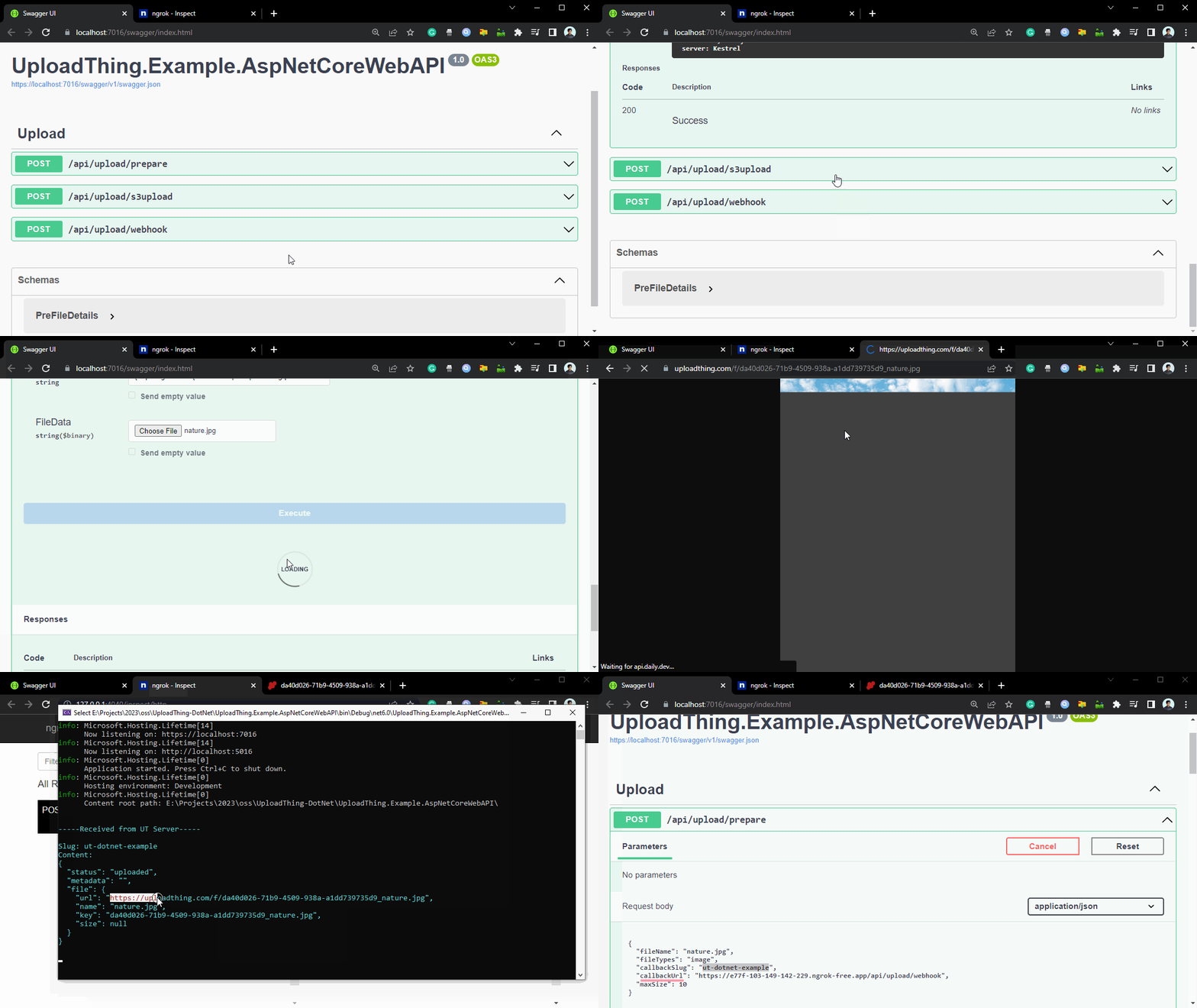
A simple api, an example how you might use it in your API.
[POST] /api/upload/prepare: to prepare S3's presigned URL, that can be used from your client application to upload directly to S3.
[POST] /api/upload/s3upload: simple endpoint to upload a file using presigned url response and file. This is just for demonstration how presigned url can be used to upload file.
[POST] /api/upload/webhook: this the endpoint you can pass in callbackUrl. This will be invoked by UT's server, when file is uploaded to s3. For better understanding, please overview this diagram.
Code: ./UploadThing.Example.AspNetCoreWebAPI/
A simple console application that upload an image.

Code: ./UploadThing.Example.Console/
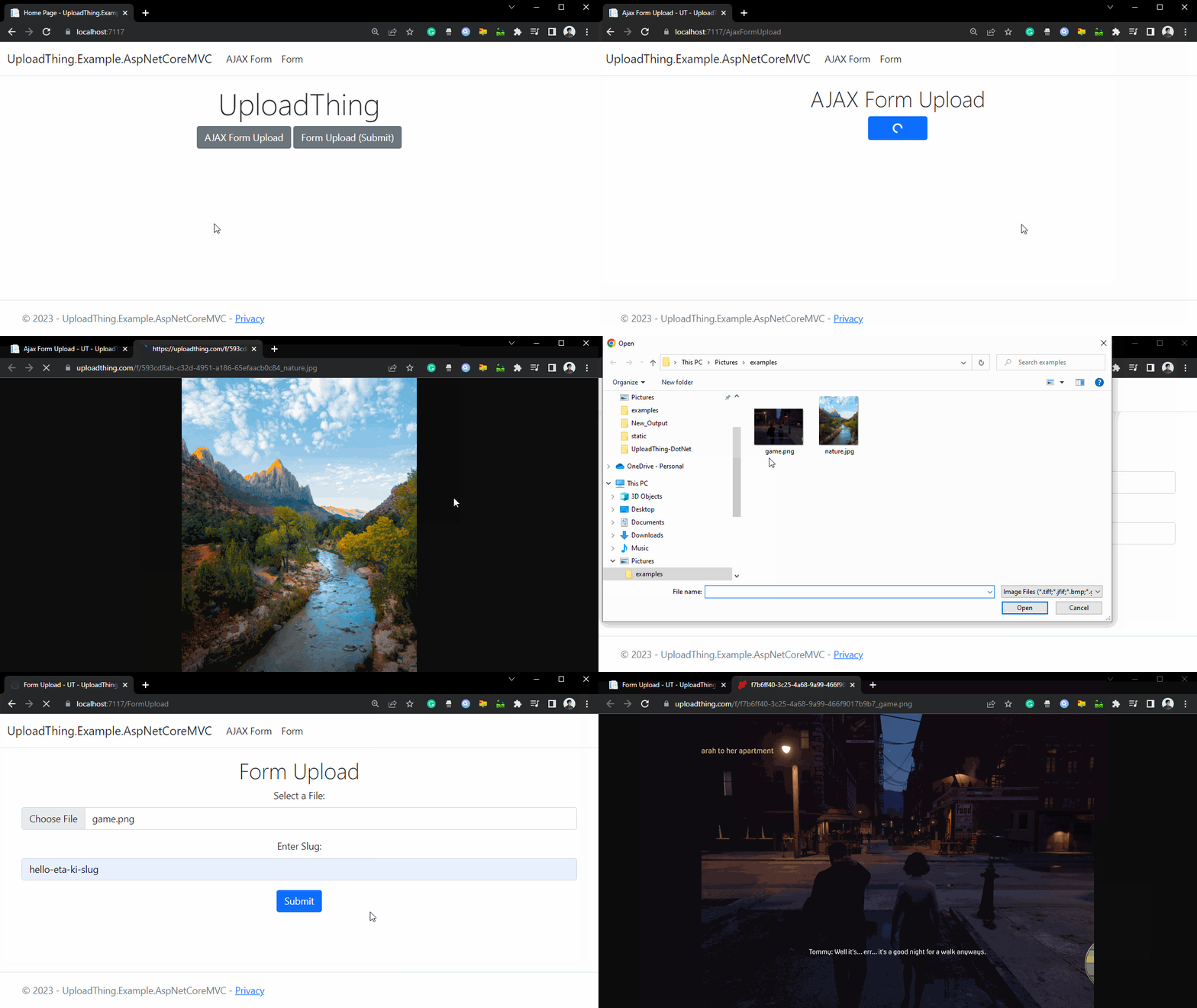
A simple example in ASP.NET MVC, demonstrating AJAX Form Upload and POST Form Upload.

Code: ./UploadThing.Example.AspNetCoreMVC/
Upcoming...
To handle exceptions related to Presigned URL or any action toward UploadThing server, we may get best use of -
catch (UploadThingException utException)
{
    Console.WriteLine("Error when preparing for upload to UT server - " + utException.Message);
}
To handle exception related uploading to AWS S3 -
catch (UploadThingS3Exception s3Exception)
{
    Console.WriteLine("Error when uploading to S3 - " + s3Exception.ErrorCode);
}