



A knn algorithm based solution to help identify and classify AI written emails or text
View Demo
·
Report Bug
·
Request Feature
Table of Contents


This guide assumes you are using Linux and have Rust installed.
This guide assumes you are using Linux and have git, Rust and openssl installed or are capable of installing them
- Clone the repo
git clone https://github.com/ShaneM123/ai_detector.git
- you will need the enron_email dataset (or similar). currently it can be found here:
https://huggingface.co/datasets/corbt/enron-emails/tree/main - create keys using openssh
openssl req -x509 -nodes -days 365 -newkey rsa:2048 -keyout test_server.key -out test_server.crt
- run the app locally
cargo run
- open your browser and go to
localhost:8080
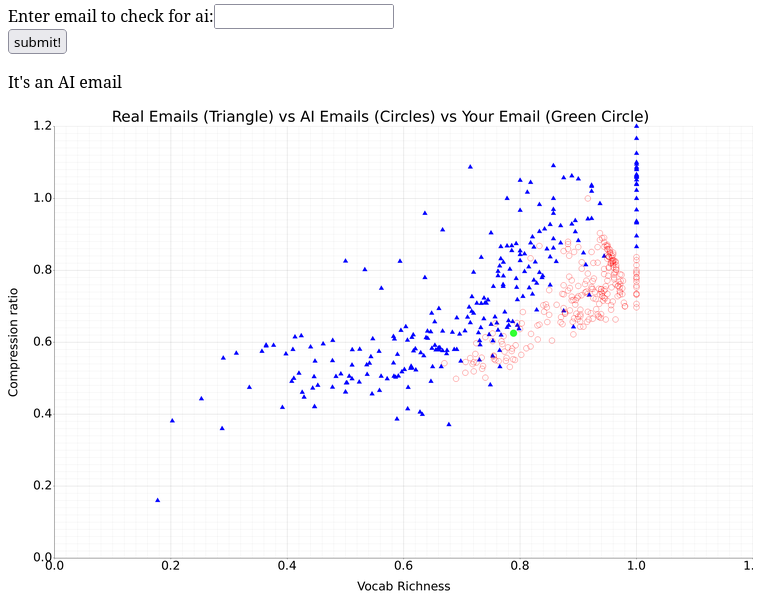
This app uses knn and 2 data sets. simply copy and paste an email into the input and submit. The analysis will show where your email is in relation to the emails in the dataset. With the correct K value and datasets, KNN is quite accurate at identifying which group the input data belongs to.
- Add Styling to Frontend
- Allow users to set k value
- Allow users to adjust datasets
- Implement Lempel-Ziv Jaccard Distance
See the open issues for a full list of proposed features (and known issues).
Contributions are what make the open source community such an amazing place to learn, inspire, and create. Any contributions you make are greatly appreciated.
If you have a suggestion that would make this better, please fork the repo and create a pull request. You can also simply open an issue with the tag "enhancement". Don't forget to give the project a star! Thanks again!
- Fork the Project
- Create your Feature Branch (
git checkout -b feature/AmazingFeature) - Commit your Changes (
git commit -m 'Add some AmazingFeature') - Push to the Branch (
git push origin feature/AmazingFeature) - Open a Pull Request
Distributed under the project_license. See LICENSE.txt for more information.
Shane Moloney - aidetector.eagle209@passmail.net
Project Link: https://github.com/ShaneM123/ai_detector