Status (2026-10-13): not actively maintained. Last updated 2026-07-25 and built against OpenClaw before 2.0 — not verified on OpenClaw 2.0 (2026.9+). Issues are read, but replies may be slow.
Stop getting paged at 3 AM. Let the machine try the obvious fixes first.







Quick Start · How It Works · Known Gaps · Docs


A set of shell scripts that wrap a long-running service with a five-level recovery ladder. A plain watchdog restarts a crashed process; that is enough right up until the crash is caused by something a restart cannot fix — a corrupted config, a missing key, a broken dependency. Then the restart becomes a crash loop and you get paged anyway.
This system adds two things a plain watchdog does not have: validation before start (Level 0) and an AI diagnosis session (Level 3) that reads the actual logs and config before attempting a repair. If both fail, it escalates to a human with the log paths attached.
It was built for OpenClaw Gateway and is tested against it. The architecture is not specific to OpenClaw — the scripts take the service command, port and paths from environment variables — but adapting it to another service currently means editing the scripts, not flipping a config switch.
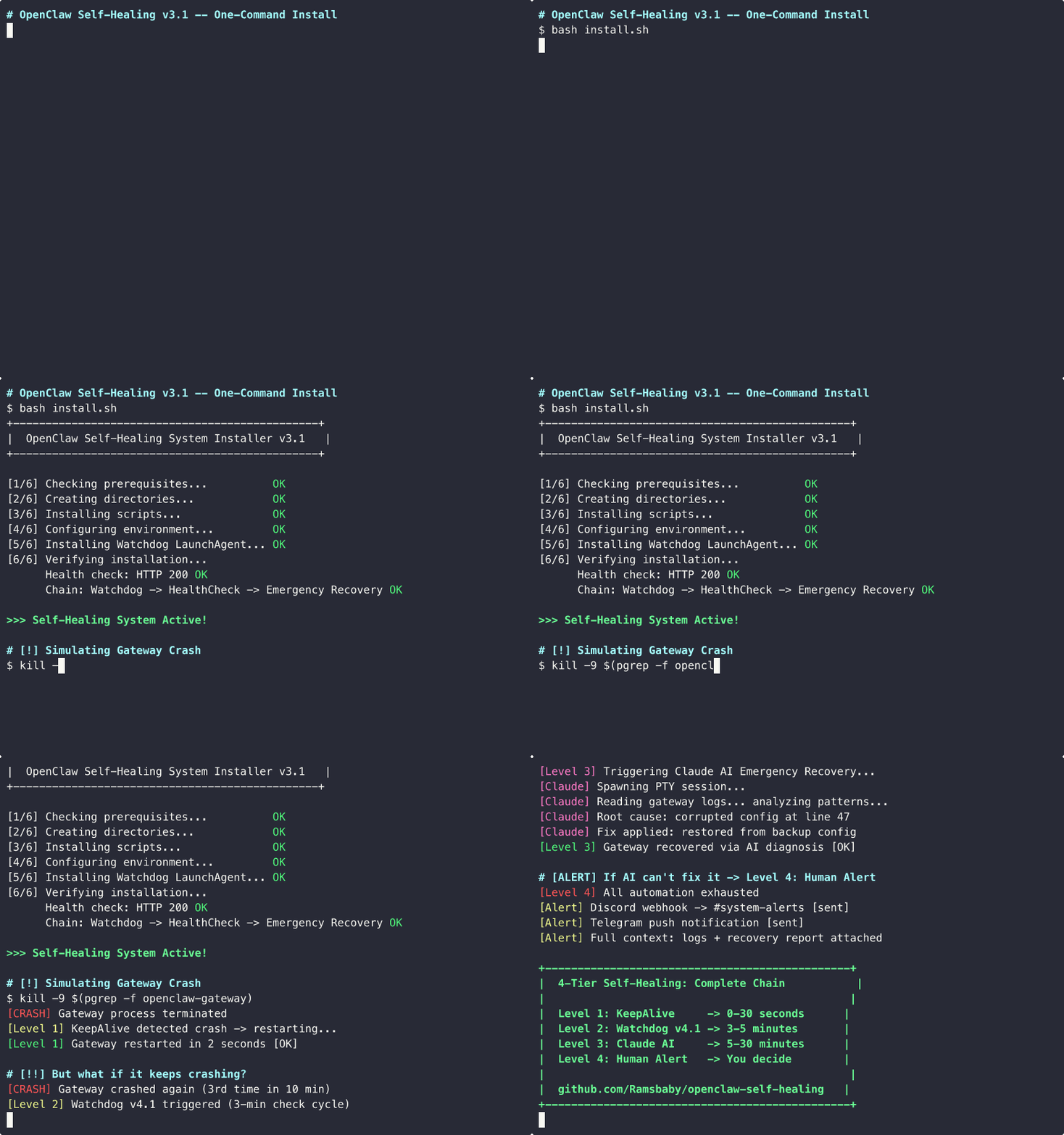
Recovery ladder in action: KeepAlive → Watchdog → AI diagnosis → Alert
| Level | Component | Triggered by | What it does |
|---|---|---|---|
| 0 | gateway-preflight.sh |
Every cold start | Validates the gateway binary, node, .env keys and JSON configs, backs up known-good configs, then execs the gateway. On failure: opens an AI recovery session and backs off (30s → 90s → 180s), max 3 attempts per 6 hours. |
| 1 | Your gateway's own service unit | Any crash | Instant restart (0–30s). Provided by the OpenClaw Gateway LaunchAgent / systemd unit — not installed by this project. |
| 2 | gateway-watchdog.sh (3 min)gateway-healthcheck.sh (5 min) |
Repeated crashes | PID + HTTP + memory checks, exponential backoff, crash counter with 6-hour decay, automatic openclaw doctor --fix on config-schema errors. Escalates to Level 3 after 30 min of continuous failure. |
| 3 | emergency-recovery-v2.sh |
30 min continuous failure, or Level 0 failure | Opens a tmux PTY session running the Claude Code CLI, which reads logs and config, diagnoses, and attempts a repair. Writes a report and appends to a persistent learnings file. |
| 4 | Notification libraries | All automation exhausted | Discord / Slack / Telegram message with the failure reason and log paths. |
Level 0: Preflight              (every cold start)
│  validate binary · node · .env keys · JSON configs → backup → exec gateway
│  on failure: AI recovery session + backoff (30s → 90s → 180s) → exit 1
▼  passes
Level 1: KeepAlive              (0–30s)
│  provided by your OpenClaw Gateway service unit
▼  repeated failures
Level 2: Watchdog + HealthCheck (3–5 min)
│  HTTP + PID + memory every 3 min · HTTP poll every 5 min
│  backoff: 10s → 30s → 90s → 180s → 300s → 600s
│  crash counter decays after 6 hours
▼  30 minutes of continuous failure
Level 3: AI Emergency Recovery  (5–30 min)
│  tmux PTY session: read logs → diagnose → fix → write report
▼  all automation fails
Level 4: Human Alert
   Discord / Slack / Telegram with reason + log paths
This matters more than the diagram. The installer downloads all five scripts plus both shared libraries, but it only creates two scheduled units:
| Level | Script installed | Scheduled by installer | Notes |
|---|---|---|---|
| 0 Preflight | yes | no | You must point your gateway's LaunchAgent / systemd unit at gateway-preflight.sh yourself. See Enabling Level 0. |
| 1 KeepAlive | n/a | no | Owned by the OpenClaw Gateway service. Assumed to exist. |
| 2 Watchdog | yes | yes | ai.openclaw.watchdog every 180s |
| 2 HealthCheck | yes | yes | com.openclaw.healthcheck every 300s |
| 3 AI Recovery | yes | on demand | Invoked by Level 2, not scheduled |
| 4 Alerts | yes | on demand | Invoked by the level that failed |
| Basic watchdog | supervisord | openclaw-self-healing | |
|---|---|---|---|
| Auto-restart on crash | yes | yes | yes |
| HTTP health polling | no | no | yes |
| Crash-loop backoff | no | partial | yes, exponential |
| Config validation before start | no | no | yes (Level 0) |
| AI root-cause diagnosis | no | no | yes (Claude Code CLI) |
| Auto-fix corrupted config | no | no | yes (openclaw doctor --fix) |
| Multi-channel alerts | no | no | Discord / Slack / Telegram |
| Prometheus metrics | no | no | yes |
| macOS + Linux + Docker | partial | yes | yes |
The gap that matters: when a crash loop is caused by something a restart alone cannot fix, every other tool pages you. This one tries to read the logs first.
Preview exactly what the installer would do. Nothing is written:
curl -fsSL https://raw.githubusercontent.com/Ramsbaby/openclaw-self-healing/main/install.sh | bash -s -- --dry-runActual output:
╔═══════════════════════════════════════════════════════════╗
║  🔍 DRY RUN — nothing will be installed or modified       ║
╚═══════════════════════════════════════════════════════════╝

What this installer would do:

[Pre-flight] Checking prerequisites...
   ✅ All prerequisites present

[Step 1] Directories that would be created:
   📁 ~/openclaw/scripts
   📁 ~/openclaw/memory
   📁 ~/.openclaw
   📁 ~/.openclaw/skills/openclaw-self-healing/scripts
   📁 ~/.openclaw/logs
   📁 ~/.openclaw/watchdog
   📁 ~/Library/LaunchAgents

[Step 2] Scripts that would be downloaded to
         ~/.openclaw/skills/openclaw-self-healing/scripts/ :
   📄 gateway-preflight.sh          (Level 0 — config validation wrapper)
   📄 gateway-watchdog.sh           (Level 2 — reactive watchdog)
   📄 gateway-healthcheck.sh        (Level 2 — HTTP health polling)
   📄 emergency-recovery-v2.sh      (Level 3 — AI autonomous recovery)
   📄 emergency-recovery-monitor.sh (Level 3 — recovery session monitor)
   📄 lib/notify.sh                 (Discord / Slack / Telegram dispatcher)
   📄 lib/llm-gateway.sh            (Claude / GPT-4 / Gemini / Ollama router)

[Step 3] Environment file that would be created:
   📄 ~/.openclaw/.env
      → Discord webhook URL (optional, prompted)
      → OpenClaw gateway port (default: 18789)

[Step 4] LaunchAgents that would be installed:
   🔧 ai.openclaw.watchdog          → ~/Library/LaunchAgents/ai.openclaw.watchdog.plist
      Runs every 3 minutes (StartInterval=180)
   🔧 com.openclaw.healthcheck      → ~/Library/LaunchAgents/com.openclaw.healthcheck.plist
      Runs every 5 minutes (StartInterval=300)

━━━━━━━━━━━━━━━━━━━━━━━━━━━━━━━━━━━━━━━━━━━━━━━━━━━━━━━━━━
  5-Tier Recovery Chain — resulting state:
━━━━━━━━━━━━━━━━━━━━━━━━━━━━━━━━━━━━━━━━━━━━━━━━━━━━━━━━━━

  ○ Level 0: Pre-flight validation                SCRIPT INSTALLED
     ↳ activate by pointing your gateway launch unit at gateway-preflight.sh
  ○ Level 1: KeepAlive (instant restart)          PROVIDED BY GATEWAY
     ↳ owned by your OpenClaw Gateway service, not by this installer
  ✓ Level 2: Watchdog + HealthCheck (3-5 min)     ACTIVE
  ✓ Level 3: AI Emergency Recovery (auto-trigger) ACTIVE
  ✓ Level 4: Discord/Telegram Human Alert         ACTIVE

━━━━━━━━━━━━━━━━━━━━━━━━━━━━━━━━━━━━━━━━━━━━━━━━━━━━━━━━━━

  No changes were made.
  Run without --dry-run to install.
--dry-runis macOS-only.install-linux.shdoes not implement it yet.
The installer checks these and exits if any are missing:
macOS (install.sh) |
Linux (install-linux.sh) |
|
|---|---|---|
openclaw |
required | required |
tmux |
required | required |
claude (Claude Code CLI) |
required | required |
curl |
required | required |
jq |
— | required |
| systemd + user lingering | — | required |
Also needed, but not checked by the installer:
- macOS 12+ with Homebrew at
/opt/homebrew— Level 3 hardcodes/opt/homebrew/bin/claude. Intel Macs and Linux need a one-line patch. nodeonPATH— Level 0 uses it to validate JSON configs.python3— only for the Prometheus exporter.- A running OpenClaw Gateway with its own service unit (that is Level 1).
The Claude Code CLI is a hard requirement today even if you plan to use another LLM. See Known Gaps.
curl -fsSL https://raw.githubusercontent.com/Ramsbaby/openclaw-self-healing/main/install.sh | bashOn Linux this hands off to install-linux.sh automatically. The macOS run has eight steps:
[1/8] Checking prerequisites...
[2/8] Creating directories...
[3/8] Downloading scripts...
[4/8] Setting up environment...
      Enter Discord webhook URL (or press Enter to skip):
      OpenClaw Gateway port [18789]:
[5/8] Installing LaunchAgents (Level 2 Watchdog + HealthCheck)...
      ✅ Watchdog LaunchAgent installed (runs every 3 minutes)
      ✅ HealthCheck LaunchAgent installed (runs every 5 minutes)
[6/8] Verifying installation...
[7/8] Testing the recovery chain...
[8/8] Installation complete!
Linux runs the same flow in nine steps, installing four systemd user units instead of two LaunchAgents: openclaw-watchdog.{timer,service} and openclaw-healthcheck.{timer,service}.
Custom workspace:
curl -fsSL https://raw.githubusercontent.com/Ramsbaby/openclaw-self-healing/main/install.sh | bash -s -- --workspace ~/my-openclawgit clone https://github.com/Ramsbaby/openclaw-self-healing.git
cd openclaw-self-healing
cp .env.example .env # edit with your config
docker compose up -dTwo services: openclaw-gateway and self-healing-watchdog, the latter starting only once the gateway reports healthy. See docs/DOCKER.md.
~/.openclaw/
├── .env                                          # your config (chmod 600)
├── logs/                                         # watchdog.log, healthcheck-*.log, preflight.log
├── watchdog/                                     # crash counters, backoff state
└── skills/openclaw-self-healing/scripts/         # all installed scripts
    ├── gateway-preflight.sh
    ├── gateway-watchdog.sh
    ├── gateway-healthcheck.sh
    ├── emergency-recovery-v2.sh
    ├── emergency-recovery-monitor.sh
    └── lib/{notify.sh,llm-gateway.sh}

~/openclaw/memory/                                # recovery reports, learnings, session logs
# 1. Are the scheduled units loaded?
launchctl list | grep -E 'watchdog|healthcheck'          # macOS
systemctl --user list-timers | grep openclaw             # Linux

# 2. Kill the gateway and watch it come back
kill -9 $(pgrep -f openclaw-gateway)
tail -f ~/.openclaw/logs/watchdog.log

# 3. Confirm it is serving again
curl -sf http://localhost:18789/ && echo "OK"
The watchdog runs on a 180-second interval, so allow up to ~3 minutes plus the backoff delay.
The installer places gateway-preflight.sh but does not schedule it, because it has to run as your gateway rather than alongside it. To enable it, change your gateway's service unit to launch the preflight wrapper — it execs the real gateway once its checks pass, so launchd/systemd still tracks the gateway PID.
macOS — in ~/Library/LaunchAgents/ai.openclaw.gateway.plist:
<key>ProgramArguments</key>
<array>
    <string>/bin/bash</string>
    <string>/Users/YOU/.openclaw/skills/openclaw-self-healing/scripts/gateway-preflight.sh</string>
</array>
Linux — in your gateway systemd unit:
ExecStart=/bin/bash %h/.openclaw/skills/openclaw-self-healing/scripts/gateway-preflight.shPreflight requires OPENCLAW_GATEWAY_TOKEN and ANTHROPIC_API_KEY to be present and non-empty in ~/.openclaw/.env, and will refuse to start the gateway without them.
bash scripts/validate-deployment.shChecks all five levels: script presence, .env keys, node smoke test, LaunchAgent/systemd status, watchdog log freshness, Claude CLI, tmux, and which notification channels are configured. Exits non-zero if any check fails.
Known issue: the script looks for
~/.openclaw/scripts/, but the installers write to~/.openclaw/skills/openclaw-self-healing/scripts/. On a correct install it will report the Level 0 and Level 2 scripts as missing. Until that is fixed, run it with the path overridden, or read those two failures as false alarms:ln -s ~/.openclaw/skills/openclaw-self-healing/scripts ~/.openclaw/scripts
See docs/DEPLOYMENT-VALIDATION.md for the manual checklist. Re-run it after every OS update or brew upgrade — path changes are the most common cause of silent self-healing failure.
Everything lives in ~/.openclaw/.env. .env.example is the full annotated inventory; the values below are the ones worth knowing.
| Variable | Default | Used by |
|---|---|---|
OPENCLAW_GATEWAY_URL |
http://localhost:18789/ |
Levels 2, 3 |
OPENCLAW_GATEWAY_PORT |
18789 |
Level 2 |
OPENCLAW_GATEWAY_TOKEN |
— | Level 0 (required), Level 2 |
ANTHROPIC_API_KEY |
— | Level 0 (required), Level 3 |
OPENCLAW_MEMORY_DIR |
$HOME/openclaw/memory |
Levels 3, 4 |
OPENCLAW_WATCHDOG_MAX_RETRIES |
6 |
Level 2 |
OPENCLAW_WATCHDOG_CRASH_DECAY_HOURS |
6 |
Level 2 |
OPENCLAW_WATCHDOG_MEMORY_WARN_MB |
1536 |
Level 2 |
OPENCLAW_WATCHDOG_MEMORY_CRITICAL_MB |
2048 |
Level 2 |
OPENCLAW_WATCHDOG_ESCALATE_TO_L3_AFTER |
1800 |
Level 2 → 3 |
HEALTH_CHECK_MAX_RETRIES |
3 |
Level 2 |
HEALTH_CHECK_ESCALATION_WAIT |
300 |
Level 2 → 3 |
EMERGENCY_RECOVERY_TIMEOUT |
1800 |
Level 3 |
DISCORD_WEBHOOK_URL |
— | Level 4 |
SLACK_WEBHOOK_URL |
— | Level 4 (notify.sh only) |
TELEGRAM_BOT_TOKEN + TELEGRAM_CHAT_ID |
— | Level 4 |
NOTIFICATION_CHANNEL |
auto-detect | Level 4 (notify.sh only) |
OPENCLAW_METRICS_PORT |
9090 |
Metrics exporter |
scripts/lib/notify.sh is the unified dispatcher. Source it and call send_notification "Title" "Body" "info|warning|error". It picks a channel from NOTIFICATION_CHANNEL, or auto-detects from whichever webhook variable is set — Discord, then Slack, then Telegram.
DISCORD_WEBHOOK_URL="https://discord.com/api/webhooks/..."
SLACK_WEBHOOK_URL="https://hooks.slack.com/services/..."
TELEGRAM_BOT_TOKEN="..."   # with TELEGRAM_CHAT_ID
NOTIFICATION_CHANNEL="slack"   # optional, forces one channel
Not every script uses it yet. Three scripts predate the library and still carry their own senders, so channel support is uneven:
| Script | Dispatcher | Discord | Slack | Telegram | ntfy |
|---|---|---|---|---|---|
gateway-healthcheck.sh |
notify.sh |
yes | yes | yes | — |
emergency-recovery.sh |
notify.sh |
yes | yes | yes | — |
emergency-recovery-monitor.sh |
notify.sh |
yes | yes | yes | — |
incident-digest.sh |
notify.sh |
yes | yes | yes | — |
emergency-recovery-v2.sh |
own | yes | no | yes | — |
gateway-preflight.sh |
own | yes | no | no | yes |
gateway-watchdog.sh |
external hook | — | — | — | — |
gateway-watchdog.sh writes every alert to ~/.openclaw/logs/watchdog.log and to a pending-alert state file, then hands off to ~/.openclaw/scripts/alert.sh if that file exists and is executable. That script is not shipped and not installed, so out of the box Level 2 alerts are logged but never delivered; the log records WARN 알림 스크립트 없음. Level 2 still escalates to Level 3 correctly — only the notification is missing. Either drop your own alert.sh at that path (it receives level, title, message, fields), or see Known Gaps.
From an audit of 14 real incidents (February 2026):
| Scenario | Result |
|---|---|
| 17 consecutive crashes | Full recovery via Level 1 |
| Config corruption | Auto-fixed in ~3 min |
| All services killed | Recovered in ~3 min |
| 38+ crash loop | Stopped by design (loop guard) |
9 of 14 incidents resolved fully autonomously (64%). The other 5 escalated to a human, which is the designed behaviour, not a failure.
Level 3 opens a tmux session running the Claude Code CLI against your live system. Before diagnosing, the prompt requires the model to read at least two of:
README.md— the recovery chain it is operating inside~/.openclaw/openclaw.json— current gateway config~/.openclaw/logs/*.log— the actual error messagesgateway-watchdog.sh/gateway-healthcheck.sh— how Levels 1–2 behave
This "mandatory first steps" block exists because a model that diagnoses without reading real state will confidently prescribe fixes for problems you do not have. The prompt also asks it to record its Read-tool call count in the report; a report showing tool_use=0 is flagged as suspected hallucination and should not be trusted.
The session writes to ~/openclaw/memory/:
emergency-recovery-<ts>.log— execution logemergency-recovery-report-<ts>.md— what it didclaude-reasoning-<ts>.md— why it did itrecovery-learnings.md— cumulative symptom → root cause → fix → prevention
Level 3 has write access to your OpenClaw config, gateway process control, and log files. That is deliberate and it is the whole point, but it is worth knowing before you enable it.
scripts/lib/llm-gateway.sh is a provider-agnostic wrapper exposing ask_llm "<prompt>" [timeout]:
| Provider | OPENCLAW_LLM_PROVIDER |
Default model | Requires |
|---|---|---|---|
| Claude | claude |
Claude Code CLI | Claude Max subscription |
| OpenAI | openai |
gpt-4o |
OPENAI_API_KEY, pip install openai |
| Google Gemini | gemini |
gemini-2.0-flash |
GOOGLE_API_KEY, pip install google-generativeai |
| Ollama | ollama |
llama3.2 |
Ollama running locally, no API key |
Status: shipped but not yet wired in. The library is installed and works standalone, but no script calls
ask_llm()today.emergency-recovery-v2.shdrives the Claude Code CLI directly throughtmux, so settingOPENCLAW_LLM_PROVIDER=ollamacurrently has no effect on Level 3. Routing Level 3 through this library is tracked in Known Gaps. Use it in your own scripts meanwhile:source ~/.openclaw/skills/openclaw-self-healing/scripts/lib/llm-gateway.sh ask_llm "Summarise the last 50 lines of watchdog.log"
bash scripts/start-metrics-exporter.sh start     # also: stop | restart | status
curl -s http://localhost:9090/metrics
OPENCLAW_METRICS_PORT=8080 bash scripts/start-metrics-exporter.sh start
Requires python3. Eight gauges are exported:
| Metric | Description |
|---|---|
openclaw_gateway_healthy |
1 if the gateway returns HTTP 200, else 0 |
openclaw_recovery_attempts |
Total Level 3 recovery attempts |
openclaw_recovery_success |
Successful recoveries |
openclaw_recovery_failed |
Failed recoveries |
openclaw_recovery_rate_percent |
Autonomous recovery rate, 0–100 |
openclaw_last_recovery_duration_seconds |
Duration of the last attempt |
openclaw_last_recovery_success |
1 if the last recovery succeeded |
openclaw_last_recovery_timestamp_seconds |
Unix timestamp of the last recovery |
# prometheus.yml
scrape_configs:
  - job_name: 'openclaw'
    static_configs:
      - targets: ['localhost:9090']
    scrape_interval: 30s
Useful alert expressions:
openclaw_gateway_healthy == 0          # gateway down
openclaw_recovery_rate_percent < 50    # recovery quality degrading
bash scripts/incident-digest.sh              # print to stdout
bash scripts/incident-digest.sh --discord    # print and post to your configured channel
Reads the last 7 days from ~/.openclaw/logs/ and emits Markdown:
## Weekly Incident Digest

**Period**: 2026-03-18 → 2026-03-25

| Metric | Value |
|--------|-------|
| Total incidents | 7 |
| Auto-resolved | 5 (71%) |
| Escalated to human | 2 |
| Autonomy rate | 71% || Script | Level | Installed | Purpose |
|---|---|---|---|
scripts/gateway-preflight.sh |
0 | yes | Config validation before start; execs the gateway on success |
scripts/gateway-watchdog.sh |
2 | yes | PID + HTTP + memory monitoring, backoff, doctor --fix, L3 escalation |
scripts/gateway-healthcheck.sh |
2 | yes | HTTP health polling with retries, L3 escalation |
scripts/emergency-recovery-v2.sh |
3 | yes | AI diagnosis and repair via tmux PTY (the one Levels 0 and 2 call) |
scripts/emergency-recovery.sh |
3 | no | Earlier v1 recovery script. Uses notify.sh and carries the mandatory-Read prompt block. Referenced by systemd/openclaw-emergency-recovery.service, which no installer installs — both need manual placement. |
scripts/emergency-recovery-monitor.sh |
4 | yes | Detects failed recovery sessions in the logs and alerts |
scripts/lib/notify.sh |
4 | yes | Discord / Slack / Telegram dispatcher |
scripts/lib/llm-gateway.sh |
— | yes | LLM provider router; not yet called by any script |
scripts/incident-digest.sh |
ops | no | Weekly incident report; run from a clone |
scripts/validate-deployment.sh |
ops | no | Post-install verification of all five levels |
scripts/prometheus-exporter.py |
ops | no | Metrics HTTP server (python3) |
scripts/start-metrics-exporter.sh |
ops | no | start / stop / restart / status for the exporter |
scripts/test-all.sh |
dev | no | Test suite for the recovery helper functions |
scripts/demo-recording.sh |
dev | no | Scripted terminal demo for asciinema; simulation only, touches nothing |
scripts/generate-traffic-chart.py |
dev | no | Renders the repo traffic chart in CI |
"Installed" means the one-line installer copies it to ~/.openclaw/skills/openclaw-self-healing/scripts/. The rest are run from a git clone.
Honest list of things the code does not do yet. PRs welcome on any of these.
- Level 2 alerts are not delivered.
gateway-watchdog.shcalls out to~/.openclaw/scripts/alert.sh, which this repo does not ship. Fix is to sourcelib/notify.shin the watchdog likegateway-healthcheck.shalready does. - The LLM router is not wired into Level 3.
OPENCLAW_LLM_PROVIDERhas no effect on recovery today;emergency-recovery-v2.shalways drives the Claude Code CLI. - Claude CLI path is hardcoded.
emergency-recovery-v2.shlooks for/opt/homebrew/bin/claude. Intel Macs (/usr/local/bin) and Linux need that line changed, or Level 3 fails its dependency check. - The installer requires
claudeunconditionally, even for users who intend to run another provider. Combined with gaps 2 and 3, a fully offline Ollama-only setup is not achievable today without editing scripts. validate-deployment.shchecks the wrong path (~/.openclaw/scripts/instead of the install location) and reports false failures.emergency-recovery-v2.shhas no Slack support — it predatesnotify.shand implements Discord and Telegram directly.gateway-preflight.shsupports Discord and ntfy only.install-linux.shhas no--dry-run.- Checked-in unit files under
systemd/are reference material, not what the installers use.install-linux.shgenerates its own units inline with correct paths; the files insystemd/still point at the older~/openclaw/scripts/layout.
Done — five-level ladder · Level 0 preflight · Level 2→3 auto-escalation · install.sh / install-linux.sh · Linux systemd · Docker Compose · Prometheus exporter · unified notification library · weekly incident digest · --dry-run · deployment validation
Next — close the gaps above · Grafana dashboard template · multi-node clusters
Later — Kubernetes operator
| Quick Start | Step-by-step installation |
| Self-Healing System | Design rationale for the recovery ladder (Korean) |
| Blog: single-server auto-recovery | Watchdog, circuit breaker and approval gate in practice (Korean) |
| Linux Setup | systemd user units, no sudo required |
| Docker | Docker Compose setup |
| Deployment Validation | Post-install checklist |
| Troubleshooting | Common failures and fixes |
| Release Notes v3.0.0 | Historical release notes |
| Changelog | Version history |
| Contributing | How to submit a PR |
No secrets in code — all webhooks and keys live in ~/.openclaw/.env, written chmod 600. Lock files prevent concurrent recovery runs. Every recovery attempt is logged with a timestamped report.
Level 3 gives an AI session write access to your OpenClaw config, the gateway process, and your log files. That access is what makes autonomous repair possible; if you are not comfortable with it, leave ANTHROPIC_API_KEY unset and the chain will stop at Level 2 and escalate to you instead.
| Project | Role |
|---|---|
| openclaw-self-healing (here) | Five-level autonomous crash recovery |
| openclaw-memorybox | Memory hygiene CLI — prevents the bloat that causes crashes |
| openclaw-self-evolving | Agent that proposes its own AGENTS.md improvements |
| jarvis | 24/7 AI ops system — self-healing, RAG, cron automation |
All MIT licensed, all running on the same production instance.
Bug reports, feature requests and docs fixes are all welcome — the Known Gaps list is a good place to start. See CONTRIBUTING.md.
MIT License · Made by @ramsbaby
"The best system is one that fixes itself before you notice it's broken."