



PaddleX 3.0 is a low-code development tool for AI models built on the PaddlePaddle framework. It integrates numerous ready-to-use pre-trained models, enabling full-process development from model training to inference, supporting a variety of mainstream hardware both domestic and international, and aiding AI developers in industrial practice.
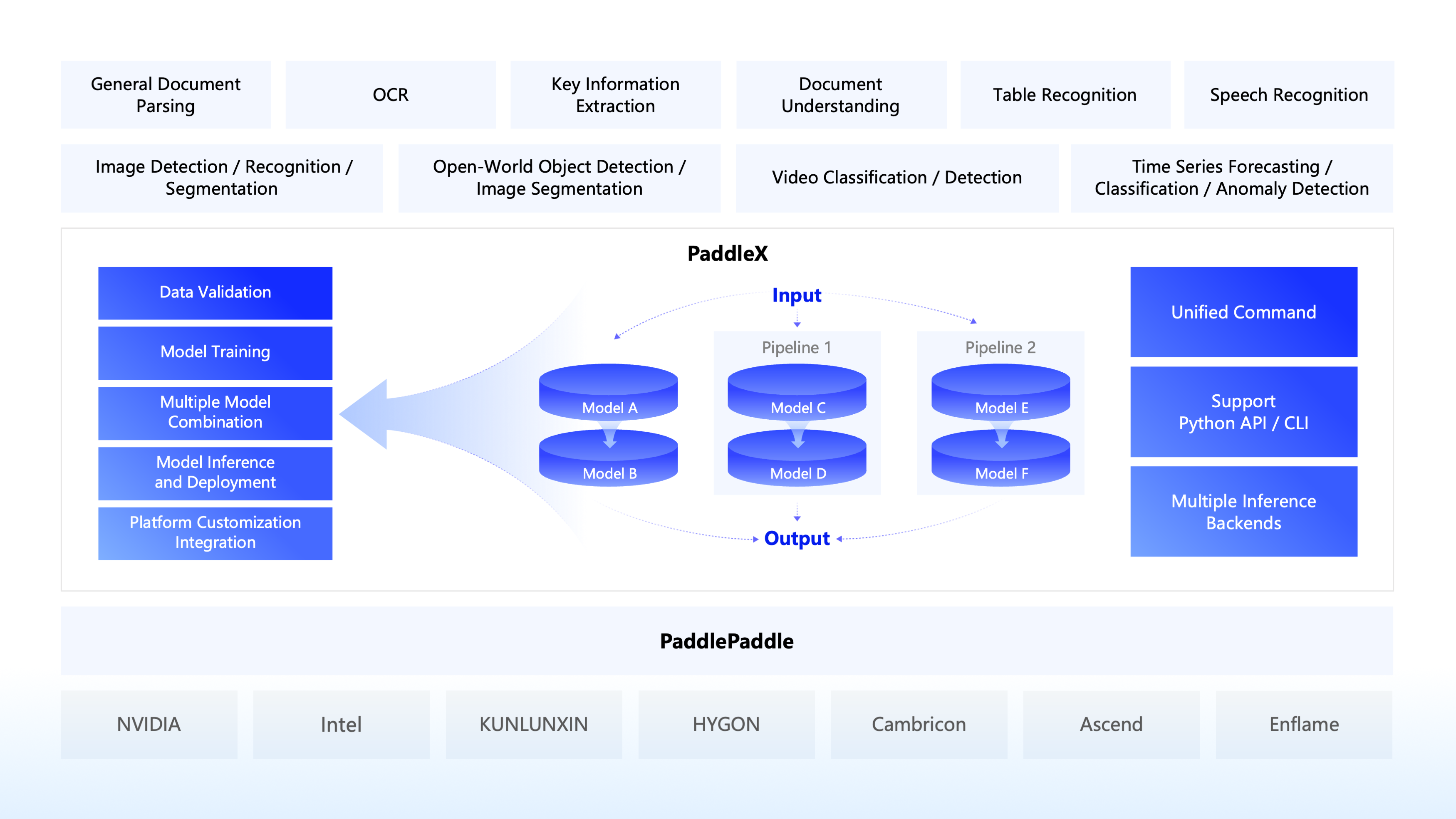
🎨 Rich Models One-click Call: Integrate over 200 PaddlePaddle models covering multiple key areas such as OCR, object detection, and time series forecasting into 33 pipelines. Experience the model effects quickly through easy Python API calls. Also supports 39 modules for easy model combination use by developers.
🚀 High Efficiency and Low barrier of entry: Achieve model full-process development based on graphical interfaces and unified commands, creating 8 featured model pipelines that combine large and small models, semi-supervised learning of large models, and multi-model fusion, greatly reducing the cost of iterating models.
🌐 Flexible Deployment in Various Scenarios: Support various deployment methods such as high-performance inference, serving, and lite deployment to ensure efficient operation and rapid response of models in different application scenarios.
🔧 Efficient Support for Mainstream Hardware: Support seamless switching of various mainstream hardware such as NVIDIA GPUs, Kunlun XPU, Ascend NPU, and Cambricon MLU to ensure efficient operation.
🔥🔥 2025.10.16, PaddleX v3.3.0 Released
- Added support for inference and deployment of PaddleOCR-VL and PP-OCRv5 multilingual models.
🔥🔥 2025.8.20, PaddleX v3.2.0 Released
-
Deployment Capability Upgrades:
- Fully supports PaddlePaddle framework versions 3.1.0 and 3.1.1.
- High-performance inference supports CUDA 12, with backend options including Paddle Inference and ONNX Runtime.
- High-stability serving solution is fully open-sourced, enabling users to customize Docker images and SDKs as needed.
- High-stability serving solution supports invocation via manually constructed HTTP requests, allowing client applications to be developed in any programming language.
-
Key Model Additions:
- Added training, inference, and deployment support for PP-OCRv5 English, Thai, and Greek recognition models. The PP-OCRv5 English model delivers an 11% improvement over the main PP-OCRv5 model in English scenarios, with the Thai model achieving an accuracy of 82.68% and the Greek model 89.28%.
-
Benchmark Enhancements:
- All pipelines support fine-grained benchmarking, enabling the measurement of end-to-end inference time as well as per-layer and per-module latency data to assist with performance analysis.
- Added key metrics such as inference latency and memory usage for commonly used configurations on mainstream hardware to the documentation, providing deployment reference for users.
-
Bug Fixes:
- Fixed an issue where invalid input image file formats could cause recursive calls.
- Resolved ineffective parameter settings for chart recognition, seal recognition, and document pre-processing in the configuration files for the PP-DocTranslation and PP-StructureV3 pipelines.
- Fixed an issue where PDF files were not properly closed after inference.
-
Other Updates:
- Added support for Windows users with NVIDIA 50-series graphics cards; users can install the corresponding PaddlePaddle framework version as per the installation guide.
- The PP-OCR model series now supports returning coordinates for individual characters.
- The
model_nameparameter inPaddlePredictorOptionhas been moved toPaddleInfer, improving usability. - Refactored the official model download logic, with new support for multiple model hosting platforms such as AIStudio and ModelScope.
🔥🔥 2025.6.28, PaddleX v3.1.0 Released
- Key Models:
- Added PP-OCRv5 Multilingual Text Recognition Model, supporting training and inference workflows for text recognition in 37 languages, including French, Spanish, Portuguese, Russian, Korean, and more. Average precision increased by over 30%.
- Upgraded PP-Chart2Table model in PP-StructureV3. Chart-to-table conversion capability further improved, with RMS-F1 on our internal evaluation set increased by 9.36 percentage points (71.24% -> 80.60%).
- Key Pipelines:
- Added document translation pipeline PP-DocTranslation based on PP-StructureV3 and ERNIE 4.5 Turbo. Supports translation of Markdown documents, various complex-layout PDF documents, and document images, with results saved as Markdown format documents.
🔥🔥 2025.5.20: PaddleX v3.0.0 Released
Core upgrades are as follows:
-
Rich Model Library:
- Extensive Model Coverage: PaddleX 3.0 includes 270+ models, covering diverse scenarios such as image/video classification/detection/segmentation, OCR, speech recognition, time series analysis, and more.
- Mature Solutions: Built on this robust model library, PaddleX 3.0 offers critical and production-ready AI solutions, including general document parsing, key information extraction, document understanding, table recognition, and general image recognition.
-
Unified Inference API & Enhanced Deployment Capabilities:
- Standardized Inference Interface: Reduces API fragmentation across model types, lowering the learning curve for users and accelerating enterprise adoption.
- Multi-Model Composition: Complex tasks can be efficiently tackled by combining different models, achieving synergistic performance (1+1>2).
- Upgraded Deployment: Unified commands now manage deployments for diverse models, supporting multi-GPU inference and multi-instance serving deployments.
-
Full Compatibility with PaddlePaddle Framework 3.0:
- Leveraging New Paddle 3.0 Features:
- Compiler-accelerated training: Enable by appending
-o Global.dy2st=Trueto training commands. Most GPU-based models see >10% speed gains, with some exceeding 30%. - Inference upgrades: Full adaptation to Paddle 3.0’s Program Intermediate Representation (PIR) enhances flexibility and compatibility. Static graph models now use
xxx.jsoninstead ofxxx.pdmodel.
- Compiler-accelerated training: Enable by appending
- ONNX Model Support: Seamless format conversion via the Paddle2ONNX plugin.
- Leveraging New Paddle 3.0 Features:
-
Flagship Capabilities:
- PP-OCRv5: Powers multi-hardware inference, multi-backend support, and serving deployments for this industry-leading OCR system.
- PP-StructureV3: Orchestrates 15+ models in hybrid (serial/parallel) pipelines, achieving SOTA accuracy on OmniDocBench.
- PP-ChatOCRv4: Integrates with PP-DocBee2 and ERNIE 4.5Turbo, boosting key information extraction accuracy by 15.7 percentage points over the previous generation.
-
Multi-Hardware Support:
- Broad Compatibility: Training and inference supported on NVIDIA, Intel, Apple M-series, Kunlunxin, Ascend, Cambricon, Hygon, Enflame, and more.
- Ascend-Optimized: 200+ fully adapted models, including 21 OM-accelerated inference models, plus key solutions like PP-OCRv5 and PP-StructureV3.
- Kunlunxin-Optimized: Critical classification, detection, and OCR models (including PP-OCRv5) are fully supported.
PaddleX is dedicated to achieving pipeline-level model training, inference, and deployment. A pipeline refers to a series of predefined development processes for specific AI tasks, which includes a combination of single models (single-function modules) capable of independently completing a certain type of task.
All pipelines of PaddleX support online experience on AI Studio and local fast inference. You can quickly experience the effects of each pre-trained pipeline. If you are satisfied with the effects of the pre-trained pipeline, you can directly perform high-performance inference / serving / edge deployment on the pipeline. If not satisfied, you can also Custom Development to improve the pipeline effect. For the complete pipeline development process, please refer to the PaddleX pipeline Development Tool Local Use Tutorial.
In addition, PaddleX provides developers with a full-process efficient model training and deployment tool based on a cloud-based GUI. Developers do not need code development, just need to prepare a dataset that meets the pipeline requirements to quickly start model training. For details, please refer to the tutorial "Developing Industrial-level AI Models with Zero Barrier".
❗Note: The above capabilities are implemented based on GPU/CPU. PaddleX can also perform local inference and custom development on mainstream hardware such as Kunlunxin, Ascend, Cambricon, and HYGON. The table below details the support status of the pipelines. For specific supported model lists, please refer to the Model List (Kunlunxin XPU)/Model List (Ascend NPU)/Model List (Cambricon MLU)/Model List (HYGON DCU). We are continuously adapting more models and promoting the implementation of high-performance and serving on mainstream hardware.
🔥🔥 Support for Domestic Hardware Capabilities
| Pipeline | Ascend 910B | Kunlunxin R200/R300 | Cambricon MLU370X8 | HYGON Z100 |
|---|---|---|---|---|
| OCR | ✅ | ✅ | ✅ | 🚧 |
| Table Recognition | ✅ | 🚧 | 🚧 | 🚧 |
| Object Detection | ✅ | ✅ | ✅ | 🚧 |
| Instance Segmentation | ✅ | 🚧 | ✅ | 🚧 |
| Image Classification | ✅ | ✅ | ✅ | ✅ |
| Semantic Segmentation | ✅ | ✅ | ✅ | ✅ |
| Time Series Forecasting | ✅ | ✅ | ✅ | 🚧 |
| Time Series Anomaly Detection | ✅ | 🚧 | 🚧 | 🚧 |
| Time Series Classification | ✅ | 🚧 | 🚧 | 🚧 |
| Multi-label Image Classification | ✅ | 🚧 | 🚧 | ✅ |
| Pedestrian Attribute Recognition | ✅ | 🚧 | 🚧 | 🚧 |
| Vehicle Attribute Recognition | ✅ | 🚧 | 🚧 | 🚧 |
| Image Recognition | ✅ | 🚧 | ✅ | ✅ |
| Seal Recognition | ✅ | 🚧 | 🚧 | 🚧 |
| Image Anomaly Detection | ✅ | ✅ | ✅ | ✅ |
| Face Recognition | ✅ | ✅ | ✅ | ✅ |
❗Before installing PaddleX, please ensure that you have a basic Python runtime environment (Note: Currently supports Python 3.8 to Python 3.13). The PaddleX 3.0.x version depends on PaddlePaddle version 3.0.0 and above. Please make sure the version compatibility is maintained before use.
- Installing PaddlePaddle
# CPU
python -m pip install paddlepaddle==3.3.0 -i https://www.paddlepaddle.org.cn/packages/stable/cpu/

# gpu,requires GPU driver version ≥450.80.02 (Linux) or ≥452.39 (Windows)
 python -m pip install paddlepaddle-gpu==3.3.0 -i https://www.paddlepaddle.org.cn/packages/stable/cu118/

# gpu,requires GPU driver version ≥550.54.14 (Linux) or ≥550.54.14 (Windows)
 python -m pip install paddlepaddle-gpu==3.3.0 -i https://www.paddlepaddle.org.cn/packages/stable/cu126/
❗No need to focus on the CUDA version on the physical machine, only the GPU driver version needs attention. For more information on PaddlePaddle Wheel versions, please refer to the PaddlePaddle Official Website.
- Installing PaddleX
pip install "paddlex[base]"❗For more installation methods, refer to the PaddleX Installation Guide.
One command can quickly experience the pipeline effect, the unified CLI format is:
paddlex --pipeline [Pipeline Name] --input [Input Image] --device [Running Device]Each Pipeline in PaddleX corresponds to specific parameters, which you can view in the respective Pipeline documentation for detailed explanations. Each Pipeline requires specifying three necessary parameters:
pipeline: The name of the Pipeline or the configuration file of the Pipelineinput: The local path, directory, or URL of the input file (e.g., an image) to be processeddevice: The hardware device and its index to use (e.g.,gpu:0indicates using the 0th GPU), or you can choose to use NPU (npu:0), XPU (xpu:0), CPU (cpu), etc.
For example, using the OCR pipeline:
paddlex --pipeline OCR \
        --input https://paddle-model-ecology.bj.bcebos.com/paddlex/imgs/demo_image/general_ocr_002.png \
        --use_doc_orientation_classify False \
        --use_doc_unwarping False \
        --use_textline_orientation False \
        --save_path ./output \
        --device gpu:0
👉 Click to view the running result
{'res': {'input_path': 'general_ocr_002.png', 'page_index': None, 'model_settings': {'use_doc_preprocessor': False, 'use_textline_orientation': False}, 'doc_preprocessor_res': {'input_path': None, 'model_settings': {'use_doc_orientation_classify': True, 'use_doc_unwarping': False}, 'angle': 0},'dt_polys': [array([[ 3, 10],
       [82, 10],
       [82, 33],
       [ 3, 33]], dtype=int16), ...], 'text_det_params': {'limit_side_len': 960, 'limit_type': 'max', 'thresh': 0.3, 'box_thresh': 0.6, 'unclip_ratio': 2.0}, 'text_type': 'general', 'textline_orientation_angles': [-1, ...], 'text_rec_score_thresh': 0.0, 'rec_texts': ['www.99*', ...], 'rec_scores': [0.8980069160461426,  ...], 'rec_polys': [array([[ 3, 10],
       [82, 10],
       [82, 33],
       [ 3, 33]], dtype=int16), ...], 'rec_boxes': array([[  3,  10,  82,  33], ...], dtype=int16)}}
The visualization result is as follows:
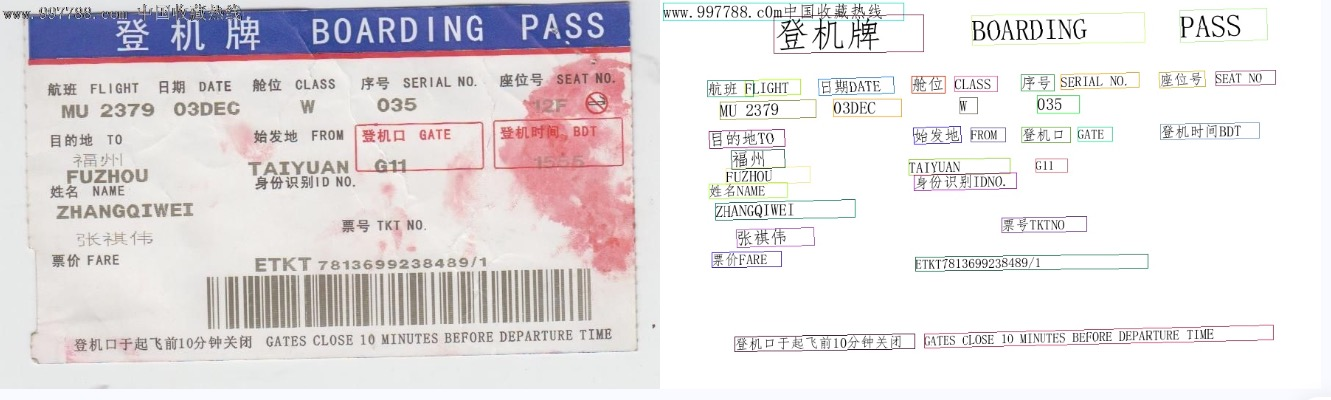
To use the command line for other pipelines, simply adjust the pipeline parameter to the name of the corresponding pipeline and modify the parameters accordingly. Below are the commands for each pipeline:
👉 More CLI usage for pipelines
| Pipeline Name | Command |
|---|---|
| General Image Classification | paddlex --pipeline image_classification --input https://paddle-model-ecology.bj.bcebos.com/paddlex/imgs/demo_image/general_image_classification_001.jpg --device gpu:0 --save_path ./output/ |
| General Object Detection | paddlex --pipeline object_detection --input https://paddle-model-ecology.bj.bcebos.com/paddlex/imgs/demo_image/general_object_detection_002.png --threshold 0.5 --save_path ./output/ --device gpu:0 |
| General Instance Segmentation | paddlex --pipeline instance_segmentation --input https://paddle-model-ecology.bj.bcebos.com/paddlex/imgs/demo_image/general_instance_segmentation_004.png --threshold 0.5 --save_path ./output --device gpu:0 |
| General Semantic Segmentation | paddlex --pipeline semantic_segmentation --input https://paddle-model-ecology.bj.bcebos.com/paddlex/PaddleX3.0/application/semantic_segmentation/makassaridn-road_demo.png --target_size -1 --save_path ./output --device gpu:0 |
| Image Multi-label Classification | paddlex --pipeline image_multilabel_classification --input https://paddle-model-ecology.bj.bcebos.com/paddlex/imgs/demo_image/general_image_classification_001.jpg --save_path ./output --device gpu:0 |
| Small Object Detection | paddlex --pipeline small_object_detection --input https://paddle-model-ecology.bj.bcebos.com/paddlex/imgs/demo_image/small_object_detection.jpg --threshold 0.5 --save_path ./output --device gpu:0 |
| Image Anomaly Detection | paddlex --pipeline anomaly_detection --input https://paddle-model-ecology.bj.bcebos.com/paddlex/imgs/demo_image/uad_grid.png --save_path ./output --device gpu:0 |
| Pedestrian Attribute Recognition | paddlex --pipeline pedestrian_attribute_recognition --input https://paddle-model-ecology.bj.bcebos.com/paddlex/imgs/demo_image/pedestrian_attribute_002.jpg --save_path ./output/ --device gpu:0 |
| Vehicle Attribute Recognition | paddlex --pipeline vehicle_attribute_recognition --input https://paddle-model-ecology.bj.bcebos.com/paddlex/imgs/demo_image/vehicle_attribute_002.jpg --save_path ./output/ --device gpu:0 |
| 3D Multi-modal Fusion Detection | paddlex --pipeline 3d_bev_detection --input https://paddle-model-ecology.bj.bcebos.com/paddlex/det_3d/demo_det_3d/nuscenes_demo_infer.tar --device gpu:0 --save_path ./output/ |
| Human Keypoint Detection | paddlex --pipeline human_keypoint_detection --input https://paddle-model-ecology.bj.bcebos.com/paddlex/imgs/demo_image/keypoint_detection_001.jpg --det_threshold 0.5 --save_path ./output/ --device gpu:0 |
| Open Vocabulary Detection | paddlex --pipeline open_vocabulary_detection --input https://paddle-model-ecology.bj.bcebos.com/paddlex/imgs/demo_image/open_vocabulary_detection.jpg --prompt "bus . walking man . rearview mirror ." --thresholds "{'text_threshold': 0.25, 'box_threshold': 0.3}" --save_path ./output --device gpu:0 |
| Open Vocabulary Segmentation | paddlex --pipeline open_vocabulary_segmentation --input https://paddle-model-ecology.bj.bcebos.com/paddlex/imgs/demo_image/open_vocabulary_segmentation.jpg --prompt_type box --prompt "[[112.9,118.4,513.8,382.1],[4.6,263.6,92.2,336.6],[592.4,260.9,607.2,294.2]]" --save_path ./output --device gpu:0 |
| Rotated Object Detection | paddlex --pipeline rotated_object_detection --input https://paddle-model-ecology.bj.bcebos.com/paddlex/imgs/demo_image/rotated_object_detection_001.png --threshold 0.5 --save_path ./output --device gpu:0 |
| General OCR | paddlex --pipeline OCR --input https://paddle-model-ecology.bj.bcebos.com/paddlex/imgs/demo_image/general_ocr_002.png --use_doc_orientation_classify False --use_doc_unwarping False --use_textline_orientation False --save_path ./output --device gpu:0 |
| Document Image Preprocessor | paddlex --pipeline doc_preprocessor --input https://paddle-model-ecology.bj.bcebos.com/paddlex/demo_image/doc_test_rotated.jpg --use_doc_orientation_classify True --use_doc_unwarping True --save_path ./output --device gpu:0 |
| General Table Recognition | paddlex --pipeline table_recognition --input https://paddle-model-ecology.bj.bcebos.com/paddlex/imgs/demo_image/table_recognition.jpg --save_path ./output --device gpu:0 |
| General Table Recognition v2 | paddlex --pipeline table_recognition_v2 --input https://paddle-model-ecology.bj.bcebos.com/paddlex/imgs/demo_image/table_recognition.jpg --save_path ./output --device gpu:0 |
| General Layout Parsing | paddlex --pipeline layout_parsing --input https://paddle-model-ecology.bj.bcebos.com/paddlex/imgs/demo_image/demo_paper.png --use_doc_orientation_classify False --use_doc_unwarping False --use_textline_orientation False --save_path ./output --device gpu:0 |
| General Layout Parsing v2 | paddlex --pipeline PP-StrucutrV3 --input https://paddle-model-ecology.bj.bcebos.com/paddlex/imgs/demo_image/pp_structure_v3_demo.png --use_doc_orientation_classify False --use_doc_unwarping False --use_textline_orientation False --save_path ./output --device gpu:0 |
| Formula Recognition | paddlex --pipeline formula_recognition --input https://paddle-model-ecology.bj.bcebos.com/paddlex/demo_image/general_formula_recognition.png --use_layout_detection True --use_doc_orientation_classify False --use_doc_unwarping False --layout_threshold 0.5 --layout_nms True --layout_unclip_ratio 1.0 --layout_merge_bboxes_mode large --save_path ./output --device gpu:0 |
| Seal Text Recognition | paddlex --pipeline seal_recognition --input https://paddle-model-ecology.bj.bcebos.com/paddlex/imgs/demo_image/seal_text_det.png --use_doc_orientation_classify False --use_doc_unwarping False --device gpu:0 --save_path ./output |
| Time Series Forecasting | paddlex --pipeline ts_forecast --input https://paddle-model-ecology.bj.bcebos.com/paddlex/ts/demo_ts/ts_fc.csv --device gpu:0 --save_path ./output |
| Time Series Anomaly Detection | paddlex --pipeline ts_anomaly_detection --input https://paddle-model-ecology.bj.bcebos.com/paddlex/ts/demo_ts/ts_ad.csv --device gpu:0 --save_path ./output |
| Time Series Classification | paddlex --pipeline ts_classification --input https://paddle-model-ecology.bj.bcebos.com/paddlex/ts/demo_ts/ts_cls.csv --device gpu:0 --save_path ./output |
| Multilingual Speech Recognition | paddlex --pipeline multilingual_speech_recognition --input https://paddlespeech.bj.bcebos.com/PaddleAudio/zh.wav --save_path ./output --device gpu:0 |
| General Video Classification | paddlex --pipeline video_classification --input https://paddle-model-ecology.bj.bcebos.com/paddlex/videos/demo_video/general_video_classification_001.mp4 --topk 5 --save_path ./output --device gpu:0 |
| General Video Detection | paddlex --pipeline video_detection --input https://paddle-model-ecology.bj.bcebos.com/paddlex/videos/demo_video/HorseRiding.avi --device gpu:0 --save_path ./output |
A few lines of code can complete the quick inference of the pipeline, the unified Python script format is as follows:
from paddlex import create_pipeline

pipeline = create_pipeline(pipeline=[Pipeline Name])
output = pipeline.predict([Input Image Name])
for res in output:
    res.print()
    res.save_to_img("./output/")
    res.save_to_json("./output/")
The following steps are executed:
create_pipeline()instantiates the pipeline object- Passes the image and calls the
predict()method of the pipeline object for inference prediction - Processes the prediction results
To use the Python script for other pipelines, simply adjust the pipeline parameter in the create_pipeline() method to the name of the corresponding pipeline and modify the parameters accordingly. Below are the parameter names and detailed usage explanations for each pipeline:
👉 More Python script usage for pipelines
⬇️ Installation
🔥 Pipeline Usage
-
📝 Information Extraction
-
🎥 Computer Vision
- 🖼️ Image Classification Pipeline Tutorial
- 🎯 Object Detection Pipeline Tutorial
- 📋 Instance Segmentation Pipeline Tutorial
- 🗣️ Semantic Segmentation Pipeline Tutorial
- 🏷️ Multi-label Image Classification Pipeline Tutorial
- 🔍 Small Object Detection Pipeline Tutorial
- 🖼️ Image Anomaly Detection Pipeline Tutorial
- 🌐 3D Bev Detection Pipeline Tutorial
- 🔍 Human Keypoint Detection Pipeline Tutorial
- 📚 Open Vocabulary Detection Pipeline Tutorial
- 🎨 Open Vocabulary Segmentation Pipeline Tutorial
- 🔄 Rotated Object Detection Pipeline Tutorial
- 🖼️ Image Recognition Pipeline Tutorial
- 🚶♀️ Pedestrian Attribute Recognition Pipeline Tutorial
- 🚗 Vehicle Attribute Recognition Pipeline Tutorial
- 🆔 Face Recognition Pipeline Tutorial
-
🎤 Speech Recognition
-
🌐 Multimodal Vision-Language Model
⚙️ Module Usage
-
🔍 OCR
- 📝 Text Detection Module Tutorial
- 🔖 Seal Text Detection Module Tutorial
- 🔠 Text Recognition Module Tutorial
- 🗺️ Layout Parsing Module Tutorial
- 📊 Table Structure Recognition Module Tutorial
- 📊 Table Cell Detection Module Tutorial
- 📈 Table Classification Module Tutorial
- 📄 Document Image Orientation Classification Tutorial
- 🔧 Document Image Unwarp Module Tutorial
- 📝 Text Line Orientation Classification Module Tutorial
- 📐 Formula Recognition Module Tutorial
-
🏞️ Image Features
-
🎯 Object Detection
-
🎤 Speech Recognition
-
🌐 Multimodal Vision-Language Model
-
📄 Related Instructions
🏗️ Pipeline Deployment
🖥️ Multi-Hardware Usage
📊 Data Annotation Tutorials
📑 Pipeline List
📄 Model List
📝 Tutorials & Examples
- 📑 PP-ChatOCRv3 Model Line —— Paper Document Information Extract Tutorial
- 📑 PP-ChatOCRv3 Model Line —— Seal Information Extract Tutorial
- 📑 Document Scene Information Extraction v3 (PP-ChatOCRv3_doc) -- DeepSeek Edition
- 🚗 General OCR Model Line —— License Plate Recognition Tutorial
- ✍️ General OCR Model Line —— Handwritten Chinese Character Recognition Tutorial
- 🔍 Practical Guide to Formula Recognition Model Production Line
- 💻 Layout Detection Model Pipeline Tutorial —— Large Model Training Data Construction Tutorial
- 😊 Face Recognition Pipeline —— Cartoon Face Recognition Tutorial
- 🖼️ General Image Classification Model Line —— Garbage Classification Tutorial
- 🧩 General Instance Segmentation Model Line —— Remote Sensing Image Instance Segmentation Tutorial
- 👥 General Object Detection Model Line —— Pedestrian Fall Detection Tutorial
- 👗 General Object Detection Model Line —— Fashion Element Detection Tutorial
- 🗣️ General Semantic Segmentation Model Line —— Road Line Segmentation Tutorial
- 🛠️ Time Series Anomaly Detection Model Line —— Equipment Anomaly Detection Application Tutorial
- 🎢 Time Series Classification Model Line —— Heartbeat Monitoring Time Series Data Classification Application Tutorial
- 🔋 Time Series Forecasting Model Line —— Long-term Electricity Consumption Forecasting Application Tutorial
- 🔧 Pipeline Deployment Tutorial
For answers to some common questions about our project, please refer to the FAQ. If your question has not been answered, please feel free to raise it in Issues.
We warmly welcome and encourage community members to raise questions, share ideas, and feedback in the Discussions section. Whether you want to report a bug, discuss a feature request, seek help, or just want to keep up with the latest project news, this is a great platform.
The release of this project is licensed under the Apache 2.0 license.