Releases: OpenToontownTools/OpenLevelEditor
1.1.6

Important Notice
If you are using the provided Panda3D and DLL files download from the readme file, please redownload from here. This is an update to python 3.9, with newer panda fixes, including a major fix for the editor, along with newer DLL files for the DNA reader.
If you are not using the provided engine, please update your engine with this important fix commit, and optionally this visual tweak
Improvements
- Added Suit Building Previews 3d2ca5b
- Accessible by pressing Alt-S
- Also accessible via the TAB radial menu b4bfaba
- This feature is crucial for developers, as it allows you to ensure the suit buildings positions work in the streets, and to make sure flat buildings don't clip through elevators. Watch an example here.
- There is currently an issue where modifying landmark building parts (like signs and doors) create a duplicate suit_building node which affects this feature. Please reload your levels before using this feature. If you haven't moved the landmark building after making a change to it, this shouldn't be a problem.
- Added Box Selection 5861c06
- Accessible by pressing S, then holding mouse click and dragging
- This is only temporary, and the 'press s' step will be removed
- Accessible by pressing S, then holding mouse click and dragging
Fixes
1.1.5
Important Notice
If you are using the provided Panda3D and DLL files download from the readme file, please redownload from here. This is an update to python 3.9, with newer panda fixes, including a major fix for the editor, along with newer DLL files for the DNA reader.
If you are not using the provided engine, please update your engine with this important fix commit, and optionally this visual tweak
Improvements
- Updated Corporate Clash compiler to support changes made to the DNA reader in Beta 1.1.3 18575cf
1.1.4
Important Notice
If you are using the provided Panda3D and DLL files download from the readme file, please redownload from here. This is an update to python 3.9, with newer panda fixes, including a major fix for the editor, along with newer DLL files for the DNA reader.
Improvements
- Added small popup notifications to the top right corner. These appear with the following actions:
- Opening and Saving files
- Toggling Collision View modes
- Reparenting Objects
- Removing Objects
- Zone labels no longer show up in the SceneGraph
- The visgroup editor now properly updates the colors to show the selected visgroup when you make changes
- Tweaks to the --experimental section of the UI
Fixes
- Using the PLACER no longer spawns a new instance of DirectSession which would break camera controls (Requires this Panda3D fix; this is included in the pre-packaged Panda3D)
1.1.3
Improvements
- Implemented a YOTT style filter option under the ADVANCED menu while using the --server clash launch option 48f5e40
- UI Tweaks d46fa84
- Updated menu bar to include separators to group options clearly
- Various style tweaks
- Reorganized the bottom of the panel to make it more compact and organized
- Space bar / insert keys for duplication should now work properly (#13 | @loonaticx)
- Holiday support d09f1de
- Each zone .json file now supports defining halloween and winter storage files
- Accessible by using the --holiday launch option (--holiday halloween or --holiday winter)
Fixes
- Saving styles now properly works f943f41
Important notice
- I have committed a couple of fixes to libtoontown. These fixes for the editor can be found here These fixes are crucial if you are developing for a server which has their own building models (Corporate Clash for example). There are also a ton of visual flickering fixes found there as well.
- If you are using my prepackaged copy of panda3d, you can download an updated one below
1.1.2
Improvements
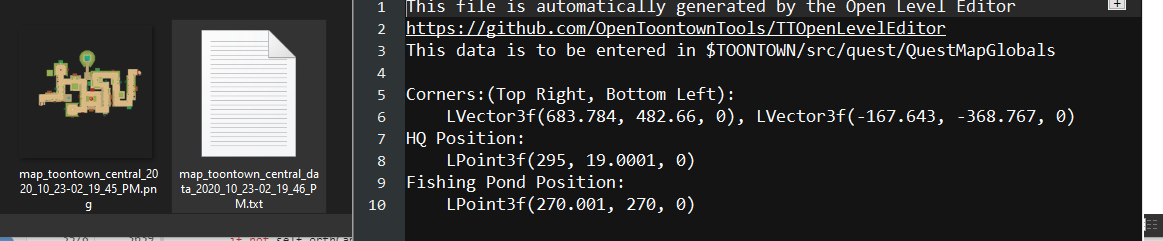
- Shift + F12 map rendering now automatically calculates positioning and scaling
- You no longer need to switch to orthographic, or position the camera yourself
- Shift + F12 now writes corner positions, hq position, and fishing pond positions to a text file
Important notice
- I have committed a couple of fixes to libtoontown. These fixes for the editor can be found here
- If you are using my prepackaged copy of panda3d, you can download an updated one below
1.1.1
Improvements
- Implemented super easy map rendering! Takes less than 20 seconds to create a high quality accurate map! See how here
- Regular screenshots will now hide insertion markers prior to taking a screenshot
- Misc code cleanup
Important notice
- I have committed a couple of fixes to libtoontown. These fixes for the editor can be found here
- If you are using my prepackaged copy of panda3d, you can download an updated one below
1.1.0 Hotfix 1
1.1.0 Hotfix 1
- Fix a compiler crash
Original 1.1.0 notes:
Major Feature: Compilers!
- The level editor now includes a --compiler launch option which can be used to auto compile your dna file to .pdna.
- For servers using a recent c++ version of libpandadna, use --compiler libpandadna
- For Corporate Clash (or other servers using the legacy python libpandadna reader), use --compiler clash
Other improvements
- Removed CVS support
- Updated tab names to be a bit more consistent
Just to recap, here are most of the new features the editor currently has compared to the only previously released editor that you could find:
- Fully updated to the latest version of Panda3D and Python 3
- This means you can now load custom props without having to convert them to panda 1.6 compatible bam files
- Now that it is not a hacky panda3d build, there are many fixes to come with that:
- Resizing TK windows no longer crashes
- Spawning a Toon HQ no longer crashes
- And a ton of other random crashes are fixed
- You now specify which hood storages you want to use with the --hoods argument
- Control-S can now be used to save (currently only if the engine window is selected)
- Collision Boundaries can now be displayed using Control-C
- JSON based modular custom zone management (read here)
- Animated Props support (Right Click to change animations)
- Interactive Props support
- Animated Buildings support
- Server unique features support (accessible with --server option. Currently only clash has unique options, like the uncapturable building type)
- User-friendliness improvements (help dialogs, like the controls dialog under HELP)
- Debug injector (under advanced)
- Various UI improvements
- Building Width can now be adjusted while using maya cam (Shift + Right Click)
- SceneGraph now displays nodes as their DNAType as opposed to PandaNode
- The TopLevel node is now a DNAGroup as opposed to a DNANode for consistency between custom levels and Disney's levels
- Editor includes some higher quality fonts
- You can pass a DNA file as an argument to load it upon startup
- e.g.
python -m ttle --hoods TT phase_5/dna/toontown_central_2100.dna will load Silly Street upon startup
- e.g.
- All COGHQs now go by their IN-GAME 4 letter abbreviation (e.g. CM is now CBHQ)
- Holding tab brings up a radial menu with some convenience access to some features
- Many bug fixes and stability improvements
Special thanks to all contributors!
1.1.0
Major Feature: Compilers!
- The level editor now includes a --compiler launch option which can be used to auto compile your dna file to .pdna.
- For servers using a recent c++ version of libpandadna, use --compiler libpandadna
- For Corporate Clash (or other servers using the legacy python libpandadna reader), use --compiler clash
Other improvements
- Removed CVS support
- Updated tab names to be a bit more consistent
Just to recap, here are most of the new features the editor currently has compared to the only previously released editor that you could find:
- Fully updated to the latest version of Panda3D and Python 3
- This means you can now load custom props without having to convert them to panda 1.6 compatible bam files
- Now that it is not a hacky panda3d build, there are many fixes to come with that:
- Resizing TK windows no longer crashes
- Spawning a Toon HQ no longer crashes
- And a ton of other random crashes are fixed
- You now specify which hood storages you want to use with the --hoods argument
- Control-S can now be used to save (currently only if the engine window is selected)
- Collision Boundaries can now be displayed using Control-C
- JSON based modular custom zone management (read here)
- Animated Props support (Right Click to change animations)
- Interactive Props support
- Animated Buildings support
- Server unique features support (accessible with --server option. Currently only clash has unique options, like the uncapturable building type)
- User-friendliness improvements (help dialogs, like the controls dialog under HELP)
- Debug injector (under advanced)
- Various UI improvements
- Building Width can now be adjusted while using maya cam (Shift + Right Click)
- SceneGraph now displays nodes as their DNAType as opposed to PandaNode
- The TopLevel node is now a DNAGroup as opposed to a DNANode for consistency between custom levels and Disney's levels
- Editor includes some higher quality fonts
- You can pass a DNA file as an argument to load it upon startup
- e.g.
python -m ttle --hoods TT phase_5/dna/toontown_central_2100.dna will load Silly Street upon startup
- e.g.
- All COGHQs now go by their IN-GAME 4 letter abbreviation (e.g. CM is now CBHQ)
- Holding tab brings up a radial menu with some convenience access to some features
- Many bug fixes and stability improvements
Special thanks to all contributors!
1.0.9
Improvements
- Added a Debug Python injector under the
Advanceddropdown menu (#9 | @loonaticx) - Improved the right click scroll list UI
- Now shows more on the screen at once
- Is now wider to support longer names
- Now has icons instead of 'DEC' and 'INC' for scrolling
- Added a global radial menu for convenience features (more options will come in the future)
- Accessible by holding tab
- The engine window now appears in the center of the screen
Fixes
- Some tabs will no longer attempt to load if there are no items in any of the loaded storages (e.g. if there are no animated props, the animated props page will just show a warning instead of causing a crash)
Notice
- Panda3D has now officially pushed a fix, so you no longer need a modified version of panda3D if you intend to build it yourself. You can still use my attached build, existing users aren't affected and don't have to do anything. Panda3D/b507c88
1.0.8
Improvements
Complete overhaul to how zones are loaded! (#6 | @Benjamin8693 + @drewc5131)
-
You can now easily implement new zones for your game!
- Go into the leveleditor/hoods/ folder, add a file with the shorthand abbreviation, and fill it out. Then add it to the --hoods launch option in your start.bat file

- Go into the leveleditor/hoods/ folder, add a file with the shorthand abbreviation, and fill it out. Then add it to the --hoods launch option in your start.bat file
-
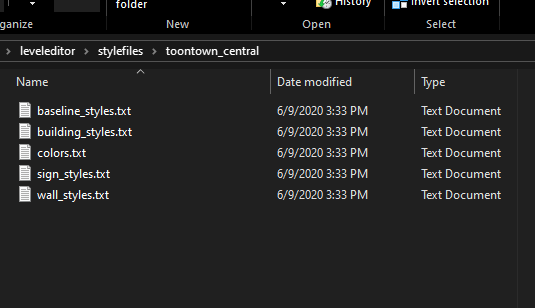
Level style files are now organized into folders, with the individual files no longer containing the long hand zone names
Other Changes
- Along with the above changes, some zone names have had their names simplified / updated
- ALL Cog HQs now go by their OFFICIAL 4 letter abbreviation
- e.g. CM is now CBHQ
- Daisy Gardens' long hand has been adjusted from
daisys_gardentodaisy_gardens
- ALL Cog HQs now go by their OFFICIAL 4 letter abbreviation
- The
--clashoption has been replaced with a more general--serveroption. This will pave the way for future updates tailored to specific games other than Corporate Clash. (#6 | @Benjamin8693)- Currently there are 4 modes:
online,rewritten,clash, andoffline.- Currently only
clashhas functional differences, the rest will all function identical.
- Currently only
- Currently there are 4 modes: