A terminal music player written in Rust, powered by Ratatui — native Spotify streaming, synced lyrics, a real-time audio visualizer, and optional Local, Subsonic/Navidrome, Internet Radio, and YouTube sources. Spotify is optional.
A community-maintained, actively developed fork of spotify-tui.







- Features
- Installation
- Quickstart
- Music Sources
- Native Streaming
- Configuration
- Plugins
- Performance
- Playback Requirements
- Using with spotifyd
- Migrating from spotify-tui
- Libraries used
- Development
- Help Wanted
- Maintainer
- spotatui Contributors
- Upstream Contributors (spotify-tui)
- Star History
- Roadmap
- Multiple sources — Spotify optional. Play from Spotify, Local Files, a Subsonic/Navidrome server, Internet Radio, or YouTube. The free sources need no Spotify account; press
dto switch between them at any time. - Native streaming. Play Spotify audio directly, no official app or spotifyd required — spotatui appears as its own Spotify Connect device (Premium required).
- Synced lyrics. Line-by-line lyrics that follow playback.
- Real-time audio visualizer. A system-wide FFT visualizer (press
v) that reacts to whatever is playing. - Cross-source play queue. Press
zon any track to queue it — the queue plays across every source before your current context resumes. - Lua plugins. Extend spotatui with event hooks, commands, keybindings, popups, and theming.
- Listening history & recap. spotatui keeps a local play history and can generate a shareable HTML recap (
spotatui history recap). - Full CLI. Most of what the UI does is scriptable — playback, search, playlists, shell completions. Run
spotatui --help. - Lightweight. ~78 MB RAM while streaming, versus a full Electron client. See Performance.
Spotify is optional. On first launch spotatui asks which source you want to use. YouTube, Subsonic/Navidrome, Internet Radio, and Local Files all work with no Spotify account. Spotify Premium is only needed for the Spotify source; you can add it anytime from the
dmenu.
# Homebrew (macOS only)
brew tap LargeModGames/spotatui
brew install spotatui

# Winget (Windows)
winget install spotatui

# Cargo
cargo install --locked spotatui

# Arch Linux (AUR) - pre-built binary (faster)
yay -S spotatui-bin

# Arch Linux (AUR) - build from source
yay -S spotatui

# Void Linux (Unofficial Repo)
echo repository=https://raw.githubusercontent.com/Event-Horizon-VL/blackhole-vl/repository-x86_64 | sudo tee /etc/xbps.d/20-repository-extra.conf
sudo xbps-install -S spotatui
# NixOS (Flake)
# Add spotatui to your flake inputs:
inputs = {
spotatui = {
url = "github:LargeModGames/spotatui";
inputs.nixpkgs.follows = "nixpkgs";
};
}
# Add the spotatui package from your inputs to your config:
{ inputs, ...}:{
# Your other configurations
environment.systemPackages = with pkgs; [
inputs.spotatui.packages.${pkgs.stdenv.hostPlatform.system}.default
];
}Or download pre-built binaries from GitHub Releases.
See the Installation Wiki for platform-specific requirements and building from source.
Run spotatui. On the first launch it asks which source to set up:
Welcome to spotatui! Choose your music source:

  1) Spotify        (needs login)
  2) YouTube        (free, needs the yt-dlp binary)
  3) Subsonic       (free, needs a Subsonic/Navidrome server)
  4) Internet Radio (free)
  5) Local Files    (free)
Pick a free source to skip Spotify entirely, or pick Spotify to run the auth wizard (you'll create a Spotify Developer app — see the Installation Wiki). Only sources compiled into your build are listed.
Once you're in:
- Press
?for the in-app help menu of all key events. - Press
dto open the Source & Device picker and switch sources. - Press
zon a track to queue it; open the queue withShift+Q. - Run
spotatui --helpfor the CLI. See the Keybindings Wiki for every shortcut.
A few CLI examples to get you started:
spotatui --completions zsh                       # Shell completions (bash, powershell, and more supported)
spotatui play --name "Your Playlist" --playlist --random  # Play a random song from a playlist
spotatui playback --toggle                       # Play/pause current playback
spotatui list --liked --limit 50                 # List your liked songs
spotatui history recap --period 30d --output ./recap.html # Generate a shareable listening recapStarted with a free source and want Spotify too? Press d, select Spotify, and spotatui opens your browser to log in without restarting — enabling browsing, playlists, and controlling external devices right away. Native (librespot) streaming still requires a restart, since it initializes at startup.
spotatui is a general music player, not just a Spotify client. Press d to open the Source & Device picker; the sidebar and search re-scope to the active source. Playback for these sources runs through spotatui's own audio engine, so volume control and the visualizer work exactly as they do for Spotify — and none of them need Spotify Premium.
| Source | What it does | Needs |
|---|---|---|
| Local Files | Browse and play a folder of audio files (FLAC, MP3, OGG, WAV, …) | Nothing; set local_music_path or use the OS music dir |
| Subsonic | Browse, search, and stream from any Subsonic-compatible server (Navidrome, Gonic, Airsonic, Funkwhale, …) | A server account |
| Internet Radio | Play icecast/shoutcast streams with live now-playing metadata; search the radio-browser.info directory (30k+ stations) | Nothing |
| YouTube | Search YouTube and play audio; build local playlists stored in a plain file | yt-dlp on your PATH (ffmpeg recommended) |
Resuming your last session: quit while playing from a non-Spotify source and spotatui restores that track and its position on the next launch, following the startup_behavior setting (continue, play, or pause).
Availability: included in the Linux and Windows release binaries. Not yet on macOS (the shared audio output path is disabled there pending a fix; contributions welcome). When building from source, enable them with cargo features:
cargo install --locked spotatui --features local-files,subsonic,internet-radio,youtubeEach source has a few config keys; the essentials are below, and the full reference lives in the Configuration Wiki.
Set a folder (defaults to the OS music directory), then pick Local Files in the d picker:
behavior:
local_music_path: "/home/you/Music"behavior:
subsonic_url: "https://music.example.com"
subsonic_username: "you"Prefer setting the password via the SPOTATUI_SUBSONIC_PASSWORD environment variable so it never sits in the config file in plaintext.
Search the radio-browser.info directory in-app (Enter plays a station directly), and press the save key (F by default) to keep a station in your sidebar. Saved stations live under behavior.radio_stations; the playbar shows a LIVE badge with the stream's now-playing title.
Requires the yt-dlp binary (ffmpeg recommended). No Google account, API key, or cookies — search and playback are anonymous. If playback breaks after a YouTube change, updating yt-dlp (yt-dlp -U) is the fix; no spotatui update needed.
Local YouTube playlists live in ~/.config/spotatui/youtube_playlists.yml, a plain human-editable file you can back up or share. Create one from the sidebar, add tracks with w, and play a playlist as a queue with Enter.
spotatui can play Spotify audio directly, without spotifyd or the official app — just run it and it appears as a Spotify Connect device.
- Premium account required
- Works with media keys, MPRIS (Linux), and macOS Now Playing
- Runs on our maintained librespot fork, which backports upstream fixes for Spotify's evolving audio delivery (e.g. the HTTP 530 CDN issue that silenced native playback)
See the Native Streaming Wiki for setup details.
The config file is at ${HOME}/.config/spotatui/config.yml. You can also configure spotatui in-app by pressing Alt-, to open Settings.
Nearly everything is customizable: keybindings, themes, icons, playbar button labels, status-line and window-title format templates, table columns (reorder/rename/resize), default sorting per screen, startup screen, and layout (sidebar/playbar position). Invalid values fall back to defaults with a logged warning — a config typo never blocks startup.
- Customization guide:
docs/configuration.md, with a commentedexamples/config.example.yml - Full config reference: Configuration Wiki
- Built-in themes (Spotify, Dracula, Nord, …): Themes Wiki
spotatui also stores local listening history at ${HOME}/.config/spotatui/history/listens.jsonl, which powers spotatui history recap. Short or skipped plays are stored but excluded from recap totals.
Enabled by default using the built-in spotatui application ID, so no setup is required. Optional overrides:
behavior:
  enable_discord_rpc: true
  discord_rpc_client_id: "your_client_id"
You can also override the app ID via SPOTATUI_DISCORD_APP_ID, or disable it in Settings or with behavior.enable_discord_rpc: false.
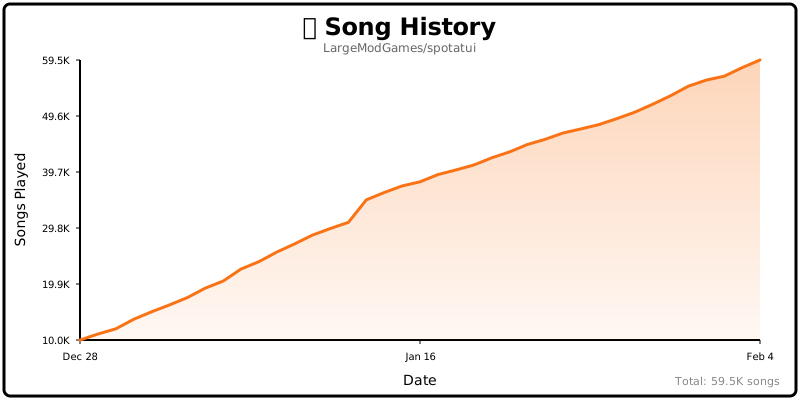
spotatui includes an opt-in global counter showing how many songs have been played by all users worldwide (the badge and chart at the top of this README). It is completely anonymous — no personal information, song names, artists, or listening history is collected; it only sends a simple increment when a new song starts. It is enabled by default and can be disabled with enable_global_song_count: false in ~/.config/spotatui/config.yml. This is purely a fun community metric with zero tracking of individual users.
Show what you're listening to as a live card on your GitHub profile. Create an account at spotatui.com, paste your sync token into Settings → sync_token, then pick a public username and enable the widget on your dashboard. Add this to your profile README:
[](https://spotatui.com)The card shows cover art, title, artist, a progress bar, and an animated equalizer while playing; internet radio gets a LIVE badge. Append ?theme=light for the light variant. Only your current track is public, and only after you opt in.
spotatui runs user-written Lua plugins. They react to playback events, add commands and key bindings, draw popups and playbar segments, restyle the theme, and make async HTTP requests. Install one published as a git repository (requires git):
spotatui plugin add owner/repo
spotatui plugin list
spotatui plugin update
spotatui plugin remove <name>
See PLUGINS.md for the ecosystem overview, examples/plugins/ for runnable examples, and docs/scripting.md for the full API reference.
spotatui is extremely lightweight compared to the official Electron client.
| Mode | RAM Usage |
|---|---|
| Native Streaming (Base) | ~78 MB |
| With Synced Lyrics | ~78 MB |
| With System-Wide Visualizer | ~80 MB |
Tested on Arch Linux (Hyprland).
The free sources (Local Files, Subsonic, Internet Radio, YouTube) play through spotatui's own audio engine and need no extra setup.
Spotify is different: it uses the Web API, which doesn't stream audio itself. To play Spotify tracks you need one of:
- Native Streaming — spotatui plays audio directly using its built-in streaming. See Native Streaming. (Recommended.)
- Official Spotify Client — have the official app open on your computer.
- spotifyd — a lightweight background alternative.
Playing Spotify tracks requires a Premium account. With a free Spotify account spotatui can authenticate and browse your library/search results, but playback actions (play/pause/seek/transfer) will not work in either native streaming or Web API playback control mode.
As of November 2024, Spotify removed access to certain API endpoints for new applications. The following features only work if your Spotify Developer application was created before November 27, 2024:
-
Related Artists — the "Related Artists" section on an artist page.
-
Audio Analysis — spotatui no longer depends on it. The audio visualizer (press
v) now uses local real-time FFT analysis of your system audio, so it works regardless of your app's creation date:Platform Status Notes Windows Works out of the box Uses WASAPI loopback Linux Works out of the box Uses PipeWire/PulseAudio monitor devices macOS Requires setup Needs a virtual audio device (see below) macOS: macOS doesn't natively expose system audio loopback. Install a virtual audio device like BlackHole (free) or Loopback (paid), route system audio through it, and set it as your default input device.
Note: The visualizer is system-wide — it captures all audio on your system, so it also reacts to YouTube videos, games, and any other source.
For more information, see Spotify's announcement about API changes.
Using with spotifyd
Note: If you're using native streaming, you don't need spotifyd!
Follow the spotifyd documentation to get set up. After that:
- Start the spotifyd daemon.
- Start
spotatui. - Press
dto open the device selection menu — the spotifyd "device" should appear (if not, check these docs).
If you used the original spotify-tui before:
- The binary name changed from
spttospotatui. - Config paths changed:
~/.config/spotify-tui/→~/.config/spotatui/.
You can copy your existing config:
mkdir -p ~/.config/spotatui
cp -r ~/.config/spotify-tui/* ~/.config/spotatui/
You may be asked to re-authenticate with Spotify the first time.
- ratatui - Terminal UI framework
- rspotify - Spotify Web API client
- librespot - Spotify Connect streaming (via our maintained fork spotatui-librespot, which backports fixes for Spotify's CDN changes)
- tokio - Async runtime
- crossterm - Terminal manipulation
- clap - CLI argument parsing
- Install OpenSSL
- Install Rust
- Install
xorg-dev(required for clipboard support) - Linux only: Install PipeWire development libraries (required for audio visualization)
# Debian/Ubuntu
sudo apt-get install libpipewire-0.3-dev libspa-0.2-dev

# Arch Linux
sudo pacman -S pipewire

# Fedora
sudo dnf install pipewire-devel

# NixOS
nix develop github:LargeModGames/spotatui
- Clone or fork this repo and
cdto it - And then
cargo run
See CONTRIBUTING.md for pull request guidelines.
You might get a linking error. If so, you'll probably need to install additional dependencies required by the clipboard package:
sudo apt-get install -y -qq pkg-config libssl-dev libxcb1-dev libxcb-render0-dev libxcb-shape0-dev libxcb-xfixes0-devspotatui is currently maintained by a solo developer. More contributors would be hugely appreciated — and you don't need to write code to help:
- Star the repo to help others discover the project
- Report bugs or request features in Issues
- Join the community in Discussions
- Submit a PR for code, docs, or themes
See CONTRIBUTING.md for more details!
Maintained by LargeModGames (@LargeModGames on Twitter).
Originally forked from spotify-tui by Alexander Keliris.
Looking for contributors! spotatui is actively maintained but could use your help. Whether it's bug fixes, new features, documentation, or testing - all contributions are welcome!


Want to see your name here? Check out our open issues or the Roadmap below!
Thanks to all the contributors who built the original spotify-tui that this project is forked from:


This project follows the all-contributors specification. Contributions of any kind welcome!
The goal is to eventually implement almost every Spotify feature.
High-priority features:
- Scroll through result pages in every view
See the Roadmap Wiki for the full API coverage table.