Autogenerated documentation #1
Conversation


| uses: maxheld83/[email protected] | ||
| env: | ||
| BUILD_DIR: docu/TcMatrixDocu/_site | ||
| GH_PAT: ${{ secrets.GH_PAT }} No newline at end of file |
There was a problem hiding this comment.
this is the github action which deploys the website
| <Declaration><

|
Wow, this is amazingly cool. Thank you so much for taking the effort to set this up and modify all of the comments to meet this format! I think your HTML documentation that was generated is a really great tool for someone trying to use this library. I will need to keep this option in mind for the other two libraries I am working on! If I understand what you are doing correctly, basically you are ripping the FB comment data out from each block then sticking it above an autogenerated c# class/method/property with the same name. From there, you can use standard documentation generators (I have experience with sandcastle, but it looks like you are using something else) that leverage standardized XML comments to create documentation. Groovy! Two questions I have:
This is a really cool approach to PLC library documentation, but I think the biggest drawback is that by switching from TwinCat markdown documentation styles to C# XML documentation styles we lose out on having the documentation well formatted for the internal library browser. Two examples of this are the way warning/info messages are formatted (xml vs weird markdown syntax), along with how function parameters are formatted (xml list of arguments vs comments after each VAR_IN declaration). My ideal solution would be able to output documentation from the native twincat markdown syntax. It seems like beckhoff is internally just generating/rendering some kind of *.chm file for each library and all I really want to do is save it to disk. If you can point me in the right direction for your logic that parsed the XML comments from each FB maybe I can help make it a reality! |

|
My pleasure @BurksEngineering - I'd be happy to help with the other two libraries as well! You got that almost right! By the way, you can use Sandcastle if you prefer it, but we find DocFx faster and easier to work with.
In This will executable will generate C# classes with XML comments. So if you make a change you run it like this (or use VS extension) # Creates C# classes - Visual Studio needs to be open
$inxtonCompiler = (Join-Path $env:USERPROFILE "\.nuget\packages\inxton.vortex.compiler.console\1.15.4-nightly.651\tools\vortex.compiler.console.exe")
& $inxtonCompiler -s TcMatrix.sln
No such a thing as stupid question :) You just need to run the DocFx tool https://dotnet.github.io/docfx/tutorial/docfx_getting_started.html#2-use-docfx-as-a-command-line-tool $docfx = Join-Path $env:USERPROFILE "\.nuget\packages\docfx.console\2.58.5\tools\docfx.exe"
pushd .\docu\TcMatrixDocu\
& $docfx
& $docfx --serve
# now go to http://localhost:8080/, you can close the docfx app and use "popd" to go to previous dir.
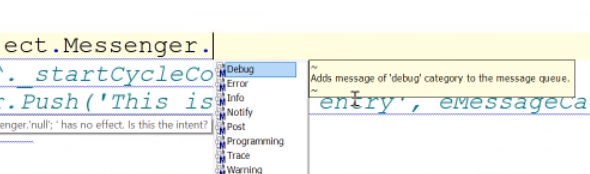
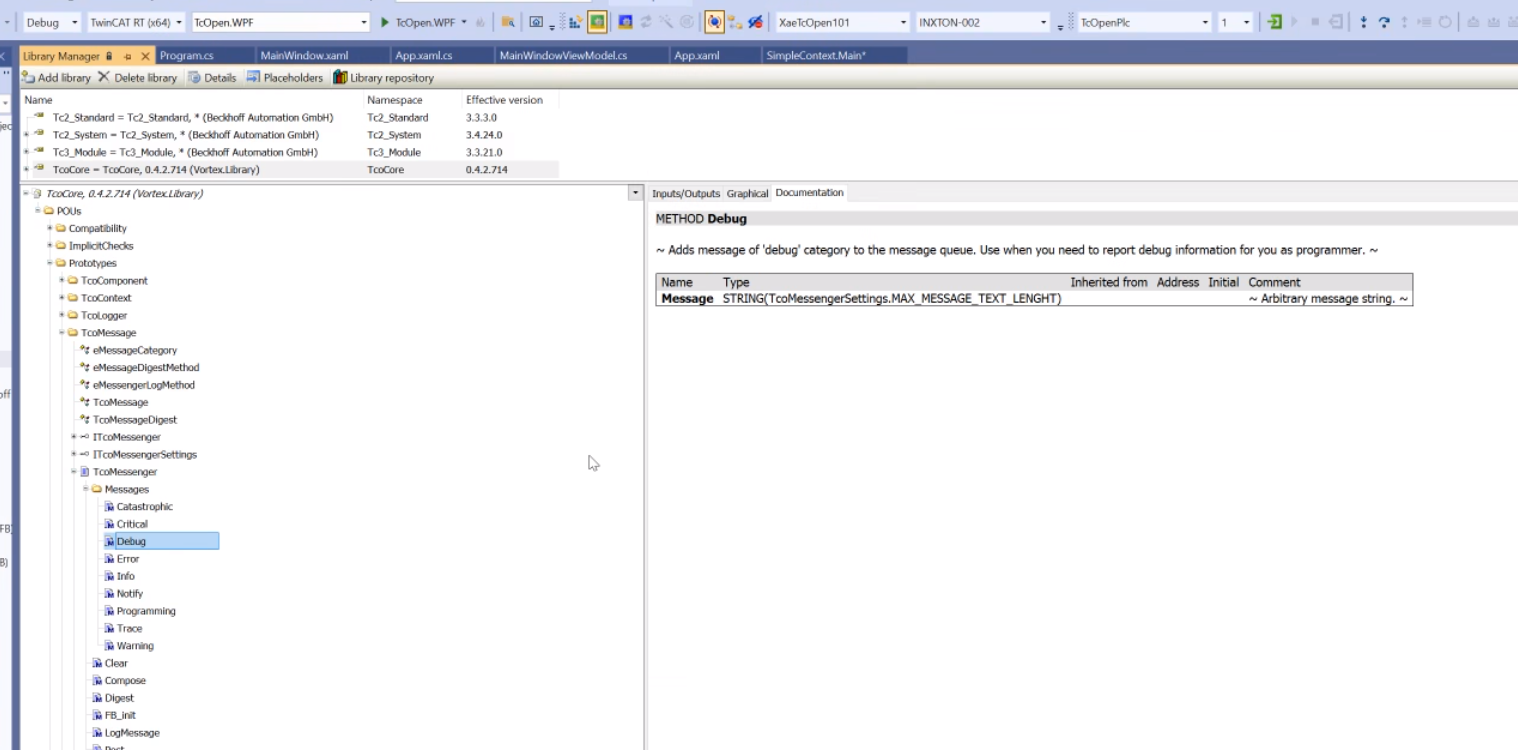
Yeah, it's far from perfect. But you can still use TwinCAT markdown even with DocFx and have it kinda nice-looking in the internal library browser. It looks like that TwinCat is removing XML tags (at least in version 24.22) defined in the documentation, so the debug method has XML style documentation, but Twincat just displays the text...neat |

|
Thanks for walking me through this! I've been out of town for the last 3 weeks but now that I'm back I can dive in to this more. It looks like the only thing preventing TwinCAT documentation from working perfectly with Inxton is function parameter documentation. TwinCAT wants you to put a comment in-line with the function parameter (VAR_IN, VAR_OUT) declaration, but the C# style would prefer an XML tag for each parameter above the FB or method. Or maybe I'm misunderstanding the limitations and the inxton package already parses non-xml comments inside the declaration area as documentation? I poked through the inxton workspace in github but couldn't find the compiler package repo. I assume this is some closed-source secret sauce owned by the company? Is Inxton open for contributors to their compiler with the right contact in place, in order to submit a pull request for a parsing feature that sucks in native FB/FC/Method function parameter documentation and merges it into the main XML? Let me know what I can do to help! |
|
No problem @BurksEngineering I appreciate your willingness to contribute to the compiler. One day it may become open-source, but currently, there are way too many offensive comments in the code and plenty of legacy code...simply put, it's not polished enough to be put on public display :) I've talked to @PTKu, the main contributor, he said that he will implement documentation parameters on top of VAR_IN/OUT I'll submit a PR fixing the issue when the new version will be released and I'll have a spare moment to do so. |
|
Thanks for the update! I look forward to seeing @PTKu 's contribution. Once I see how the function parameter stuff is implemented I should be able to update my other two libraries to match this documentation style too. |

|
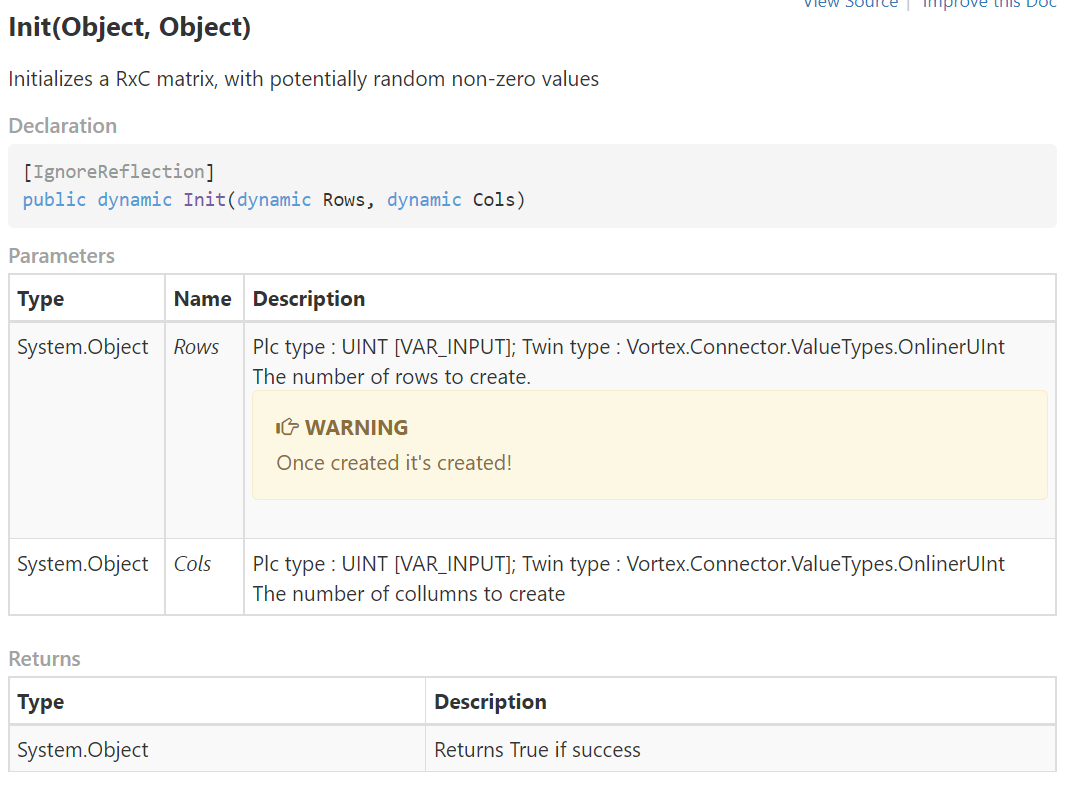
Hey guys! So I had a brief look at the compiler this morning. I believe it is already done. v1.15.4+ should do the trick. So let's have this:(*~
<docu>
<summary>
Initializes a RxC matrix, with potentially random non-zero values
</summary>
<returns>Returns True if success</returns>
</docu>
~*)
METHOD PUBLIC Init : BOOL
VAR_INPUT
(*~
<docu>
<summary>
The number of rows to create.
</summary>
<remarks>
<note type="warning">
Once created it's created!
</note>
</remarks>
</docu>
~*)
Rows : UINT;
(*~
<docu>
<summary>
The number of collumns to create
</summary>
</docu>
~*)
Cols : UINT;
END_VARWill render as:
If the method documentation contains It would be nice to get rid of |
|
I was playing around and found the generated documentation you were probably looking for. When I opened TcMatrix in TwinCAT's Library Manager to browse the documentation generated by TwinCAT i found out that you can access the generated HTML in They generate You can have a look at that. You can have a look around that folder, maybe find something useful there. There's one downside though...HTML documentation is not that nice and it's hard to navigate in the browser. It's only meant to be used in the library manager in TwinCAT. We're thinking that we'll parse the markdown documentation comments in Tc and generate XML automatically for docfx so we can have best of both worlds. |
|
Wow, good find! I will definitely poke around with this. I think I have some syntax errors in the Tc_Matrix library documentation comments (before your contributions) preventing it from building properly, but I got a similar folder to show up for another library I’m working on. In the root folder for the library in the temp area there are two json files that look like they have some well-structured data. I wonder if that could be a good starting point for your docfx generation if you want to avoid the bad html linking? I’m going to see if there is a way to build an old-school CHM file from the html files using this tool: https://docs.microsoft.com/en-us/previous-versions/windows/desktop/htmlhelp/microsoft-html-help-downloads, because I think there is a way to install those as F1-accessible help content within visual studio. At the very least I could manually build that and include it with each library release on github, but I agree with you that a web-based documentation is also very important! Finally, I have a best-practices question for you! When I’ve made C# libraries for work and compiled documentation using sandcastle, there were two other great features I leveraged to improve the usability of the documentation. I wonder how you would approach these problems with either the Inxton/xml or the twincat/markdown documentation styles: Some of my best contributions at my former job were making C# libraries to interact with internal systems/services (ERP, historian, configuration, python analysis, reporting). The libraries all their functionality exposed over ActiveX/Interop so VBA/VBScript HMI’s could interact with them. To some extent I’ve accidentally locked my brain into that documentation pattern so I’m trying to be mindful of the fact that PLC library documentation/structure might need to be very different from what I’m used to! Thanks for sharing all of this interesting information with me 😊 |
There's already a structured C# code generated by Inxton, so I don't have to parse the json. btw, cool idea with the F1 help! It's been a while since I've pressed F1 and got something helpful. Hopefully, I'll answer your questions:
I was using this a lot in Sandcastle and still am in DocFx. In both you're able to specify the table of content, and you can add custom files which were directly in the project. Usually I'd have a structure like this The Generated docs came from PlcConnector project, and additional articles were included in the sandcastle or docfx project - usually as markdown files.
This is also something I've done with C# code generated with Inxton. It's fairly easy to reference c# code … as you have done. It sure is harder with PLC code. The closest I've been to using PLC code samples is using Inxton's way of unit testing (https://github.com/PTKu/Tc.Prober/#run-test-in-nunit) with unit. This way the code looks similar to PLC code. Maybe you could leverage the TwinCATs way of generating documenntation with Sphinx (https://www.sphinx-doc.org/en/1.4.9/markup/code.html#caption-and-name ) My HMIs are usually in C# WPF so for me it's natural to use c# based tools. Same goes for documentation. So my thinking is more on the c# spectrum. No problem Andrew! Happy to share! |
|
Hi @BurksEngineering don't know if this helps but here are some quick remarks:
I think you could use sandcastle referencing the plctwinconnector project, where you could create the topics as you are used to. We used sandcastle in the past that way, but we switched to docfx because of better performance, native markdown, and frictionless deployment in GitHub pages. (It is true, though that sandcastle is very mature and docfx has a way to go to get to that level of maturity.) Here is the documentation for TcOpen project with topic/articles and API documentation (still in progress): Here is the documentation repo: https://github.com/TcOpenGroup/TcOpen.Documentation
here is an example of referencing the PLC code (that at least compiles, but you could unit test it as well) directly in the documentation: here is the source: referencing: where the region is marked by If I remember correctly in sandcastle you would need to use something like this: |
|
Thanks for sending this info along, the code region referencing stuff is really cool! I’ll need to see if that also works for regions within methods, but I don’t see why it wouldn’t. This is very exciting! Thanks 😊
…-Andrew
From: Peter ***@***.***>
Sent: Thursday, December 16, 2021 3:45 AM
To: BurksEngineering/TcMatrix ***@***.***>
Cc: BurksEngineering ***@***.***>; Mention ***@***.***>
Subject: Re: [BurksEngineering/TcMatrix] Autogenerated documentation (PR #1)
Hi @BurksEngineering <https://github.com/BurksEngineering> don't know if this helps but here are some quick remarks:
• Topic pages associated with no specific class. In C# I would either document the namespace, or just make a documentation page (with a GUID) and sandcastle would add it to the root of the CHM. An example would be generic error handling paradigms for the library, or background information that gives the library more context
I think you could use sandcastle referencing the plctwinconnector project, where you could create the topics as you are used to. We used sandcastle in the past that way, but we switched to docfx because of better performance, native markdown, and frictionless deployment in GitHub pages. (It is true, though that sandcastle is very mature and docfx has a way to go to get to that level of maturity.)
Here is the documentation for TcOpen <https://github.com/TcOpenGroup/TcOpen> project with topic/articles and API documentation (still in progress):
https://docs.tcopengroup.org/
Here is the documentation repo: https://github.com/TcOpenGroup/TcOpen.Documentation
• Inserting sample code from an executable file into (potentially multiple) comments where relevant. I loved to make quick example scripts that used library features that were commented and runnable, then use the C# xml docs to reference the file with the script and insert it as example code for relevant methods/classes. That way I knew my example would run (because I could unit test them) and I could plop the sample code on any relevant data because people seem to learn best with context. (This one seems harder in a PLC!)
here is an example of referencing the PLC code (that at least compiles, but you could unit test it as well) directly in the documentation:
https://docs.tcopengroup.org/api/TcoCore/PlcDocu.TcoCore.TcoContext.html
here is the source
https://github.com/TcOpenGroup/TcOpen/blob/dev/src/TcoCore/src/XaeTcoCore/TcoCore/POUs/Prototypes/TcoContext/TcoContext.TcPOU
referencing
https://github.com/TcOpenGroup/TcOpen/blob/dev/src/TcoApplicationExamples/XaeAppExamples/PlcAppExamples/POUs/Context/VitoCorleone_Context.TcPOU
where the region is marked by <ContextExampleDeclarations></ContextExampleDeclarations> and <ContextExampleCode></ContextExampleCode>
If I remember correctly in sandcastle would need to use something like this
// #region ContextExampleDeclarations
(*
	THIS EXAMPLE AIMS TO EXPLAIN WHAT CONTEXT AND IDENITY ARE IN A 'TcoOpen' APPLICATION.
	SEE Main() method of this block.
*)
FUNCTION_BLOCK VitoCorleone_Context EXTENDS TcoCore.TcoContext
VAR
(*
	Each context member object has it 'context' and assigned when instantiated (at birth)
	This is typically done by instantiating the objects with FB_init(ITcoObject) as follows
	These are Don Corleone's children. When you look inside definitions you' find
	Don Corleone's grand-childrend (whole family shares the same context).
*)
	_santino : Santino_Object(THIS^);
	_thomas : Thomas_Object(THIS^);
	_frederico : Frederico_Object(THIS^);
	_michael : Michael_Object(THIS^);
	_costanzia : Constanzia_Object(THIS^);
END_VAR
VAR
	_donCorleoneContext : ITcoContext;
	_isSameContext : BOOL;

	_donCorleoneIdentity : ULINT;
	_isDifferentIndentity : BOOL;
END_VAR
// #endregion
—
You are receiving this because you were mentioned.
Reply to this email directly, view it on GitHub <#1 (comment)> , or unsubscribe <https://github.com/notifications/unsubscribe-auth/AWCFA7WVLAOONSHK3SHEOR3URGRJ7ANCNFSM5G2AUG6Q> .
Triage notifications on the go with GitHub Mobile for iOS <https://apps.apple.com/app/apple-store/id1477376905?ct=notification-email&mt=8&pt=524675> or Android <https://play.google.com/store/apps/details?id=com.github.android&referrer=utm_campaign%3Dnotification-email%26utm_medium%3Demail%26utm_source%3Dgithub> . <https://github.com/notifications/beacon/AWCFA7UMLEEVHZVVR2SQVADURGRJ7A5CNFSM5G2AUG62YY3PNVWWK3TUL52HS4DFVREXG43VMVBW63LNMVXHJKTDN5WW2ZLOORPWSZGOHNLQUUA.gif>
|

|
@BurksEngineering it will work within methods, you will need to make sure that the |
3 participants


Hello @BurksEngineering!
I saw this library on r/PLC and I find it really cool! Thank you very much for such a contribution.
You mentioned that you had a problem with writing the documentation twice.
So I thought I'd give it a try a show you how I do it.
It's not perfect by any means, but it does the trick. Here you can see the result :
https://jozefchmelar.com/TcMatrix/api/PlcDocu.TcMatrix.Matrix.html
It's deployed as github page, so it has my domain and I can't change it for a single project.
I'll leave some comments in the code explaining what I did.
feel free to close this PR. I know it's a way too big change.