This repository was archived by the owner on Oct 1, 2025. It is now read-only.
Releases: Azure/azure-remote-rendering
Releases · Azure/azure-remote-rendering
Release 1.0.25

Important Service Updates
- SDK updated to version 1.0.25
API Changes
- The constructor for
AssetConversionOptionswas removed. Use the static functionAssetConversionOptions.CreateForBlobStorage()instead.
Release 1.0.23

Important Service Updates
- SDK updated to version 1.0.23
Features
- Models that have been exported with the "SceneGraphMode=static" option now allow for transform updates on individual parts. This makes the "static" option the ideal solution for models with many parts, where only a small subset of (leaf-)nodes need to be transformed at runtime. The remaining limitation on static scene graphs is that entities from a static scene graph cannot be re-parented. Furthermore, runtime performance of 'dynamic' scene graphs is better when a significant amount of nodes is transformed each frame, e.g. in an explosion view animation.
For compatibility reasons, the 'dynamic' scene graph mode is still the default, but we encourage to use the static option now in case re-parenting is not required.
This new feature also works with old conversions in 'static' scene graph mode, but runtime version 1.0.23 or newer is required.
API Changes
- Transform operations on entities that have been converted with "SceneGraphMode=static" option no longer throw the "ObjectStatic" exception. Transform updates are now allowed (see features section).
Bug Fixes
-
Fixed a bug in which local and remote content could potentially misalign.
-
Exporting a Unity project for OpenXR into the same folder twice will no longer corrupt the VS project file.
Release 1.0.22

Important Service Updates
- SDK updated to version 1.0.22
API Changes
- Improved error codes when downloading a model failed.
Bug Fixes
- Fixed rare crash when using OpenXR on HoloLens2.
- Improved performance for bounds queries on large scene graphs.
Sample Updates
- Quickstart will now recenter the model and also scale it down if it is too large to fit into the far plane distance to make sure any model is visible once loaded.
Release 1.0.21
Important Service Updates
- SDK updated to version 1.0.21
Features
TransparencyWritesDepthcan now be overwritten at import time in the.MaterialOverrides.jsonfile.
Bug Fixes
- Potential server-side scene graph corruption upon creating/reparenting objects on the client side.
Sample Updates
- Updated Quickstart and Tutorial-Complete samples to use Unity 2020.3 and OpenXR.
- Changed STS token scope to
https://sts.mixedreality.azure.com//.defaultin Tutorial-Complete.
Release 1.0.19
Important Service Updates
- SDK updated to version 1.0.19
API Changes
- More specific error codes are now returned for model load failures.
Bug Fixes
- Fixed potential hard crash on disconnect.
- In very rare cases on 'premium' sessions, a model texture may have been rendered with a very low mip-level.
- Fixed an issue where RemoteManagerUnity is trying to access the active XR Loader, when XR is not available.
Sample Updates
- Native C++ sample: After model loading, the model is now placed 2m in front of the camera.
- Showcase: do not try to move individual entities on a static scene graph.
Release 1.0.17
Important Service Updates
- SDK updated to version 1.0.17
Bug Fixes
- Fixed an OpenXR stability regression introduced in 1.0.16 and improved stability to be on par with WMR.
Release 1.0.16

Important Service Updates
- SDK updated to version 1.0.16
Bug Fixes
- Reduce planar reprojection jitter on high latencies.
- Fixed an issue in which the video feed would jump erratically and misalign with local content from time to time.
- Improve thread safety of Unity Promise implementation.
Sample Updates
- Include highest layer in camera culling mask in
RemoteManagerUnity. - Fix graphics API detection for windows standalone builds in
RemoteManagerUnity. - Update of retrieving STS signing cert from regional specific STS instance.
Release 1.0.15

Release 1.0.15
Important Service Updates
- SDK updated to version 1.0.15
Features
- Support for OpenXR version
- this is supported through Unity 2020.3. This requires Universal RP to be manually updated to version 10.5.1 in the package manager, as shown in this screenshot:
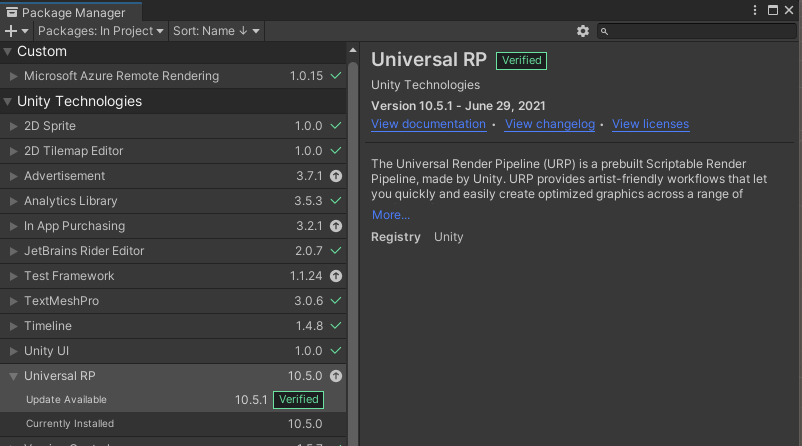
- there is also a native OpenXR sample that leverages the new graphics binding
GraphicsBindingOpenXrD3d11
- this is supported through Unity 2020.3. This requires Universal RP to be manually updated to version 10.5.1 in the package manager, as shown in this screenshot:
API Changes
- In the C# (Unity) API the non-default constructors for
LoadModelOptionsandLoadTextureOptionshave been removed. Instead, use the static functionsLoadModelOptions.CreateForBlobStorageandLoadTextureOptions.CreateForBlobStorageto create and initialize these objects.
Old code:
LoadModelOptions params = new LoadModelOptions(container, blob, path);
New code:
LoadModelOptions params = LoadModelOptions.CreateForBlobStorage(container, blob, path);
Bug Fixes
- Fixed a regression in 1.0.13 client SDK, where the client side tends to disconnect on server connections with high ping times (issue #38)
- Fixed Unity build error in Windows standalone configuration (issue #36)
- In very rare cases of rendering with 'premium' VM in depth composition mode, the wrong texture mipmaps were picked, so some textures looked blurry
- Model conversion: Occasionally, collision generation would fail to produce a viable collision mesh for a submesh. This might happen, for example, when a submesh just contained a few degenerate triangles. When these failures occurred we were issuing an internal warning without details. We now provide a warning with details.
Sample Updates
- A new native C++ sample has been added that integrates ARR into a stock OpenXR sample
Release 1.0.13

Important Service Updates
- SDK updated to version 1.0.13
Features
- Improving image quality for interactions of local and remote content
Bug Fixes
- Models with many very small parts could hit a problem where meshes were assigned the wrong material. This required a fix to the conversion service, so if you believe your model was affected, you should reconvert it.
- The collision information for material references could get muddled during conversion. For affected models, raycast queries would sometimes return the wrong material reference index (RayCastHit.SubPartId) within a mesh component. This required a fix to the conversion service, so if you believe your model was affected, you should reconvert it.
- The culling frustum for remotely rendered content now correctly respects the camera far plane.
- The native C++ Hololens sample crashed when camera looks away from the spinning cube, because an invalid planar projection plane was passed
- Fixing a potential deadlock on reconnect in-Editor in the Unity Showcase sample.
Sample Updates
- Correct the AAD (Azure Active Directory) permission scope in Tutorial-Complete to https://sts.mixedreality.azure.com/mixedreality.signin, i.e. without the region part, to fix AAD authentication.
Known issues
- The com.microsoft.azure.remote_rendering Unity package will fail to compile in 'Standalone Windows' configuration. See issue #36.
Release 1.0.10

Important Service Updates
- SDK updated to version 1.0.10
Bug Fixes
- Fixed null reference exception in Unity stack on disconnect on HoloLens 2. (issue #34)
- The info.json file produced by conversion now summarises the count and size of the files that were obtained from the input container, and also the files that were actually used when converting. A difference between the two represents unnecessary overhead that slows down conversion. If the difference is sufficiently large, a warning will be written to the result.json file.
- Some models had meshes where all of the vertex positions are highly displaced in the same direction from the origin. This could indirectly lead to significant slowdowns during conversion and visual artefacts during rendering. These large displacements most likely arise when an FBX or GLTF file is created with world positions directly in its vertex buffers, rather than having translations in its scene graph. We've added a mitigation to the conversion service so that very large displacements of this kind (> 7km) are removed from the vertex buffers and put in the scene graph instead. If this step is performed, a warning is added to the result.json file. This mitigation should improve conversion times, but may not help with visual artefacts. If your models are highly displaced from the origin, it would be better to export those models nearer to the origin or at least ensure that the offset is in the scene graph.
Sample Updates
- Tutorial-Complete: Make session statistics panel display in HoloLens version.