| rows (9:16) | columns |
|---|---|
 |
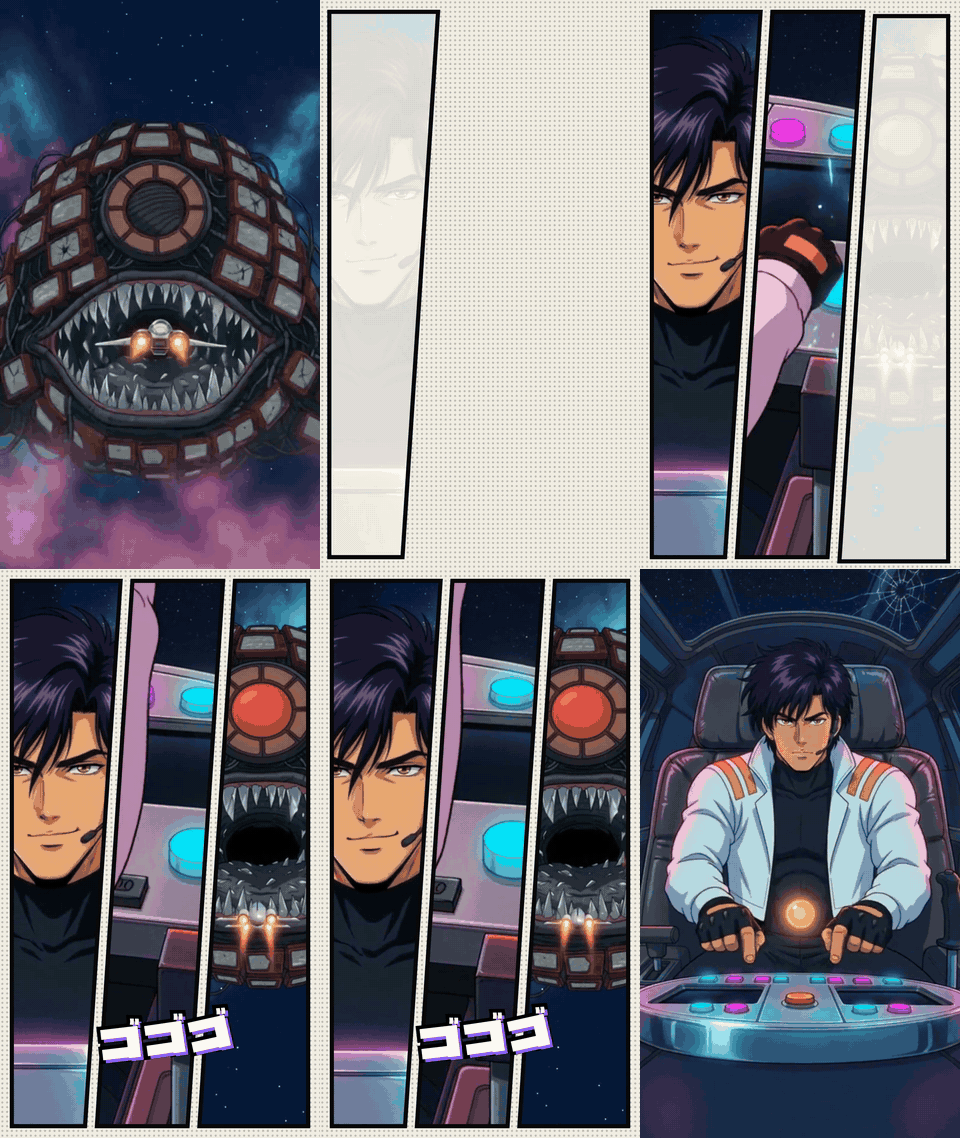 |
The anime / manga split screen: three live video panels slam onto screentone paper one after another on the beat, with thick ink borders, slanted gutters and a white impact flash in each panel. A katakana SFX stamp (ドキッ, ゴゴゴ) lands on top, then the page tears away and the background video continues. Rendered locally with HyperFrames; no AI calls, no credits.
Use it for reaction beats ("hero / the button / the monster"), for three angles of one moment, or to hide a weak shot behind a stylish page.
- Point
split.jsonat three panel clips (and optionally a background clip): paths relative to the config or http(s) URLs, downloaded once intoexamples/. The example clips are on S3, so it runs right after cloning. - Edit
split.json. - Run
bash make.command(orbash make.command examples/split.columns.json). - Collect
out/<config>.mp4andout/<config>.gif. The HyperFrames project is inout/hf/.
{ "width": 1080, "height": 1920, "layout": "rows",
  "background": { "video": "examples/bg.mp4", "media_start": 0 },
  "t_in": 0.5, "t_out": 2.6, "beats": [0.5, 0.8, 1.1], "duration": 3.0,
  "panels": [
    { "video": "examples/face.mp4", "media_start": 0.0, "focus": [0, 330], "zoom": 1.1, "from": "left" },
    { "video": "examples/fist.mp4", "media_start": 0.0, "focus": [0, 0], "zoom": 1.15, "from": "right" },
    { "video": "examples/eye.mp4",  "media_start": 0.0, "focus": [0, 0], "zoom": 1.0, "from": "bottom" } ],
"sfx": { "jp": "ドキッ", "x": 590, "y": 1150, "size": 130, "rot": 10 } }| key | meaning |
|---|---|
layout |
rows (three stacked panels, best for 9:16), columns (three side by side: faces, 16:9), staircase (rows inset left/right like a manga page) |
t_in, t_out, beats |
page appears, page tears away, the time each panel slams in (put them on the music's beats) |
background |
optional clip under the page (plays before t_in and after t_out, carries the audio) |
panels[].video, media_start |
clip (path relative to the config, or a URL) and in-point |
panels[].focus, zoom |
the clip is centred on the panel; focus [dx, dy] moves it (px), zoom scales it (it also eases from ×1.08 to ×1) |
panels[].from |
entrance: left, right, top, bottom |
margin, gutter, slant, border |
page margin, gap between panels, slant of the gutters (px), ink border width |
paper, ink, tone |
paper colour, border colour, screentone dots on/off |
exit |
alternate (panels fly out left/right) or cut |
sfx |
optional katakana stamp: jp, x, y, size, rot, t, end, shadow_color |
- Each panel clip must hold one continuous shot from its beat to
t_out, or a cut inside the source shows up inside the panel. Pick clips at leastt_out - beatlong. - Faces: move them into the window with
focus(positivedymoves the picture down). Check one frame after the last panel lands. - 2–3 s in total is the anime rhythm: panels a beat apart, a short hold, the page tears away.
Requirements: ffmpeg, Python 3, Node with npx (npx --yes hyperframes@0.8.186; set NPX=/path/to/npx if
your shell's npx is a broken nvm function), uv for the SFX font subset (Dela Gothic One, SIL OFL). A 3 s render
takes about 10 s on an M-series Mac.