Repository navigation

Replies: 3 comments

|
Looks like you have a managed instance sql server. I've to build that option in the Framework, it requires a different connectiontype in the copy activity the Azure SQL. If it is really a SQL MI, can you please raise an issue, so that i can add it for you. Other option is to use the SQL MI as a Mirror database and then you can use the Onelake Tables connection. For CustomNotebook, you must use the template for every table seperatly, you register every notebook with their own name in the Framework. |

|
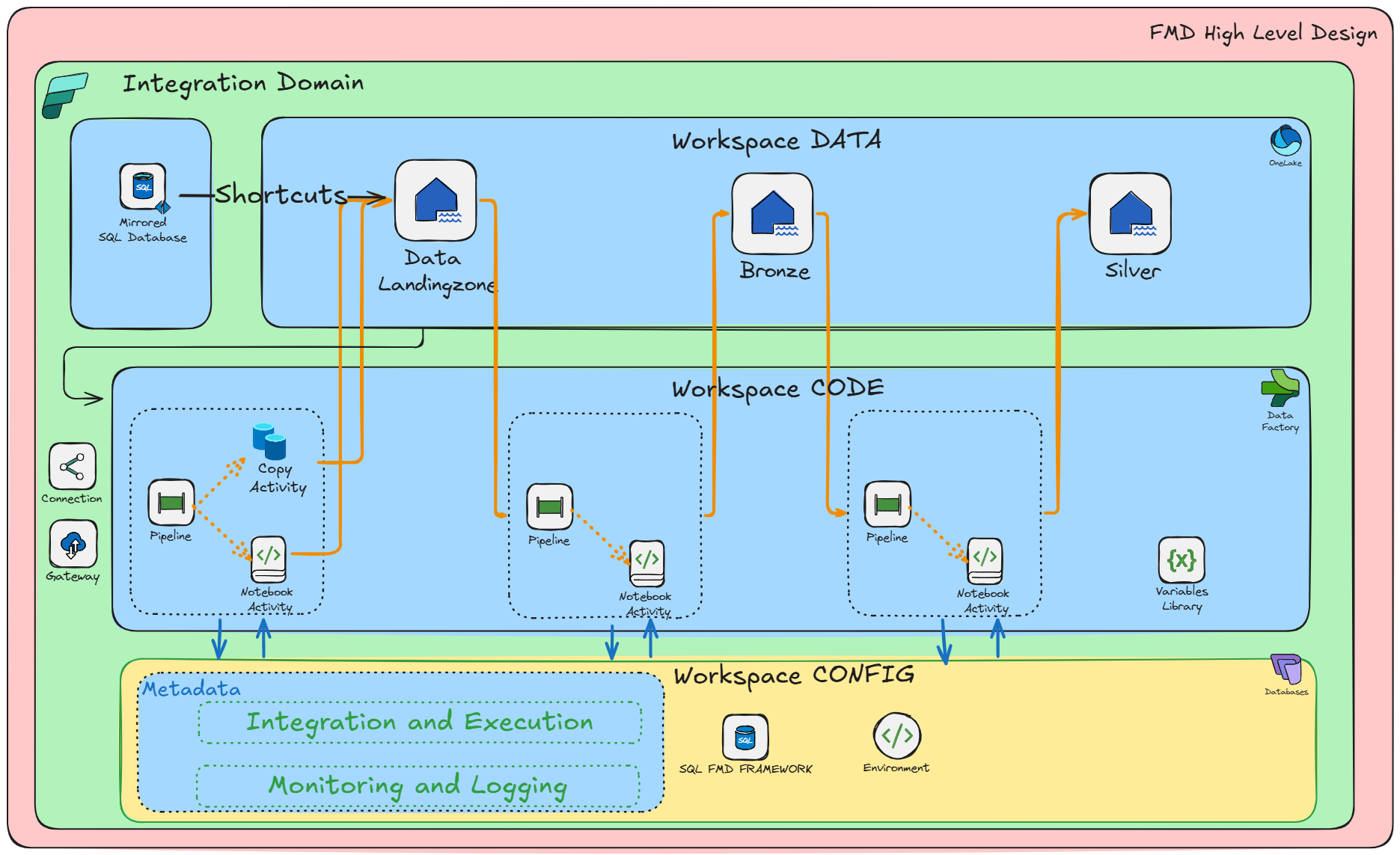
Hi. I think the easiest thing is mapping a mirrored database into fabric and use shortcut to an onelake path. How do that match with metadata driven pattern here?
…________________________________
From: Erwin de Kreuk ***@***.***>
Sent: Thursday, March 5, 2026 8:15 PM
To: edkreuk/FMD_FRAMEWORK ***@***.***>
Cc: gforsmo ***@***.***>; Author ***@***.***>
Subject: Re: [edkreuk/FMD_FRAMEWORK] CustomNotebooks and metadata driven approach (Discussion #177)
Looks like you have a managed instance sql server. I've to build that option in the Framework, it requires a different connectiontype in the copy activity the Azure SQL. If it is really a SQL MI, can you please raise an issue, so that i can add it for you.
https://learn.microsoft.com/en-us/fabric/data-factory/connector-azure-sql-managed-instance-copy-activity
Other option is to use the SQL MI as a Mirror database and then you can use the Onelake Tables connection.
image.png (view on web)<https://github.com/user-attachments/assets/c76b5d4e-5279-42ed-ab98-8686978ce271>
Creating a Notebook will work, only you need to create a notebook for each table(Entitie) otherwise Bronze and Silver will not work.
For CustomNotebook, you must use the template for every table seperatly, you register every notebook with their own name in the Framework.
—
Reply to this email directly, view it on GitHub<#177 (comment)>, or unsubscribe<https://github.com/notifications/unsubscribe-auth/ADROT4BMHRZRX4OZ3JIN23L4PHG63AVCNFSM6AAAAACWH45S7GVHI2DSMVQWIX3LMV43URDJONRXK43TNFXW4Q3PNVWWK3TUHMYTMMBRGQZTEOI>.
You are receiving this because you authored the thread.Message ID: ***@***.***>
|
|
@gforsmo the option with the shortcuts is the easiest one |


Uh oh!
There was an error while loading. Please reload this page.
Hi Erwin.
I am trying to set up my solution with FMD. I have two data source mainly, which is an Azure Sql database (managed I guess since the database people had added an _mi at the end of the servername) and an on premise sql db. The last one is set up with onpremise data gateway connection and that works well without any big issue. The other way, the azure sql db, is an disabled from internet database, using either vnet gateway or managed private endpoint. Both are set up in the workspace and a connection with the vnet data gateway are in place. BUT it does not work with copy activity in the pipeline. It just "processes" until it times out. That is what I am earlier have experienced and to solve it I needed to write a notebook. This is working. But to adjust it to FMD I need to write a Custom notebook. You have earlier written how to register it. But this notebook must use the rows from the landingzone table. So I don't really know how to go from here. I believe I need to take a copy of the notebook template and register the notebook in the FMD framework. But to iterate through the landingzone table ingesting a table one by one or taking in all json collection and make the notebook to the whole work. I don't really see how I should do this. I see there is a customnotebook column in the landingzone table. Could you please set up some step by step to make this work
regards Geir
All reactions