| title | Zephyr RTOS Introduction | ||||||
|---|---|---|---|---|---|---|---|
| description | Port the traffic light controller from Lesson 2 to Zephyr RTOS. Learn the Zephyr build system (west), devicetree hardware abstraction, Kconfig configuration, threading model, and cross-RTOS portability patterns. | ||||||
| contributors | sam-macharia,lawrence-langat | ||||||
| pubDate | 2026-03-12 | ||||||
| tags |
|
||||||
| excerpt | Take the FreeRTOS traffic light controller from Lesson 2 and rebuild it on Zephyr RTOS using the same hardware. Compare threading APIs, learn devicetree for pin configuration, configure the build with Kconfig, and identify which RTOS concepts transfer directly and which require a different approach. | ||||||
| heroImage | https://cdn.siliconwit.com/education/rtos-programming/zephyr-rtos-introduction.png |
import TawkWidget from '../../../../components/TawkWidget.astro'; import UniversalContentContributors from '../../../../components/UniversalContentContributors.astro'; import InArticleAd from '../../../../components/InArticleAd.astro'; import Copyright from '../../../../components/Copyright.astro'; import BionicText from '../../../../components/BionicText.astro'; import TailwindWrapper from '../../../../components/TailwindWrapper.jsx'; import { Tabs, TabItem } from '@astrojs/starlight/components'; import { Card, CardGrid, Badge, Steps, LinkButton, FileTree } from '@astrojs/starlight/components';
import RtosProgrammingComments from '../../../../components/rtos-programming/RtosProgrammingComments.astro';
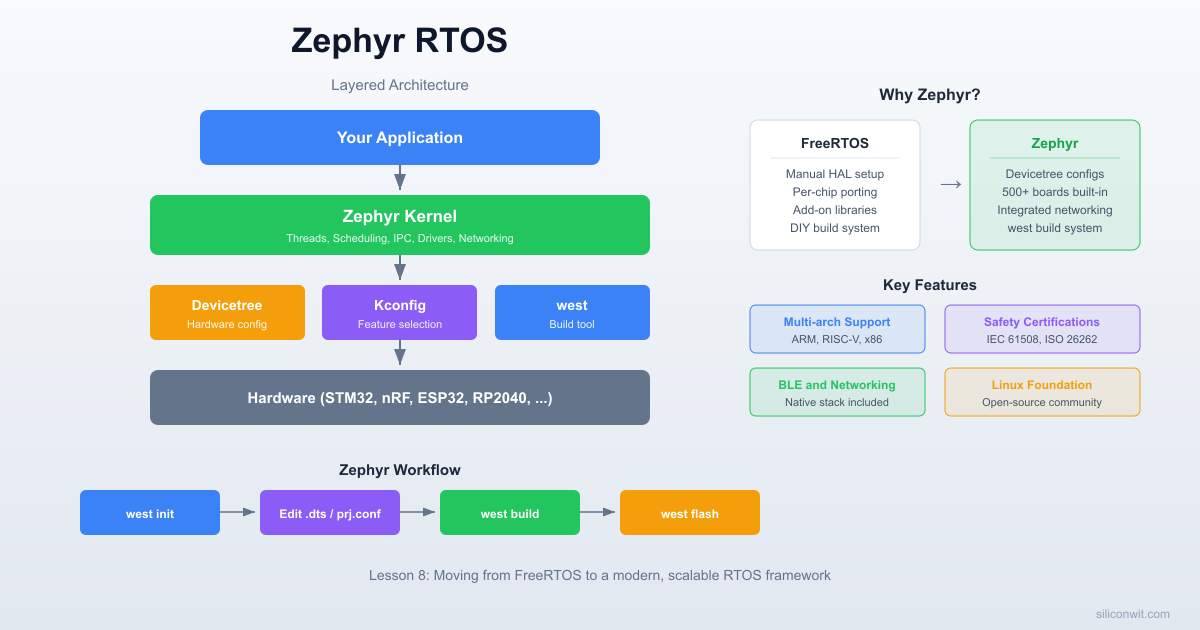
FreeRTOS gives you tasks, queues, and semaphores, but everything else (board support, networking, Bluetooth, filesystem) you wire together yourself from vendor libraries. Porting a FreeRTOS project to a new chip means rewriting the HAL layer, reworking pin definitions, and often restructuring the build system. Zephyr RTOS takes the opposite approach: board support, networking, BLE, logging, and a shell are built in, and switching hardware is a one-line board change in the build command because pin mappings live in devicetree overlays, not in your source code. In this lesson you will take the traffic light controller from Lesson 2 and rebuild it in Zephyr from scratch. Same wiring, same behavior, completely different RTOS. By comparing the two implementations side by side, you will see which concepts transfer directly and where Zephyr makes fundamentally different design choices. #ZephyrRTOS #Devicetree #Portability
The same priority-based traffic light controller from Lesson 2, rebuilt on Zephyr RTOS. Three threads manage the light cycle, pedestrian button, and emergency override. GPIO pins are defined in a devicetree overlay instead of hardcoded addresses. Build configuration uses Kconfig and the west build tool. The final result is identical behavior on identical hardware, through a completely different RTOS framework.Project specifications:
| Parameter | Value |
|---|---|
| MCU | STM32 Blue Pill or ESP32 DevKit (same as Lesson 2) |
| RTOS | Zephyr (latest LTS) |
| Build system | west (Zephyr meta-tool) |
| Hardware abstraction | Devicetree overlay for GPIO pins |
| Configuration | Kconfig (prj.conf) |
| Threads | 3 (light cycle, pedestrian, emergency) |
| LEDs | Red, Yellow, Green (same wiring as Lesson 2) |
| Buttons | Pedestrian request, Emergency override |
| Ref | Component | Quantity | Notes |
|---|---|---|---|
| U1 | STM32 Blue Pill or ESP32 DevKit | 1 | Same board as Lesson 2 |
| D1 | Red LED | 1 | Same wiring as Lesson 2 |
| D2 | Yellow LED | 1 | Same wiring as Lesson 2 |
| D3 | Green LED | 1 | Same wiring as Lesson 2 |
| R1, R2, R3 | 330 ohm resistor | 3 | LED current limiters |
| SW1 | Tactile push button | 1 | Pedestrian request |
| SW2 | Tactile push button | 1 | Emergency override |
| - | Breadboard and jumper wires | 1 set | Same setup as Lesson 2 |
Zephyr is an open-source RTOS hosted by the Linux Foundation. It supports over 600 boards across architectures including ARM Cortex-M, RISC-V, x86, ARC, and Xtensa. Unlike FreeRTOS, which focuses primarily on task scheduling and leaves everything else to you or third-party libraries, Zephyr ships with integrated subsystems for Bluetooth, networking (TCP/IP, MQTT, CoAP), USB, filesystems, and device drivers.
The project started at Wind River as Rocket OS, was open-sourced in 2016, and has since attracted contributions from Intel, Nordic Semiconductor, NXP, and hundreds of other companies. Major products like the Google Nest thermostats and Gralmarly's keyboard firmware run on Zephyr.
| Aspect | FreeRTOS | Zephyr |
|---|---|---|
| Hardware description | Hardcoded pin definitions in C | Devicetree (.dts/.dtsi files) |
| Build configuration | FreeRTOSConfig.h header |
Kconfig (prj.conf) |
| Build/project tool | Makefile, CMake, or IDE | west (meta-tool wrapping CMake) |
| API style | xTaskCreate, xSemaphoreTake |
k_thread_create, k_sem_take |
| Driver model | You write your own or use vendor HAL | Built-in driver API with devicetree bindings |
| Connectivity | Add your own TCP/IP stack | Built-in networking, BLE, USB |
| Licensing | MIT | Apache 2.0 |
| Scope | Kernel + minimal extras | Full OS with subsystems |
  FreeRTOS vs Zephyr Scope
  ──────────────────────────────────────────
  FreeRTOS:
  ┌───────────────┐
  │  Task Sched.  │  You add everything else:
  │  Queues       │  HAL, drivers, TCP/IP,
  │  Semaphores   │  BLE, USB, filesystem...
  │  Timers       │
  └───────────────┘

  Zephyr:
  ┌───────────────────────────────────────┐
  │  Kernel + Scheduler                   │
  │  Devicetree + Kconfig                 │
  │  GPIO, I2C, SPI, UART drivers         │
  │  TCP/IP, BLE, USB, CAN               │
  │  Logging, Shell, Filesystem           │
  │  600+ board support packages          │
  └───────────────────────────────────────┘
FreeRTOS gives you a lean kernel and maximum freedom. Zephyr gives you a complete platform with opinions about how hardware should be described and configured. Neither approach is inherently better; it depends on your project requirements.
Zephyr uses a meta-tool called west that handles workspace initialization, dependency management, building, and flashing. The installation process involves setting up west, fetching the Zephyr source tree, and installing the SDK (cross-compilation toolchains).
sudo apt update
sudo apt install --no-install-recommends git cmake ninja-build gperf \
  ccache dfu-util device-tree-compiler wget python3-dev python3-pip \
  python3-setuptools python3-tk python3-wheel xz-utils file \
make gcc gcc-multilib g++-multilib libsdl2-dev libmagic1-
Install west.
pip3 install --user west
Make sure
~/.local/binis in yourPATH. Addexport PATH="$HOME/.local/bin:$PATH"to your.bashrcif needed. -
Initialize the Zephyr workspace.
west init ~/zephyrproject
cd ~/zephyrproject
west update
This clones the Zephyr repository and all its module dependencies. The initial download is roughly 1 GB.
-
Install Python requirements.
pip3 install --user -r ~/zephyrproject/zephyr/scripts/requirements.txt -
Install the Zephyr SDK (toolchains).
cd ~
wget https://github.com/zephyrproject-rtos/sdk-ng/releases/download/v0.16.8/zephyr-sdk-0.16.8_linux-x86_64.tar.xz
tar xf zephyr-sdk-0.16.8_linux-x86_64.tar.xz
cd zephyr-sdk-0.16.8
./setup.sh
The SDK includes toolchains for ARM, RISC-V, Xtensa, and other architectures. The setup script registers the SDK location so west can find it automatically.
-
Set the Zephyr environment.
source ~/zephyrproject/zephyr/zephyr-env.sh
Add this line to your
.bashrcfor persistence across terminal sessions.
Use Homebrew for system dependencies:
brew install cmake ninja gperf python3 ccache qemu dtc wget libmagic
pip3 install west
west init ~/zephyrproject && cd ~/zephyrproject && west update
pip3 install -r zephyr/scripts/requirements.txt
Download the macOS SDK bundle from the Zephyr SDK releases page and run ./setup.sh after extracting.
The recommended approach on Windows is to use the Chocolatey package manager or install inside WSL2 (which then follows the Linux instructions). The Zephyr documentation provides detailed Windows-native instructions at docs.zephyrproject.org/latest/develop/getting_started.
choco install cmake ninja gperf python git dtc-msys2
pip install west
west init C:\zephyrproject
cd C:\zephyrproject
west update
pip install -r zephyr\scripts\requirements.txt
:::note[Check your installation] Verify everything works by building the built-in blinky sample:
cd ~/zephyrproject/zephyr
west build -p always -b stm32_min_dev_blue samples/basic/blinky
If the build completes without errors, your toolchain is correctly configured. :::
Every Zephyr application follows a standard directory layout. The build system expects certain files in specific locations.
- traffic-light-zephyr/ - CMakeLists.txt - prj.conf - boards/ - stm32_min_dev_blue.overlay - src/ - main.cCMakeLists.txt tells west where to find your source files and links your application against the Zephyr kernel. prj.conf is the Kconfig configuration file where you enable kernel features and drivers. The boards/ directory contains devicetree overlays that customize pin assignments for specific boards. src/main.c is your application code.
The minimal CMakeLists.txt for any Zephyr application looks like this:
cmake_minimum_required(VERSION 3.20.0)
find_package(Zephyr REQUIRED HINTS $ENV{ZEPHYR_BASE})
project(traffic_light_zephyr)

target_sources(app PRIVATE src/main.c)
The find_package(Zephyr) call is where the magic happens. It pulls in the entire Zephyr build system, including the devicetree compiler, Kconfig processing, and toolchain configuration. Your application is built as a library (app) that gets linked against the Zephyr kernel.
  Zephyr Build Pipeline
  ──────────────────────────────────────────
  Board .dts          prj.conf
  + your .overlay     (Kconfig)
       │                  │
       ▼                  ▼
  ┌──────────┐     ┌──────────────┐
  │  dtc     │     │  Kconfig     │
  │ compiler │     │  processor   │
  └────┬─────┘     └──────┬───────┘
       │                  │
       ▼                  ▼
  devicetree_        .config
  generated.h       (final config)
       │                  │
       └────────┬─────────┘
                ▼
         ┌────────────┐
         │  CMake +   │
         │  Compiler  │◄── src/main.c
         └─────┬──────┘
               ▼
          zephyr.elf ──► west flash
When you run west build, the following happens:
-
The devicetree compiler (dtc) merges the board's base
.dtsfile with your overlay file to produce a final devicetree. This is compiled into a C header (devicetree_generated.h) containing macros for every node. -
Kconfig processes your
prj.conf, the board's default configuration, and all dependency rules to produce a final.configfile. This determines which kernel features and drivers are compiled. -
The C compiler builds your source files along with the selected Zephyr kernel modules, drivers, and libraries.
-
The linker produces an ELF binary. West can then flash it to your board with
west flash.
Devicetree is borrowed from the Linux kernel world. Instead of hardcoding register addresses and pin numbers in your C code, you describe the hardware in a separate .dts file. The build system compiles this description into C macros that your code references. If you move to a different board, you change the devicetree overlay; the C code stays the same.
Every board supported by Zephyr has a base .dts file that describes its hardware: the CPU, memory, peripherals, default pin configurations. When you build for stm32_min_dev_blue, Zephyr uses the file at boards/arm/stm32_min_dev_blue/stm32_min_dev_blue.dts as the starting point.
Your application adds an overlay file that extends or overrides the base. Overlays live in your project's boards/ directory, named to match the board identifier.
Here is the devicetree overlay that defines our three LEDs and two buttons on the STM32 Blue Pill:
/* boards/stm32_min_dev_blue.overlay */

/ {
    traffic_leds {
        compatible = "gpio-leds";

        led_red: led_red {
            gpios = <&gpioa 0 GPIO_ACTIVE_HIGH>;
            label = "Red LED";
        };
        led_yellow: led_yellow {
            gpios = <&gpioa 1 GPIO_ACTIVE_HIGH>;
            label = "Yellow LED";
        };
        led_green: led_green {
            gpios = <&gpioa 2 GPIO_ACTIVE_HIGH>;
            label = "Green LED";
        };
    };

    traffic_buttons {
        compatible = "gpio-keys";

        btn_ped: btn_ped {
            gpios = <&gpiob 0 (GPIO_PULL_UP | GPIO_ACTIVE_LOW)>;
            label = "Pedestrian Button";
        };
        btn_emrg: btn_emrg {
            gpios = <&gpiob 1 (GPIO_PULL_UP | GPIO_ACTIVE_LOW)>;
            label = "Emergency Button";
        };
    };

    aliases {
        led-red = &led_red;
        led-yellow = &led_yellow;
        led-green = &led_green;
        btn-ped = &btn_ped;
        btn-emrg = &btn_emrg;
    };
};
Each node (like led_red) describes a piece of hardware. The compatible property tells Zephyr which driver to use (gpio-leds is a built-in binding for simple GPIO-connected LEDs). The gpios property specifies the GPIO controller (&gpioa), pin number (0), and flags (GPIO_ACTIVE_HIGH).
The aliases block gives short, portable names to each node. In your C code, you reference DT_ALIAS(led_red) instead of hardcoding a pin number. If you port to a different board, you write a new overlay with different pin assignments, and the C code compiles unchanged.
Zephyr provides macros to extract information from the compiled devicetree:
/* Get a node identifier from an alias */
#define LED_RED_NODE    DT_ALIAS(led_red)
#define BTN_PED_NODE    DT_ALIAS(btn_ped)

/* Get the GPIO spec (controller + pin + flags) from a node */
static const struct gpio_dt_spec led_red = GPIO_DT_SPEC_GET(LED_RED_NODE, gpios);
static const struct gpio_dt_spec btn_ped = GPIO_DT_SPEC_GET(BTN_PED_NODE, gpios);
The gpio_dt_spec structure holds the GPIO controller device pointer, pin number, and configuration flags. You pass it directly to GPIO API functions. If the devicetree node does not exist (wrong alias name, missing overlay), the build fails with a clear error message rather than silently using a wrong pin.
Kconfig is Zephyr's build-time configuration system. It determines which kernel features, drivers, and subsystems are compiled into your firmware. The syntax is the same as the Linux kernel's Kconfig: CONFIG_FEATURE=y to enable, # CONFIG_FEATURE is not set to disable.
# Kernel features
CONFIG_GPIO=y
CONFIG_SERIAL=y
CONFIG_PRINTK=y

# Thread and scheduling
CONFIG_NUM_PREEMPT_PRIORITIES=16
CONFIG_MAIN_STACK_SIZE=1024

# GPIO interrupt support
CONFIG_GPIO_STM32=y

# Debug output
CONFIG_CONSOLE=y
CONFIG_UART_CONSOLE=y

# Timestamp in printk
CONFIG_LOG=y
CONFIG_LOG_DEFAULT_LEVEL=3| Setting | FreeRTOS (FreeRTOSConfig.h) |
Zephyr (prj.conf) |
|---|---|---|
| Enable preemption | #define configUSE_PREEMPTION 1 |
Enabled by default |
| Max priorities | #define configMAX_PRIORITIES 5 |
CONFIG_NUM_PREEMPT_PRIORITIES=16 |
| Tick rate | #define configTICK_RATE_HZ 1000 |
CONFIG_SYS_CLOCK_TICKS_PER_SEC=1000 (default) |
| Heap size | #define configTOTAL_HEAP_SIZE 8192 |
Managed by Zephyr's memory subsystem |
| Stack overflow check | #define configCHECK_FOR_STACK_OVERFLOW 2 |
CONFIG_THREAD_STACK_INFO=y + CONFIG_STACK_SENTINEL=y |
| GPIO driver | You write register-level code | CONFIG_GPIO=y |
| Serial output | You write UART init code | CONFIG_SERIAL=y + CONFIG_UART_CONSOLE=y |
The fundamental difference: FreeRTOS configuration is a C header included at compile time. Zephyr's Kconfig is processed by a separate tool that resolves dependencies automatically. If you enable CONFIG_LOG, Kconfig automatically pulls in the required subsystem dependencies without you listing them.
Zephyr threads are functionally equivalent to FreeRTOS tasks. They have their own stack, a priority, and a scheduling state. The API names and creation patterns differ, but the underlying concepts are the same.
The most common pattern in Zephyr is to define threads at compile time:
/* Thread entry function */
void light_cycle_entry(void *p1, void *p2, void *p3) {
    ARG_UNUSED(p1); ARG_UNUSED(p2); ARG_UNUSED(p3);

    while (1) {
        /* Thread logic here */
        k_msleep(1000);
    }
}

/* Define a thread statically (stack allocated at compile time) */
K_THREAD_DEFINE(light_cycle_tid,       /* Thread ID variable name */
                1024,                   /* Stack size in bytes */
                light_cycle_entry,      /* Entry function */
                NULL, NULL, NULL,       /* Three parameters (p1, p2, p3) */
                5,                      /* Priority */
                0,                      /* Options (0 = preemptible) */
                0);                     /* Delay before start (0 = immediate) */
K_THREAD_DEFINE allocates the stack and thread structure at compile time. No heap allocation, no runtime failure. This is Zephyr's equivalent of FreeRTOS xTaskCreateStatic, but with a cleaner macro interface.
For threads you need to create at runtime:
#define STACK_SIZE 1024
K_THREAD_STACK_DEFINE(my_stack, STACK_SIZE);
static struct k_thread my_thread_data;

k_tid_t tid = k_thread_create(&my_thread_data, my_stack, STACK_SIZE,
                               my_entry_fn, NULL, NULL, NULL,
                               5,           /* Priority */
                               0,           /* Options */
K_NO_WAIT); /* Start immediately */Zephyr's priority scheme differs from FreeRTOS in an important way:
| Priority Range | Type | Behavior |
|---|---|---|
| Negative values (e.g., -1) | Cooperative | Thread runs until it explicitly yields or sleeps. Cannot be preempted by other threads (only by ISRs). |
| Zero and positive values (e.g., 0, 1, 5) | Preemptive | Can be preempted by higher-priority threads at any time. |
| Lower number = higher priority | (Both types) | Priority 0 is the highest preemptive priority. Priority 5 is lower than priority 2. |
This is the opposite of FreeRTOS, where a higher number means higher priority. In FreeRTOS the emergency task was priority 3 (highest). In Zephyr it will be priority 2 (lowest number among the three, therefore highest priority).
| FreeRTOS | Zephyr | Purpose |
|---|---|---|
vTaskDelay(pdMS_TO_TICKS(1000)) |
k_msleep(1000) |
Sleep for milliseconds |
vTaskDelay(ticks) |
k_sleep(K_TICKS(n)) |
Sleep for raw ticks |
vTaskDelayUntil(...) |
k_sleep(K_TIMEOUT_ABS_TICKS(t)) |
Sleep until absolute time |
Zephyr provides the same synchronization primitives as FreeRTOS, with different API names.
/* Define a semaphore (initial count 0, max count 1 = binary) */
K_SEM_DEFINE(ped_sem, 0, 1);

/* In the button callback or ISR */
k_sem_give(&ped_sem);

/* In the pedestrian thread */
k_sem_take(&ped_sem, K_FOREVER); /* Block until given */K_MUTEX_DEFINE(led_mutex);
k_mutex_lock(&led_mutex, K_FOREVER);
/* Critical section: access shared resource */
k_mutex_unlock(&led_mutex);Zephyr mutexes support priority inheritance by default, which prevents the priority inversion problem discussed in earlier lessons.
K_MSGQ_DEFINE(cmd_queue, sizeof(uint8_t), 10, 4);

uint8_t cmd = 0x01;
k_msgq_put(&cmd_queue, &cmd, K_NO_WAIT);

uint8_t received;
k_msgq_get(&cmd_queue, &received, K_FOREVER);| Concept | FreeRTOS | Zephyr |
|---|---|---|
| Create task/thread | xTaskCreate() |
k_thread_create() or K_THREAD_DEFINE |
| Delete task/thread | vTaskDelete() |
k_thread_abort() |
| Sleep (ms) | vTaskDelay(pdMS_TO_TICKS(ms)) |
k_msleep(ms) |
| Binary semaphore create | xSemaphoreCreateBinary() |
K_SEM_DEFINE(sem, 0, 1) |
| Semaphore give | xSemaphoreGive() |
k_sem_give() |
| Semaphore take | xSemaphoreTake(sem, timeout) |
k_sem_take(&sem, timeout) |
| Mutex create | xSemaphoreCreateMutex() |
K_MUTEX_DEFINE(mtx) |
| Mutex lock | xSemaphoreTake(mtx, timeout) |
k_mutex_lock(&mtx, timeout) |
| Mutex unlock | xSemaphoreGive(mtx) |
k_mutex_unlock(&mtx) |
| Queue create | xQueueCreate(len, size) |
K_MSGQ_DEFINE(q, size, len, align) |
| Queue send | xQueueSend(q, &item, timeout) |
k_msgq_put(&q, &item, timeout) |
| Queue receive | xQueueReceive(q, &item, timeout) |
k_msgq_get(&q, &item, timeout) |
| Notify task | xTaskNotify(handle, val, action) |
k_sem_give() or k_poll() |
| Suspend task | vTaskSuspend(handle) |
k_thread_suspend(tid) |
| Resume task | vTaskResume(handle) |
k_thread_resume(tid) |
| Get tick count | xTaskGetTickCount() |
k_uptime_get() (ms) or k_uptime_ticks() |
Zephyr's GPIO API is device-model based. You obtain a gpio_dt_spec from the devicetree and pass it to configuration and control functions. No register-level code, no vendor-specific HAL calls.
#include <zephyr/drivers/gpio.h>

/* Get the GPIO spec from devicetree */
static const struct gpio_dt_spec led_red = GPIO_DT_SPEC_GET(DT_ALIAS(led_red), gpios);

/* In your init function */
if (!gpio_is_ready_dt(&led_red)) {
    printk("Error: LED GPIO not ready\n");
    return;
}
gpio_pin_configure_dt(&led_red, GPIO_OUTPUT_INACTIVE);

/* Turn on the LED */
gpio_pin_set_dt(&led_red, 1);

/* Turn off the LED */
gpio_pin_set_dt(&led_red, 0);static const struct gpio_dt_spec btn_ped = GPIO_DT_SPEC_GET(DT_ALIAS(btn_ped), gpios);
static struct gpio_callback btn_ped_cb_data;
/* Callback fires in ISR context */
void btn_ped_callback(const struct device *dev, struct gpio_callback *cb, uint32_t pins) {
k_sem_give(&ped_sem);
}
/* Configuration */
gpio_pin_configure_dt(&btn_ped, GPIO_INPUT);
gpio_pin_interrupt_configure_dt(&btn_ped, GPIO_INT_EDGE_TO_ACTIVE);
gpio_init_callback(&btn_ped_cb_data, btn_ped_callback, BIT(btn_ped.pin));
gpio_add_callback(btn_ped.port, &btn_ped_cb_data);The callback function runs in interrupt context, so it must be fast. Giving a semaphore is safe from ISR context in Zephyr. The thread waiting on that semaphore will wake up after the ISR completes.
Here is the full implementation. The circuit wiring is identical to Lesson 2 (PA0, PA1, PA2 for LEDs; PB0, PB1 for buttons on the STM32 Blue Pill).
/* boards/stm32_min_dev_blue.overlay */

/ {
    traffic_leds {
        compatible = "gpio-leds";

        led_red: led_red {
            gpios = <&gpioa 0 GPIO_ACTIVE_HIGH>;
            label = "Red LED";
        };
        led_yellow: led_yellow {
            gpios = <&gpioa 1 GPIO_ACTIVE_HIGH>;
            label = "Yellow LED";
        };
        led_green: led_green {
            gpios = <&gpioa 2 GPIO_ACTIVE_HIGH>;
            label = "Green LED";
        };
    };

    traffic_buttons {
        compatible = "gpio-keys";

        btn_ped: btn_ped {
            gpios = <&gpiob 0 (GPIO_PULL_UP | GPIO_ACTIVE_LOW)>;
            label = "Pedestrian Button";
        };
        btn_emrg: btn_emrg {
            gpios = <&gpiob 1 (GPIO_PULL_UP | GPIO_ACTIVE_LOW)>;
            label = "Emergency Button";
        };
    };

    aliases {
        led-red = &led_red;
        led-yellow = &led_yellow;
        led-green = &led_green;
        btn-ped = &btn_ped;
        btn-emrg = &btn_emrg;
    };
};
# GPIO and serial
CONFIG_GPIO=y
CONFIG_SERIAL=y
CONFIG_PRINTK=y
CONFIG_CONSOLE=y
CONFIG_UART_CONSOLE=y

# Thread configuration
CONFIG_NUM_PREEMPT_PRIORITIES=16
CONFIG_MAIN_STACK_SIZE=1024

# Logging with timestamps
CONFIG_LOG=y
CONFIG_LOG_DEFAULT_LEVEL=3

# Stack monitoring (for debugging)
CONFIG_THREAD_STACK_INFO=y
CONFIG_THREAD_MONITOR=ycmake_minimum_required(VERSION 3.20.0)
find_package(Zephyr REQUIRED HINTS $ENV{ZEPHYR_BASE})
project(traffic_light_zephyr)
target_sources(app PRIVATE src/main.c)#include <zephyr/kernel.h>
#include <zephyr/drivers/gpio.h>
#include <zephyr/sys/printk.h>
/* ---------- Devicetree node references ---------- */
#define LED_RED_NODE DT_ALIAS(led_red)
#define LED_YELLOW_NODE DT_ALIAS(led_yellow)
#define LED_GREEN_NODE DT_ALIAS(led_green)
#define BTN_PED_NODE DT_ALIAS(btn_ped)
#define BTN_EMRG_NODE DT_ALIAS(btn_emrg)
/* GPIO specs from devicetree */
static const struct gpio_dt_spec led_red = GPIO_DT_SPEC_GET(LED_RED_NODE, gpios);
static const struct gpio_dt_spec led_yellow = GPIO_DT_SPEC_GET(LED_YELLOW_NODE, gpios);
static const struct gpio_dt_spec led_green = GPIO_DT_SPEC_GET(LED_GREEN_NODE, gpios);
static const struct gpio_dt_spec btn_ped = GPIO_DT_SPEC_GET(BTN_PED_NODE, gpios);
static const struct gpio_dt_spec btn_emrg = GPIO_DT_SPEC_GET(BTN_EMRG_NODE, gpios);
/* ---------- Synchronization ---------- */
K_SEM_DEFINE(ped_sem, 0, 1);
K_SEM_DEFINE(emrg_sem, 0, 1);
/* ---------- Thread IDs (for suspend/resume) ---------- */
extern const k_tid_t light_cycle_tid;
extern const k_tid_t pedestrian_tid;
/* ---------- LED helper ---------- */
static void set_leds(int red, int yellow, int green) {
gpio_pin_set_dt(&led_red, red);
gpio_pin_set_dt(&led_yellow, yellow);
gpio_pin_set_dt(&led_green, green);
}
/* ---------- Timestamped logging ---------- */
static void log_state(const char *source, const char *message) {
int64_t ms = k_uptime_get();
printk("[%06ld ms] %s: %s\n", (long)ms, source, message);
}
/* ---------- GPIO interrupt callbacks ---------- */
static struct gpio_callback btn_ped_cb_data;
static struct gpio_callback btn_emrg_cb_data;
static void btn_ped_callback(const struct device *dev,
struct gpio_callback *cb,
uint32_t pins) {
ARG_UNUSED(dev);
ARG_UNUSED(cb);
ARG_UNUSED(pins);
k_sem_give(&ped_sem);
}
static void btn_emrg_callback(const struct device *dev,
struct gpio_callback *cb,
uint32_t pins) {
ARG_UNUSED(dev);
ARG_UNUSED(cb);
ARG_UNUSED(pins);
k_sem_give(&emrg_sem);
}
/* ---------- Hardware initialization ---------- */
static int hw_init(void) {
int ret;
/* Verify all GPIO devices are ready */
if (!gpio_is_ready_dt(&led_red) ||
!gpio_is_ready_dt(&led_yellow) ||
!gpio_is_ready_dt(&led_green) ||
!gpio_is_ready_dt(&btn_ped) ||
!gpio_is_ready_dt(&btn_emrg)) {
printk("Error: GPIO device not ready\n");
return -1;
}
/* Configure LED outputs */
gpio_pin_configure_dt(&led_red, GPIO_OUTPUT_INACTIVE);
gpio_pin_configure_dt(&led_yellow, GPIO_OUTPUT_INACTIVE);
gpio_pin_configure_dt(&led_green, GPIO_OUTPUT_INACTIVE);
/* Configure button inputs with interrupts */
gpio_pin_configure_dt(&btn_ped, GPIO_INPUT);
gpio_pin_configure_dt(&btn_emrg, GPIO_INPUT);
/* Set up interrupts on falling edge (button press, active low) */
ret = gpio_pin_interrupt_configure_dt(&btn_ped, GPIO_INT_EDGE_TO_ACTIVE);
if (ret < 0) {
printk("Error: failed to configure pedestrian button interrupt\n");
return ret;
}
ret = gpio_pin_interrupt_configure_dt(&btn_emrg, GPIO_INT_EDGE_TO_ACTIVE);
if (ret < 0) {
printk("Error: failed to configure emergency button interrupt\n");
return ret;
}
/* Register callbacks */
gpio_init_callback(&btn_ped_cb_data, btn_ped_callback, BIT(btn_ped.pin));
gpio_add_callback(btn_ped.port, &btn_ped_cb_data);
gpio_init_callback(&btn_emrg_cb_data, btn_emrg_callback, BIT(btn_emrg.pin));
gpio_add_callback(btn_emrg.port, &btn_emrg_cb_data);
return 0;
}
/* ---------- Light Cycle Thread (Priority 5, lowest) ---------- */
static void light_cycle_entry(void *p1, void *p2, void *p3) {
ARG_UNUSED(p1); ARG_UNUSED(p2); ARG_UNUSED(p3);
for (;;) {
/* Red phase: 3 seconds */
set_leds(1, 0, 0);
log_state("LightCycle", "RED on");
k_msleep(3000);
/* Yellow phase: 1 second */
set_leds(0, 1, 0);
log_state("LightCycle", "YELLOW on");
k_msleep(1000);
/* Green phase: 3 seconds */
set_leds(0, 0, 1);
log_state("LightCycle", "GREEN on");
k_msleep(3000);
/* Yellow before red */
set_leds(0, 1, 0);
log_state("LightCycle", "YELLOW on");
k_msleep(1000);
}
}
/* ---------- Pedestrian Thread (Priority 4, medium) ---------- */
static void pedestrian_entry(void *p1, void *p2, void *p3) {
ARG_UNUSED(p1); ARG_UNUSED(p2); ARG_UNUSED(p3);
for (;;) {
/* Block until button press semaphore is given */
k_sem_take(&ped_sem, K_FOREVER);
log_state("Pedestrian", "Button pressed, requesting walk signal");
/* Suspend the light cycle thread */
k_thread_suspend(light_cycle_tid);
/* Flash green 5 times to warn drivers */
for (int i = 0; i < 5; i++) {
set_leds(0, 0, 1);
k_msleep(150);
set_leds(0, 0, 0);
k_msleep(150);
}
/* Red for vehicles, pedestrian crosses */
set_leds(1, 0, 0);
log_state("Pedestrian", "WALK signal active (red for vehicles)");
k_msleep(5000);
log_state("Pedestrian", "Walk complete, resuming normal cycle");
/* Resume normal cycle */
k_thread_resume(light_cycle_tid);
}
}
/* ---------- Emergency Thread (Priority 2, highest) ---------- */
static void emergency_entry(void *p1, void *p2, void *p3) {
ARG_UNUSED(p1); ARG_UNUSED(p2); ARG_UNUSED(p3);
for (;;) {
/* Block until emergency button press */
k_sem_take(&emrg_sem, K_FOREVER);
log_state("Emergency", "Override activated, flashing red");
/* Suspend both lower-priority threads */
k_thread_suspend(light_cycle_tid);
k_thread_suspend(pedestrian_tid);
/* Flash red for 10 seconds */
for (int i = 0; i < 20; i++) {
set_leds(1, 0, 0);
k_msleep(250);
set_leds(0, 0, 0);
k_msleep(250);
}
log_state("Emergency", "Override complete, resuming normal operation");
/* Resume threads */
k_thread_resume(pedestrian_tid);
k_thread_resume(light_cycle_tid);
}
}
/* ---------- Static thread definitions ---------- */
K_THREAD_DEFINE(light_cycle_tid, 1024, light_cycle_entry,
NULL, NULL, NULL, 5, 0, 0);
K_THREAD_DEFINE(pedestrian_tid, 1024, pedestrian_entry,
NULL, NULL, NULL, 4, 0, 0);
K_THREAD_DEFINE(emergency_tid, 1024, emergency_entry,
NULL, NULL, NULL, 2, 0, 0);
/* ---------- Main (runs once at boot) ---------- */
int main(void) {
printk("Zephyr Traffic Light Controller starting...\n");
if (hw_init() < 0) {
printk("Hardware init failed. Halting.\n");
return -1;
}
printk("Hardware initialized. Threads running.\n");
/* Threads are already started by K_THREAD_DEFINE.
main() can return; the kernel keeps running. */
return 0;
}The behavior is identical, but notice these structural differences:
| Aspect | Lesson 2 (FreeRTOS) | This Lesson (Zephyr) |
|---|---|---|
| Pin definitions | #define LED_RED_PIN 0 (hardcoded) |
DT_ALIAS(led_red) (from devicetree) |
| GPIO init | Register-level (GPIOA->CRL = ...) |
gpio_pin_configure_dt() |
| GPIO write | GPIOA->BSRR = (1 << pin) |
gpio_pin_set_dt(&led_red, 1) |
| Button events | Task notification from polling task | Semaphore from GPIO interrupt callback |
| Thread creation | xTaskCreate() at runtime in main() |
K_THREAD_DEFINE at compile time |
| Priority | Higher number = higher priority | Lower number = higher priority |
| Sleep | vTaskDelay(pdMS_TO_TICKS(3000)) |
k_msleep(3000) |
| Serial output | Manual UART init + uart_send_string() |
printk() (console configured by Kconfig) |
| Build system | Makefile with manual source lists | west build with CMake and Kconfig |
The FreeRTOS version required 40+ lines of register-level GPIO and UART initialization. The Zephyr version replaces all of that with devicetree lookups and gpio_pin_configure_dt() calls. The tradeoff: you need to understand devicetree overlay syntax, and the Zephyr toolchain installation is heavier.
This table extends beyond the traffic light to cover the broader differences you will encounter when choosing between the two.
| Category | FreeRTOS | Zephyr |
|---|---|---|
| Task/Thread Creation | xTaskCreate() (dynamic), xTaskCreateStatic() (static) |
k_thread_create() (dynamic), K_THREAD_DEFINE (static) |
| Delays | vTaskDelay(), vTaskDelayUntil() |
k_msleep(), k_sleep(), k_usleep() |
| Semaphores | xSemaphoreCreateBinary(), xSemaphoreGive/Take() |
K_SEM_DEFINE(), k_sem_give/take() |
| Mutexes | xSemaphoreCreateMutex(), same give/take API |
K_MUTEX_DEFINE(), k_mutex_lock/unlock() |
| Queues | xQueueCreate(), xQueueSend/Receive() |
K_MSGQ_DEFINE(), k_msgq_put/get() |
| Interrupt Handling | FromISR variants (xSemaphoreGiveFromISR) |
Same API from thread or ISR for semaphores |
| Build System | Makefile, CMake, IDE (your choice) | west (wraps CMake, mandatory) |
| Hardware Abstraction | None built-in (use vendor HAL or bare metal) | Devicetree + driver model |
| Memory Allocation | 5 heap schemes (heap_1 through heap_5) | Kernel heap, memory slabs, memory pools |
| Licensing | MIT | Apache 2.0 |
| Board Support | Port layer per architecture (you configure) | 600+ boards with ready-made configs |
| Connectivity | Add lwIP, NimBLE, etc. separately | Built-in networking, BLE, USB, CAN |
| Code Size (minimal) | ~6 KB (kernel only) | ~20 KB (kernel + minimal drivers) |
| Learning Curve | Low (small API, few concepts) | Moderate (devicetree, Kconfig, west) |
| Community | Largest installed base in embedded | Fastest-growing, strong corporate backing |
cd ~/zephyrproject/traffic-light-zephyr-
Build for the STM32 Blue Pill. The
-p alwaysflag forces a pristine build, removing any cached configuration from a previous board.west build -p always -b stm32_min_dev_blue
West looks for the overlay file at
boards/stm32_min_dev_blue.overlayautomatically based on the board name. -
Flash the firmware via ST-Link.
west flash
If you have multiple debug probes connected, specify the runner:
west flash --runner openocd
-
Open a serial monitor to see
printkoutput. The default UART on the Blue Pill is USART1 (PA9/PA10) at 115200 baud.minicom -D /dev/ttyUSB0 -b 115200
You should see:
Zephyr Traffic Light Controller starting...
Hardware initialized. Threads running.
[000000 ms] LightCycle: RED on
[003000 ms] LightCycle: YELLOW on
[004000 ms] LightCycle: GREEN on
:::note[Building for ESP32]
To target ESP32 instead, create boards/esp32_devkitc_wroom.overlay with the appropriate GPIO pins (GPIO 16, 17, 18 for LEDs; GPIO 25, 26 for buttons) and build with:
west build -p always -b esp32_devkitc_wroom
west flash
The C source code remains unchanged. Only the overlay and board name differ. :::
There is no universally correct choice. The right RTOS depends on your project constraints.
Choose FreeRTOS when:
- You need the smallest possible code footprint (under 10 KB kernel)
- Your project uses a single MCU with no networking or connectivity requirements
- Your team is familiar with bare-metal or register-level programming
- You want maximum control over every aspect of the system
- The vendor SDK already integrates FreeRTOS (common with STM32 HAL, ESP-IDF, TI SimpleLink)
- You need the widest possible community support and examples
Choose Zephyr when:
- Your project requires Bluetooth, Wi-Fi, or TCP/IP networking
- You want a Linux-like development experience (devicetree, Kconfig, menuconfig)
- You plan to support multiple hardware platforms from one codebase
- Your team has Linux kernel experience and is comfortable with devicetree
- You need built-in support for USB, CAN, sensors, or filesystems
- Long-term maintenance matters and you want a single integrated platform
Choose neither (consider Linux) when:
- Your hardware has an MMU and 32+ MB of RAM
- You need a full filesystem, user-space processes, or POSIX compatibility
- Real-time response under 1 ms is not critical
The skills transfer well between FreeRTOS and Zephyr. As this lesson demonstrates, the core concepts (threads, priorities, semaphores, mutexes, queues) are nearly identical. Learning one makes learning the other straightforward.
Take the multi-stage sensor pipeline from Lesson 3 (queues and inter-task communication) and rewrite it using Zephyr's `k_msgq`. Create a producer thread that reads a simulated sensor value, a processing thread that applies a filter, and a display thread that prints the result. Use `K_MSGQ_DEFINE` for the queues and compare the code structure with the FreeRTOS version. Add `CONFIG_SHELL=y` and `CONFIG_SHELL_BACKEND_SERIAL=y` to `prj.conf`. The Zephyr shell gives you an interactive command line over UART at runtime. Register a custom shell command that prints the current traffic light state. This is far more powerful than `printk` for debugging deployed firmware. Replace all `printk` calls with the Zephyr LOG module. Add `#include ` and use `LOG_MODULE_REGISTER(traffic, LOG_LEVEL_INF)` at the top of `main.c`. Replace `printk` with `LOG_INF()`, `LOG_WRN()`, and `LOG_ERR()`. This adds automatic timestamps, log levels, and the ability to filter output per module at runtime. Pick a board you have available (nRF52840 DK, Nucleo F401RE, or any Zephyr-supported board) and create a new overlay file with the correct GPIO pins for that board. Build and flash without changing a single line of C code. This exercise demonstrates the power of the devicetree abstraction: hardware portability without `#ifdef` blocks.