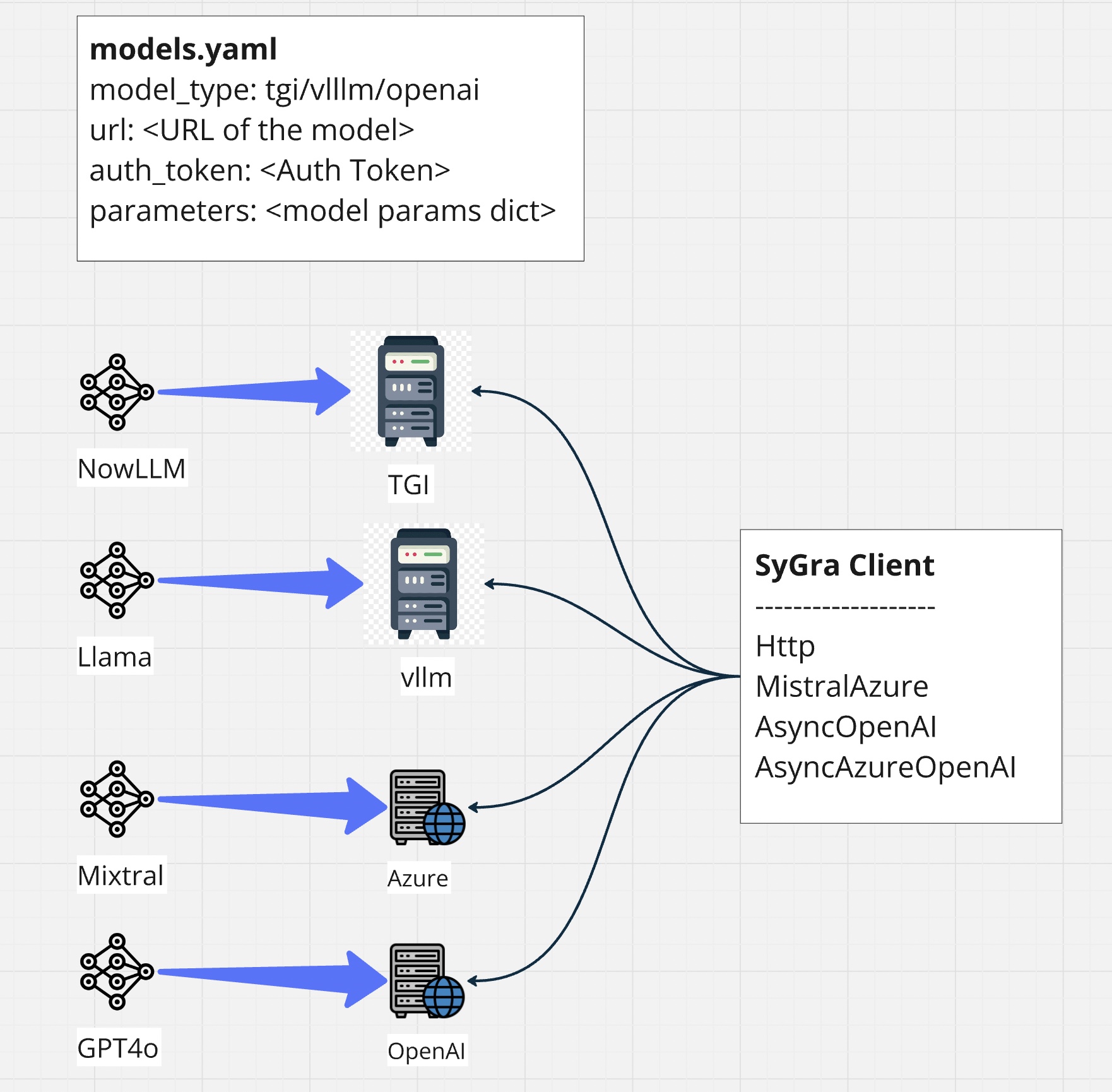
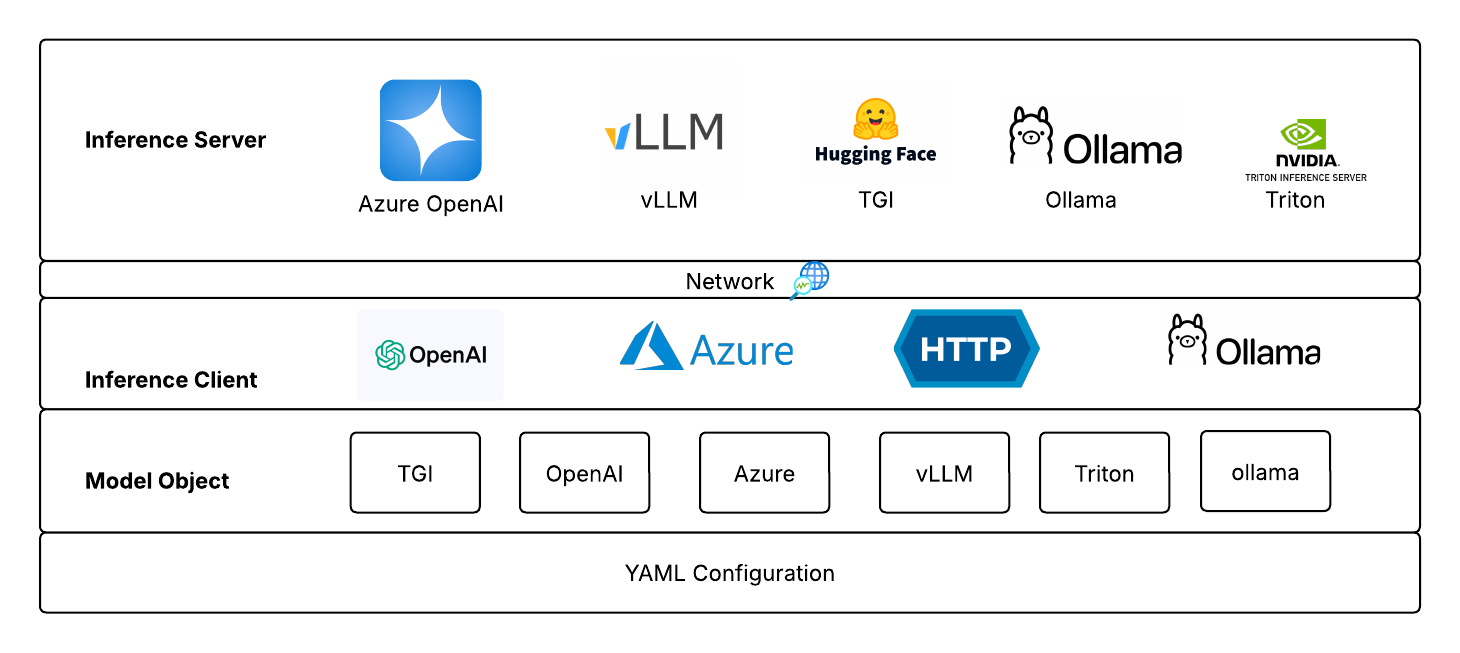
SyGra requires model configuration as the first step. It supports various clients like HTTP, MistralAzure, AsyncOpenAI, AsyncAzureOpenAI, Ollama to connect to inference servers (Text Generation Inference (TGI), vLLM server, Azure Cloud Service, Ollama, Triton etc.).
The config folder contains the main configuration file: models.yaml. You can add your model alias as a key and define its properties as shown below.
Note:
For Triton, the pre-processing and post-processing configuration (payload_json&response_key) can be defined in thepayload_cfg.jsonfile.payload_keyin thepayload_cfg.jsonfile should be added to themodels.yamlfile for the corresponding Triton model. If the payload key is not defined inmodels.yaml, the default payload format will be used.
SyGra doesn't support inference within the framework, but it supports various clients, which helps connecting with different kind of servers. For example, openai client is being supported by Huggingface TGI, vLLM server and Azure services. However, model configuration does not allow to change clients, but it can be configured in models code.
Integration with LiteLLM
SyGra now integrates with LiteLLM—unlocking more flexibility, expanded model compatibility, and seamless end-to-end integrations.
All sensitive connection information such as model URL and tokens must be set via environment variables and not stored in the config file.
For each model defined in your models.yaml, set environment variables as follows:
SYGRA_<MODEL_NAME>_URL(for the model endpoint)SYGRA_<MODEL_NAME>_TOKEN(for API keys or tokens)- If
modify_tokenizer: trueis set for a model, provide a chat template string via:SYGRA_<MODEL_NAME>_CHAT_TEMPLATE
Naming Convention:
<MODEL_NAME> is the model’s key from your models.yaml, with all spaces replaced by underscores, and all letters uppercased (e.g., mixtral 8x7b → MIXTRAL_8X7B).
Example:
For mixtral_8x7b and gpt4, set:
SYGRA_MIXTRAL_8X7B_URL,SYGRA_MIXTRAL_8X7B_TOKENSYGRA_GPT4_URL,SYGRA_GPT4_TOKEN- If
mixtral_8x7bhasmodify_tokenizer: true, set:SYGRA_MIXTRAL_8X7B_CHAT_TEMPLATEto your custom Jinja2 chat template string
You should use a .env file at the project root or set these in your shell environment.
Note:
If you want to define a list of URLs for any model, you can use pipe (|) as a separator. For example, if you have a model called mixtral_8x7b with URLs https://myserver/models/mixtral-8x7b and https://myserver/models/mixtral-8x7b-2, you can set the following environment variables as shown in examples below.
SYGRA_MIXTRAL_8X7B_URL=https://myserver/models/mixtral-8x7b|https://myserver/models/mixtral-8x7b-2
SYGRA_MIXTRAL_8X7B_TOKEN=sk-abc123
SYGRA_MIXTRAL_8X7B_CHAT_TEMPLATE={% for m in messages %} ... {% endfor %}| Key | Description |
|---|---|
model_type |
Type of backend server (tgi, vllm, openai, azure_openai, azure, mistralai, ollama, triton, bedrock, vertex_ai) |
client_type |
(Optional) model_type uses a client by default without this parameter. Use this to override default client for the selected model_type. |
model_name |
Model name for your deployments (for Azure/Azure OpenAI) |
api_version |
API version for Azure or Azure OpenAI |
input_type |
(Optional) What type of input the model accepts (default: text) Supported values: text, image, audio.input_type: audio mandatory for transcription models |
output_type |
(Optional) What type of output the model generates (default: text) Supported values: text, image, audio |
backend |
(Optional) Backend for the model (default: litellm for litellm supported models, custom for other models, proxy for models running behind proxy layer, langgraph for models used in agent node) Supported values: litellm, custom, proxy. Please note proxy backend needs http client_type. Models used in agent node need langgraph backend type. Currently langgraph backend type is only supported for the following model_type: vllm, openai, azure_openai |
completions_api |
(Optional) Boolean: use completions API instead of chat completions API (default: false) Supported models: tgi, vllm, ollama |
hf_chat_template_model_id |
(Optional) Hugging Face model ID. Make sure to set this when completions_api is set to true |
modify_tokenizer |
(Optional) Boolean: apply custom chat template and modify the base model tokenizer (default: false) |
special_tokens |
(Optional) List of special stop tokens used in generation |
post_process |
(Optional) Post processor after model inference (e.g. models.model_postprocessor.RemoveThinkData) |
parameters |
(Optional) Generation parameters (see below) |
image_capabilities |
(Optional) Image model limits as dict. Supports prompt_char_limit (warn if exceeded) and max_edit_images (truncate extra input images). |
chat_template_params |
(Optional) Chat template parameters (e.g. reasoning_effort for gpt-oss-120b) when completions_api is enabled |
ssl_verify |
(Optional) Verify SSL certificate (default: true) |
ssl_cert |
(Optional) Path to SSL certificate file |
json_payload |
(Optional) Boolean: use JSON payload instead of JSON string for http client based models (default: false) |
headers |
(Optional) Dictionary of headers to be sent with the request for http client based models |
 |
- Do not include
url,auth_token, orapi_keyin your YAML config. These are sourced from environment variables as described above.- If you want to set ssl_verify to false globally, you can set
ssl_verify:falseundermodel_configsection in config/configuration.yaml
temperature: Sampling randomness (0.0–2.0; lower is more deterministic)top_p: Nucleus sampling (0.0–1.0)max_tokens/max_new_tokens: Maximum number of tokens to generatestop: List of stop strings to end generationrepetition_penalty: Penalizes repeated tokens (1.0 = no penalty)presence_penalty: (OpenAI only) Encourages novel tokensfrequency_penalty: (OpenAI only) Penalizes frequently occurring tokens
The model alias set as a key in the configuration is referenced in your graph YAML files (for node types such as llm or multi_llm). You can override these model parameters, chat_template_params in the graph YAML for specific scenarios.
SyGra supports multiple ways of connecting to OpenAI and OpenAI-compatible models. The following clarifies the difference between openai, azure_openai, and azure model types:
| Model Type | Description | Typical Use Case | Required Config Keys |
|---|---|---|---|
openai |
Connects directly to the public OpenAI API (https://api.openai.com/v1). |
Use this for hosted OpenAI models like gpt-4o, gpt-3.5-turbo, etc. |
model_type: openai |
azure_openai |
Connects to OpenAI models hosted on Azure (Azure Cognitive Services → OpenAI deployment). Requires model_name and api_version. |
Use when your organization deploys OpenAI models via Azure. | model_type: azure_openai, model_name, api_version |
azure |
Generic HTTP client wrapper for non-OpenAI Azure models (e.g., Anthropic Claude, Mistral, Custom inference endpoints) using Azure API Gateway / Managed Endpoints. | Use when Azure acts simply as a proxy HTTP endpoint to another model. | model_type: azure, plus any extra headers in .env and models.yaml |
| Client | Required Environment Variables |
|---|---|
openai |
SYGRA_<MODEL>_URL=https://api.openai.com/v1SYGRA_<MODEL>_TOKEN=sk-... |
azure_openai |
SYGRA_<MODEL>_URL=https://<resource>.openai.azure.comSYGRA_<MODEL>_TOKEN=<azure-key> |
azure |
SYGRA_<MODEL>_URL=https://<your-azure-endpoint>SYGRA_<MODEL>_TOKEN=<auth-if-required> |
gpt4_openai:
  model_type: openai
  parameters:
    temperature: 0.7
    max_tokens: 512

gpt4_azure:
  model_type: azure_openai
  model_name: gpt-4-32k
  api_version: 2024-05-01-preview
  parameters:
    temperature: 0.7
    max_tokens: 512

llama_3_1_405b_instruct:
  model_type: azure
  load_balancing: round_robin
  parameters:
    max_tokens: 4096
    temperature: 0.8
  hf_chat_template_model_id: meta-llama/Meta-Llama-3.1-405B-Instruct

qwen_2.5_32b_vl:
  model_type: vllm
  completions_api: true
  hf_chat_template_model_id: Qwen/Qwen2.5-VL-32B-Instruct
  parameters:
    temperature: 0.15
    max_tokens: 10000
    stop: ["<|endoftext|>", "<|im_end|>", "<|eod_id|>"]

qwen3_1.7b:
  hf_chat_template_model_id: Qwen/Qwen3-1.7B
  post_process: sygra.core.models.model_postprocessor.RemoveThinkData
  model_type: ollama
  parameters:
    max_tokens: 2048
    temperature: 0.8

qwen3-32b-triton:
  hf_chat_template_model_id: Qwen/Qwen3-32B
  post_process: sygra.core.models.model_postprocessor.RemoveThinkData
  model_type: triton
  payload_key: default
  # Uses default payload format defined in config/payload_cfg.json.
  # Add/Update the payload_cfg.json if you need to use a different payload format with new key.
  parameters:
    temperature: 0.7

gemini_2_5_pro:
  model_type: vertex_ai
  model: gemini-2.5-pro
  parameters:
    max_tokens: 5000
    temperature: 0.5

bedrock_model:
  model_type: bedrock
  model: anthropic.claude-sonnet-4-5-20250929-v1:0
  parameters:
    max_tokens: 5000
    temperature: 0.5
Important: If you set modify_tokenizer: true for a model, you must provide the corresponding chat template in your environment as SYGRA_<MODEL_NAME>_CHAT_TEMPLATE. Otherwise, exception will be raised during the model initialization.
This section summarizes provider-specific configuration and capabilities for models implemented with litellm in sygra.
| Provider | Text (chat) | Image generation | Image editing | Audio (TTS) | Audio chat | Native structured output | Completions API | Required keys | Env vars |
|---|---|---|---|---|---|---|---|---|---|
AWS Bedrock (bedrock) |
✅ | ✅* | ❌ | ❌ | ❌ | ✅ | ❌ | aws_access_key_id, aws_secret_access_key, aws_region_name |
SYGRA_<MODEL>_AWS_ACCESS_KEY_ID, SYGRA_<MODEL>_AWS_SECRET_ACCESS_KEY, SYGRA_<MODEL>_AWS_REGION_NAME |
Azure (azure) |
✅ | ✅ | ✅ | ✅ | ❌ | ❌ | ✅ | url, auth_token |
SYGRA_<MODEL>_URL, SYGRA_<MODEL>_TOKEN |
Azure OpenAI (azure_openai) |
✅ | ✅ | ✅ | ✅ | ✅ | ✅ | ❌ | url, auth_token, api_version |
SYGRA_<MODEL>_URL, SYGRA_<MODEL>_TOKEN |
Ollama (ollama) |
✅ | ❌ | ❌ | ❌ | ❌ | ✅ | ✅ | None | SYGRA_<MODEL>_URL |
OpenAI (openai) |
✅ | ✅ | ✅ | ✅ | ✅ | ✅ | ❌ | url, auth_token |
SYGRA_<MODEL>_URL, SYGRA_<MODEL>_TOKEN |
Triton (triton) |
✅ | ❌ | ❌ | ❌ | ❌ | ❌ | ✅ | url, auth_token |
SYGRA_<MODEL>_URL, SYGRA_<MODEL>_TOKEN |
Vertex AI (vertex_ai) |
✅ | ✅* | ❌ | ✅ | ✅ | ✅ | ❌ | vertex_project, vertex_location, vertex_credentials |
SYGRA_<MODEL>_VERTEX_PROJECT, SYGRA_<MODEL>_VERTEX_LOCATION, SYGRA_<MODEL>_VERTEX_CREDENTIALS |
vLLM (vllm) |
✅ | ❌ | ❌ | ❌ | ❌ | ✅ | ✅ | url, auth_token |
SYGRA_<MODEL>_URL, SYGRA_<MODEL>_TOKEN |
Legend: ✅ supported, ❌ not supported, ✅* supported depending on the selected model/deployment.
Many of the enterprise organizations keeps the models running behind a proxy URL. SyGra supports model connectivity through proxy URL. The proxy models requires specific tool translation, hence only a few important models are being supported in this(Gemini, Claude). To configure models running behind proxy, make sure to set the following variables:
model_type: claude_proxy or gemini_proxy
backend: proxy
client_type: http
Please note that model running behind proxy layer can only communicate using http client. Hence, we need to explicitly define client_type for proxy. For other models, the model_type internally uses appropriate client and therefore do not require a client_type.
gemini_2.5_proxy:
  model_type: gemini_proxy
  client_type: http
  backend: proxy
  parameters:
    maxOutputTokens: 2500
    temperature: 0