


Building performant 3D browser games with WebGL, physics, and real-time multiplayer.
| Isometric Racing | Multiplayer Gameplay |
|---|---|
 |
 |
Example of isometric racing game with WebGL rendering
Browser Game Architecture
──────────────────────────────────────────────────
┌─────────────────────────────────────────────────┐
│                   Client                        │
│  ┌──────────┐  ┌──────────┐  ┌──────────────┐  │
│  │  WebGL   │  │  Physics │  │   Network    │  │
│  │ Renderer │  │  Engine  │  │ (WebSocket)  │  │
│  └──────────┘  └──────────┘  └──────────────┘  │
│        │             │              │           │
│        └─────────────┼──────────────┘           │
│                      ▼                          │
│              ┌─────────────┐                    │
│              │  Game Loop  │                    │
│              └─────────────┘                    │
└─────────────────────────────────────────────────┘
                       │
                       ▼ WebSocket
┌─────────────────────────────────────────────────┐
│                   Server                        │
│  ┌──────────────┐  ┌────────────────────────┐  │
│  │ Game State   │  │ Authoritative Physics  │  │
│  │ Sync         │  │                        │  │
│  └──────────────┘  └────────────────────────┘  │
└─────────────────────────────────────────────────┘
// Initialize WebGL context
const canvas = document.getElementById('game')
const gl = canvas.getContext('webgl2')

// Vertex shader for isometric view
const vertexShader = `#version 300 es
  in vec3 a_position;
  in vec2 a_texCoord;

  uniform mat4 u_projection;
  uniform mat4 u_view;
  uniform mat4 u_model;

  out vec2 v_texCoord;

  void main() {
    gl_Position = u_projection * u_view * u_model * vec4(a_position, 1.0);
    v_texCoord = a_texCoord;
  }
`

// Fragment shader
const fragmentShader = `#version 300 es
  precision highp float;

  in vec2 v_texCoord;
  uniform sampler2D u_texture;

  out vec4 outColor;

  void main() {
    outColor = texture(u_texture, v_texCoord);
  }
`
Isometric projection transforms 3D coordinates to 2D screen space at 30-degree angles
// Create isometric projection matrix
function createIsometricProjection(width, height) {
  const angle = Math.PI / 6 // 30 degrees
  const scale = 64 // pixels per unit

  return new Float32Array([
    Math.cos(angle) * scale, Math.sin(angle) * scale / 2, 0, 0,
    -Math.cos(angle) * scale, Math.sin(angle) * scale / 2, 0, 0,
    0, -1, 0.001, 0,
    width / 2, height / 2, 0, 1
  ])
}

// Depth sorting for isometric rendering
class DepthSorter {
  sort(entities) {
    return entities.sort((a, b) => {
      // Sort by y position (further = rendered first)
      const depthA = a.position.x + a.position.y
      const depthB = b.position.x + b.position.y
      return depthA - depthB
    })
  }
}
Forces acting on a car: engine force, drag, friction, and cornering forces
| Force | Description |
|---|---|
| Engine | Forward thrust from wheels |
| Drag | Air resistance (proportional to v^2) |
| Rolling Resistance | Tire friction with ground |
| Cornering | Lateral forces during turns |
class CarPhysics {
  constructor() {
    this.position = { x: 0, y: 0 }
    this.velocity = { x: 0, y: 0 }
    this.angle = 0
    this.angularVelocity = 0

    // Car properties
    this.mass = 1200 // kg
    this.wheelBase = 2.5 // meters
    this.maxSteerAngle = Math.PI / 6

    // Physics constants
    this.engineForce = 8000
    this.brakeForce = 12000
    this.drag = 0.4257
    this.rollingResistance = 12.8
  }

  update(dt, input) {
    // Calculate steering
    const steerAngle = input.steering * this.maxSteerAngle

    // Calculate forces
    let force = { x: 0, y: 0 }

    // Engine/brake force
    if (input.throttle > 0) {
      force.x += Math.cos(this.angle) * this.engineForce * input.throttle
      force.y += Math.sin(this.angle) * this.engineForce * input.throttle
    }
    if (input.brake > 0) {
      const speed = Math.sqrt(this.velocity.x ** 2 + this.velocity.y ** 2)
      if (speed > 0.1) {
        force.x -= (this.velocity.x / speed) * this.brakeForce * input.brake
        force.y -= (this.velocity.y / speed) * this.brakeForce * input.brake
      }
    }

    // Drag and rolling resistance
    const speed = Math.sqrt(this.velocity.x ** 2 + this.velocity.y ** 2)
    force.x -= this.velocity.x * this.drag * speed
    force.y -= this.velocity.y * this.drag * speed
    force.x -= this.velocity.x * this.rollingResistance
    force.y -= this.velocity.y * this.rollingResistance

    // Apply forces (F = ma)
    this.velocity.x += (force.x / this.mass) * dt
    this.velocity.y += (force.y / this.mass) * dt

    // Update angular velocity (simplified Ackermann)
    if (speed > 0.5) {
      const turnRadius = this.wheelBase / Math.sin(steerAngle)
      this.angularVelocity = speed / turnRadius
    } else {
      this.angularVelocity = 0
    }

    // Update position and angle
    this.position.x += this.velocity.x * dt
    this.position.y += this.velocity.y * dt
    this.angle += this.angularVelocity * dt
  }
}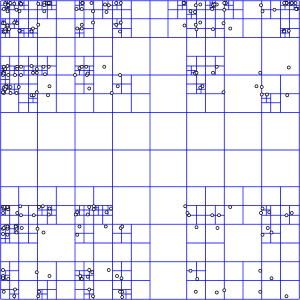
Quad-tree divides space into 4 quadrants recursively for O(log n) collision queries
┌───────────────────────────────┐
│               │               │
│      NW       │      NE       │
│               │               │
│───────────────┼───────────────│
│               │               │
│      SW       │      SE       │
│               │               │
└───────────────────────────────┘
class QuadTree {
  constructor(bounds, maxObjects = 10, maxLevels = 5, level = 0) {
    this.bounds = bounds
    this.maxObjects = maxObjects
    this.maxLevels = maxLevels
    this.level = level
    this.objects = []
    this.nodes = []
  }

  split() {
    const { x, y, width, height } = this.bounds
    const subWidth = width / 2
    const subHeight = height / 2

    this.nodes = [
      new QuadTree({ x: x + subWidth, y, width: subWidth, height: subHeight },
                   this.maxObjects, this.maxLevels, this.level + 1),
      new QuadTree({ x, y, width: subWidth, height: subHeight },
                   this.maxObjects, this.maxLevels, this.level + 1),
      new QuadTree({ x, y: y + subHeight, width: subWidth, height: subHeight },
                   this.maxObjects, this.maxLevels, this.level + 1),
      new QuadTree({ x: x + subWidth, y: y + subHeight, width: subWidth, height: subHeight },
                   this.maxObjects, this.maxLevels, this.level + 1)
    ]
  }

  insert(object) {
    if (this.nodes.length) {
      const index = this.getIndex(object)
      if (index !== -1) {
        this.nodes[index].insert(object)
        return
      }
    }

    this.objects.push(object)

    if (this.objects.length > this.maxObjects && this.level < this.maxLevels) {
      if (!this.nodes.length) this.split()

      this.objects = this.objects.filter(obj => {
        const index = this.getIndex(obj)
        if (index !== -1) {
          this.nodes[index].insert(obj)
          return false
        }
        return true
      })
    }
  }

  retrieve(object) {
    const index = this.getIndex(object)
    let found = [...this.objects]

    if (this.nodes.length && index !== -1) {
      found = found.concat(this.nodes[index].retrieve(object))
    }

    return found
  }
}
Self-driving car AI using ray-casting sensors and neural network decision making
     Sensors (5)          Hidden Layer (8)         Outputs (2)
         ○                     ○
        /│\                   /│\                    ○ Steering
       / │ \                 / │ \                  /
      ○  ○  ○ ─────────────○  ○  ○ ───────────────○ Throttle
       \ │ /                 \ │ /
        \│/                   \│/
         ○                     ○
class NeuralNetwork {
  constructor(layers) {
    this.layers = layers
    this.weights = this.initializeWeights()
  }

  initializeWeights() {
    const weights = []
    for (let i = 0; i < this.layers.length - 1; i++) {
      const layerWeights = []
      for (let j = 0; j < this.layers[i + 1]; j++) {
        const neuronWeights = []
        for (let k = 0; k < this.layers[i] + 1; k++) { // +1 for bias
          neuronWeights.push(Math.random() * 2 - 1)
        }
        layerWeights.push(neuronWeights)
      }
      weights.push(layerWeights)
    }
    return weights
  }

  // Ray-casting sensors for track detection
  getSensorInputs(car, track) {
    const sensors = []
    const angles = [-60, -30, 0, 30, 60] // degrees

    for (const angle of angles) {
      const rayAngle = car.angle + (angle * Math.PI / 180)
      const distance = this.castRay(car.position, rayAngle, track, 200)
      sensors.push(distance / 200) // Normalize 0-1
    }

    return sensors
  }

  forward(inputs) {
    let activations = inputs

    for (const layerWeights of this.weights) {
      const newActivations = []
      for (const neuronWeights of layerWeights) {
        let sum = neuronWeights[neuronWeights.length - 1] // bias
        for (let i = 0; i < activations.length; i++) {
          sum += activations[i] * neuronWeights[i]
        }
        newActivations.push(Math.tanh(sum)) // activation
      }
      activations = newActivations
    }

    return activations // [steering, throttle]
  }
}

// Genetic algorithm for training
class GeneticAlgorithm {
  constructor(populationSize) {
    this.population = Array(populationSize).fill(null)
      .map(() => new NeuralNetwork([5, 8, 2])) // 5 sensors, 8 hidden, 2 outputs
    this.generation = 0
  }

  evolve(fitnessScores) {
    // Selection - tournament selection
    const selected = this.tournamentSelection(fitnessScores)

    // Crossover
    const offspring = this.crossover(selected)

    // Mutation
    this.mutate(offspring)

    this.population = offspring
    this.generation++
  }

  mutate(population, rate = 0.1) {
    for (const network of population) {
      for (const layer of network.weights) {
        for (const neuron of layer) {
          for (let i = 0; i < neuron.length; i++) {
            if (Math.random() < rate) {
              neuron[i] += (Math.random() * 2 - 1) * 0.5
            }
          }
        }
      }
    }
  }
}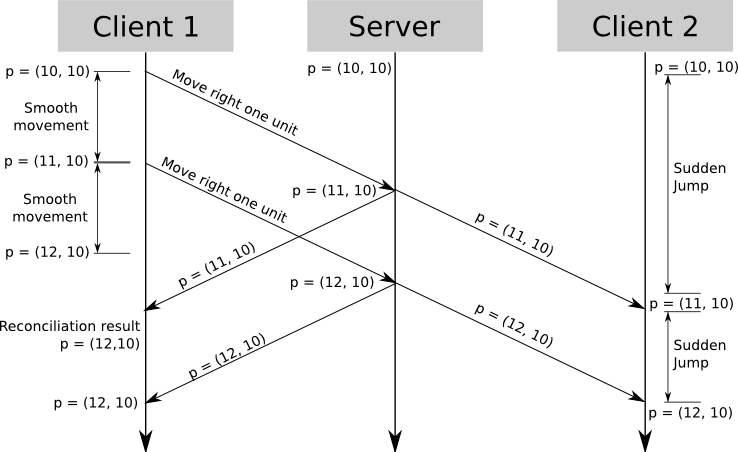
Client predicts movement locally while waiting for server confirmation
Timeline:
─────────────────────────────────────────────────────►
Client:  Input → Predict → Predict → Reconcile
                    ↓         ↓          ↑
Server:          Receive → Process → Broadcast
class ClientPrediction {
  constructor() {
    this.pendingInputs = []
    this.lastServerState = null
    this.sequence = 0
  }

  // Send input to server and predict locally
  processInput(input) {
    const inputWithSeq = { ...input, sequence: this.sequence++ }

    // Send to server
    this.socket.send(JSON.stringify({
      type: 'input',
      data: inputWithSeq
    }))

    // Store for reconciliation
    this.pendingInputs.push(inputWithSeq)

    // Apply locally (prediction)
    this.localState = this.applyInput(this.localState, input)

    return this.localState
  }

  // Reconcile with server state
  reconcile(serverState) {
    this.lastServerState = serverState

    // Remove acknowledged inputs
    this.pendingInputs = this.pendingInputs.filter(
      input => input.sequence > serverState.lastProcessedInput
    )

    // Re-apply pending inputs on top of server state
    let state = serverState
    for (const input of this.pendingInputs) {
      state = this.applyInput(state, input)
    }

    this.localState = state
  }
}
Bezier curves create smooth racing tracks from control points
| Curve Type | Control Points | Use Case |
|---|---|---|
| Quadratic | 3 points | Simple curves |
| Cubic | 4 points | S-curves, complex paths |
| Higher Order | N points | Detailed track sections |
// De Casteljau algorithm for track curves
class BezierTrack {
  constructor(controlPoints) {
    this.controlPoints = controlPoints
    this.segments = this.generateSegments()
  }

  // De Casteljau's algorithm
  evaluate(t) {
    let points = [...this.controlPoints]

    while (points.length > 1) {
      const newPoints = []
      for (let i = 0; i < points.length - 1; i++) {
        newPoints.push({
          x: (1 - t) * points[i].x + t * points[i + 1].x,
          y: (1 - t) * points[i].y + t * points[i + 1].y
        })
      }
      points = newPoints
    }

    return points[0]
  }

  generateSegments(resolution = 100) {
    const segments = []
    for (let i = 0; i <= resolution; i++) {
      segments.push(this.evaluate(i / resolution))
    }
    return segments
  }

  // Generate track with width
  generateTrackMesh(width) {
    const leftEdge = []
    const rightEdge = []

    for (let i = 0; i < this.segments.length - 1; i++) {
      const current = this.segments[i]
      const next = this.segments[i + 1]

      // Calculate perpendicular
      const dx = next.x - current.x
      const dy = next.y - current.y
      const len = Math.sqrt(dx * dx + dy * dy)
      const nx = -dy / len
      const ny = dx / len

      leftEdge.push({
        x: current.x + nx * width / 2,
        y: current.y + ny * width / 2
      })
      rightEdge.push({
        x: current.x - nx * width / 2,
        y: current.y - ny * width / 2
      })
    }

    return { leftEdge, rightEdge }
  }
}
WebSocket enables real-time bidirectional communication between clients and server
┌─────────┐     WebSocket      ┌─────────┐
│ Client1 │◄──────────────────►│         │
└─────────┘                    │  Game   │
┌─────────┐     WebSocket      │ Server  │
│ Client2 │◄──────────────────►│         │
└─────────┘                    └─────────┘
// Server-side game room
class GameRoom {
  constructor(id) {
    this.id = id
    this.players = new Map()
    this.state = { cars: [], raceTime: 0 }
    this.tickRate = 60
  }

  addPlayer(socket, playerData) {
    const player = {
      id: playerData.id,
      socket,
      car: new CarPhysics(),
      inputs: { steering: 0, throttle: 0, brake: 0 }
    }
    this.players.set(playerData.id, player)
    this.broadcast({ type: 'playerJoined', player: playerData })
  }

  tick(dt) {
    // Process all player inputs
    for (const [id, player] of this.players) {
      player.car.update(dt, player.inputs)
    }

    // Broadcast state
    const state = {
      type: 'state',
      cars: Array.from(this.players.values()).map(p => ({
        id: p.id,
        position: p.car.position,
        angle: p.car.angle,
        velocity: p.car.velocity
      })),
      timestamp: Date.now()
    }

    this.broadcast(state)
  }

  broadcast(message) {
    const data = JSON.stringify(message)
    for (const player of this.players.values()) {
      player.socket.send(data)
    }
  }
}// Object pooling for particles/effects
class ObjectPool {
constructor(factory, initialSize = 100) {
this.factory = factory
this.pool = Array(initialSize).fill(null).map(() => factory())
this.active = []
}
acquire() {
const obj = this.pool.pop() || this.factory()
this.active.push(obj)
return obj
}
release(obj) {
const index = this.active.indexOf(obj)
if (index !== -1) {
this.active.splice(index, 1)
this.pool.push(obj)
}
}
}
// Struct packing for network efficiency
class StructPacker {
static packCarState(car) {
const buffer = new ArrayBuffer(24)
const view = new DataView(buffer)
view.setFloat32(0, car.position.x, true)
view.setFloat32(4, car.position.y, true)
view.setFloat32(8, car.velocity.x, true)
view.setFloat32(12, car.velocity.y, true)
view.setFloat32(16, car.angle, true)
view.setFloat32(20, car.angularVelocity, true)
return buffer
}
static unpackCarState(buffer) {
const view = new DataView(buffer)
return {
position: { x: view.getFloat32(0, true), y: view.getFloat32(4, true) },
velocity: { x: view.getFloat32(8, true), y: view.getFloat32(12, true) },
angle: view.getFloat32(16, true),
angularVelocity: view.getFloat32(20, true)
}
}
}
Fixed timestep game loop separates physics updates from rendering
┌─────────────────────────────────────────────────────┐
│                    GAME LOOP                        │
├─────────────────────────────────────────────────────┤
│                                                     │
│  ┌──────────┐    ┌──────────┐    ┌──────────────┐  │
│  │  Input   │───►│  Update  │───►│    Render    │  │
│  │ Process  │    │ (Fixed)  │    │ (Variable)   │  │
│  └──────────┘    └──────────┘    └──────────────┘  │
│       │               │                  │          │
│       └───────────────┴──────────────────┘          │
│                       ▼                             │
│              requestAnimationFrame                  │
└─────────────────────────────────────────────────────┘
class GameLoop {
  constructor(update, render) {
    this.update = update
    this.render = render
    this.lastTime = 0
    this.accumulator = 0
    this.fixedDt = 1 / 60 // 60 Hz physics
    this.running = false
  }

  start() {
    this.running = true
    this.lastTime = performance.now()
    requestAnimationFrame(this.loop.bind(this))
  }

  loop(currentTime) {
    if (!this.running) return

    const dt = (currentTime - this.lastTime) / 1000
    this.lastTime = currentTime
    this.accumulator += dt

    // Fixed timestep for physics
    while (this.accumulator >= this.fixedDt) {
      this.update(this.fixedDt)
      this.accumulator -= this.fixedDt
    }

    // Interpolated render
    const alpha = this.accumulator / this.fixedDt
    this.render(alpha)

    requestAnimationFrame(this.loop.bind(this))
  }
}micro-racing/
├── packages/
│ ├── client/ # WebGL renderer, UI
│ │ ├── src/
│ │ │ ├── renderer/ # WebGL shaders, sprites
│ │ │ ├── physics/ # Client-side physics
│ │ │ ├── network/ # WebSocket client
│ │ │ └── ui/ # HUD, menus
│ │ └── package.json
│ ├── server/ # Game server
│ │ ├── src/
│ │ │ ├── rooms/ # Game rooms
│ │ │ ├── physics/ # Authoritative physics
│ │ │ └── ai/ # Neural network bots
│ │ └── package.json
│ └── shared/ # Common types, utils
│ ├── src/
│ │ ├── types/
│ │ └── physics/
│ └── package.json
├── turbo.json
└── package.json
1. Separate physics from rendering (fixed timestep)
2. Use client-side prediction for responsiveness
3. Quad-tree for efficient collision detection
4. Object pooling for memory efficiency
5. Binary packing for network optimization
6. Neural networks can learn driving behavior
7. Isometric depth sorting is order-dependent
Learned: December 20, 2025 Tags: WebGL, Game Development, Physics, Multiplayer, Neural Networks, JavaScript