13 | How create a tilemap
Step 1
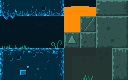
Save this image in folder "res" as "tileset.png"
Step 2
Download the Tiled, export and run -> link
Step 3
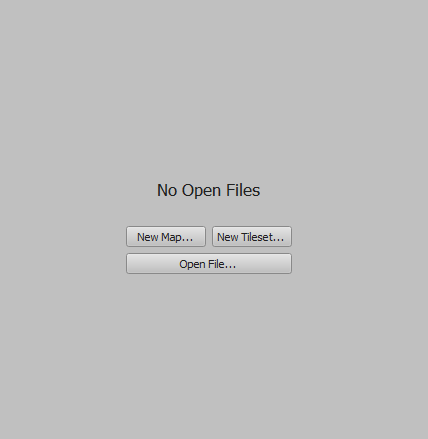
Create new map
Step 4
Set the configurations:
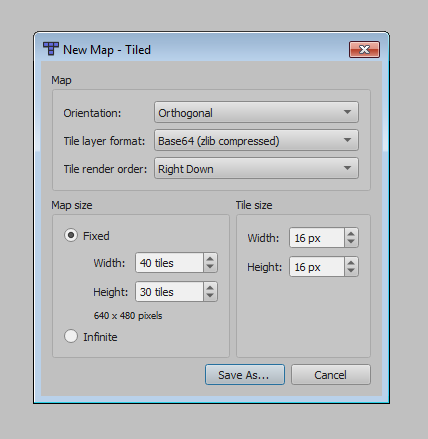
Orientation: Orthogonal
Tile layer format: Base64 (zlib compressed)
Tile render order: Right Down
Map Size. Fixed: 40 tiles by 30 tiles (640x480)
Tile Size: 16px by 16px
Step 5
Save As... "map.tmx"
Save inside folder "res".
Step 6
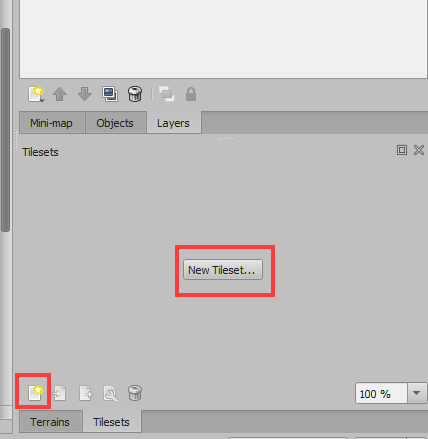
Click in "New Tileset" or in "icon"
Step 7
Set configurations:
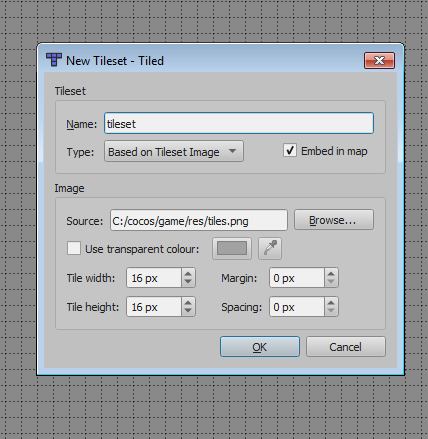
Name: tileset
Type: Based on Tileset Image
Select "Embed in map"
Click in "Browse" and select the "image"
Tile width: 16px
Tile height: 16px
Click ok
Step 8
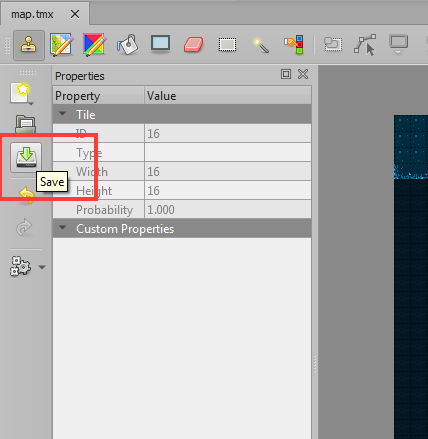
Draw a tilemap and click in save

13 | How create a tilemap
Step 1
Save this image in folder "res" as "tileset.png"

Step 2
Download the Tiled, export and run -> link
Step 3
Create new map

Step 4
Set the configurations:

Orientation: Orthogonal
Tile layer format: Base64 (zlib compressed)
Tile render order: Right Down
Map Size. Fixed: 40 tiles by 30 tiles (640x480)
Tile Size: 16px by 16px
Step 5
Save As... "map.tmx"
Save inside folder "res".
Step 6
Click in "New Tileset" or in "icon"

Step 7
Set configurations:

Name: tileset
Type: Based on Tileset Image
Select "Embed in map"
Click in "Browse" and select the "image"
Tile width: 16px
Tile height: 16px
Click ok
Step 8
Draw a tilemap and click in save
