🔮 GitVoyant v0.2.0 - AI Agent Platform for Temporal Code Intelligence
by ByteStack Labs
GitVoyant provides a Rich-formatted CLI experience:
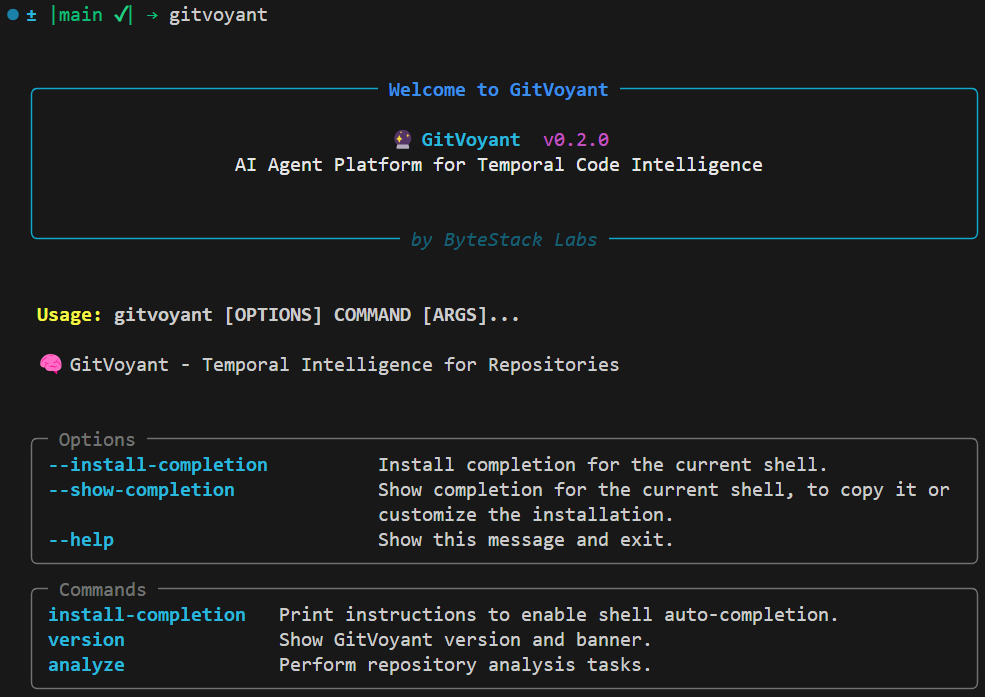
GitVoyant is a command-line tool that analyzes your Git repositories to understand how code complexity evolves over time. Using temporal intelligence and AI-powered analysis, GitVoyant helps you identify code decay patterns, quality trends, and maintenance hotspots before they become critical issues.
- 🎨 Rich CLI Interface: Cyan banners, color-coded results, and emoji indicators
- 📊 Temporal Analysis: Track how code complexity changes over time with statistical confidence
- 🧠 AI Agent Integration: Interactive Claude AI agent for repository insights
- 🔍 Quality Decay Detection: Identify files at risk of becoming maintenance burdens
- 🌐 Flexible Input: Works with local repositories and remote Git URLs
- ⚡ Auto-Caching: Intelligent repository cloning and caching for remote sources
GitVoyant requires Python 3.11+ and uses UV for fast Python package management.
Install UV:
curl -LsSf https://astral.sh/uv/install.sh | shInstall Python 3.11+ (if needed):
You can install it via pyenv or your OS package manager.
-
Clone and bootstrap (recommended for first-time setup):
git clone https://github.com/Cre4T3Tiv3/gitvoyant.git
cd gitvoyant
make bootstrap
This will:
- Create a
.venvusinguv - Install core and CLI dependencies
- Setup the CLI (
gitvoyant) in editable mode
- Create a
-
Activate the environment:
source .venv/bin/activateOr add this to your
.bashrc/.zshrc:export PATH="$(pwd)/.venv/bin:$PATH"
-
Enable shell autocompletion (optional but recommended):
gitvoyant install-completion
Follow the printed instructions to enable it for your shell permanently.
| Command | Description |
|---|---|
make bootstrap |
🔁 Create .venv and install all tools/dev deps |
make install |
📦 Install core dependencies |
make dev |
🧪 Install development dependencies |
make cli |
📦 Install CLI entry point in editable mode |
make cli-complete |
💻 Install CLI + shell autocompletion |
make completions-debug |
🧪 Debug CLI app discovery for completion |
| Command | Description |
|---|---|
make lint |
🔍 Run Ruff linting |
make format |
✨ Format code using Ruff |
make test |
🧪 Run all tests (unit, integration, CLI, coverage) |
make test-unit |
🔬 Run unit tests |
make test-integration |
🔗 Run integration tests |
make test-cli |
💻 Run CLI-level tests |
make test-coverage |
📊 Run tests with coverage report |
| Command | Description |
|---|---|
make clean |
🧹 Remove temp and build artifacts |
make version |
📋 Show version and system info |
make check-path |
🧪 Print current PYTHONPATH |
make check-uv |
🔍 Ensure uv is installed |
All GitVoyant commands start with the banner shown above.
gitvoyant --helpShows the main help screen with the available commands and options in a clean organized format.
gitvoyant versionDisplays the GitVoyant version information.
GitVoyant provides two main analysis modes with Rich-formatted output:

The temporal analysis provides a complete view with the repository info grid and clean results table.
Analyze how code complexity evolves over time in your repository.
Analyze entire repository:
gitvoyant analyze temporal /path/to/repoAnalyze specific file:
gitvoyant analyze temporal /path/to/repo main.pyAnalyze with custom time window:
gitvoyant analyze temporal /path/to/repo --window-days 90Remote repository analysis:
gitvoyant analyze temporal https://github.com/user/repo.git🔮 GitVoyant Banner: Welcome message with version and company info 📊 Repository Info Grid:
- 🔍 Repository: Path or URL being analyzed
- 📊 Health Score: Overall repository health metric
- 📂 Evaluated Files: Number of files processed
📋 Results Table: Clean table with:
- File paths in cyan
- Color-coded temporal scores with visual indicators
The temporal analysis produces Temporal Scores with intuitive visual indicators:
- 🟢 Green Circle: Negative scores (e.g., -0.35) = decreasing complexity over time (good!)
- 🟡 Yellow Circle: Near-zero scores (-0.25 to +0.25) = stable complexity
- 🔴 Red Circle: Positive scores (>+0.25) = increasing complexity (needs attention)
For remote repositories, GitVoyant automatically handles cloning with status messages:
⬇️ Cloning https://github.com/user/repo.git into /tmp/gitvoyant_project ...Or for subsequent runs:
📦 Reusing existing clone: /tmp/gitvoyant_project

The AI agent provides natural language interaction for repository analysis.
Launch an interactive AI agent session for conversational repository analysis.
gitvoyant analyze agentWhat You'll Experience:
- 🔮 GitVoyant Banner: Same welcome message
- 🧠 Agent Initialization: "Claude agent initialized" with clear instructions
- 💬 Interactive Conversation: Natural language Q&A about your repository
Example Conversation:
💬 You: What is the decay rate of src/gitvoyant/cli/analyze.py?

🤖 Claude: Based on the analysis:
- The file shows a negative trend of -0.35 per month, indicating decreasing complexity over time
- It has LOW exposure and a risk score of 0.00
- The analysis is based on 11 commits
- Overall, this file appears to be well-maintained with improving code quality and minimal decay risk
Agent Capabilities:
- 📊 Specific File Analysis: Ask about individual files' decay patterns
- 🔍 Repository Overview: Get comprehensive health assessments
- 💡 Recommendations: Receive actionable insights for improvement
- 📈 Trend Explanations: Understand what temporal patterns mean
| Command | Description |
|---|---|
gitvoyant --help |
Show main help and available commands |
gitvoyant version |
Display version |
gitvoyant install-completion |
Setup shell autocompletion |
| Command | Description |
|---|---|
gitvoyant analyze temporal <repo> [file] |
Run temporal complexity analysis |
gitvoyant analyze agent |
Launch interactive AI agent |
| Option | Default | Description |
|---|---|---|
--window-days |
180 | Days of commit history to analyze |
Enable shell autocompletion for better CLI experience:
gitvoyant install-completionExpected Output:
Detected shell: zsh
Run the following command to enable auto-completion temporarily:
    eval "$(gitvoyant --show-completion zsh)"

To make it permanent, add the above line to your shell config file:
    ~/.bashrc, ~/.zshrc, ~/.config/fish/config.fish, etc.
- 🎨 Cyan-Bordered Banners: Consistent headers across all commands
- 📊 Color-Coded Results: Intuitive green/yellow/red visual indicators
- 🔍 Emoji Icons: Quick visual scanning with 🔍📊📂 indicators
- 📋 Clean Tables: Formatting with proper alignment
- ⚡ Responsive Layout: Automatically adapts to terminal width
- ✅ Status Messages: Clear feedback with colored info/success/error messages
GitVoyant's CLI is designed with modern terminal aesthetics in mind:
- Visual Hierarchy: Clear separation between sections and information types
- Accessibility: High contrast colors and emoji for quick scanning
- Terminal Adaptation: Graceful handling of different terminal sizes
The overall repository health score is calculated from all evaluated files. Higher positive scores indicate increasing complexity trends across your codebase.
🟢 Decreasing Complexity (Good)
- Score: Negative values (< -0.25)
- Meaning: Code is becoming simpler over time
- Action: Continue current practices - you're doing well!
🟡 Stable Complexity (Good)
- Score: Near zero (-0.25 to +0.25)
- Meaning: Code complexity is stable
- Action: Monitor for changes
🔴 Increasing Complexity (Attention Needed)
- Score: Positive values (> +0.25)
- Meaning: Code is becoming more complex over time
- Action: Consider refactoring or closer review
- High Positive Scores (>1.0): Files rapidly gaining complexity
- Files with Many Commits: High-change files with positive trends
- Legacy Components: Older files showing complexity increases
- Run temporal analysis monthly on your main repositories
- Focus on files with the highest positive temporal scores
- Track trends over time to identify patterns
- Ask specific questions about problematic files
- Request recommendations for refactoring priorities
- Get explanations of complex temporal patterns
- Add GitVoyant analysis to your CI/CD pipeline
- Review temporal scores during code reviews
- Use results to prioritize technical debt
make bootstrap  # Full setup with virtual environment
make dev        # Install development dependencies
make cli # Install CLI in editable modemake lint # Run code linting
make format # Auto-format code
make test # Run all tests
make clean # Clean up cache filesmake test-unit # Unit tests only
make test-integration # Integration tests only
make test-cli # CLI tests only
make test-coverage # Tests with coverage report"UV not found" Error
# Install UV package manager
curl -LsSf https://astral.sh/uv/install.sh | sh
Autocompletion not working?
Run: gitvoyant install-completion and follow the shell-specific instructions.
CLI not found after bootstrap?
Add .venv/bin to your PATH or activate the virtualenv:
source .venv/bin/activatePython version issues?
GitVoyant requires Python 3.11+. You can install it via pyenv or your OS package manager.
"Repository path does not exist"
- Verify the path to your Git repository
- Ensure the directory contains a
.gitfolder - Check file permissions
"Path is not a Git repository"
- Initialize Git if needed:
git init - Verify you're in the correct directory
- Check if
.gitfolder exists and is not corrupted
Remote Repository Access Issues
- Verify the Git URL is accessible
- Check network connectivity
- Ensure proper authentication for private repositories
Python Path Issues
# Check current Python path
make check-path

# Reset environment
make clean
make bootstrap- CLI Help: Use
gitvoyant --helpfor command information - Verbose Output: Most commands support verbose flags
- Log Files: Check temporary directories for clone logs
- GitHub Issues: Having issues? Feel free to open an issue on GitHub
- Support: Reach out via ByteStack Labs
Adjust the analysis timeframe based on your project's needs:
# Short-term trend (30 days)
gitvoyant analyze temporal ./repo --window-days 30

# Long-term trend (1 year)
gitvoyant analyze temporal ./repo --window-days 365Analyze multiple repositories:
#!/bin/bash
repos=(
    "https://github.com/org/repo1.git"
    "https://github.com/org/repo2.git"
    "./local/repo3"
)

for repo in "${repos[@]}"; do
    echo "Analyzing $repo..."
    gitvoyant analyze temporal "$repo"
    echo "---"
doneExample GitHub Actions workflow:
name: Code Quality Analysis
on: [push, pull_request]

jobs:
  gitvoyant-analysis:
    runs-on: ubuntu-latest
    steps:
    - uses: actions/checkout@v3
      with:
        fetch-depth: 0

    - name: Install UV
      run: curl -LsSf https://astral.sh/uv/install.sh | sh

    - name: Setup GitVoyant
      run: |
        git clone https://github.com/Cre4T3Tiv3/gitvoyant.git
        cd gitvoyant
        make bootstrap

    - name: Run Temporal Analysis
      run: |
        cd gitvoyant
.venv/bin/gitvoyant analyze temporal ${{ github.workspace }}GitVoyant is built with extensibility in mind. The core temporal evaluation service can be imported and used programmatically:
from gitvoyant.domain.services.temporal_evaluator_service import TemporalEvaluatorService
import asyncio

async def analyze_repo():
    service = TemporalEvaluatorService()
    result = await service.evaluate_repository("/path/to/repo")
    print(result)

asyncio.run(analyze_repo())GitVoyant is open source and welcomes contributions! From AI agent enhancements to temporal intelligence research, there are many ways to contribute to the future of code analysis.
📋 Complete Contributing Guide → - Comprehensive guidelines, research areas, and development standards
git clone https://github.com/Cre4T3Tiv3/gitvoyant.git
cd gitvoyant
make bootstrap
make devGitVoyant v0.2.0 is licensed under Apache 2.0.
🔮 GitVoyant by Jesse Moses (@Cre4T3Tiv3) at ByteStack Labs
🧠 Built with purpose by Jesse Moses
🔗 @Cre4T3Tiv3 | bytestacklabs.com
Happy analyzing! 🔮✨