Arm Examples » CI/CD
Modern embedded software development requires automated workflows that ensure code quality, enable rapid iteration, and support collaborative development. CI/CD practices bring these capabilities to embedded systems, helping teams deliver reliable firmware faster while maintaining high quality standards.
MDK includes tools to establish comprehensive CI/CD workflows that include automated builds as well as unit testing and integration testing on simulation models or target hardware. Keil Studio is based on VS Code that integrates Git features and offers several VS Code extensions for static code analysis. The CMSIS-Toolbox is a command-line interface for building embedded applications, enabling seamless integration with popular CI/CD platforms (like GitHub Actions). Integration with static code analysis tools (e.g. MISRA checking) is achieved with standard database files that third-party tools can consume.

GitHub Actions execute build or test jobs on runners. A *.yml file in a .github/workflows directory of a repository defines a set of tasks such as building and testing pull requests.
The repositories on github.com/Arm-Examples use topics to label:
- cicd – repository with automated workflows.
- simulation – repository with test on simulation.
- hardware – repository with test on hardware target.
Arm-Software/cmsis-actions are reusable workflows that let you install tools and active software licenses. Use the instructions of these actions to enable other CI/CD systems such as Azure DevOps or GitLab.
The underlying build system of Keil Studio uses the CMSIS-Toolbox and CMake. GitHub-hosted runners provide virtual machines for automated build and execution tests using simulation models, while self-hosted runners enable testing on actual target hardware. CI is streamlined with:
- Consistent tool installation based on a single
vcpkg-configuration.jsonfile for desktop and CI environments. - CMSIS solution files (
*.csolution.yml) that enable seamless builds in CI, for example using GitHub actions. - Run and Debug Configuration for pyOCD that uses a single configuration file
*.cbuild-run.yml.
The CMSIS-Toolbox enables reproducible builds across different environments using the csolution project files that define build configurations, dependencies, and target devices. Build automation ensures that every code change is validated consistently, catching integration issues early.
Badges with a label Build indicate GitHub actions that run build tests using the CMSIS-Toolbox.

Effective embedded development incorporates various testing strategies:
- Unit testing where code is tested primarily at function level using a test framework like Unity.
- Integration testing where multiple components are combined and interfaces between these components are verified.
- System testing where the complete system is tested against the requirements.
MDK supports unit testing and integration testing on target systems with:
- Arm Fixed Virtual Platforms (FVP) are simulation models to test without physical devices, accelerating feedback cycles.
- Hardware-in-the-Loop (HIL) Testing with debug adapters to execute tests on actual target hardware to verify real-world behavior.
CI pipelines may store build artifact files, reports, and may further automate firmware packaging, versioning, and deployment processes, ensuring traceability from source code to deployed binaries.
Arm FVPs are functionally accurate simulation models of Arm-based Cortex-M CPUs and Corstone-3xx subsystems. Virtual Interfaces in Arm FVPs implement various CPU peripherals that allow to use external resources for stimulating the firmware application. Several virtual interfaces connect to Python for flexible scripting in test automation.
Badges with a label Test or Simulation indicate GitHub actions that run tests on virtual hardware with FVP simulation models.

Hardware-in-the-Loop (HIL) testing is enabled with self-hosted GitHub runners that connect to Linux systems equipped with debug probes. Build artifacts (firmware images) are generated through automated build tests on GitHub-hosted runners, then deployed to self-hosted runners where pyOCD downloads the firmware to target hardware and executes the test suite.
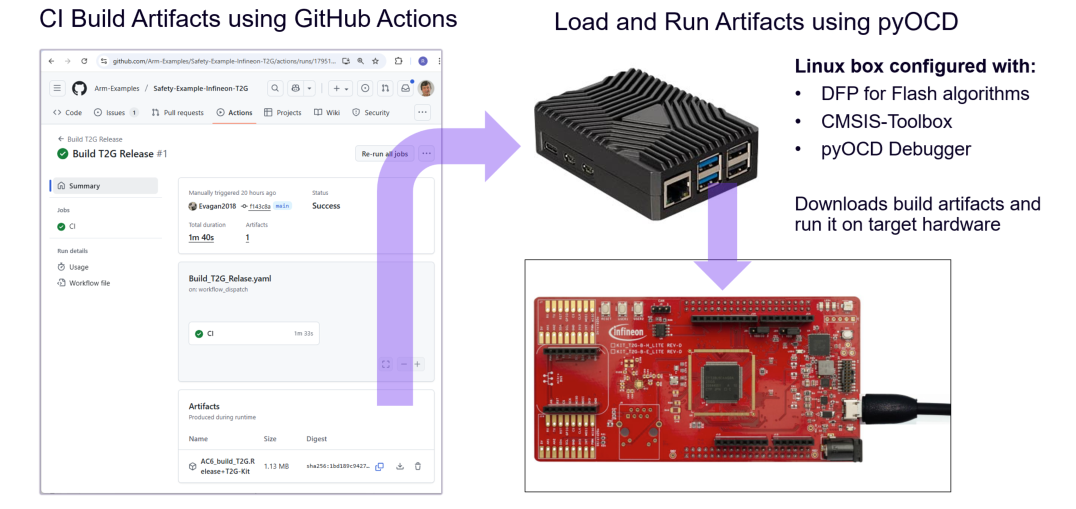
Badges with a label Run or HIL indicate GitHub actions that run tests on actual target hardware with self-hosted GitHub runners.


See Setup of Raspberry Pi as Self-Hosted GitHub Runner for more information.